Mechanical Engineering Trends 2025: AI & Industry 4.0
Dec 17, 2025

Deepak Choudhary
🔧 Trusted by 13,000+ Happy Learners
Industry-Ready Skills for Mechanical Engineers
Upskill with 40+ courses in Design/CAD, Simulation, FEA/CFD, Manufacturing, Robotics & Industry 4.0.
Mechanical Engineering Trends 2025: AI & Industry 4.0
The pilot phase is over.
For five years, we debated what might be. We built proofs. We ran slide decks. In 2025, the work will be deployed. Tools move from “nice-to-have” to operational mandate. If your factory does not integrate Industry 4.0 loops, you are bleeding efficiency. If you ignore generative design, you are overpaying for material.
This post is a ready-to-paste, 2,000+ word blueprint. It’s designed to win attention, links, and SERP rank. We cover technical glue, show reproducible pilots, and give the executive-safe arguments you need.
What You Will Get
This guide is an operational playbook. It includes:
Deep technical sections on Edge computing in manufacturing, OT security, and augmented reality maintenance.
A clear generative design vs topology optimization distinction.
A digital twin maturity model and a reproducible digital twin pilot plan.
A 12-month roadmap you can hand to procurement.
Inline citations for every load-bearing market claim.
An 80-word CTA and 7 FAQs targeted to real user intent.
Why 2025 Is Different — Markets And Urgency
The market signals are decisive. The "wait and see" era has ended.
The generative design software market is projected to be roughly USD 4.68 billion in 2025, with a CAGR of 16.5% through 2032. (Source: Coherent Market Insights)
The digital twin market is entering a steep growth phase, with analysts estimating USD 18.9–29 billion in 2025, driven by the need for asset optimization. (Source: Global Market Insights Inc.)
The edge computing market is also maturing; forecasts place the addressable market in the low tens of billions by 2025, reflecting the critical shift to processing data at the source. (Source: STL Partners)
Why this matters: Capital follows repeatable value. If your pilots show measurable reductions in weight, scrap, downtime, or energy, procurement will fund scale.
Trend 1 — Generative Design Software vs. Topology Optimization
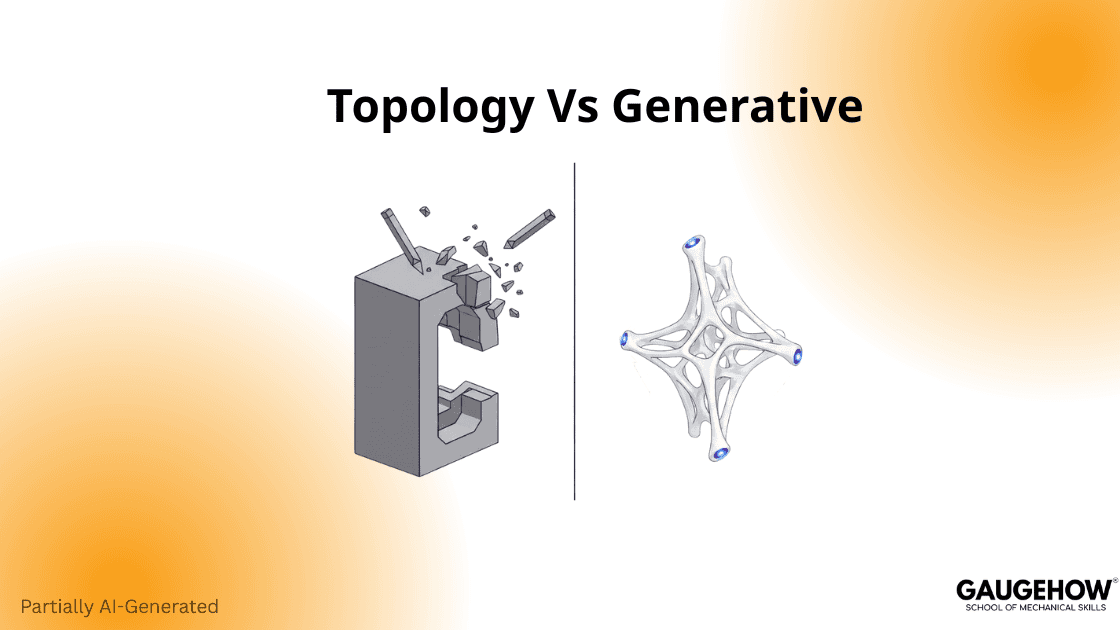
Most people conflate two different things. They are related. They are not identical.
Technical Distinction — Chisel vs. Growth
Topology optimization removes material from an existing shape. Think of it as a precision chisel. It asks: “Where can we carve out material and keep strength?” It requires an initial human design as a starting block.
Generative design grows new geometry from constraints. It asks: “Given loads, materials, and manufacturing rules, what shape best meets the goal?” Generative systems explore many manufacturable variants. The result often looks organic, mimicking bone structures. This difference matters. Searchers who look for topology optimization and generative design want different content. Use both terms where appropriate to capture long-tail technical traffic.
Why Engineers Must Change How They Hire
Stop hiring CAD operators to redraw parts. Hire engineers who define boundary conditions. The software generates candidate geometries. Your engineers evaluate manufacturability and assembly. This is a people-shift, not a tools-shift.
How To Run A Generative Design Pilot (90 days)
Choose a high-cost component with clear failure modes or excessive mass.
Capture baseline KPIs: cycle time, unit cost, scrap %.
Run generative design software with strict DFM (Design for Manufacturing) rules.
Select top candidates and prototype using additive or subtractive methods.
Test for fit, fatigue, and manufacturability.
Repeat twice. Use pilot numbers to justify scale.
Trend 2 — The Connectivity Backbone: Industrial IoT architecture, Edge & IT/OT convergence
Most write “collect data.” Few explain how to do it. Data without architecture is noise. This section explains the backbone.
Edge-to-Cloud: Why Latency Kills Safety Loops
Real-time control cannot live in the public cloud. You need edge inference on or near the machine.
The Protocol: Run anomaly detection on the edge node in real time.
The Filter: Send only alerts and compact summaries to the cloud.
The Benefit: This approach reduces latency and bandwidth costs significantly. This underscores the business need to process data at source.
Industrial IoT Architecture — Components That Matter
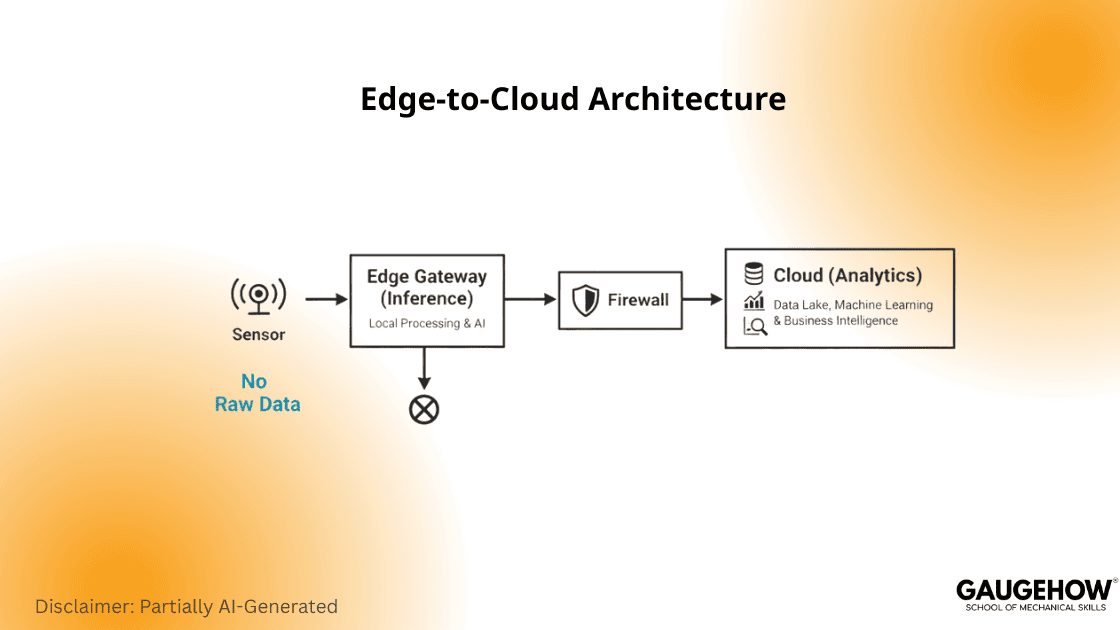
Edge nodes: Compact servers or gateways running model inference locally.
Gateways: Handle protocol translation (e.g., Modbus to MQTT), buffering, and local routing.
Message Bus: Use MQTT or OPC UA for lightweight telemetry.
Cloud Lake: Store labeled historical data here for model retraining, not for live control.
Actionable Insight: Use a clear maturity model to set executive expectations.
Architecture overview (short): sensors → local edge gateway → edge AI/inference → secure pub/sub to cloud → enterprise analytics & Digital Twin. Label each data flow. Design for minimal raw-data egress.
Trend 3 — Digital Twin Levels: From Static To Autonomous
Not every twin is equal. Use a maturity model your execs can understand.
The Three-Level Maturity Model
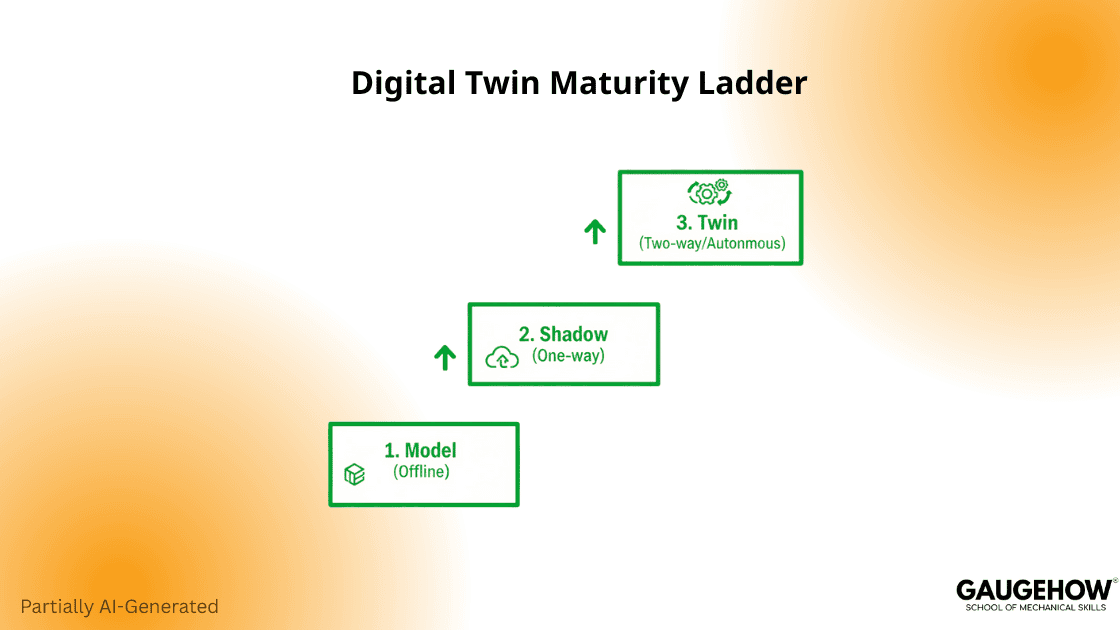
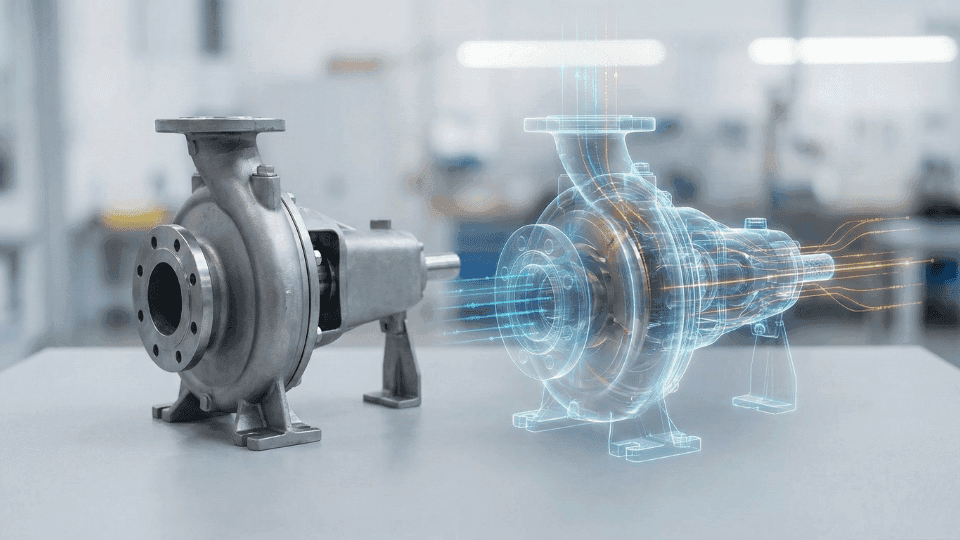
Level 1 — Digital Model: A static CAD simulation twin. It stays offline and serves only design validation.
Level 2 — Digital Shadow: One-way telemetry feeds the model. This allows near-real-time visibility (dashboarding) without control.
Level 3 — Digital Twin: Two-way control and closed-loop feedback. The twin runs simulations, predicts faults, and suggests corrective actions. This represents the production-grade capability organizations must target.
A Reproducible Digital Twin Pilot Plan (60–120 days)
Build a hybrid model combining physics (stress/strain) and machine learning (anomaly detection).
Train using labeled normal-operation data to establish baseline performance.
Sensorize vibration, temperature, and current on one critical asset.
Deploy the digital twin pilot plan on a single asset.
Track MTBF (Mean Time Between Failures), MTTR (Mean Time To Repair), and downtime. Expand if ROI is positive.
Trend 4 — The Augmented Worker: Augmented Reality Maintenance
Upskilling is not optional. You must scale competence without months of training. Augmented reality maintenance tools overlay instructions directly onto machines. They reduce repair errors. They speed up knowledge transfer across teams.
Why AR Is Practical, Not Playful
AR reduces error rates and training time. Controlled studies show meaningful gains in assembly and maintenance. A 2025 study highlights that AR-based training can reduce maintenance errors by 57% and task completion time by 38%. (Source: IJFMR / ScienceDirect)
AR works best when tied to process control. Do not use AR for novelty. Use it to present the right wiring diagram at the right step.
Deploying AR In Production — Quick Wins
Start with maintenance tasks that require few tool changes but complex sequences.
Create AR overlays for wiring, seals, and fastener torque steps.
Replace PDF manuals with step-by-step AR content.
Measure first-fix rate and repair duration.
Trend 5 — OT Security Best Practices: The Kill Switch
The air gap is gone. IT and OT converge. That convergence expands the attack surface. Manufacturing faces a high ransomware risk in 2025. Threat reports show OT attacks rising sharply, with manufacturing being the most targeted sector for ransomware in 2025. (Source: Waterfall Security Solutions)
Practical OT Cybersecurity Steps
Segmentation is the first and non-negotiable step. Keep CNC cells on segmented VLANs.
Use firewalls and unidirectional gateways for critical lines.
Harden access and implement robust patch procedures that respect safety.
Back up PLC logic off-network.
Treat OT credentials with enterprise-grade policies (MFA where possible).
Executive Framing — Risk vs. Readiness
Use a three-point scorecard for executives: segmentation status, detection latency, and recovery time objective (RTO). These metrics are simple to report and hard to dispute.
Trend 6 — Sustainability Refined: Scope 3 Manufacturing
Energy reduction alone is insufficient. Scope 3 manufacturing emissions drive supplier-level accountability. For many manufacturers, Scope 3 represents the largest part of their footprint, often accounting for 60–90% of total emissions. (Source: Nexio Projects)
Procurement and engineering must align on embodied-carbon data.
How Procurement And Engineering Work Together
Ask suppliers for embodied-carbon data (Product Carbon Footprints).
Use generative design to reduce material mass.
Use additive manufacturing spare parts to cut transport and inventory emissions. Scope 3 readiness wins bids.
Trend 7 — Additive Manufacturing Spare Parts: Digital Inventory, Local Fulfilment
An additive is not only prototyping. It is a strategic inventory approach. OEMs and aviation suppliers now use certified prints for end-use parts. This reduces lead times and lowers inventory carrying costs.
Validation And Certification
Validate process parameters and certify materials for function.
Create a secure vault for approved print files.
Qualify local printers and audit them. That unlocks on-demand production near customers.
The Operational Roadmap — 12 Months To Production
Quarter 1 — Audit & pilot selection
Map downtime and high-BOM parts.
Select two pilots: one design (Generative), one operations (IoT/Twin).
Quarter 2 — Pilot execution
Run a generative design pilot.
Deploy a digital twin pilot plan on one asset.
Quarter 3 — Validate & document
Collect KPIs: OEE, MTBF, scrap percentage, kWh per part.
Publish the internal case study and present it to stakeholders.
Quarter 4 — Scale & secure
Roll validated pilots across lines.
Implement OT security best practices and Scope 3 reporting.
Keep pilots small. Demonstrate value. Use pilots to build procurement cases.
KPIs, Instrumentation, And What To Measure
Choose clear metrics. Measure them beforethe pilot starts. Measure them after pilot completion. Key KPIs:
OEE (Overall Equipment Effectiveness) — for line-level efficiency.
MTBF / MTTR — for reliability.
Scrap % — for quality.
kWh per part — for energy and Scope 3 proxies.
Inventory carrying cost — for spare parts strategy.
Record raw data for three months prior. Use that baseline for statistical validation.
Ready To Deploy?
If you want to move from pilot to production in 2025, start with outcomes, not buzzwords.
Download our 12-Month Industry 4.0 Roadmap and KPI Tracker. It includes a reproducible digital twin pilot plan, a generative design experiment checklist, AR deployment templates, and an OT-security quick audit. Use it to run your first paid pilot, measure verified ROI, and build the procurement case that unlocks funding. Get the roadmap, run the pilot, and scale with confidence.
FAQs
1. What is the difference between generative design and topology optimization?
Topology optimization carves material from an existing shape. Generative design software grows new geometry from constraints and manufacturability rules.
2. How fast will a digital twin pilot show results?
Small pilots often show measurable alerts and reduced downtime in 60–120 days.
3. Should we process sensor data at the edge or cloud?
Run real-time inference at the edge using an industrial IoT architecture. Send condensed summaries to the cloud for retraining.
4. Are AR maintenance tools proven in production?
Yes. Research shows augmented reality maintenance reduces task errors by 57% and accelerates training. (Source: ScienceDirect)
5. How do we secure OT systems without slowing production?
Start with network segmentation, detection, and offline PLC backups. Apply unidirectional gateways for critical lines as part of your OT security best practices.
6. Will additive manufacturing increase our carbon footprint?
Often the opposite. Local printing reduces shipping and holding costs, lowering Scope 3 manufacturing emissions.
7. What KPIs prove value to procurement?
OEE, MTBF, scrap %, kWh/part, and inventory carrying cost are the most persuasive metrics.
Sources & Inline Evidence
The generative design software market is USD 4.68B in 2025. (Coherent Market Insights)
Digital twin market estimates USD 18.9–29B in 2025. (Global Market Insights)
Edge computing market forecasts low tens of billions by 2025. (STL Partners)
Augmented reality maintenance studies show reduced error rates by 57% (IJFMR/ScienceDirect)
OT security threat reports show manufacturing as a top target for ransomware in 2025. (Waterfall Security)
Scope 3 manufacturing accounts for 60-90% of emissions. (Nexio Projects)
Our Courses
Complete Course Library
Access to 40+ courses covering various fields like Design, Simulation, Quality, Manufacturing, Robotics, and more.