steel scale and measuring tape

Steel Scale And Measuring tape

Dec 13, 2025

author image Deepak choudhary

Deepak Choudhary


Learn What Industry Wants

Lead the CHANGE in Mechanical Engineering

Upskill with 40+ courses in Design/CAD, Simulation, FEA/CFD, Manufacturing, Robotics & Industry 4.0.

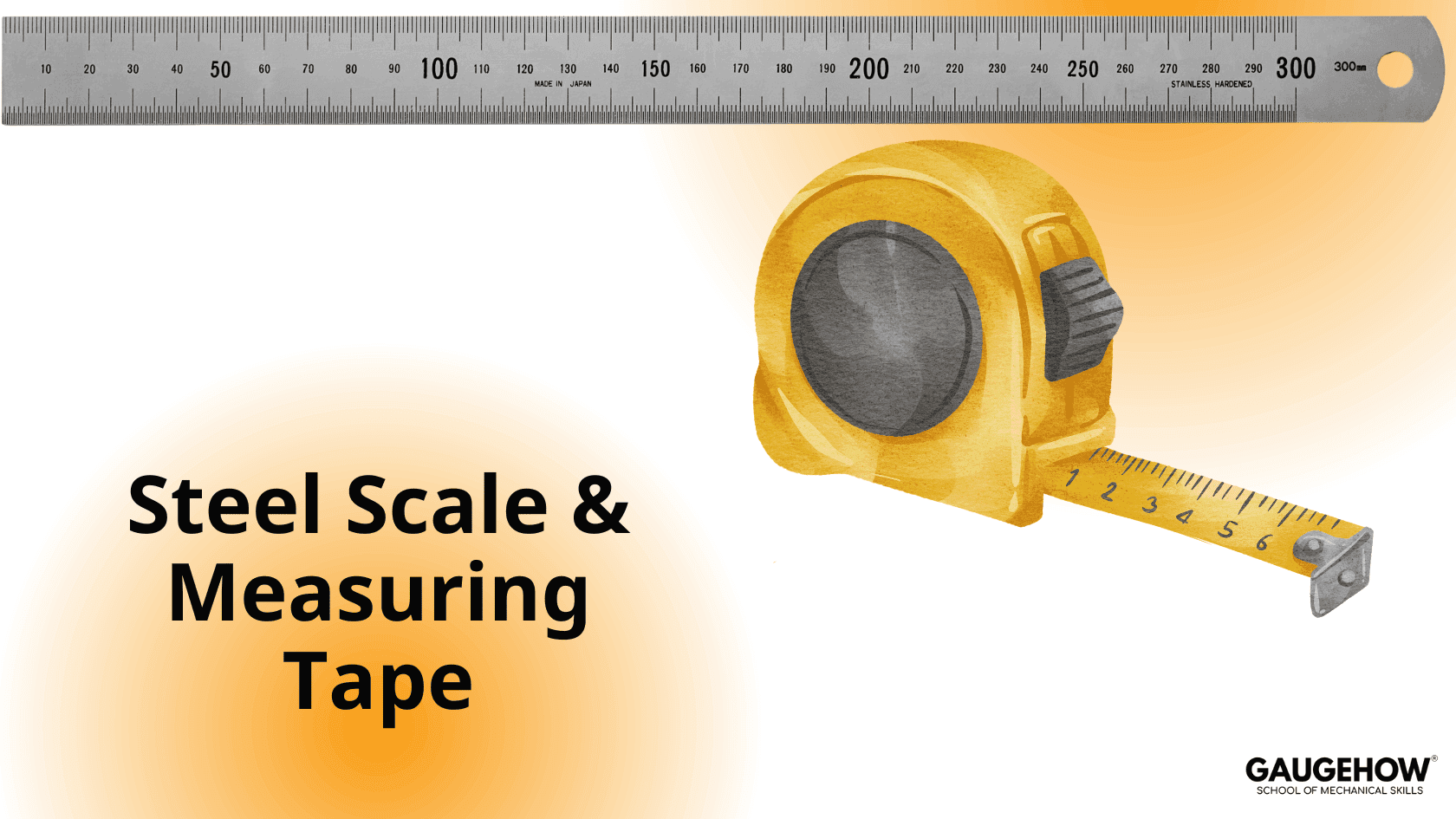
A steel scale is a single-piece linear measuring instrument. It usually indicates two units: centimetres (cm) and inches, with centimetre divisions on one side and inch divisions on the other.

A steel scale is used to measure simple linear dimensions in one direction. The least count of a standard steel scale is 1 mm. It is mainly used for quick comparison and measurements where high precision is not required.

When linear measurements of length are to be made, scales are used.

A scale (or ruler) is a long, rectangular tool with straight edges and corners that provides accurate measurement over a surface in one dimension.

Units

Scales measure length in SI units such as millimetre (mm), centimetre (cm), and kilometre (km).

The scale generally has two divisions:

  • Upper division: centimetres (cm) and millimetres (mm)

  • Lower division: inches

One inch is equal to 2.54 cm.

Scales are also used to draw straight lines and for marking out.

Depending on their size, scales are lightweight and portable. They are commonly made of plastic, glass, steel, or wood, with graduations engraved or printed on the surface.

Scales are widely used in almost every profession. Their primary purpose is to draw geometric figures and straight lines.

Based on size and application, scales are classified according to their usage and the area or surface to be measured. The most common standard sizes are 15 cm (medium) and 30 cm (long).

Based on professional use, scales are further classified into architect’s scales and engineering scales.

Uses

  • Architect’s scales are used for preparing building plans.

  • Engineering scales are used in engineering drawing and graphics.

A scale is also a technical drafting tool used to represent large areas on a smaller scale in drawings and plans. It helps convert 2D and 3D views into accurate 1D measurements on paper.

Scales are cost-effective, easily available, and simple to use.

Our Courses

Complete Course Library

Access to 40+ courses covering various fields like Design, Simulation, Quality, Manufacturing, Robotics, and more.
comsol design of mechanical part

COMSOL Multiphysics Essentials

You will understand the major COMSOL modules such as AC/DC, CFD, Heat Transfer, Structural Mechanics, MEMS, and Pipe Flow. This helps you see how COMSOL is used in different engineering fields.

You will learn how to customize the COMSOL desktop, use the Model Wizard, access the main menu and toolbar, and follow the basic steps needed to build any simulation model. You will also use ChatGPT to understand sequencing in COMSOL.

You will learn global and local definitions, create variables and expressions, use operators and functions, and load parameters from external text files with AI assistance. This gives you strong control over parametric modeling.

You will work with geometry tools, selection lists, transparency settings, hiding and showing entities, rendering, and user-defined selections. This helps you build clean and accurate models.

You will learn geometry modeling, adding nodes, editing nodes, and understanding the current node. You will also use ChatGPT to assist with geometry features.

You will explore material databases, assign materials properly, work with the material browser, and use external material libraries. You will understand how materials behave in multiphysics simulations.

You will learn how to build full COMSOL models using the Model Builder, manage nodes, enable or disable physics, save files, open model libraries, and explore advanced results sections using GPT-based guidance.

Finally, you will work on multiple learning projects covering named selections, meshing, solver studies, results plotting, friction modeling, and cylindrical roller simulations. These projects help you apply COMSOL to real engineering problems.

Featured

Advanced

comsol design of mechanical part

COMSOL Multiphysics Essentials

You will understand the major COMSOL modules such as AC/DC, CFD, Heat Transfer, Structural Mechanics, MEMS, and Pipe Flow. This helps you see how COMSOL is used in different engineering fields.

You will learn how to customize the COMSOL desktop, use the Model Wizard, access the main menu and toolbar, and follow the basic steps needed to build any simulation model. You will also use ChatGPT to understand sequencing in COMSOL.

You will learn global and local definitions, create variables and expressions, use operators and functions, and load parameters from external text files with AI assistance. This gives you strong control over parametric modeling.

You will work with geometry tools, selection lists, transparency settings, hiding and showing entities, rendering, and user-defined selections. This helps you build clean and accurate models.

You will learn geometry modeling, adding nodes, editing nodes, and understanding the current node. You will also use ChatGPT to assist with geometry features.

You will explore material databases, assign materials properly, work with the material browser, and use external material libraries. You will understand how materials behave in multiphysics simulations.

You will learn how to build full COMSOL models using the Model Builder, manage nodes, enable or disable physics, save files, open model libraries, and explore advanced results sections using GPT-based guidance.

Finally, you will work on multiple learning projects covering named selections, meshing, solver studies, results plotting, friction modeling, and cylindrical roller simulations. These projects help you apply COMSOL to real engineering problems.

Featured

Advanced