Dial Indicator (Plunger Dial Gauge)

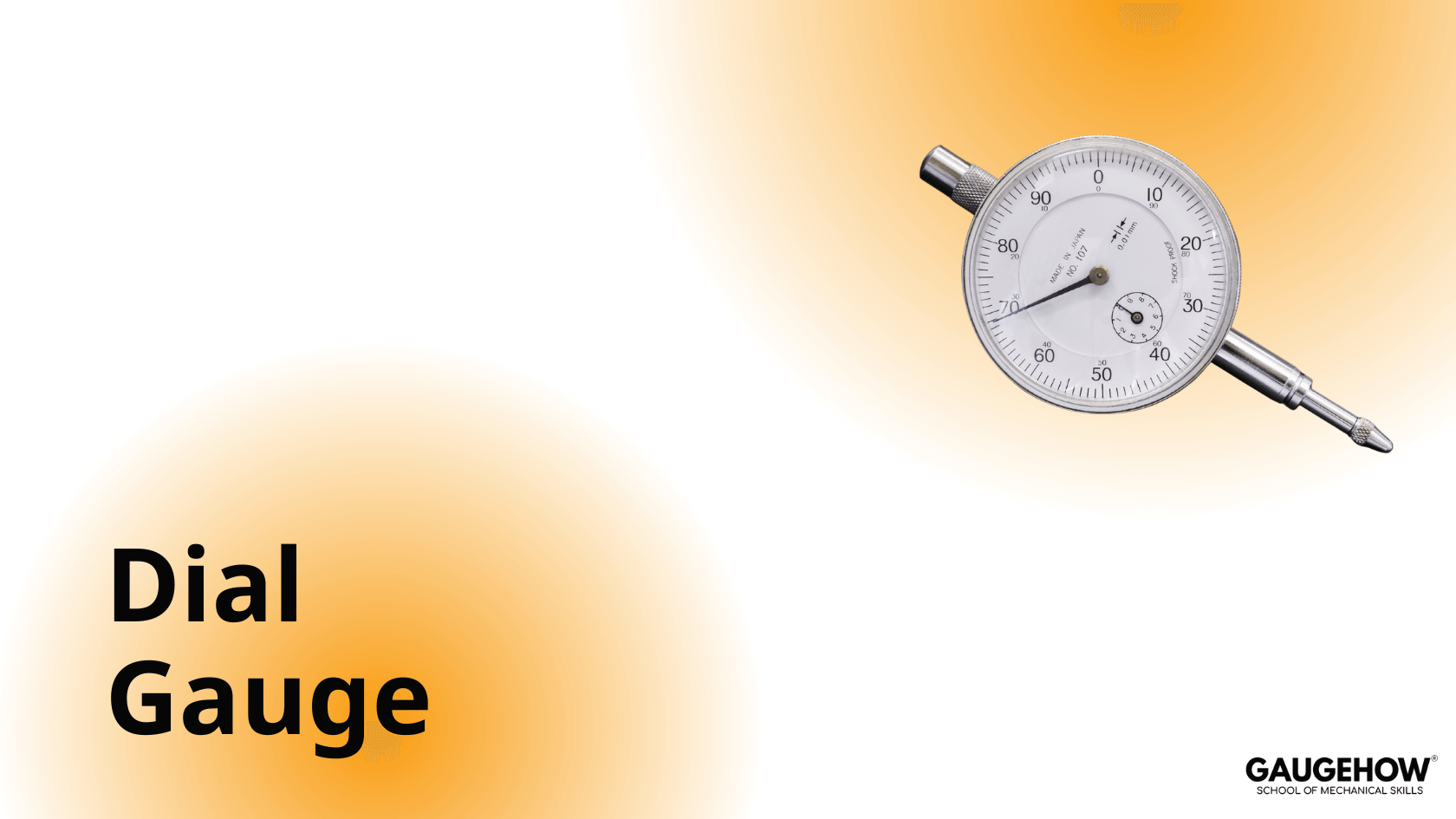
A dial indicator, also known as a plunger dial gauge, is one of the simplest and most widely used mechanical comparators.
The primary use of a plunger dial gauge is to compare a workpiece against a master or reference standard, rather than measuring absolute dimensions.
Least Count of Dial Indicator
A plunger dial gauge is commonly available in:
10 mm range with a least count of 0.01 mm
1 mm range with a least count of 0.001 mm
The selection depends on the application, required accuracy, and precision of measurement.
As the contact point moves upward or downward, the internal mechanism converts this movement into rotation of the pointer, which is displayed on the dial.
Dial indicators are also available with a large dial diameter for easy and clear reading.
Additional Features
Back plunger dial indicators are used when rear contact measurement is required
Digital dial indicators provide higher accuracy and easier reading than analog types
Dial indicators are available with different contact points based on application
Interchangeable back covers are available for various mounting situations
Colour caps and limit markers help identify tolerance limits
Precautions
The user should avoid:
Sudden contact with the workpiece
Over-tightening of contact points
Applying side pressure on the plunger
Lever Dial Gauge (Test Indicator)
A lever dial gauge, also known as a test indicator, is used for highly sensitive contact measurements.
Unlike a plunger dial gauge, it uses a lever-type contact mechanism, making it lighter and smaller.
Measuring Range and Least Count
Typical measuring range: 0.80 mm
Special designs: up to 2 mm
Common least count: 0.01 mm
High-precision models: 0.001 mm (range 0–1 mm)
These specifications apply to dial-type test indicators. For higher accuracy, digital test indicators are preferred.
Digital indicators offer better accuracy but are costly and require careful handling and maintenance.
How to Read a Lever Dial Gauge
Measurement using a lever dial gauge is straightforward:
As the lever moves, the internal mechanism transmits motion to the indicator
The dial shows the relative deviation from the reference
The same precautions apply: avoid shock, side load, and excessive force
Applications of Lever Dial Gauge
Lever dial gauges are commonly used to measure:
Height variation
Flatness
Roundness
Runout
They are often used in combination with:
Vernier height gauges
Digital height gauges
This ensures consistent measuring force.
Lever dial gauges are widely used in:
Manufacturing industries
Metrology laboratories
Tool rooms and workshops
Popular manufacturers include Mitutoyo, Mahr, and Baker, known for precision and reliability.
Dial Thickness Gauge
A dial thickness gauge is used to measure the thickness of materials using a dial indicator-based comparison system.
Construction
It consists of:
A rigid frame (usually aluminum)
A movable upper spindle with a lifting lever
A spring-loaded mechanism for constant measuring force
Applications
Dial thickness gauges are used for measuring:
Leather
Paper and paperboard
Rubber
Plastic films
Glass
Sheet metal
Plywood and wooden panels
Accuracy and Measuring Faces
Typical accuracy: 0.01 mm
Flat measuring faces: used for soft materials (rubber, paper, films)
Spherical measuring faces: used for hard materials (sheet metal, glass, boards)
Graduations are usually in millimetres and microns.
Advantages
Quick and efficient inspection
Easy handling with grip and thumb trigger
Hard metal contact points for durability
Dial tolerance marks for easy interpretation
Additional Notes
Dial caliper gauges and dial thickness gauges are comparison gauges and should be used with:
Setting rings
Micrometers
Dial gauge stands are designed for comparison measurements using dial or digital indicators.
Dial indicators are widely used to:
Monitor tolerance variation during inspection
Measure deflection under load
Detect small dimensional changes in precision components
They are essential tools wherever small deviations must be detected and controlled accurately.
Mechanical Engineering Courses That Industry Actually Uses
Learn Tools of Design & CAD, Analysis & Simulation, Automation & Robotics, and Industry 4.0 used in modern factories.
Join 40+ Mech Courses like GD&T, Siemens NX, SolidWorks, CATIA V5, AutoCAD, ANSYS (FEA & Fluent), ABAQUS, Creo, Fusion 360, CNC Programming, Digital Twins, Python for Mechanical, and Industry 4.0.
Our Courses
Complete Course Library
Access to 40+ courses covering various fields like Design, Simulation, Quality, Manufacturing, Robotics, and more.