Simulation Engineering: AI Native CAE, Cloud CAE & FEM

Deepak S Choudhary
Simulation is moving from a single analyst’s workstation to an organization-level capability. You now see AI-assisted setup, cloud-scaled compute, and stricter credibility expectations from reviewers. This guide explains what changed, which tools matter, and what to verify so speed does not create wrong answers.
Your design team will hear a lot of big claims. This time, treat it like an engineering upgrade, not a trend article. In practice, Simulation Engineering is the operating system around models, data, compute, and review gates. It is also the fastest way to reduce prototype loops when you control inputs, not just solver runtime.
The future stack is not “AI replaces solvers.” It is AI Native CAE for faster setup and exploration, Cloud CAE for burst scale and collaboration, plus FEM as the ground truth engine when decisions are high risk. That blend is what serious teams are standardizing now.
Market Reality And Industry Pull
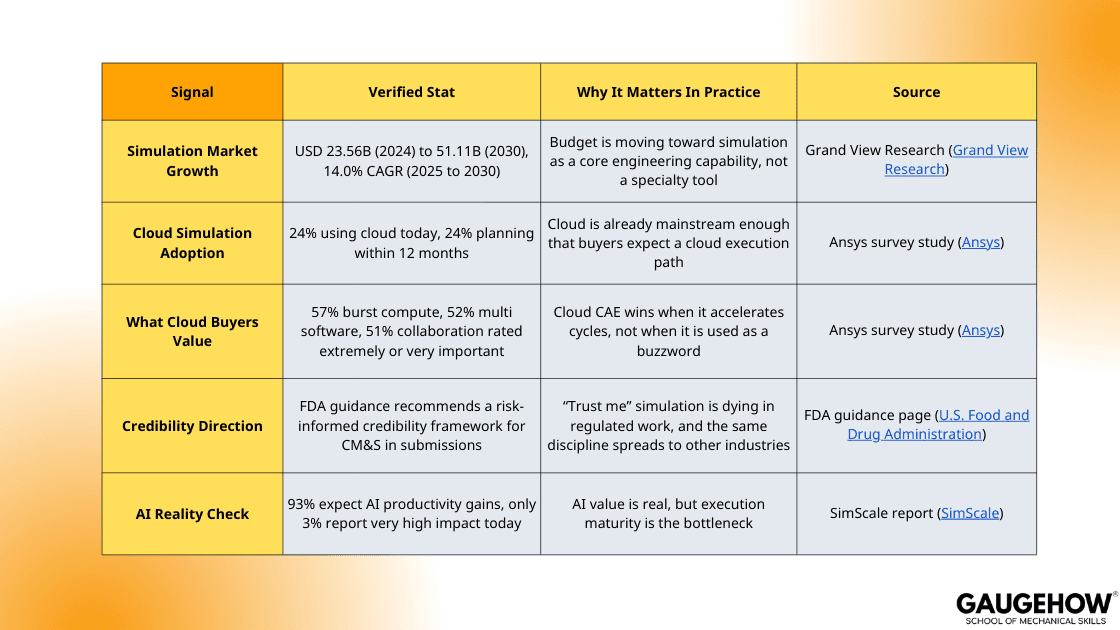
Simulation is not growing because it is fashionable. It is growing because product cycles have gotten tighter, safety margins have gotten thinner, and validation needs stronger evidence.
Industries are not adopting in the same way. They are adopting where simulation changes the first constraint, like mass, thermal limit, fatigue life, or certification evidence.
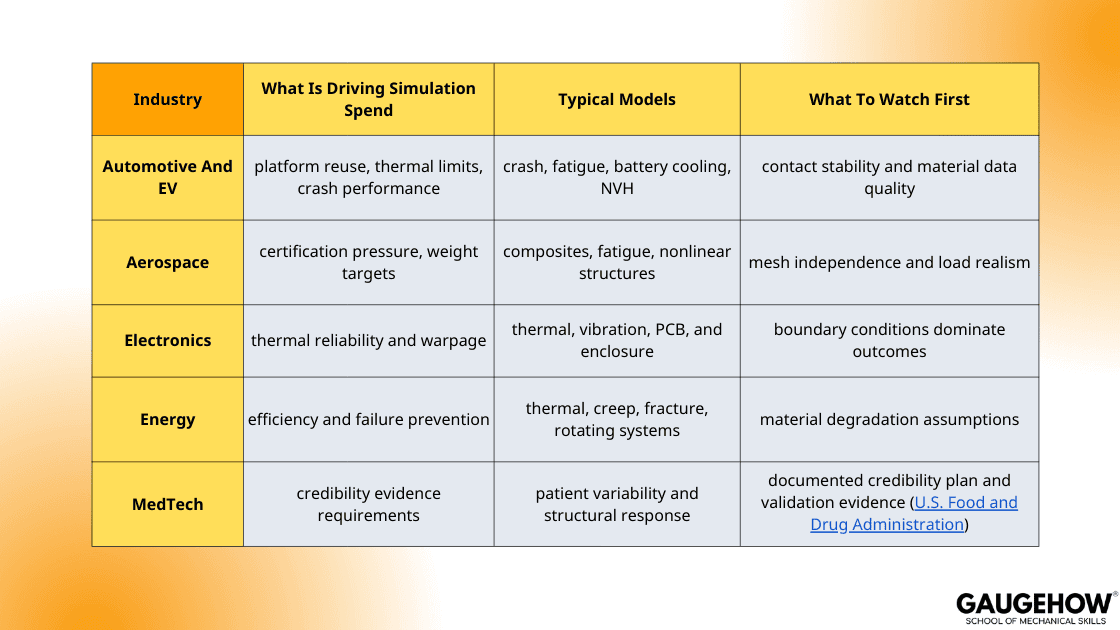
If you want a simple “market truth” takeaway, it is this. Growth is real, but the winners are the teams that can prove credibility, not just teams that can run models faster. (U.S. Food and Drug Administration)
The Modern Simulation Stack And The Simulation Manager Role
Most teams fail on repeatability.
They rerun models with slightly different assumptions, lose traceability, and then debate results instead of decisions. This is where governance tools matter.
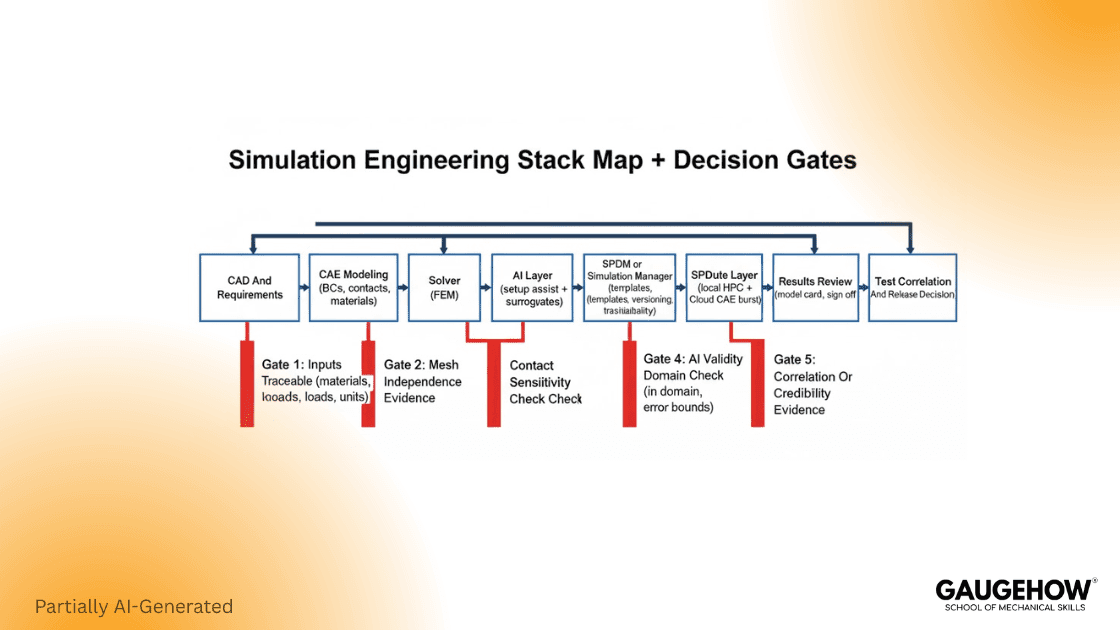
A practical way to explain Simulation Manager is “the layer that controls who runs what, with which template, on which compute, and how results get reviewed.” CAE Assistant highlights Simulation Manager as a workflow surface for running Abaqus jobs and organizing execution through a platform layer.
In an engineering organization, that role usually covers:
Model templates and approved boundary condition patterns
Versioning of geometry, material cards, and solver settings
Compute routing, including local queues and cloud burst
Review gates, sign off on evidence, and audit trails
This matters because the highest cost is not solver minutes. It is a rework caused by inconsistent modeling and weak review discipline.
AI In CAE That Actually Works
Most AI value today is not “replace the solver.” It is “remove friction in setup and exploration.” That is why so many leaders expect big gains, yet very few achieve them. SimScale reports 93% of engineering leaders expect AI productivity gains, 30% expect “very high gains,” but only 3% report achieving that level today. (SimScale)
Here is the technical reality you can trust.
PINNs work best with limited data, well-defined governing equations, and when you want smooth fields or inferred parameters directly.
PirateNet was proposed since very deep PINNs can be unstable to optimize. It adds residual, adaptive links to improve training stability significantly.
Deep Operator Networks pay off when you must evaluate a PDE family many times under new inputs. They learn mappings from conditions to solutions, not one case repeatedly.
The engineering point is simple. AI helps you explore, but it does not remove the need to verify.
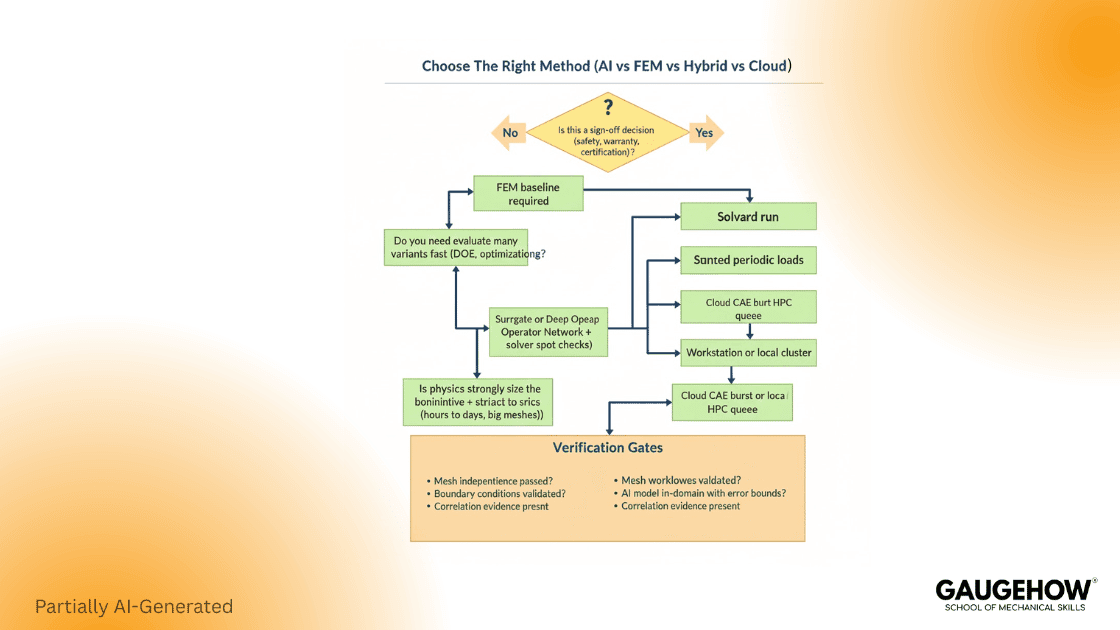
AI Verification Gates (Use This Before You Trust Outputs)
Confirm the model is inside its training domain, not extrapolating.
Check conservation and boundary condition satisfaction.
Compare against at least one solver baseline for a representative case.
Track error metrics per load case, not as one global number.
Treat the AI model as a “proposal engine” until validated.
That checklist is how you avoid confident wrong answers.
Cloud Simulation
Cloud is not a strategy by itself. It is a scaling mechanism. Use it when scale, collaboration, or multi-tool access matters more than latency.
A March 2023 survey discussed by Ansys reports that cloud-based simulation use grew from 18% to 24%, and those planning to use the cloud for simulation in the next 12 months also rose from 18% to 24%. (Ansys)
In the same survey summary, 57% rated on-demand burst capability as extremely or very important. (Ansys)
Here is how to decide without hype:
Use the cloud when you need burst scale for nonlinear or large parametric runs.
Stay local when data is sensitive, and computing is steady.
Go hybrid when pre and post are interactive, but solving is heavy.
If you want one caution that saves money, it is this. Many models do not parallelize well, so a bigger machine does not always mean a faster answer. Cloud value is highest when your workflow is structured, not when you simply “lift and shift” messy models.
Software Comparison That Maps To Decisions
Most competitor posts list tools. Ranking content must help people choose. This table is built for that.
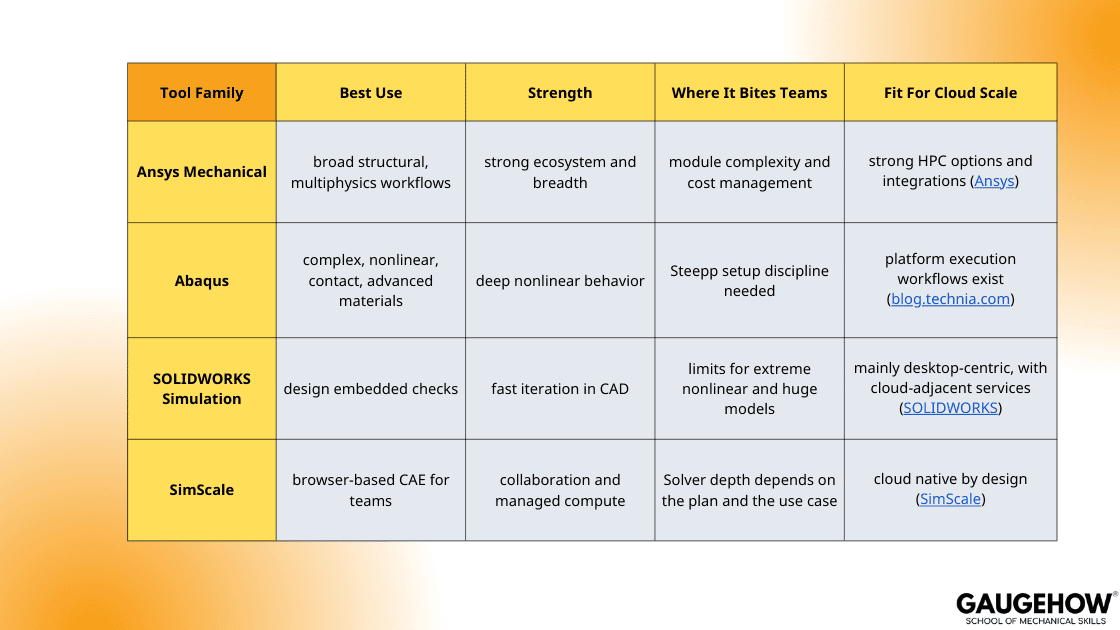
Now the important part. Tool choice should follow the failure mode you need to control. A design team needs fast loops and guardrails. An analysis team needs robustness for contact, nonlinearities, and material models.
This is where CAE Software comparisons must be tied to verification gates, not UI preferences.
Pricing And Licensing
Exact prices vary by region, modules, and support. Still, you can build a defensible comparison by separating “public pricing” from “quote only,” then listing the cost drivers that make quotes explode.
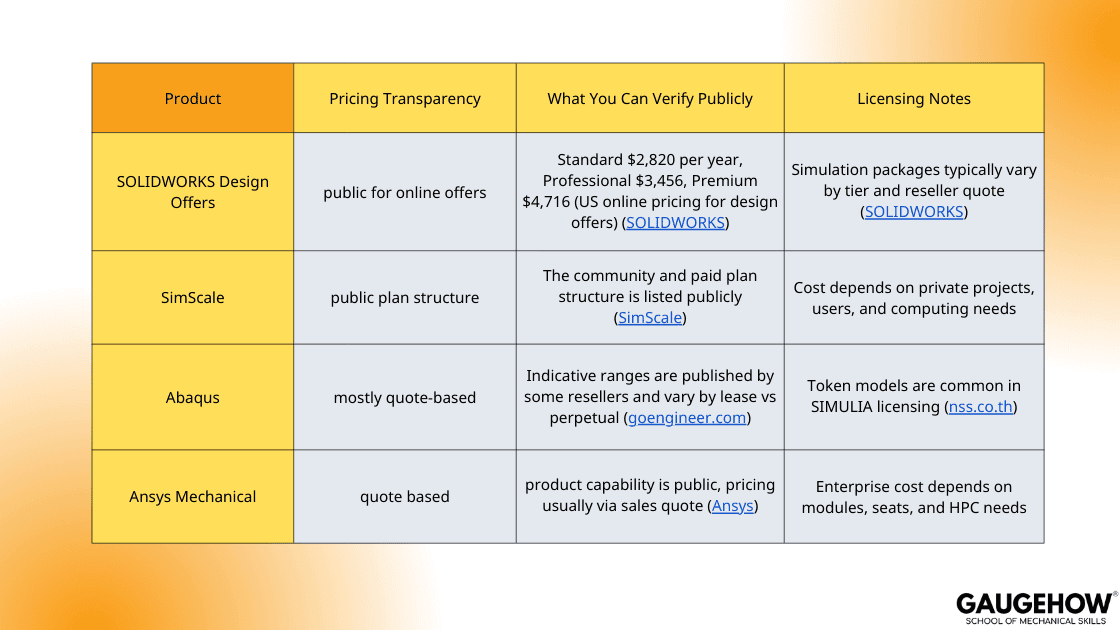
Two practical suggestions that stop budget surprises:
Ask every vendor to quote the same benchmark workflow, including one nonlinear case and one parametric sweep.
Separate solver cost from people cost. A cheaper license can still be expensive if it increases rework.
FEM Quality Gates
Speed is useless if you are fast and wrong. Here is the minimum discipline that protects decisions.
A robust FEM workflow is built around “inputs you can defend” and “outputs you can reproduce.”
FEM Quality Gates (Use These On Every Project)
The geometry intent is explicit, including simplifications and what they change first.
Materials are traceable to a test basis, not copied from old files.
Mesh independence is demonstrated on the metric that drives the decision.
Contacts are sensitivity tested because they often dominate stress results.
Loads and constraints are justified with physical reasoning, not convenience.
This is also where credibility frameworks matter. FDA’s guidance on computational modeling credibility uses a risk-informed approach and aligns with ASME V and V concepts, which makes “evidence” part of the engineering workflow, not paperwork. (U.S. Food and Drug Administration)
What To Look Out For In FEM And CAE Modeling
Most FEM and CAE mistakes are not solver failures. They are input failures, and they repeat across tools. Treat the model as a decision instrument, not a picture generator.
Mesh Convergence And Element Choice
Converge the metric that drives the decision. Do not chase a smoother stress contour. Pick one response, such as peak stress at a defined hot spot, plastic strain in a failure zone, contact pressure, or global stiffness, then refine until the trend is stable. Pair this with element logic. Thin parts need the right formulation. Bending dominated regions punish the wrong element faster than they punish a coarse mesh. Refine contact and notch zones where gradients are physically real.
Materials And Units Traps
Material models are not generic defaults. Plasticity curves must be defined correctly and used only within valid strain ranges. Temperature dependence must be explicit when loads or properties shift with heat. Unit errors still happen, especially when CAD and solver units differ, so audit density, modulus, thermal expansion, and load magnitudes first.
Contacts And Constraints
Contact settings can rewrite the load path. Run a small sensitivity check on friction, normal behavior, and constraint strategy if contact drives results.
Credibility And Evidence
High-risk decisions require higher credibility. FDA guidance and ASME V and V 40 formalize this risk-informed approach. The model earns acceptance when evidence matches the decision risk.
Democratization With Guardrails And A Practical Roadmap
The real shift is not only tech. It is the Democratization of FEA under controlled conditions. Done well, designers get fast feedback and analysts spend time on hard physics. Done badly, teams ship confident mistakes.
Use the Democratization of FEA safely by defining roles:
Designers run approved templates with bounded assumptions.
Analysts own new physics, new materials, and sign off on evidence.
Leaders measure outcomes, like prototype loops avoided, not model count.
A clean 90-day roadmap:
Weeks 1 to 3: standard templates, model cards, review checklist.
Weeks 4 to 7: automate pre-checks and result reporting.
Weeks 8 to 12: add cloud burst for peak loads and controlled AI assistance.
Copy-Paste Model Card Template
This is the artifact competitors rarely provide. Use it on every job, even small ones. It reduces rework, improves reviews, and makes learning cumulative.
MODEL CARD: Simulation Evidence For Decision Making
1) Purpose And Decision Threshold
- Decision being made:
- Pass/fail or target threshold:
- Consequence if wrong (low, medium, high):
2) Scope And Assumptions
- Geometry simplifications:
- Boundary condition assumptions:
- Loading assumptions:
- What is explicitly not modeled:
3) Materials
- Source (test, supplier data, standard, estimate):
- Validity range (strain, temperature, rate):
- Calibration notes:
4) Mesh And Discretization
- Element type and justification:
- Mesh rule (size controls, refinement zones):
- Convergence evidence and decision metric:
5) Contacts And Constraints
- Contact pairs and settings:
- Sensitivity checks performed:
- Known risk areas:
6) Solver Setup
- Nonlinearity controls:
- Time stepping or stabilization:
- Convergence criteria:
7) Verification And Validation Plan
- Baseline comparisons:
- Test correlation plan (if applicable):
- Acceptance criteria:
8) Evidence Package
- Key plots and tables:
- Version IDs for geometry, model, and results:
- Reviewer sign off:
FAQ
1) What Is The Difference Between CAE And FEM?
CAE is the umbrella workflow and toolset. FEM is one numerical method inside it.
2) When Should I Use AI In CAE?
Use it to accelerate setup and exploration. Keep solver baselines for sign off.
3) What Is The Best First Step To Move Simulation To The Cloud?
Start with burst workloads and shared collaboration projects, then expand with governance.
4) Which Software Should A Design Team Start With?
Start with design embedded simulation, then escalate hard cases to specialist solvers.
5) How Do I Prevent Confident Wrong Results?
Use model cards, mesh independence checks, contact sensitivity, and validation evidence.
References
Grand View Research, Simulation Software Market Size and Forecast (2024 to 2030). (Grand View Research)
Ansys, March 2023 survey summary on cloud-based simulation adoption and priorities. (Ansys)
SimScale, State of Engineering AI, expectation execution gap statistics (2025). (SimScale)
FDA, Assessing the Credibility of Computational Modeling and Simulation in Medical Device Submissions (guidance page and PDF). (U.S. Food and Drug Administration)
SOLIDWORKS official plans and pricing pages for design offers. (SOLIDWORKS)
SimScale plans and pricing. (SimScale)
Abaqus pricing guidance examples from resellers, for indicative ranges and model types. (goengineer.com)
Conclusion
The future is not one technology. It is the integration of governance, automation, and credibility. Simulation Engineering wins when teams standardize inputs, enforce review gates, and scale compute only after workflows are repeatable.
AI Native CAE accelerates exploration, Cloud CAE removes peak capacity limits, and FEM remains the credibility anchor for high-consequence decisions. If you build the verification contract and the stack around it, you get faster programs without trading away trust.
CAD-CAM-CAE Work Platform
Find or Post CAD, CAM and CAE freelance projects, full-time jobs and Internships.
GaugeHow is the platform built for core engineering work. Whether you need a freelancer for a CAD project, a full-time hire, or an engineering intern,post it here and get matched with the right person.
Our Courses
Complete Course Library
Access to 40+ courses covering various fields like Design, Simulation, Quality, Manufacturing, Robotics, and more.


