inside micrometer with other tools

Inside Micrometer & Least count

Dec 13, 2025

author image Deepak choudhary

Deepak Choudhary


Learn What Industry Wants

Lead the CHANGE in Mechanical Engineering

Upskill with 40+ courses in Design/CAD, Simulation, FEA/CFD, Manufacturing, Robotics & Industry 4.0.

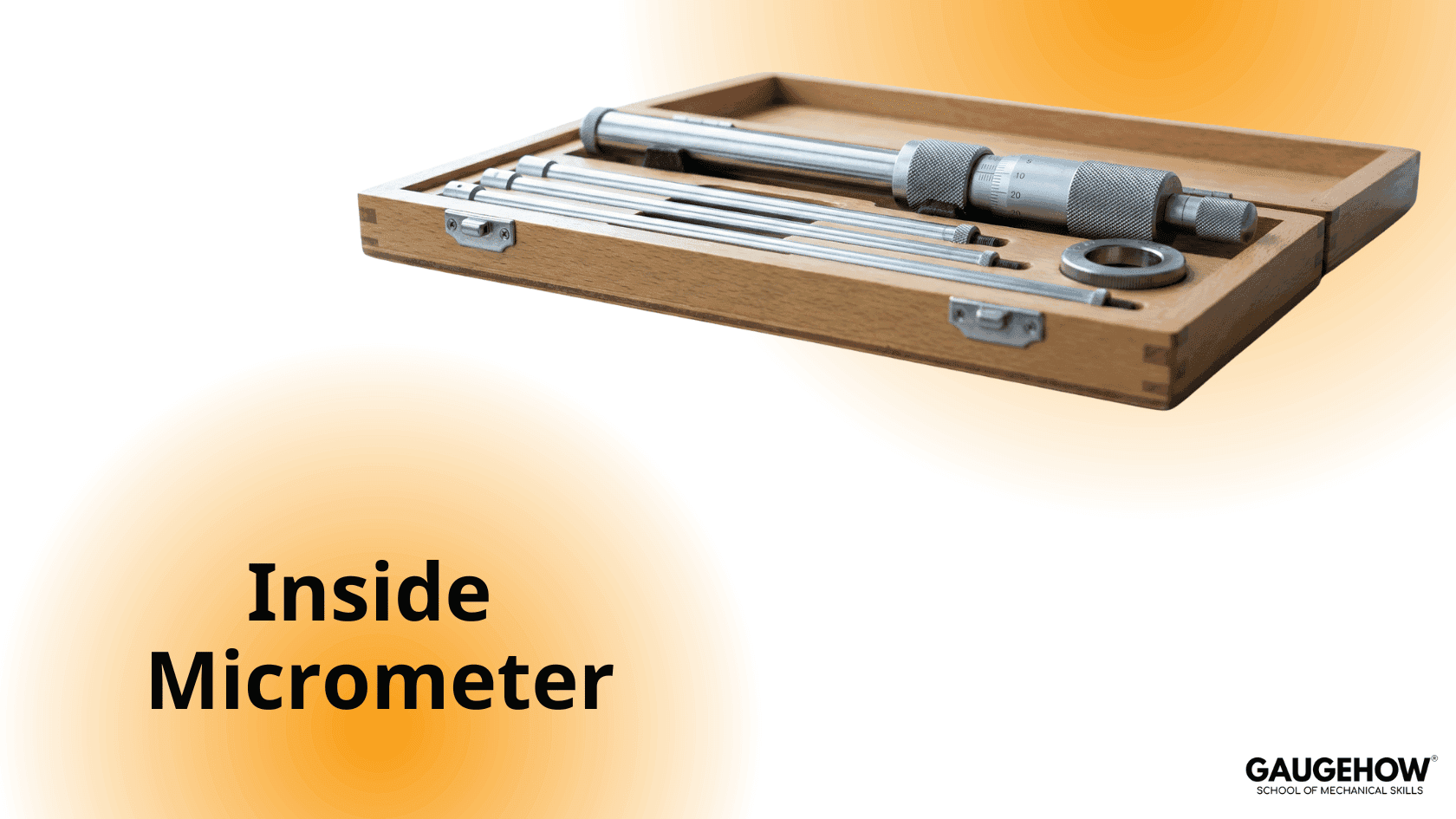
An inside micrometer is used to measure large internal dimensions, such as the internal diameter of holes, bores, and registers. It is especially useful where a vernier caliper cannot provide sufficient accuracy.

Types of Inside Micrometer

There are two main types of inside micrometers used in industry:

  1. Analog Inside Micrometer

  2. Digital Inside Micrometer

  • Least count (Analog): 0.01 mm

  • Least count (Digital): 0.001 mm

Measurements can be taken in millimetres or inches, depending on the instrument. Inside micrometers are available in various designs and ranges to suit different internal measurement requirements.

Construction of Inside Micrometer

A typical inside micrometer consists of the following parts:

  • Measuring head (micrometer unit)

  • Extension rods

  • Spacer (spacing collar)

  • Handle

Measuring Head

The measuring head includes:

  • Thimble – has circular markings and provides readings up to 50 divisions, known as thimble division (TD)

  • Sleeve (barrel) – carries the main scale and sub-scale, known as main scale division (MSD), usually up to 25 mm

Anvil and Rod Attachment

At the front end of the measuring head (anvil):

  • A hole is provided to insert extension rods

  • A locking screw is used to secure the extension rod firmly

  • Another hole is provided for fitting the handle

At the rear end, a screw is provided for thimble adjustment.

Handle

The handle is used to insert and support the inside micrometer when measuring deep holes or bores.

Range of Inside Micrometer

The measuring head and spindle are made of high-quality steel, while the measuring faces are made of high-grade tool steel for wear resistance.

Extension Rod Ranges

Extension rods are used to measure large internal diameters and are available in the following ranges:

  • 50–75 mm

  • 75–100 mm

  • 100–125 mm

  • 125–150 mm

  • 150–175 mm

  • 175–200 mm

For smaller diameters, a spacer (typically 12 mm) is used along with the measuring head.

How to Measure Internal Diameter Using an Inside Micrometer

Some inside micrometers are also designed with one fixed and one movable contact end, similar to jaws.

The working of an inside micrometer is similar to an external micrometer and involves three basic steps:

  1. Fixing the extension rod and spacer as per the required range

  2. Adjusting the thimble using the screw to expand the measuring faces

  3. Taking the measurement by gently rocking the micrometer to find the maximum reading

Accurate and careful measurement is essential to avoid measurement errors, which may lead to leakages, poor fits, or assembly issues.


Our Courses

Complete Course Library

Access to 40+ courses covering various fields like Design, Simulation, Quality, Manufacturing, Robotics, and more.

comsol design of mechanical part

COMSOL Multiphysics Essentials

You will understand the major COMSOL modules such as AC/DC, CFD, Heat Transfer, Structural Mechanics, MEMS, and Pipe Flow. This helps you see how COMSOL is used in different engineering fields.

You will learn how to customize the COMSOL desktop, use the Model Wizard, access the main menu and toolbar, and follow the basic steps needed to build any simulation model. You will also use ChatGPT to understand sequencing in COMSOL.

You will learn global and local definitions, create variables and expressions, use operators and functions, and load parameters from external text files with AI assistance. This gives you strong control over parametric modeling.

You will work with geometry tools, selection lists, transparency settings, hiding and showing entities, rendering, and user-defined selections. This helps you build clean and accurate models.

You will learn geometry modeling, adding nodes, editing nodes, and understanding the current node. You will also use ChatGPT to assist with geometry features.

You will explore material databases, assign materials properly, work with the material browser, and use external material libraries. You will understand how materials behave in multiphysics simulations.

You will learn how to build full COMSOL models using the Model Builder, manage nodes, enable or disable physics, save files, open model libraries, and explore advanced results sections using GPT-based guidance.

Finally, you will work on multiple learning projects covering named selections, meshing, solver studies, results plotting, friction modeling, and cylindrical roller simulations. These projects help you apply COMSOL to real engineering problems.

Featured

Advanced

comsol design of mechanical part

COMSOL Multiphysics Essentials

You will understand the major COMSOL modules such as AC/DC, CFD, Heat Transfer, Structural Mechanics, MEMS, and Pipe Flow. This helps you see how COMSOL is used in different engineering fields.

You will learn how to customize the COMSOL desktop, use the Model Wizard, access the main menu and toolbar, and follow the basic steps needed to build any simulation model. You will also use ChatGPT to understand sequencing in COMSOL.

You will learn global and local definitions, create variables and expressions, use operators and functions, and load parameters from external text files with AI assistance. This gives you strong control over parametric modeling.

You will work with geometry tools, selection lists, transparency settings, hiding and showing entities, rendering, and user-defined selections. This helps you build clean and accurate models.

You will learn geometry modeling, adding nodes, editing nodes, and understanding the current node. You will also use ChatGPT to assist with geometry features.

You will explore material databases, assign materials properly, work with the material browser, and use external material libraries. You will understand how materials behave in multiphysics simulations.

You will learn how to build full COMSOL models using the Model Builder, manage nodes, enable or disable physics, save files, open model libraries, and explore advanced results sections using GPT-based guidance.

Finally, you will work on multiple learning projects covering named selections, meshing, solver studies, results plotting, friction modeling, and cylindrical roller simulations. These projects help you apply COMSOL to real engineering problems.

Featured

Advanced