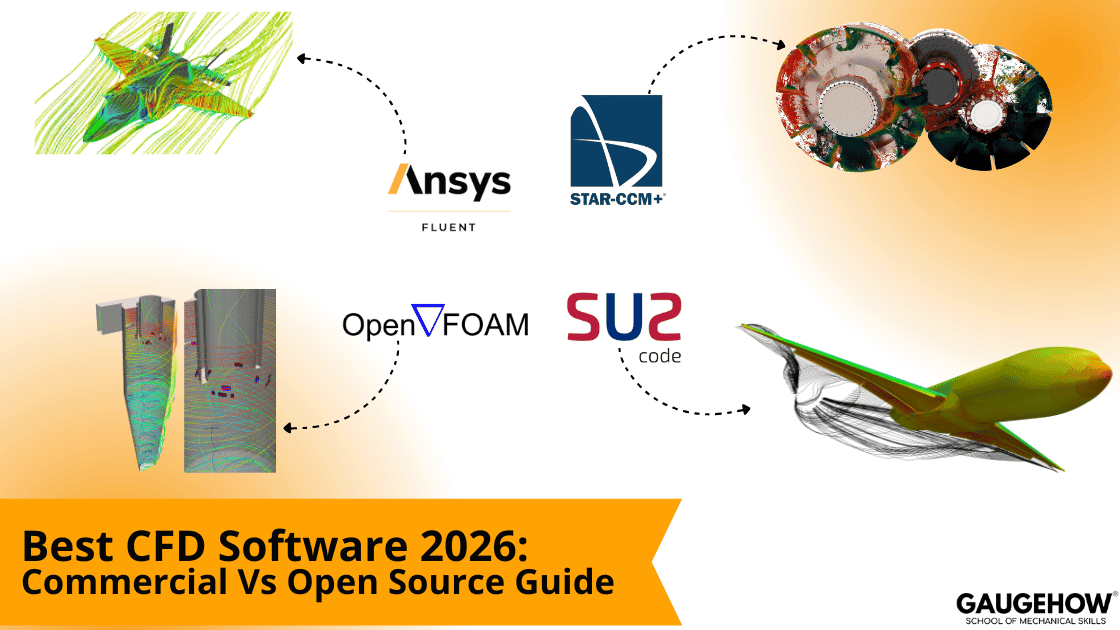
Best CFD Software 2026: Commercial Vs Open Source Guide

Deepak S Choudhary
You are choosing a solver, but you are really choosing risk. You want a workflow that remains stable under deadlines, and you want outputs that you can defend in a design review. This guide is written for you at your desk, with decision rules that you can actually run, a repeatable reporting format, and a published benchmark Proof Pack that competitors cannot copy.
Best Picks In 2026
If you only read one section, read this, because it is written to match real buying intent.
Need rapid iteration plus dependable support? Go commercial: a full CFD suite, usually Fluent or STAR-CCM+, chosen around your team’s workflow and the license model you can run.
When you must tune physics and own the solver, use open-source: OpenFOAM for general cases, and SU2 for aero and adjoint optimization.
To scale on clusters cleanly, align licensing with your concurrency plan, not wishful sizing. For Fluent, read the licensing guide and confirm what 2025 R1 HPC actually enables at your core counts. For STAR-CCM+, map Power licensing to peak simultaneous jobs and monitor checkouts during runs.
For students and portfolios, start free with OpenFOAM plus ParaView; the stack rewards disciplined setups and repeatable reporting, which makes progress measurable.
If your team is cloud-first and IT-light, a browser platform like SimScale can fit: elastic compute and parallel variants matter more than owning every low-level solver dial.
Why This Choice Is Hard In 2026
There are many tools, and most lists do not help because they list names instead of decision rules. One neutral practitioner summary notes that CFD Online lists over 200 CFD-related packages, and new ones keep appearing.
The hard part is selection, not availability; filter by your physics risk, team maturity, compute budget, and the documentation load your reviewers will demand.
Commercial platforms often win on time and support because the chain from setup to review is smoother. Open stacks can win on control and cost because you can inspect and extend the solver.
Open-source CFD only works with discipline; lock templates, enforce peer review gates, and measure run-to-run drift, not excitement.
CFD Tool Selection Decision Tree
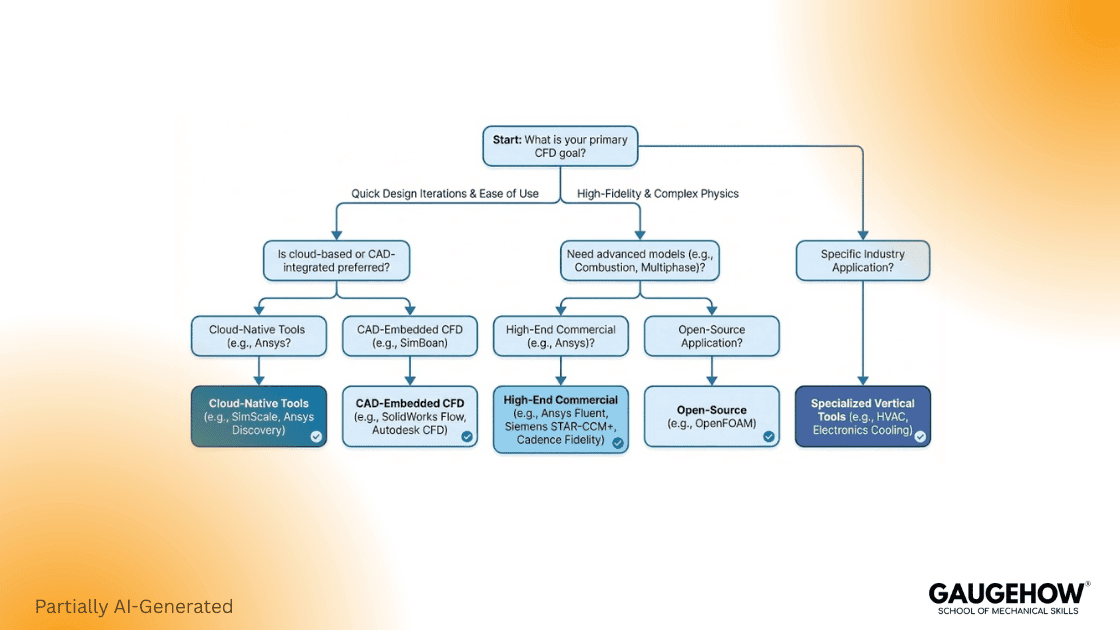
The Four Questions That Decide Most Outcomes
1) Physics Type
External aero and compressible flow, internal ducting and HVAC, multiphase and free surface, conjugate heat transfer, and electronics cooling.
2) Team Skill
Mostly GUI users with short onboarding tolerance, or comfortable scripting with reproducible workflows.
3) Compute Plan
A workstation, cluster, or cloud needs many concurrent variants.
4) Reporting Requirement
Exploration and quick trends, or an audit-grade review pack every run.
Decision Outputs
Choose a commercial all-in-one suite when onboarding time and vendor backing drive the decision.
Go enterprise-grade when scale is the requirement, but first prove license checkout at your planned core counts and peak parallel jobs.
Pick an open stack when solver ownership is non-negotiable, and you can standardize setups with templates and review gates.
Pick a hybrid stack when teams are mixed and reviews are strict, because you can keep reporting consistently even when solvers differ.
The Evaluation Criteria That Actually Predict Success
Most procurement comparisons fail because they compare feature lists instead of operational risk. Evaluate the chain, not the logo, and keep criteria consistent across trials.
1) Physics Coverage And Numerical Stability
Every serious solver can solve Navier-Stokes, but defaults vary, and that changes outcomes. If you need compressible shocks, you test stiffness and stability. If you need multiphase, you test the interface behavior and time stepping. If you need CHT, you test coupling robustness and convergence behavior.
This is why CFD cannot be judged by one screenshot. You judge it by KPI stability, mesh sensitivity, and review evidence.
2) Geometry, Meshing, And Your Modeling Tool Chain
Most schedule pain starts in geometry cleanup, so the modeling chain matters because it decides whether meshes are fast and repeatable. If CAD changes daily, prioritize robust repair and boundary persistence. If geometry is stable, prioritize quality controls and a consistent near-wall setup.
Lock a boundary condition table early and include units and sign conventions. This is boring, but it prevents silent errors that survive for weeks.
3) Scaling, Licensing, And The Cost Per Solved Design
Scaling is not only a computing question. It is often a licensing question first, so ask hard questions early.
Fluent is pitched as a top-tier CFD workhorse, and Ansys provides a licensing guide you should study before committing to production cluster usage.
Ansys offers a 2025 R1 CFD HPC Ultimate tier that changes how Fluent scales on CPU or GPU, based on what you explicitly license.
Siemens positions STAR-CCM+ around flexible licensing and publishes a Power licensing sheet that explains, for planning, the token style model at a high level.
The metric that stops bad decisions:
Cost per solved design = (license + compute + engineering hours + rework) ÷ designs shipped
This matters because a cheaper license can still be expensive if it forces rework, and a premium license can still be cheap if it increases throughput.
4) Reporting Burden And Review Defensibility
If your work goes into design decisions, your reporting pack is part of the solver choice.
ParaView is documented as an open source analysis and visualization tool with scripting support, and Tecplot 360 emphasizes automation options, including PyTecplot and macro workflows, so the post-processing tool is not a decoration choice; it is a repeatability choice.
Commercial CFD Software: Where It Wins
Commercial CFD software usually wins when deadlines are fixed and support matters. You get an integrated setup, guardrails, and smoother reporting, and that reduces operational risk, which is often worth more than the license cost.
Ansys Fluent And The Ansys Fluids Stack
Fluent targets broad physics, so it is common across industrial workflows and standardized pipelines today.
If scaling is on the roadmap, tie licensing to the compute plan early, because HPC tiers and checkout rules can spike spend fast; read the guide first before you commit to concurrency targets for leadership in writing.
Simcenter STAR CCM Plus
STAR CCM plus positions itself as an integrated CFD platform, and Siemens emphasizes licensing that can scale alongside computing resources. (Siemens Digital Industries Software)
The practical point is that you should not only ask “can it run big,” you should ask “what does it cost when I run ten variants in parallel,” because that is where teams win or lose time.
Open Stacks: Where They Win And Where They Hurt
Open stacks can be excellent, but you must own the process. If you do not standardize templates, you create variability, and then you cannot trust comparisons.
OpenFOAM
The OpenFOAM Foundation distributes OpenFOAM as free and open source software and positions it as a leading CFD tool with a large user base across industry and academia. (OpenFOAM)
OpenFOAM can be a strong free CFD software path, but only if you lock setup habits, boundary naming, meshing rules, and reporting standards.
SU2 For Aero And Optimization Work
SU2 describes itself as an open source collection of tools for PDE analysis and PDE-constrained optimization on unstructured meshes, with strong relevance to CFD and aerodynamic optimization. (SU2)
If you do aero plus gradients, SU2 is often a serious candidate, but you still need the same reporting discipline, or your optimization results become hard to defend.
Post-Processing and Reporting That Makes Reviews Defensible
Your results are only as good as your reporting pack. Post-processing is not decoration because it is where you extract KPIs, validate trends, and document limits.
ParaView’s documentation describes it as an open source, multi-platform analysis and visualization tool with scripting support, which matters when you need consistent KPI extraction across many runs. (ParaView Documentation)
Tecplot 360 describes automation paths, including PyTecplot and macros, which matter when your team needs repeatable exports at scale. (Tecplot Website)
Selection rule that saves time:
If you need repeatable KPI extraction across many runs, prioritize automation. If you need heavy interactive exploration, prioritize performance and usability, but still standardize exports.
Design Review Pack Template
This is the lever most competitors skip. They talk about tools, but they do not give you a repeatable reporting format that makes reviews calm and defensible.
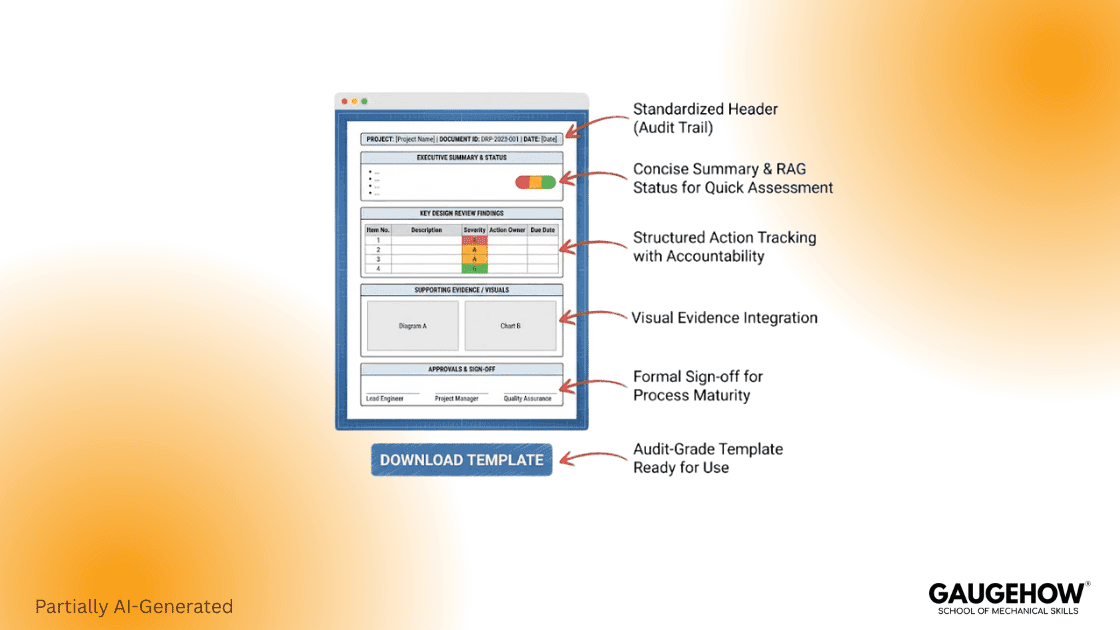
60 Minute Trial Workflow
This forces honesty. It is how you compare CFD software without demos, without bias, and without excuses.
Trial Workflow Table
Time Mark | What You Do | Deliverable You Save |
0 to 15 | Import geometry, name boundaries, and set units | Boundary table draft |
15 to 30 | Build Mesh 1, check quality, set y plus goal | Mesh stats snapshot |
30 to 45 | Run baseline solve, monitor one KPI | Residual and KPI trend |
45 to 60 | Export review page and plots | Review pack PDF |
Now ask the hard questions, because these decide adoption more than feature lists. How long did setup take, how stable was the solver, how easy was KPI extraction, and how repeatable was the report format?
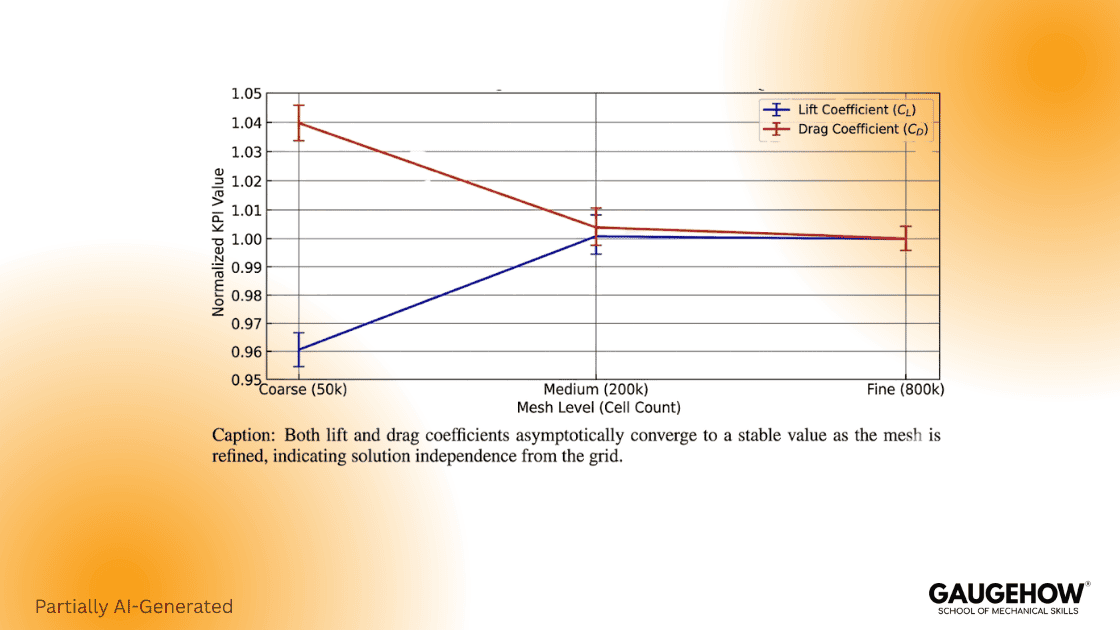
Three Mesh Levels
Competitors can copy wording, but they cannot copy proof. This guide includes a published benchmark with reference values so you can anchor your tool comparison to something real.
Volker John’s 2004 paper provides accurate reference values for a two-dimensional time-dependent cylinder in a channel case, which is widely used for validation of drag, lift, and pressure difference quantities. (wias-berlin.de)
KPI Table Across Three Mesh Levels
Mesh Level | Time Step (s) | c_d,max | c_l,max | Delta p at 8 s |
2 | 0.00125 | 2.9509487 | 0.48684486 | -0.11182187 |
3 | 0.00125 | 2.9509266 | 0.47851502 | -0.11150848 |
4 | 0.00125 | 2.9509212 | 0.47805421 | -0.11150005 |
What Changed With Each Mesh
Lift is the sensitive KPI here, not drag, so you watch lift convergence first. The coarse mesh smears the wake and shear layers, so the peak lift stays inflated. The medium mesh moves closer to the stable trend, and the fine mesh changes little, which is exactly the behavior you want before you trust a design decision.
Common Mistakes That Quietly Break Results
Most CFD failures are process failures, not solver failures, which is why the reporting pack is part of the tool decision.
Outlet backflow can distort fields without obvious warnings, so you must set backflow turbulence and check reversed flow regions.
Near-wall setup can drift heat transfer and drag silently, so you need a stated y plus target and a stated wall treatment every run.
Mesh sensitivity is often skipped, and then numerical noise looks like physics, so your review pack must include a mesh trend plot at least once per geometry family.
If you keep the review pack strict and keep the trial workflow time-boxed, CFD becomes more predictable, and decisions become easier to defend.
FAQ
How Do I Choose Between Commercial And Open Source CFD Software
Decide based on constraints and how hard the review will be. If time-to-result, vendor support, and accountability dominate, go commercial. If you need solver transparency and code control, go open-source, but only with locked templates, version control, and mandatory review gates.
What Is The Best Free CFD Software Path For Learning
Keep the scope small and freeze the reporting format. Solve in OpenFOAM, post in ParaView, and export the same KPI table and plots every run. Store outputs in one folder so learning stays measurable.
Which Post-Processing Tool Should I Standardize
Standardize on one post tool that your team can script and audit. ParaView handles scripted pipelines and heavy datasets well. Tecplot 360 also supports automation through PyTecplot and macros. Choose based on your bottleneck: repeatable automation or fastest interactive interrogation time on big files.
How Do I Avoid Scaling Surprises
Before scaling, read the primary license terms, then run a parallel job at the core counts you expect. For Fluent, use the licensing guide and the 2025 R1 HPC options, then verify checkout under load. For STAR CCM plus, read the Power licensing sheet and map tokens to concurrency.
Is Cloud CFD Worth It For Teams Without IT Support
It can be, if your main constraint is hardware access and concurrency. SimScale positions itself as a cloud simulation platform for CFD and highlights browser-based access and elastic compute, which can remove IT barriers for parallel exploration. (simscale.com)
What Is The One Benchmark I Should Run In Every Tool Trial
Run one public validation case with published target numbers, then run a three-level mesh sweep and follow one high-sensitivity KPI. John’s 2004 cylinder benchmark works because it reports lift, drag, and pressure drop references. Log Reynolds number.
What Should A Review Ready CFD Deliverable Include
A one-page run summary, computational fluid dynamics boundary condition table with units, mesh stats, KPI gates, and evidence plots. If any of those are missing, your result might still be correct, but it is harder to defend under review pressure.
Conclusion
Tool choice becomes review quality, so choose with discipline. Use the decision tree, run the 60-minute trial, and publish the Proof Pack so your work becomes linkable and defensible. When you lock post-processing and the one-page Design Review Pack format, your CFD comparisons stop being opinion, and they start being engineering.
CAD-CAM-CAE Work Platform
Find or Post CAD, CAM and CAE freelance projects, full-time jobs and Internships.
GaugeHow is the platform built for core engineering work. Whether you need a freelancer for a CAD project, a full-time hire, or an engineering intern,post it here and get matched with the right person.
Our Courses
Complete Course Library
Access to 40+ courses covering various fields like Design, Simulation, Quality, Manufacturing, Robotics, and more.