
CNC Programmer Roadmap: A Step-by-Step Career Guide
Learn More in This Video
Subscribe to GaugeHow for More
Want to become a CNC programmer but not sure what to learn first? You are not alone. Most beginners jump straight into G-code tutorials without ever learning the CAD and GD&T basics that make those codes make sense on the shop floor.
This roadmap breaks the career down into clear, practical stages. No vague advice like "learn machining." Just the tools, software, and skills that actually show up in real job postings, in the order you should learn them.
What Does a CNC Programmer Actually Do?
A CNC programmer turns a part drawing into machine instructions that cut real metal or plastic accurately, every single time. In practice, this means:
Reading engineering drawings and tolerance callouts
Building or importing 3D models for the part being machined
Writing and simulating toolpaths in CAM software
Selecting tools, speeds, and feeds for each operation
Verifying the first article against the drawing before full production
Troubleshooting programs when a machine throws an error mid-run
It's a role that sits right between design and production. You need to understand a drawing well enough to catch a mistake before it becomes a scrapped part.
CNC Programmer Roadmap: Step by Step
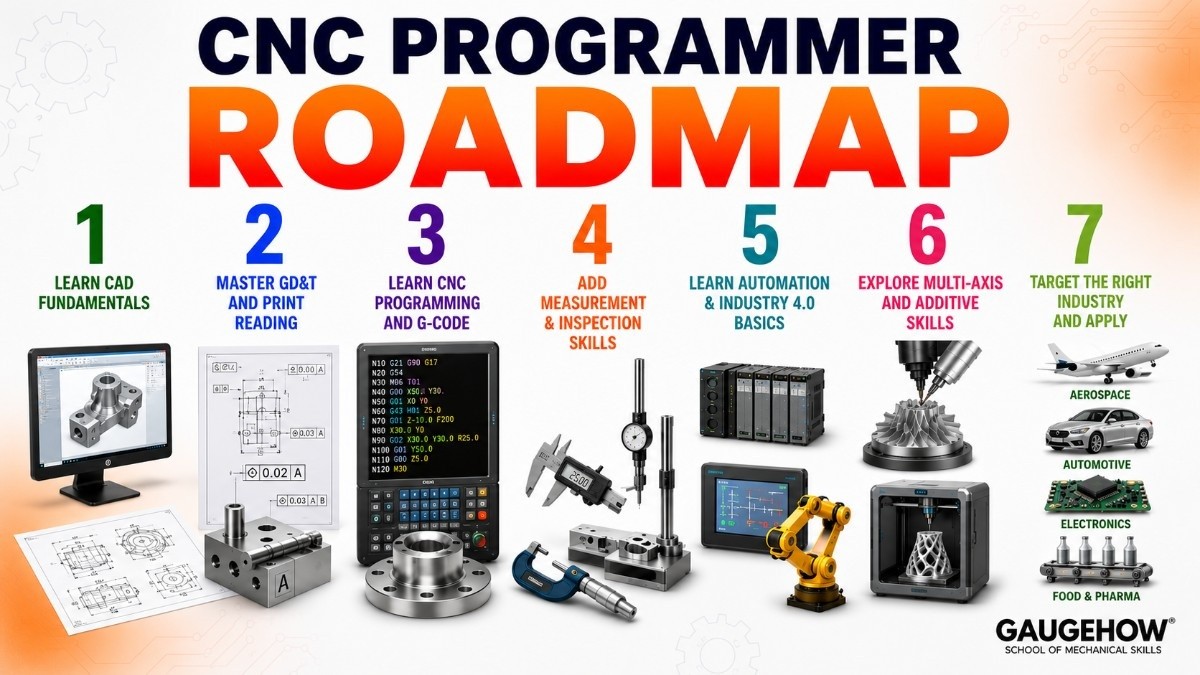
Step 1: Learn CAD Fundamentals
Every CNC program starts from a model or a drawing. Before you touch a CAM package, get comfortable building and reading 3D models and 2D drawings. Most shops still standardize on one or two CAD platforms, so pick one and go deep rather than skimming five.
The AutoCAD course covers 2D drafting fundamentals, while Fusion 360 is worth learning early since it combines CAD and CAM in a single, beginner-friendly package.
Step 2: Master GD&T and Print Reading
This is the step most beginners skip, and it shows up fast in interviews. If you cannot read a tolerance callout correctly, you will program a part that looks right and still fails inspection.
Understanding datums, feature control frames, and fit tolerances is non-negotiable for this career. The GD&T and Engineering Graphics course covers exactly this, using the same symbols you will see on real production drawings.
Step 3: Learn CNC Programming and G-Code
Now the actual programming begins. You need to understand G-code and M-code structure, work coordinate systems, tool offsets, and how to write and edit a program manually, not just generate one from software.
Even if your shop relies heavily on CAM-generated code, being able to read and hand-edit G-code is what separates a junior programmer from someone trusted with complex jobs. The CNC Programming course walks through this from the fundamentals up, with real toolpath examples.
Step 4: Add Measurement and Inspection Skills
A program is only as good as the part it produces, and you cannot confirm that without measurement skills. Gauge basics, surface finish, and first article inspection all matter here, especially in regulated industries like aerospace where every dimension needs to be documented.
Pairing this with CMM knowledge makes you far more valuable, since you will understand exactly what the inspection team is checking before the part even leaves your machine. The Engineering Metrology & 3D Measurement course and CMM Inspection & ISO 10360 course both build this skill set.
Step 5: Learn Automation and Industry 4.0 Basics
Modern CNC shops are not isolated machines anymore. Many are tied into PLCs, robotic loaders, and connected monitoring systems that track cycle time and downtime automatically.
Understanding PLC Programming and Automation alongside Industry 4.0 concepts helps you speak the same language as the automation engineers your shop increasingly depends on, and it opens the door to higher-paying hybrid roles.
Step 6: Explore Multi-Axis and Additive Skills
Once the basics are solid, look at what separates a mid-level programmer from a senior one: 4 and 5-axis programming, complex fixturing, and increasingly, additive manufacturing for prototyping and low-volume parts.
Even a working knowledge of 3D Printing / Additive Manufacturing helps you decide when a part should be printed instead of machined, which is a decision more shops expect programmers to weigh in on now.
Step 7: Target the Right Industry and Apply
CNC hiring looks different by sector. Aerospace wants documentation discipline and tight tolerance control. Automotive wants high-volume cycle time optimization. Medical wants traceability on every single part.
If you are targeting aerospace specifically, the Aerospace industry page is a good place to see what skills that sector emphasizes before you apply, and the Automotive industry page does the same for high-volume production work.
Before interviews, run through common technical questions so a toolpath or tolerance scenario does not catch you off guard. The Interview Q&A Hub has role-specific practice questions, and the Practice / MCQ Tests section is useful for a quick knowledge check the night before.
CNC Programmer Skills Checklist
Skill Area | Beginner | Job Ready |
|---|---|---|
CAD modeling | Can open and view a model | Can build and edit a part model from scratch |
GD&T and print reading | Recognizes basic symbols | Can interpret full feature control frames |
G-code and M-code | Knows the basic code structure | Can hand-edit a program without CAM |
CAM software | Has run a basic toolpath simulation | Has programmed and proven out a real part |
Measurement and inspection | Knows what a CMM does | Can perform a first article inspection |
Automation awareness | Aware PLCs exist on the shop floor | Understands how a program interfaces with automation |
CNC Programmer vs CNC Machinist vs CAM Programmer
These three titles overlap constantly on job boards, and the lines blur even more in smaller shops.
Role | Main Focus | Typical Tools |
|---|---|---|
CNC Programmer | Writing and proving out machine instructions | CAD, CAM, G-code, tool offsets |
CNC Machinist | Setting up and running the machine day to day | Work-holding, tool changes, in-process inspection |
CAM Programmer | Generating toolpaths from 3D models at scale | CAM software, post-processors, simulation |
In practice, a strong CNC programmer usually understands enough machinist-level shop floor knowledge to write programs that actually work the first time, not just in simulation. If you enjoy the design side more than the programming side, it's worth comparing this against the Design Engineer career track before committing to one path.
Frequently Asked Questions
Q: Do I need a degree to become a CNC programmer?
A: No, most employers do not require a bachelor's degree. A certificate or associate program in CNC machining, machine technology, or CAD/CAM is common, and many programmers start as machine operators and work their way up through hands-on experience.
Q: What software do CNC programmers need to know?
A: A CAD package for modeling, a CAM package for generating toolpaths, and the ability to read and hand-edit G-code directly. Fusion 360 and Mastercam are two of the most commonly requested tools in job postings.
Q: How long does it take to become job ready as a CNC programmer?
A: Most people need three to six years to become a fully qualified programmer, since it combines classroom learning with real shop floor experience. Someone with a strong CAD and GD&T foundation already can shorten this by focusing directly on programming and inspection skills.
Q: Is CNC programming a good career in 2026?
A: Yes. Demand for programmers who also understand automation and connected manufacturing is rising faster than demand for basic machine operators, which makes this a growing rather than shrinking career path.
Q: Which industries hire the most CNC programmers?
A: Aerospace, automotive, medical device, and electronics manufacturing all hire heavily for this role, since each depends on precisely machined parts at scale.
Conclusion
Becoming a CNC programmer is less about memorizing G-code and more about understanding the full chain from drawing to finished part: CAD, tolerances, programming, inspection, and increasingly, automation. Follow the roadmap in order: CAD basics, GD&T, CNC programming, measurement, automation awareness, then advanced multi-axis and additive skills.
Ready to build the skill set? Start with the CNC Programming course on GaugeHow to build the core programming skills this roadmap is built around.
Mechanical Engineering Courses That Industry Actually Uses
Learn Tools of Design & CAD, Analysis & Simulation, Automation & Robotics, and Industry 4.0 used in modern factories.
Join 40+ Mech Courses like GD&T, Siemens NX, SolidWorks, CATIA V5, AutoCAD, ANSYS (FEA & Fluent), ABAQUS, Creo, Fusion 360, CNC Programming, Digital Twins, Python for Mechanical, and Industry 4.0.
Our Courses
Complete Course Library
Access to 40+ courses covering various fields like Design, Simulation, Quality, Manufacturing, Robotics, and more.