radius gauge
radius gauge
radius gauge

What is Radius Gauge?

Dec 13, 2025

author image Deepak choudhary

Deepak Choudhary


Learn What Industry Wants

Lead the CHANGE in Mechanical Engineering

Upskill with 40+ courses in Design/CAD, Simulation, FEA/CFD, Manufacturing, Robotics & Industry 4.0.

During the early period, there were no standard units for measuring thickness, which led to the invention of gauges.

The word gauge is derived from the French word “jauge”, which means the result of a measurement.

Gauges are commonly used to measure the thickness, size, or capacity of an object.

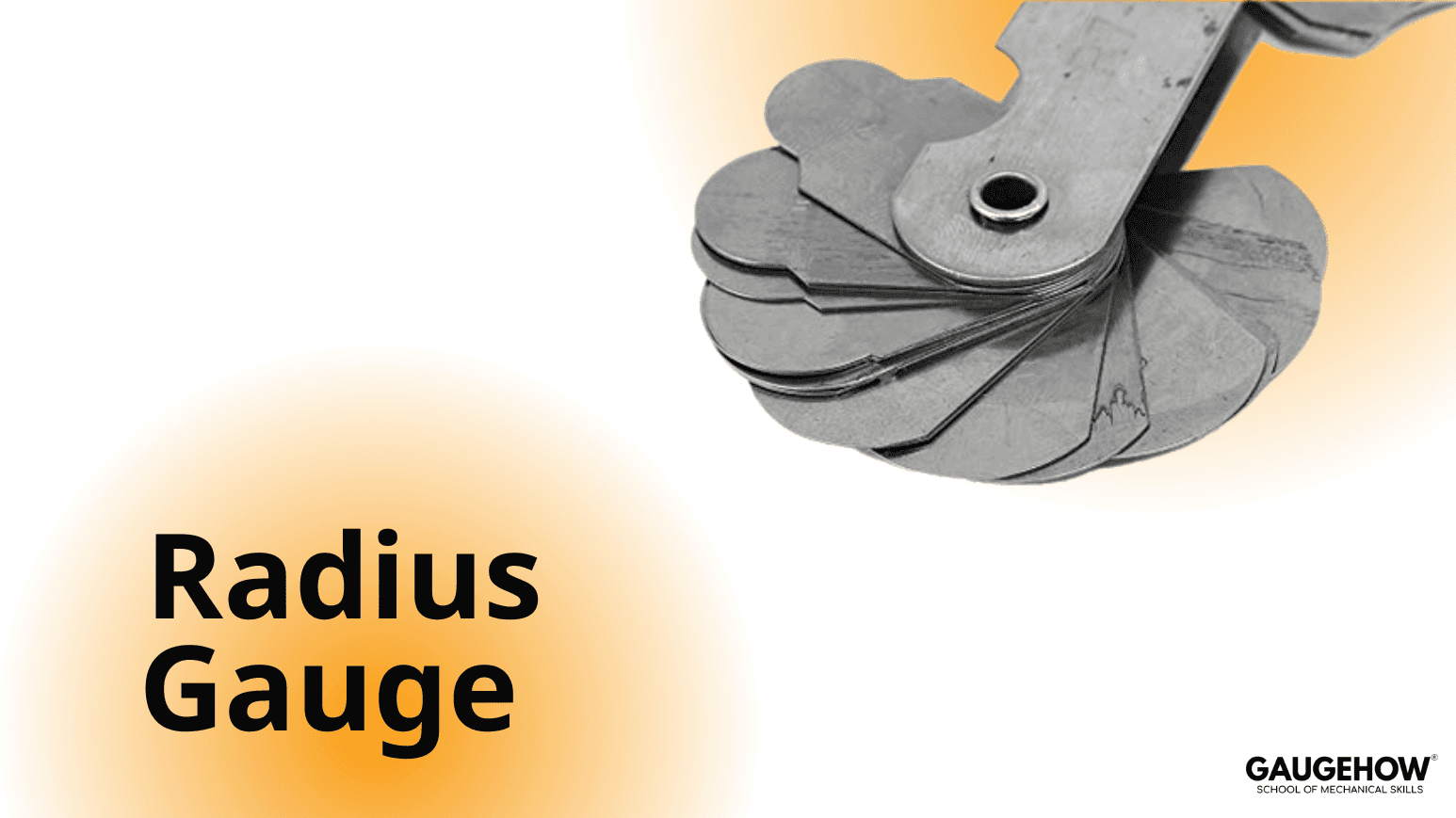
Similarly, radius gauges are instruments used to measure the radius of an object. The radius gauge is often associated with another gauge known as the fillet gauge, where a fillet in mechanics refers to the rounding of a part’s design.

A radius gauge is primarily used to measure internal radii, whereas external radii are measured using a fillet gauge.

The construction of a radius gauge consists of two gauge sets containing multiple steel strips or blades, which are screwed together in a single holder. The screw used to secure the blades is known as the lock screw.

Radius measurements are generally in metric units, measured in millimetres (mm).

The gauge is typically made entirely of stainless steel. In some cases, a satin chrome finish is added to improve corrosion resistance and prevent rust.

The blades are manufactured in both concave and convex shapes. These blades can be swung out from the holder when measurements are required. The measurement markings are engraved on the upper surface of each individual blade.

Types of Radius Gauge

Three standard sets of radius gauges are commonly manufactured:

  • Set 1: Measures radii from 0.6 to 0.8 mm

  • Set 2: Measures radii from 1 to 7 mm

  • Set 3: Measures radii from 3 to 8.25 mm

To measure a radius, the workpiece is taken and the blades are inserted one by one until a blade fits perfectly with the radius of the object.

Specifications of Radius Gauge

A radius gauge is lightweight and compact in design. With advancements in technology, more precise and advanced instruments have been developed, such as the digital radius gauge. Digital radius gauges provide higher accuracy and precision. They are user-friendly, portable, and allow fast measurements due to their digital display.

Construction of Digital Radius Gauge

The construction of a digital radius gauge is entirely different from that of a conventional radius gauge. It consists of a digital display screen for reading values, a measuring head, and a set of brackets or jaws of various sizes, typically ranging from 5 to 100 mm.

The digital display, measuring head, and jaws are integrated to perform measurements effectively. It is important to note that simple radius gauges are generally used for measuring small radii, while digital radius gauges are preferred for measuring larger radii with higher accuracy.

Our Courses

Complete Course Library

Access to 40+ courses covering various fields like Design, Simulation, Quality, Manufacturing, Robotics, and more.


comsol design of mechanical part

COMSOL Multiphysics Essentials

You will understand the major COMSOL modules such as AC/DC, CFD, Heat Transfer, Structural Mechanics, MEMS, and Pipe Flow. This helps you see how COMSOL is used in different engineering fields.

You will learn how to customize the COMSOL desktop, use the Model Wizard, access the main menu and toolbar, and follow the basic steps needed to build any simulation model. You will also use ChatGPT to understand sequencing in COMSOL.

You will learn global and local definitions, create variables and expressions, use operators and functions, and load parameters from external text files with AI assistance. This gives you strong control over parametric modeling.

You will work with geometry tools, selection lists, transparency settings, hiding and showing entities, rendering, and user-defined selections. This helps you build clean and accurate models.

You will learn geometry modeling, adding nodes, editing nodes, and understanding the current node. You will also use ChatGPT to assist with geometry features.

You will explore material databases, assign materials properly, work with the material browser, and use external material libraries. You will understand how materials behave in multiphysics simulations.

You will learn how to build full COMSOL models using the Model Builder, manage nodes, enable or disable physics, save files, open model libraries, and explore advanced results sections using GPT-based guidance.

Finally, you will work on multiple learning projects covering named selections, meshing, solver studies, results plotting, friction modeling, and cylindrical roller simulations. These projects help you apply COMSOL to real engineering problems.

Featured

Advanced

comsol design of mechanical part

COMSOL Multiphysics Essentials

You will understand the major COMSOL modules such as AC/DC, CFD, Heat Transfer, Structural Mechanics, MEMS, and Pipe Flow. This helps you see how COMSOL is used in different engineering fields.

You will learn how to customize the COMSOL desktop, use the Model Wizard, access the main menu and toolbar, and follow the basic steps needed to build any simulation model. You will also use ChatGPT to understand sequencing in COMSOL.

You will learn global and local definitions, create variables and expressions, use operators and functions, and load parameters from external text files with AI assistance. This gives you strong control over parametric modeling.

You will work with geometry tools, selection lists, transparency settings, hiding and showing entities, rendering, and user-defined selections. This helps you build clean and accurate models.

You will learn geometry modeling, adding nodes, editing nodes, and understanding the current node. You will also use ChatGPT to assist with geometry features.

You will explore material databases, assign materials properly, work with the material browser, and use external material libraries. You will understand how materials behave in multiphysics simulations.

You will learn how to build full COMSOL models using the Model Builder, manage nodes, enable or disable physics, save files, open model libraries, and explore advanced results sections using GPT-based guidance.

Finally, you will work on multiple learning projects covering named selections, meshing, solver studies, results plotting, friction modeling, and cylindrical roller simulations. These projects help you apply COMSOL to real engineering problems.

Featured

Advanced
