Advantages And Disadvantages Of CAD: What Engineers Miss

Computer-Aided Design (CAD) makes change fast, but it can also hide design intent and amplify rework when references, drawings, and exports drift apart. You will see the real advantages and disadvantages engineers feel at work, along with simple controls that keep releases calm.
Quick Advantages: faster iteration, higher drafting accuracy, stronger reuse, clearer 3D visualization, earlier clash detection, and faster drawing output when revisions are controlled.
Quick Disadvantages: learning curve, cost load, reference fragility, drawing–model drift, export translation breakage, and tolerance intent getting lost.
CAD Definition
What is CAD in simple language? CAD is how you build a digital model of a part or assembly, then generate the drawing set used for manufacturing and inspection.
In real work, the model is not just geometry. The parametric tree stores references, constraints, and feature order, so a small edit can stay clean or trigger downstream confusion. If your drawing and model drift, you have seen this failure already.
A safe routine stays boring. Reference functional features to stable datums, keep the tree readable, and treat exports as controlled translations that deserve a quick verification.
Advantages Of CAD In Real Engineering Work
The real value of the tool is speed with control. When modeling habits are consistent, iteration stays cheap, and reviews stay focused.
In workflow terms, advantages show up during reviews and change cycles. Teams feel it when redraw effort drops and decisions move faster.
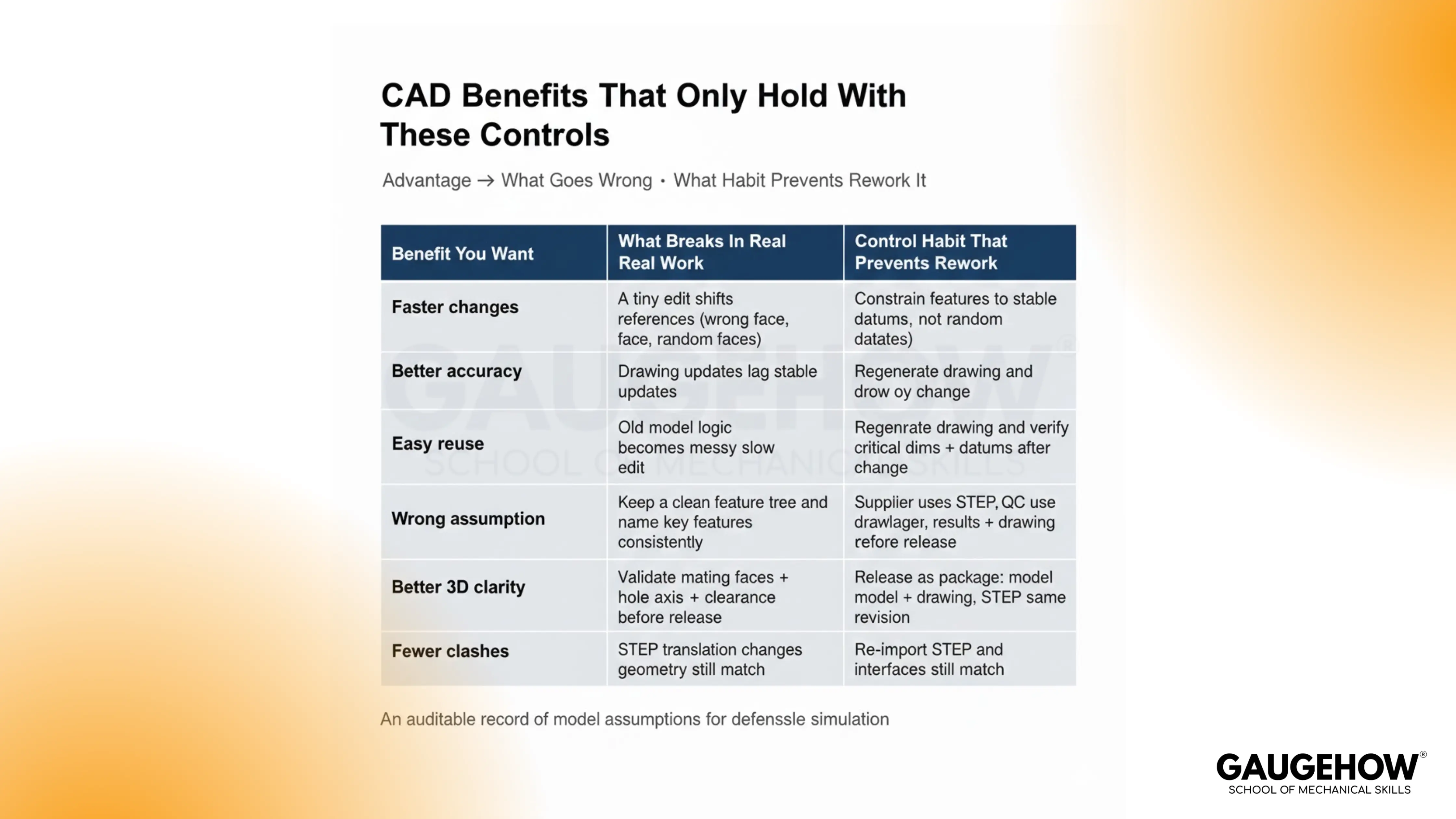
Keep advantages real by pairing each one with a practical habit:
1. Faster iteration under change: Constraints let you update dimensions without redrawing everything. Strong references keep the change local instead of cascading.
2. Better drafting consistency: Views, dimensions, and notes stay aligned when the drawing follows one controlled revision. Reviews go more smoothly because the drawing set tells one story.
3. Reuse that actually holds: Patterns and templates reduce repeat work when intent is clear. Stable parent references prevent “copied debt” from multiplying later.
4. Clearer 3D understanding in reviews: Sections and assemblies make fit issues visible early. Communication improves because people stop guessing what a view means.
5. Earlier interference discovery: Assembly checks catch clashes before build. Rework drops when the mates match how the product really assembles.
6. Easier sharing across teams: Digital files move faster than paper. Handoff improves when the release package is consistent and traceable.
Disadvantages Of CAD
Most disadvantages are not “software problems.” They are workflow problems that surface at release, supplier handoff, and inspection planning.
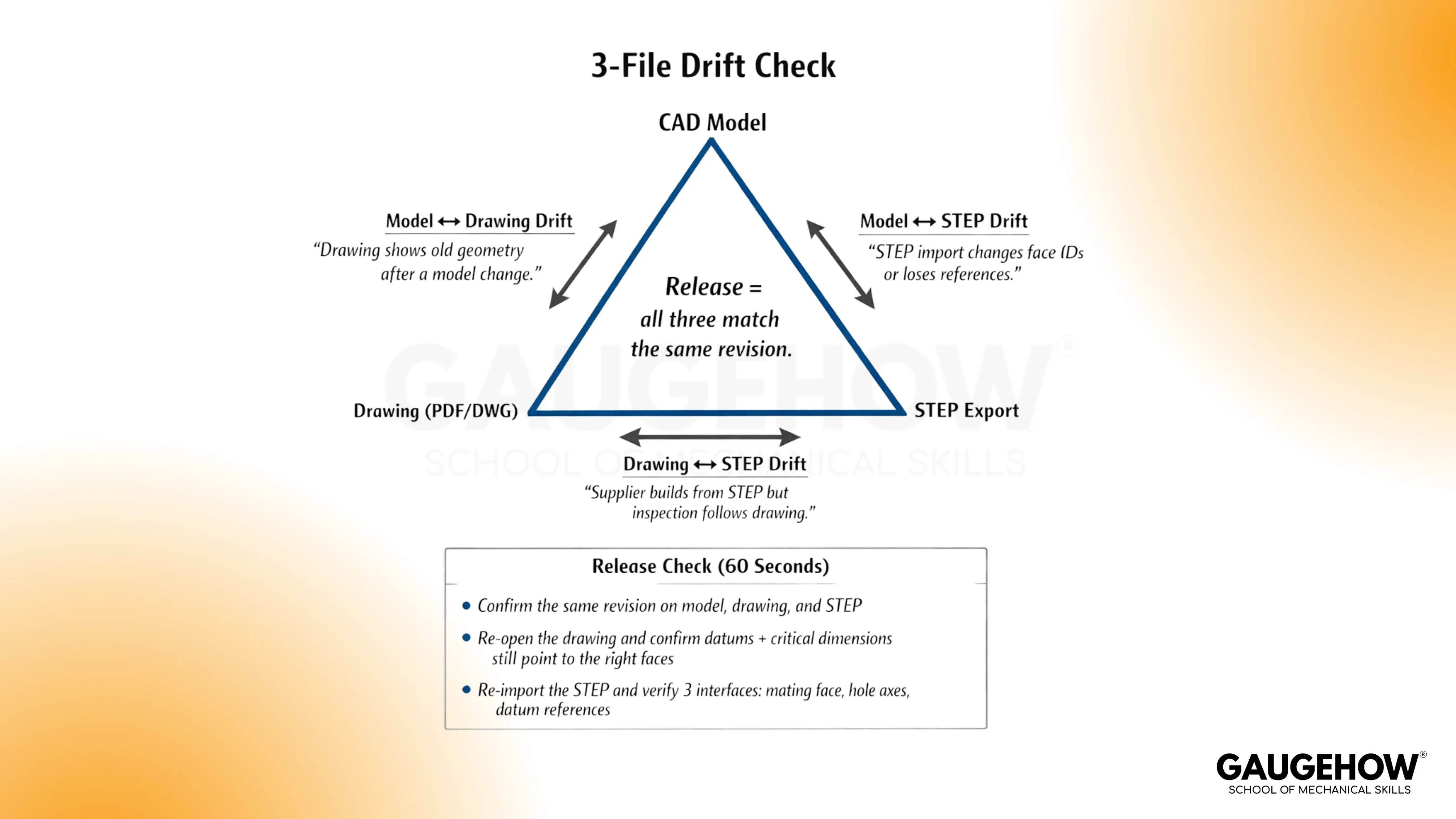
The model changes fast, but drawings and exports can lag behind. That gap is where rework is born.
These are the disadvantages engineers actually feel:
1. Reference fragility under edits: A face changes and downstream features shift “correctly” but unexpectedly. The rebuild passes, but the intent quietly moved.
2. Drawing–model drift: One view stays stale after updates, and nobody notices. Inspection follows the drawing, not your memory.
3. Export translation breakage: Faces and edges get re-identified after export. CAM setups and inspection points attach to the wrong surfaces.
4. Mixed modeling habits across a team: Two people model the same intent differently. Future changes become slower than they should be.
5. Cost and compute load: Licensing and hardware add overhead. The cost hurts most when the workflow is inconsistent.
6. Tolerance intent getting lost: Geometry looks right, but the drawing does not communicate what must be controlled. Variation becomes a surprise instead of a plan.
Conclusion
CAD only pays off when your model, drawing, and exports stay tied to one revision; the same speed creates rework. If you want to use CAD like a working engineer, learn the habits that prevent drift: stable datums, clean feature trees, and quick release checks. Gaugehow’s CAD courses train you on real change cycles and handoff proofs, so you ship designs with confidence and fewer surprises.
FAQs
1. What Are The Biggest Advantages And Disadvantages Of CAD?
The biggest advantage is controlled speed. Changes propagate quickly when references are stable. The biggest disadvantage is drift, where drawings or exports stop matching the active revision.
2. Why Do CAD Drawings And Models Go Out Of Sync?
Drift usually happens when updates are made in one place and not validated as a package. A single stale view or mismatched datum callout can create an inspection failure.
3. Why Do CAD Exports Break Faces And Edges?
File translation can re-identify surfaces even when geometry looks similar. Downstream references in CAM and inspection tools can break because they depend on face identity, not just shape.
4. How Do I Reduce Rework From CAD Changes?
Use stable datum references for functional features, lock revisions across models and drawings, and verify the same 3–5 interfaces before release. Consistency beats complexity.
5. What Should I Check Before Sending Files To A Supplier?
Confirm that the model, drawing set, and export share the same revision. Then import the export and verify that the same reference faces exist on the key functional interfaces.
CAD-CAM-CAE Work Platform
Find or Post CAD, CAM and CAE freelance projects, full-time jobs and Internships.
GaugeHow is the platform built for core engineering work. Whether you need a freelancer for a CAD project, a full-time hire, or an engineering intern,post it here and get matched with the right person.























