CAM Software Pricing: Free vs Paid vs Enterprise Costs
Learn More in This Video
Subscribe to GaugeHow for More
CAM software pricing covers more than the license price. Free tools reduce entry cost, paid tools improve support and output control, and enterprise systems add deeper capability with higher ownership cost. Real buying decisions depend on posts, updates, training, and long-term reliability, not software access alone.
By the end, you can choose the right price tier, license path, and budget buffer for your machining setup.
CAM pricing gets messy fast. One tool starts free. Another looks affordable on a yearly plan. Another sends every serious buyer to a reseller quote. Price comparison breaks early because the license cost rarely shows the full ownership cost.
Real spending comes from more than software access. Post-readiness, training time, support depth, update policy, and machine complexity shape total cost. Cheap entry can create slow prove-outs and more manual edits. Higher pricing can still reduce waste once output gets cleaner and repeatability improves.
Strong buying logic starts with production needs. Learning, small-shop programming, and team standardization need different software depth. Clear comparison starts with pricing tiers, hidden costs, and the ownership model. Then the software choice becomes easier.
How Much Does CAM Cost?
CAM cost usually falls into three practical bands.
Free and limited-use tools sit at the entry end. They support learning, trial setups, basic routing, and very simple milling. Capability stays narrower. Support also tends to stay lighter.
Mid-tier paid tools cover most serious commercial use. Better simulation, cleaner post output, stronger updates, and more reliable support justify higher recurring or ownership costs. Small shops often land here because repeat jobs punish weak software quickly.
Quote-led and enterprise-oriented platforms sit at the upper end. Multi-axis machining, advanced verification, team rollout, and process standardization drive most of that increase. Pricing becomes less about seat cost and more about support depth, machine mix, and long-term productivity.
Buying implication stays simple. Compare full production readiness, not headline access cost.
What Shapes CAM Software Pricing?
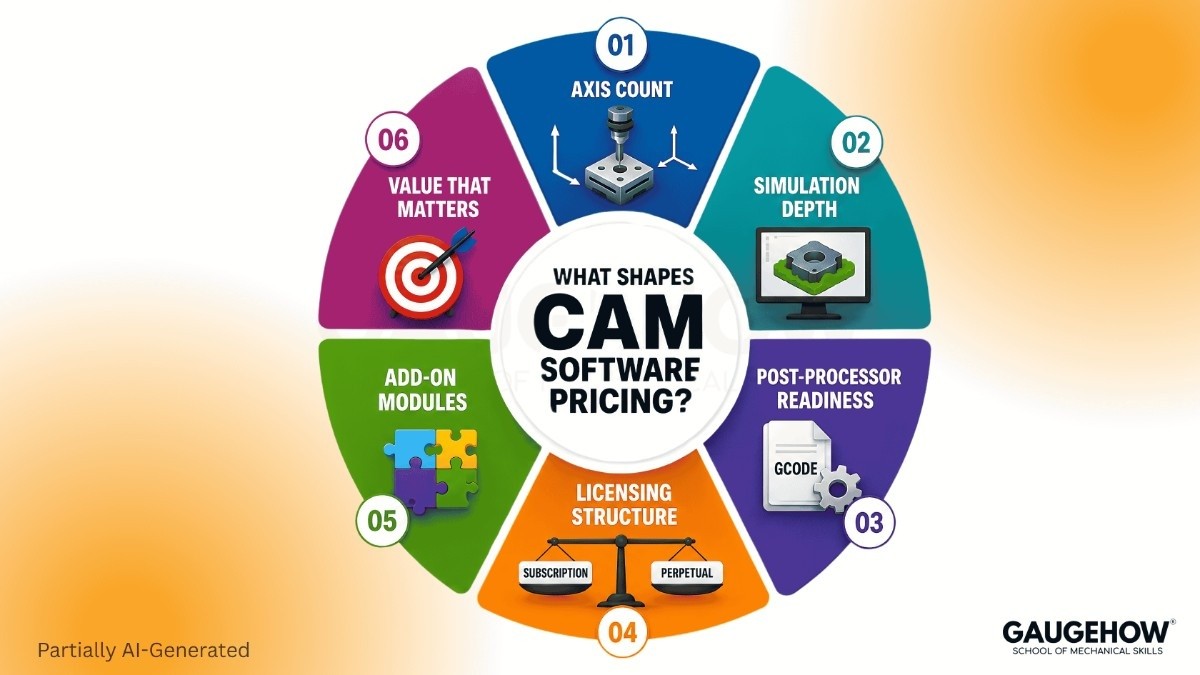
Several factors move pricing faster than buyers expect.
Axis count is one driver. Basic 2.5-axis programming sits far below advanced multi-axis capability. Simulation depth is another. Backplotting and full stock-aware verification do not live in the same pricing bracket. Post-processorr readiness adds another layer. Standard controller coverage may come easily, while custom machines, edited cycles, and uncommon formats can expand cost and delay implementation.
Licensing structure also changes investment logic. Subscription lowers early spend and keeps updates easier to manage. Perpetual ownership can improve long-term economics for stable teams with predictable machining demands. Add-on modules shift pricing again. Probing, higher-end toolpaths, automation, or manufacturing extensions often sit outside base packages.
What matters most is not feature count. What matters most is which combination reduces edits, improves toolpath confidence, and supports clean output across real machines.
Is Free CAM Software Enough?
Free CAM software makes sense at the learning stage. It lowers entry friction, helps with setup basics, and lets early users understand toolpath flow, posting logic, and simple machining strategy.
Pressure starts once commercial output enters the picture. Free tiers often limit capability, support, licensing rights, or advanced verification. Manual work increases. Confidence drops on more demanding parts. One weak post can erase early savings fast.
For a learner, free CAM software can be a practical starting point. For a shop handling paid parts, repeating jobs, or customer deadlines, low-cost access rarely stays low-cost for long. Better simulation, stronger support, and cleaner controller output become more important than first-year savings.
Buying implication is straightforward. Use no-cost tools for learning, proof-of-concept setups, and low-risk experimentation. Move up once reliability starts influencing delivery.
Subscription Or Perpetual?
Payment model changes more than accounting. It changes update rhythm, support continuity, and long-term ownership value.
CAM software subscription often serves growing shops well because entry spend stays lower and current releases remain easier to access. That can help during expansion, user changes, or shifting machine demands. Budgeting also stays more predictable under annual or monthly plans.
Perpetual ownership becomes attractive when team size stays stable, machine mix changes slowly, and long-horizon planning outweighs recurring spend. Total value improves further when internal programming standards are already mature and major software changes are less urgent.
No model wins by default. CAM software subscription favors flexibility and update continuity. Perpetual favors ownership control and slower long-term spending. Strong decisions come from time horizon, support dependency, and expected machine growth.
Buying implication: choose licensing around operating reality, not around software marketing language.
CAM Software Hidden Costs
CAM software hidden costs rarely appear on first comparison screens. They show up after purchase through post refinement, onboarding time, add-on modules, migration effort, and support dependence.
Post work is usually first. A weak or unfinished post can delay first-part approval, stretch prove-out time, and force manual edits. Training comes next. A cheaper product can still create higher ownership cost when programmers take longer to reach reliable output. Add-on capability becomes another source of spread. Advanced simulation, probing, higher-end strategies, and automation features can sit outside base packages.
Support quality shapes cost too. Slow help stretches downtime. Thin documentation increases programmer dependency. Migration adds another burden. Old templates, proven setups, tribal know-how, and controller habits rarely move across platforms without friction.
In daily production, CAM software hidden costs show up as slower release speed, more human correction, weaker scalability, and less predictable programming effort.
Buying implication: budget for readiness, support, and transition effort, not just purchase price.
Compare Leading Options
Use this section as a fast pricing-position read, not as a final buying verdict.
Check | Fusion | Mastercam | CAMWorks | DeskProto | SmartCAM |
Price | ₹34,515/year | Quote only | Starts at $3,000 | €0 to €995 | $695 to $2,795/year |
License | Subscription only | Subscription or perpetual | Reseller-dependent | One-time edition pricing | Annual tiers plus buy-up path |
Best Buyer | Growing shops, mixed CAD/CAM users | Job shops and advanced machining teams | SOLIDWORKS-led users | Learners and low-cost CNC entry | Cost-focused shops needing paid capability |
Main Risk | Extension spend rises fast | Price transparency stays limited | Bundle scope changes final cost | Capability ceiling arrives earlier | Tier depth needs careful review |
Support Note | Deeper manufacturing capability often needs added spend | Reseller path shapes support and pricing | Entry path can stay narrow for advanced use | Lower-cost entry brings lighter professional depth | Tier benefits need closer review |
CAM Software Pricing
Public pricing below was checked on March 24, 2026. Regional tax, promotions, bundles, and reseller terms can change final spend.
● Autodesk Fusion: ₹34,515/year on Autodesk India store, with a crossed-out ₹46,020/year shown on the same store page. Another Autodesk pricing page also surfaced ₹5,900/month. (Autodesk)
● Autodesk Fusion Manufacturing Extension: ₹99,120/year on Autodesk India pricing pages. Another official pricing view showed ₹8,260/month paid annually and ₹12,980/month paid monthly. (Autodesk Fusion)
● Mastercam: Pricing is not publicly listed. Contact sales or an authorized reseller for a quote. Official buy pages state subscription and perpetual licensing are available. Learning Edition is free for learning, not production. (Mastercam)
● CAMWorks: SOLIDWORKS CAM Standard can be free for users already on a SOLIDWORKS subscription and handling simple 2.5-axis milling. CAMWorks Standard bundle pricing starts at $3,000. (GoEngineer)
● DeskProto: Free Edition €0, Entry Edition €145, Expert Edition €595, Multi-Axis Edition €995. Hobby and educational Multi-Axis license €248. (DeskProto)
● SmartCAM: Tier 1 $695/year, Tier 2 $1,395/year, Tier 3 $2,795/year. Perpetual buy-up pricing listed at $1,395, $2,795, and $5,590. (SmartCAM)
What Buyers Must Check
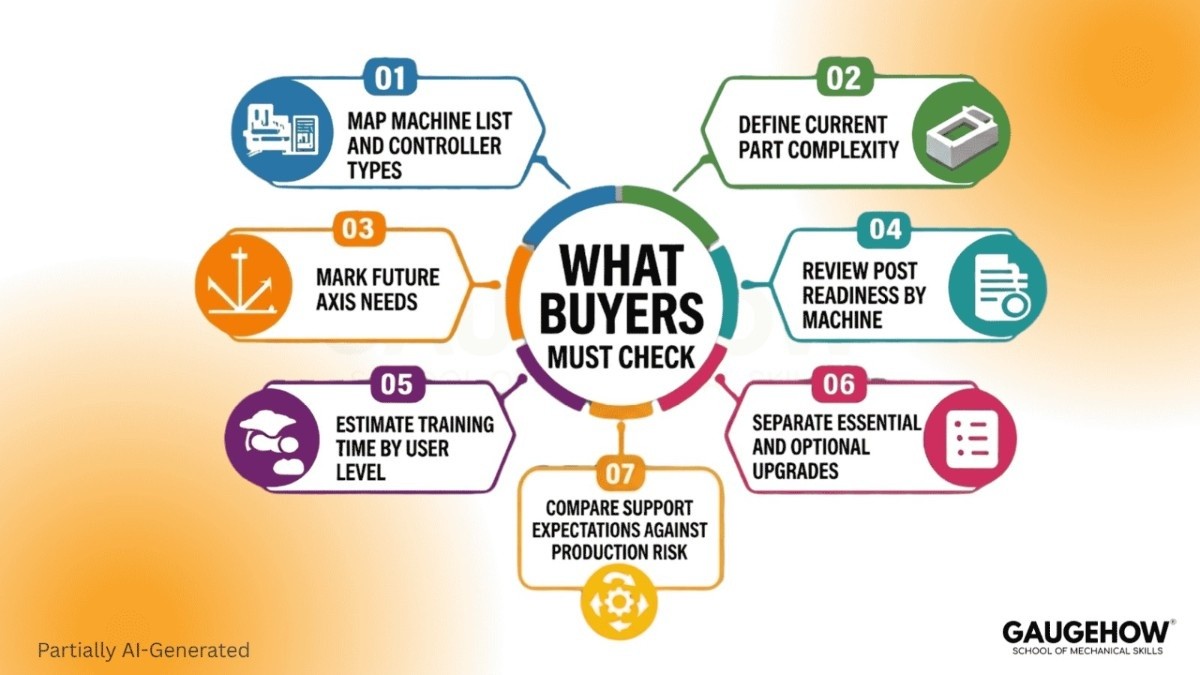
A clean shortlist starts with internal clarity.
● Map machine list and controller types
● Define current part complexity
● Mark future axis needs
● Review post readiness by machine
● Estimate training time by user level
● Separate essential features from optional upgrades
● Compare support expectations against production risk
Weak planning creates weak buying decisions. Good software cannot fix unclear requirements.
Which Skills Reduce Waste
Hard skills protect technical evaluation. Read license terms carefully. Review post coverage closely. Compare simulation depth, update policy, and add-on structure with production needs.
Soft skills protect commercial evaluation. Ask sharper demo questions. Push vendors toward machine-specific examples. Challenge vague bundle language. Separate real capability from polished marketing flow.
Best buyers combine both. They evaluate software like engineers, not like brochure readers.
Where Price Changes Output
A learner using a desktop router needs low-cost access, simple posting, and enough capability to build confidence. Fast learning is the main outcome.
A three-machine shop needs reliable output, fewer edits, and shorter prove-out cycles across recurring parts. Stable programming throughput becomes the main outcome.
A production team handling complex parts needs stronger verification, cleaner process control, deeper support, and more repeatable programming standards. Operational consistency becomes the main outcome.
Role/Task | Output | Tools | Downstream Use | Proof Check |
Learning basic milling | Simple posted code | Free or entry tools | Skill growth and low-risk prototypes | Usage limits and machine compatibility |
Programming repeat parts | Stable code with fewer edits | Mid-tier paid platforms | Faster setup and lower scrap exposure | Post quality and support depth |
Multi-axis programming | Verified advanced toolpaths | Higher-end CAM stack | Better finish and shorter prove-out cycles | Simulation strength and axis support |
Team standardization | Shared programming method | Enterprise-oriented environment | Consistency across users and machines | Rollout support and licensing control |
Three-Year Cost View
Most pricing pages stay trapped in year-one thinking. Real ownership value shows up later.
A one-person shop often wins with leaner entry spend during early growth. Training burden stays manageable. Post burden stays lighter. Support dependence remains moderate. Verdict: start lower, but leave room for better capability once the complexity rises.
A three-machine shop usually feels pressure in year two. Repeat jobs expose weak posts fast. Manual edits start slowing throughput. Retraining becomes costly once too much knowledge sits with one programmer. Verdict: paid mid-tier software often gives the strongest balance of support, updates, and ownership value.
A production team pays most for inconsistency. Uneven posts, weak rollout, poor documentation, and shallow support create losses across every shift. Upfront spend hurts once.
Operational drag hurts every week. Verdict: higher-end or quote-led platforms make sense when reliability, scale, and shared standards drive revenue.
Which Tier To Choose
Choose free or low-cost options for learning, testing, and low-risk personal machining. Choose mid-tier paid platforms for repeat commercial output, cleaner posts, and stronger support. Choose quote-led or enterprise-oriented systems for advanced machining, higher complexity, broader team use, and process standardization.
Right CAM software pricing decision does not start with lowest visible number. It starts with machine demands, support expectations, and long-term ownership logic.
FAQs
Why is Mastercam pricing not public?
Mastercam sells through sales and reseller channels. Public licensing direction is clear, but exact seat pricing is not openly listed.
Is CAMWorks cheaper than Mastercam?
Public entry guidance is easier to find for CAMWorks. Mastercam remains quote-led, so direct comparison depends on package scope and reseller terms.
Can free CAM handle commercial jobs?
Basic commercial use is possible in some cases, but capability, support, and licensing limits often push serious users toward paid platforms.
Are post processors included?
Some are included. Custom controllers, edited cycles, and machine-specific needs can add time, cost, or both.
Which licensing path lowers three-year cost?
Shorter-horizon flexibility often favors subscription. Stable long-horizon ownership can favor perpetual. Update needs and support dependency decide final value.
Mechanical Engineering Courses That Industry Actually Uses
Learn Tools of Design & CAD, Analysis & Simulation, Automation & Robotics, and Industry 4.0 used in modern factories.
Join 40+ Mech Courses like GD&T, Siemens NX, SolidWorks, CATIA V5, AutoCAD, ANSYS (FEA & Fluent), ABAQUS, Creo, Fusion 360, CNC Programming, Digital Twins, Python for Mechanical, and Industry 4.0.
Our Courses
Complete Course Library
Access to 40+ courses covering various fields like Design, Simulation, Quality, Manufacturing, Robotics, and more.


