How to Learn CAD: Beginner Roadmap (Step-by-Step) Guide
Learning how to learn CAD as a beginner becomes easier when the goal is an output, not a toolbar. Commit to one CAD tool for 30 days, follow a beginner tutorial path, practice with small projects, and finish each week with a clean deliverable: a part model, a drawing PDF, and a STEP file that opens correctly. Consistency matters more than speed.
CAD can feel heavy on day one because everything looks unfamiliar at once. Progress becomes predictable when “done” is defined early and practice is tied to files that survive edits. In real teams, work gets reviewed, revised, and released. That rhythm is the right target, even at a beginner level.
Tool choice is the first gate, so match it to the reason CAD is being learned. Students usually need submission-ready drawings and clear fundamentals. Job seekers need portfolio artifacts and basic revision habits. Hobbyists and 3D print learners need clean parts and reliable exports. Drafting-heavy learners need 2D discipline, templates, layers, and readable annotation.
What CAD Is
CAD stands for Computer-Aided Design. It refers to software used to create accurate 2D drawings and 3D models of parts, products, and systems. A CAD file is not only a picture. It is a measurable model that can be edited, checked, and shared for quoting, manufacturing, or review.
CAD in simple terms
CAD is digital design with precision, where geometry is created in a way that supports measurement, modification, and handoff.
2D CAD vs 3D CAD
2D CAD is mainly drafting and documentation: lines, layers, dimensions, symbols, and printable sheets. 3D CAD is mainly modeling and design intent: constrained sketches, features, assemblies, and models that rebuild correctly after a dimension change. Either route can be the right start, but mixing both on day one usually slows progress.
Why Learn CAD
CAD is a practical skill because it sits between ideas and buildable work. A sketch communicates intent. CAD communicates intent with accuracy, and it keeps that intent editable when changes arrive. That ability to iterate without starting over is what makes CAD valuable for coursework, internships, product projects, and manufacturing workflows.
Skills Needed to Start
A beginner does not need advanced math to begin making progress. Basic comfort with measurement, units, and simple geometry is enough for the first stage. Computer habits matter as well: saving versions, naming files clearly, and staying consistent with templates.
Patience and attention to detail matter more than most people expect. CAD rewards clean steps and repeatable habits. When practice ends with a finished file, confidence follows naturally.
Best Way to Learn CAD
The best way to learn CAD is to treat learning like a production routine. A small sequence repeated well will beat a large sequence repeated inconsistently. The target is not “knowing commands.” The target is producing files that can be reopened, edited, and exported without surprises.
A simple framework keeps the sequence stable:
1. CLIP method: Choose, Learn, Implement, Prove.
2. Choose one output lane and one tool.
3. Learn navigation, sketches, constraints, and core features first.
4. Implement through small projects that force completion.
5. Prove progress through deliverables and revision checks.
Once the lane is set, commit to one structured beginner tutorial path. Avoid stacking five courses at once. One path is enough if practice sessions end in output.
The third use of the head term belongs here: anyone searching for how to learn CAD improves faster when each session ends with an export check, not another video.
Learn CAD Online
Online training works when it leads to finished files. The phrase learn CAD online should mean more than watching lessons. It should mean following a structured path that produces models, drawings, and exports in a predictable order.
A practical online stack has three parts: one structured learning spine, one project lab, and one feedback channel. How can it fit here as a structured learning hub and a source of project briefs and free course paths, alongside official tutorials and reputable platforms, without turning the plan into a link collection?
CAD Self-Study
Self-paced learning can be effective when the routine is simple enough to sustain. The phrase CAD self-study works best when practice is treated as a loop that ends with proof, not a reading plan.
A reliable routine uses short sessions focused on one outcome, then a weekly review that repeats an older part from scratch. Rebuilding older work exposes weak fundamentals quickly and builds the revision discipline that real CAD work demands.
Week-by-Week Output Ladder
A beginner roadmap becomes clearer when each week ends with a deliverable that can be shown. This ladder keeps the learning sequence simple and output-driven, and it prevents the common pattern of learning features without being able to ship a clean file.
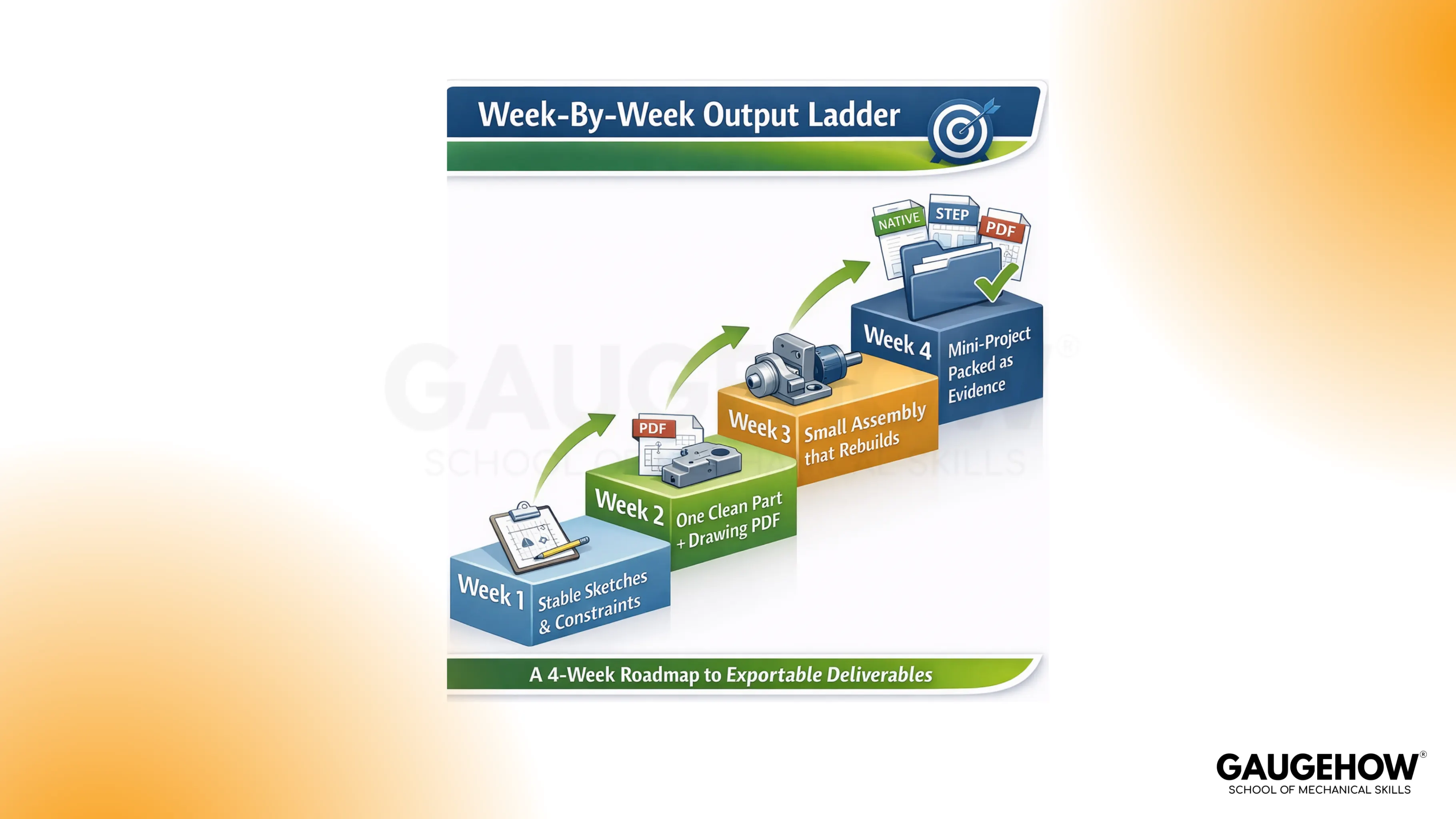
Week 1: stable sketches and constraints that stay controlled after dimension edits.
Week 2: one clean part model plus a drawing PDF that communicates the part clearly.
Week 3: a small assembly that rebuilds without errors after basic changes.
Week 4: one mini-project packaged as evidence with a native file, a STEP export, and a drawing PDF.
Each stage is meant to feel finishable. When a change breaks the model, the correct response is not to start over. Fix the build, then continue. That habit is the core of CAD competence.
Mini-Project With Acceptance Criteria
A first mini-project should be small, reproducible, and measurable. Brackets, clamps, and simple fixtures work well because they force constrained sketches, core features, and basic documentation without requiring complex surfaces or long design cycles.
Completion is defined by acceptance checks rather than time spent:

Passing these checks creates proof by specificity. The result is not only practice. It is a deliverable that behaves like real work.
Debugging Layer
Beginner progress often slows down for predictable reasons. Constraints, units, rebuild errors, and exports are the four common friction points. A short debugging routine removes hours of confusion because the first checks become obvious.
Constraint drift: when geometry moves unexpectedly, a missing constraint or unintended reference is usually responsible. Confirm sketch definition status and remove accidental dependencies.
Units and templates: wrong units often show up late, during prints or drawings. Confirm units at file start, then verify drawing scale before export.
Rebuild errors: fragile references break after edits, especially when features depend on edges or faces that move. Tie features to sketches and stable datums when possible, and keep the feature order logical.
Export surprises: exporting is not the final step unless the export opens correctly. Always open the STEP or PDF and confirm scale, geometry, and readability.
File hygiene: naming and simple versioning reduce confusion during revisions. Small habits here save a large amount of time later.
Advanced Learning and Certification
Once the fundamentals are stable, advanced topics should be layered in a practical order. Assemblies, fit checks, drawing discipline, and revision management usually deliver the biggest real-world improvement. Simulation, surfacing, and automation become valuable after stable modeling and documentation are in place.
Certification can help when a structured milestone is needed or when a hiring process values a recognizable credential. A portfolio of clean deliverables still carries more weight for most beginner and early-career situations.
Conclusion
Learning CAD is not about memorizing commands. It is about building repeatable outputs, and everyone starts from scratch. Pick one tool, finish one small part, then produce three files you can reopen: a native model, a drawing PDF, and a STEP that imports at the right scale. Do that weekly, and confidence shows up fast. If you want a guided roadmap with projects and checks. Join GaugeHow’s CAD Beginner Course and build a portfolio that employers trust.
FAQs
How long does it take to learn CAD?
The question of how long it takes to learn CAD depends on the target output and practice consistency. Basic comfort with navigation, sketches, and simple parts often arrives in a few weeks of steady output-based practice, while reliable drawings, revisions, and handoff-ready exports typically take a few months.
What is the easiest CAD software to learn?
The easiest CAD software to learn is usually the one that matches the first deliverable and offers clear onboarding with project-based practice. Ease shows up when the workflow from sketch to model to drawing to export feels predictable, and when templates and units stop causing surprises.
Do engineering math skills matter at the start?
Early progress needs comfort with measurement, units, and simple geometry, along with patience and consistency. Engineering depth becomes more important later when design decisions involve fit, tolerance, and manufacturability.
What should be in a beginner's portfolio?
A small set of well-documented projects works best: one or two parts, at least one drawing PDF per project, and at least one export file that can be opened independently. A short note explaining a revision decision signals real workflow maturity.
Is a powerful laptop required?
Beginner 2D work and simple 3D parts usually run well on a modern laptop. Hardware limitations appear with large assemblies, heavy surfacing, rendering, or simulation, so upgrades make sense after the learning stage creates that demand.
CAD-CAM-CAE Work Platform
Find or Post CAD, CAM and CAE freelance projects, full-time jobs and Internships.
GaugeHow is the platform built for core engineering work. Whether you need a freelancer for a CAD project, a full-time hire, or an engineering intern,post it here and get matched with the right person.























