Autodesk Vault
Autodesk Vault PLM

Autodesk Vault PLM: The Complete Guide for Engineers and Manufacturers (2026)
What Is Autodesk Vault?
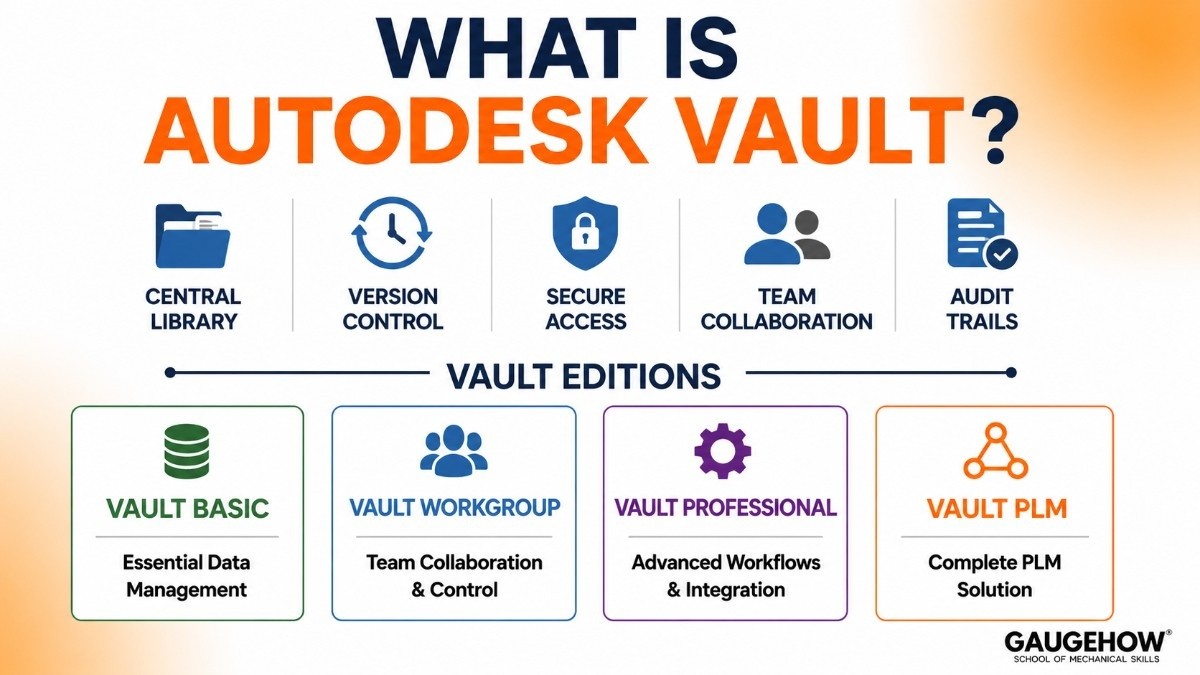
Autodesk Vault is a product data management (PDM) software that keeps your CAD files, engineering documents, and design data organised, version-controlled, and accessible to everyone who needs them — and locked away from everyone who doesn't.
It's made by Autodesk, the same company behind AutoCAD, Inventor, Fusion 360, and a long list of other design tools.
Vault was first introduced in 2007 and has been updated continuously since, with the 2026 release bringing new AI features, improved APIs, and tighter cloud connectivity.
Here's the simplest way to think about it: Vault is a central library for your engineering data.
Instead of design files scattered across shared drives, email attachments, and personal laptops, everything lives in one place — organised, tracked, and auditable. You can see who changed what, when they changed it, why, and what the design looked like before the change.
Vault comes in three main tiers — Vault Basic, Vault Workgroup, and Vault Professional — ranging from simple file management to full lifecycle workflows with ERP integration. There's also Vault PLM, which bundles Vault Professional with Autodesk Fusion Manage for a more complete PLM experience.
Autodesk Vault Software 2026: Key Features Worth Knowing
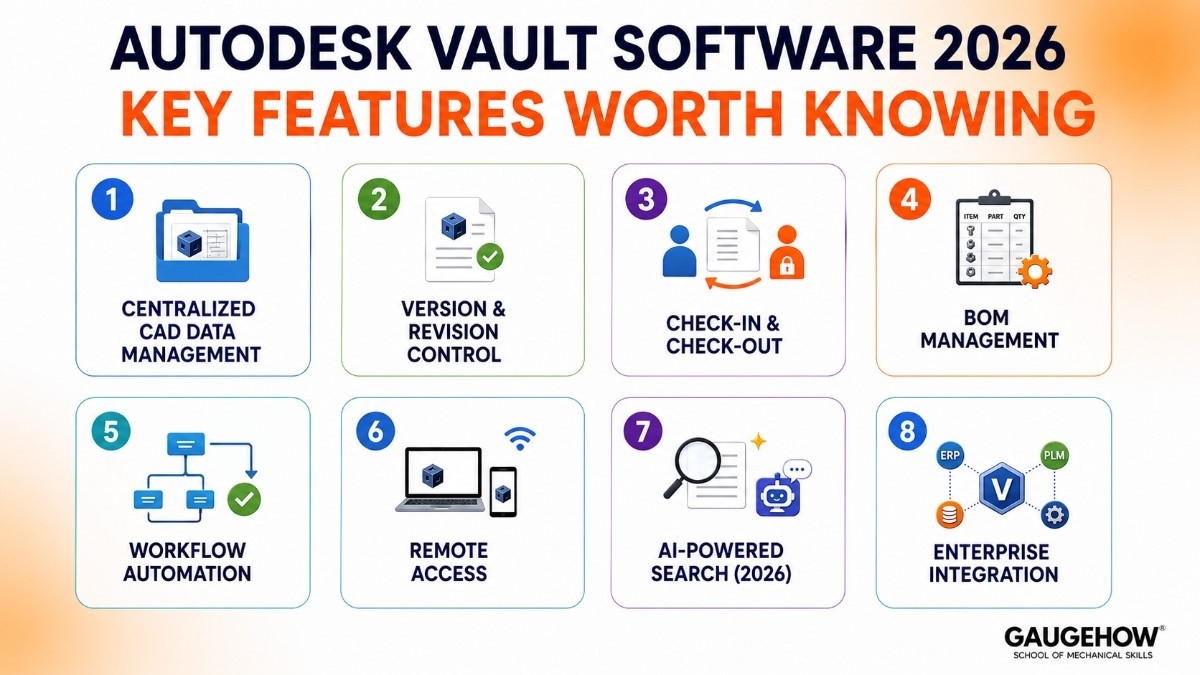
Here’s a simpler look at what Autodesk Vault actually does for engineering teams.
Centralized CAD Data Management
Vault stores all CAD files, drawings, BOMs, and documents in one secure place. This helps teams always access the latest file version and avoids confusion caused by duplicate or outdated files.
It works directly with Autodesk Inventor, AutoCAD, and other Autodesk tools, so engineers can manage files without leaving their design software.
Version and Revision Control
Vault automatically tracks every file change.
It records:
Who made changes
When changes were made
File history
It also manages formal design revisions like Rev A or Rev B, making sure released files cannot be edited without approval.
Check-In and Check-Out
When one engineer edits a file, Vault locks it for others.
This prevents multiple people from editing the same file at the same time and avoids data conflicts.
BOM Management
Vault helps create and manage Bills of Materials directly from CAD assemblies.
This reduces manual work and helps engineering and manufacturing teams stay aligned.
Workflow Automation
Vault automates approval and release processes.
For example, drawings can automatically move through review, approval, and release stages without manual tracking.
This improves consistency and saves time.
Remote Access
With Vault Gateway, teams can securely access files from outside the office.
It also offers browser and mobile access for quick file review.
AI-Powered Search (2026)
The 2026 version includes smarter search tools and Autodesk Assistant.
This helps users find files faster and get helpful support directly inside the software.
Enterprise Integration
Vault can connect with ERP, PLM, and other business systems through APIs.
This helps companies connect engineering data with the rest of their operations.
Autodesk Vault Pricing: What Does It Actually Cost?
Autodesk doesn't publish exact pricing publicly, which frustrates buyers to no end. But here's what's actually known, based on reseller data and industry research.
The Three PDM Tiers
Vault Basic — Free. Yes, actually free. Included with an Autodesk product design and manufacturing collection subscription. It handles basic file management, check-in/check-out, and version control.
Good for small teams with straightforward needs and no formal approval workflows.
Vault Workgroup — Subscription-based, typically in the $600–$900/user/year range (check with your Autodesk reseller for current pricing). Adds multi-site support, lifecycle management, and broader CAD system support beyond just Autodesk tools.
Vault Professional — The full-featured tier, typically $1,200–$1,800/user/year on subscription. Includes full workflow automation, BOM management, ERP/PLM integration via APIs, advanced reporting, and the full remote access suite. This is what most serious manufacturing operations need.
Vault PLM — Bundles Vault Professional with Autodesk Fusion Manage (cloud-based PLM). Pricing varies based on configuration; contact Autodesk or a certified reseller for a quote.
Other Cost Factors to Plan For
Implementation and configuration — for anything beyond Vault Basic, you'll likely need an Autodesk implementation partner to set up workflows, user permissions, and integrations. Budget for this separately.
Data migration — if you're moving from shared drives or another PDM system, getting your existing data into Vault cleanly takes time and usually specialist help.
Training — Autodesk offers official training through its Learning platform and certified training partners. Online Vault courses typically run $200–$400; instructor-led courses go higher.
Is There a Free Trial?
Vault Basic is free for Autodesk Collection subscribers. Vault Professional can be trialled through some Autodesk resellers on a time-limited basis — worth asking if you're in evaluation.
Autodesk Vault vs SolidWorks PDM 2026: Which One Should You Choose?
This is the comparison that comes up most often, and for good reason. Both are excellent PDM tools, and the right choice depends almost entirely on your CAD environment. Here's the honest breakdown.
Quick Comparison Table
Feature | Autodesk Vault | SolidWorks PDM |
|---|---|---|
Best For | Inventor & AutoCAD Users | SolidWorks Users |
Setup & Administration | Moderate Complexity | Easier Setup |
Free Version | ✓ Vault Basic Included | Limited PDM Standard |
Workflow Automation | Advanced & Flexible | Easy to Configure |
Revision Control | ✓ Strong | ✓ Strong |
BOM Management | ✓ Built-In | ✓ Built-In |
ERP Integration | API-Based | API-Based |
Interface | Functional | More Modern |
Multi-CAD Support | Limited | Limited |
Scalability | Excellent for Large Teams | Better for Small-Mid Teams |
Pricing (Professional) | $1,200–$1,800/User/Year* | $1,200–$1,800/User/Year* |
Which One Should You Choose?
Choose Autodesk Vault If:
✔ Your company uses Inventor or AutoCAD
✔ You need advanced workflow customization
✔ You manage large engineering teams
✔ You already own the Autodesk Product Design Collection
Choose SolidWorks PDM If:
✔ Your company uses SolidWorks CAD
✔ You want simpler deployment
✔ You prefer a more intuitive interface
✔ Your team is small to medium-sized
Final Verdict
Autodesk Vault
Best for: Autodesk Inventor and AutoCAD environments with complex engineering workflows.
SolidWorks PDM
Best for: SolidWorks-based companies looking for easier setup and administration.
Integrations: What Does Autodesk Vault Connect To?
One of the most practical questions any IT team asks during evaluation: what will this talk to? Here's what Vault actually connects to, and how well.
Autodesk Design Tools (Native)
Autodesk Inventor — full native integration, file management happens inside the Inventor interface
AutoCAD and AutoCAD verticals (Mechanical, Electrical, Civil 3D) — native integration
Autodesk Fusion 360 — partial integration; Fusion Manage (cloud PLM) is the recommended bridge
AutoCAD Plant 3D and P&ID — supported
Non-Autodesk CAD (Limited)
SolidWorks, CATIA, Creo, NX — can be stored in Vault using neutral formats (STEP, DWG, PDF), but without native file management. No check-in/check-out integration with the CAD tool itself.
ERP Systems
SAP — via third-party middleware or Vault's Data APIs. Well-established partner ecosystem.
Oracle — API-based integration; available through certified implementation partners
Microsoft Dynamics 365 — supported through partner connectors and the Vault API layer
Epicor, Infor, NetSuite — API-based; depends on partner availability
Business and Collaboration Systems
Autodesk Fusion Manage — native bridge from Vault Professional to full cloud PLM; part of the Vault PLM bundle
Microsoft SharePoint — Vault can mirror files to SharePoint for broader team access (Vault Office add-in)
Microsoft Office (Word, Excel, PowerPoint, Outlook) — Vault Office integrates directly, allowing Office documents to be managed inside Vault with full version control
Autodesk Construction Cloud — supported for AEC workflows, connecting design data to construction management
Third-Party and Custom
Vault Professional includes a full Data API (REST and COM-based) that allows custom integrations with virtually any business system. This is used for connections to MES platforms, custom ERP integrations, and enterprise reporting tools.
Deployment: Cloud, On-Premise, and Everything In Between
On-Premise (The Traditional Route)
Vault Server runs on Windows Server in your data centre or server room. This has been the standard deployment for most of Vault's history and remains common — particularly in larger organisations with existing IT infrastructure, ITAR compliance requirements, or data sovereignty concerns.
Pros: full control over data location, no dependency on internet connectivity for core CAD workflows, familiar to IT teams.
Cons: IT team is responsible for server maintenance, backups, patching, and upgrades. Hardware costs. Limited remote access without additional configuration.
Cloud-Connected (The 2026 Direction)
Vault doesn't yet offer a fully cloud-hosted version in the way that, say, Autodesk Fusion Manage does. However, cloud connectivity has expanded significantly:
Vault Gateway provides remote access to an on-premise Vault server without VPN
Fusion Manage integration adds cloud-based PLM on top of on-premise Vault data
Autodesk Docs / Construction Cloud connectivity for AEC teams
Cloud sync options allow specific Vault folders to sync with cloud drives
Autodesk's long-term direction is clearly toward deeper cloud integration. Expect this to evolve significantly over the next 2–3 releases.
Brownfield Deployments (Migrating from an Existing System)
If you're moving to Vault from a shared drive environment — or from a legacy PDM system — data migration is a real project, not an afterthought. Key considerations:
File metadata migration — part numbers, revisions, and custom properties need to come across cleanly
Folder and lifecycle structure — how data is organised in Vault is different from a Windows folder hierarchy
Link integrity — Inventor assembly and drawing references need to be preserved during migration
Change to working practices — teams moving from ad-hoc file management to a formal check-in/check-out system need training and change management support
Most organisations bringing in Vault for the first time use an Autodesk reseller or certified implementation partner for the migration. DIY migrations are possible but carry real risk for large data sets.
Here’s a simpler version of your content in easy, SEO-friendly language while keeping the same meaning, based on the uploaded file.
Alternatives to Autodesk Vault
Autodesk Vault is a strong PDM tool, but it may not fit every company. Here are some popular alternatives.
SOLIDWORKS PDM Professional
A good option for teams using SOLIDWORKS. It offers similar features to file control, version tracking, and secure collaboration.
Best for: SOLIDWORKS users.
Siemens Teamcenter
A powerful enterprise PLM platform with advanced tools for large manufacturing companies.
Best for: Large businesses with complex product development.
PTC Windchill
A strong PLM solution is often used by companies working with PTC Creo.
Best for: Companies focused on compliance and product control.
Aras Innovator
Offers flexible customization and lower software licensing costs.
Best for: Mid-sized businesses needing custom workflows.
OpenBOM
A cloud-based option that is simpler and faster to deploy.
Best for: Small teams needing basic BOM and design data management.
Autodesk Vault Interview Questions and Answers
What is the difference between a version and a revision in Autodesk Vault?
A version is created automatically every time a file is checked into Vault. It keeps track of all changes made to a file over time.
A revision is a formal release of a design, usually marked with labels like Rev A, Rev B, or Rev C. Revisions are controlled through engineering change processes and represent approved versions of a design.
Simple answer: Versions track every change, while revisions track officially released designs.
What is a lifecycle state in Autodesk Vault?
A lifecycle state shows the current status of a file or design.
Common lifecycle states include:
Work in Progress
In Review
Released
Obsolete
As a design moves through these stages, Vault controls who can edit, review, or approve it.
Simple answer: Lifecycle states help manage and control a design from creation to release.
How does the check-in/check-out system work?
When a user checks out a file, Vault locks it for editing.
Other users can view the file, but they cannot make changes until the file is checked back in.
When the user finishes their work and checks the file back in, Vault saves the changes, creates a new version, and releases the lock.
Simple answer: Check-in/check-out prevents multiple people from editing the same file at the same time.
What is the Autodesk Vault Job Processor?
The Vault Job Processor is a background service that performs tasks automatically without slowing down users.
One common example is creating DWF or DWFx visualization files whenever CAD files are checked into Vault.
This allows non-CAD users to view designs without needing the original CAD software.
Simple answer: The Job Processor handles automated background tasks and improves system performance.
What is the difference between Vault Basic, Vault Workgroup, and Vault Professional?
Vault Basic
Included with many Autodesk subscriptions
File management and version control
Check-in/check-out functionality
Best for small teams
Vault Workgroup
Adds lifecycle management
Supports multi-site environments
Better for growing engineering teams
Vault Professional
Includes workflow automation
BOM management
ERP integration
Advanced reporting and approvals
Simple answer: Basic is for file management, Workgroup adds lifecycle control, and Professional adds enterprise-level automation and integration.
How would you migrate existing engineering data into Autodesk Vault?
A good migration approach includes:
Plan the folder structure and workflows first.
Clean up old, duplicate, or unnecessary files.
Test the migration with a small sample of data.
Verify that assemblies and drawing references work correctly.
Keep the old system available during the transition.
Train users before going live.
Simple answer: Plan carefully, clean the data, test before full migration, and train users early.
Interview Tip
In Autodesk Vault interviews, employers are usually looking for an understanding of:
Version control
Revision management
Lifecycle workflows
Check-in/check-out processes
Data migration best practices
Basic Vault administration
Focus on explaining concepts clearly rather than using complex technical jargon.
Frequently Asked Questions About Autodesk Vault
Is Autodesk Vault cloud-based?
Not completely. Autodesk Vault is mainly an on-premise PDM system, although it offers cloud connectivity through tools like Vault Gateway and Autodesk Fusion Manage. Companies looking for a fully cloud-based solution may need a different platform.
How long does it take to implement Autodesk Vault?
A small Vault Basic deployment can be set up in a few days. Larger Vault Professional implementations with workflows, ERP integration, and data migration typically take 2–4 months.
Can Autodesk Vault work with SolidWorks or other non-Autodesk CAD?
Yes, Vault can store and manage files from SolidWorks, Creo, CATIA, and other CAD systems. However, the best integration features are designed for Autodesk products, so non-Autodesk users may experience some limitations.
Does Autodesk Vault replace an ERP system?
No. Autodesk Vault manages engineering data such as CAD files, drawings, and BOMs, while ERP systems manage inventory, purchasing, manufacturing, and finance. Most manufacturers use both systems together.
What happens if someone forgets to check a file back in?
An administrator can force the file back into Vault if needed. To avoid delays and conflicts, companies usually require users to check files in at the end of the workday.
Is Autodesk Vault worth it for a small team?
Yes. Vault Basic is included with many Autodesk subscriptions and provides version control, file management, and check-in/check-out capabilities. Even small engineering teams can benefit from improved collaboration and fewer file conflicts.
Final Thoughts: Should You Use Autodesk Vault?
If your engineering team runs primarily on Autodesk tools — especially Inventor and AutoCAD — Vault is the most natural fit for PDM.
The native integration is genuinely seamless, Vault Basic removes the price barrier for getting started, and the Professional tier covers most of what a mid-size manufacturing company needs for the long term.
The gotchas are real. Setup takes time and expertise. Non-Autodesk CAD environments are awkward. And if you eventually need full enterprise PLM — programme management, global supply chain collaboration, regulatory compliance workflows — Vault alone won't get you there. You'll need to layer Fusion Manage or look at enterprise platforms like Teamcenter or ENOVIA.
But for the core problem — getting your design data under control, eliminating version conflicts, and giving everyone the right access to the right files — Vault does the job well.
Start with Basic. Grow into a professional. Know when you're ready for PLM.
Manage CAD data, automate workflows, and control revisions with Autodesk Vault PLM. Trusted PDM software for Inventor and AutoCAD teams.























