3DEXPERIENCE/ENOVIA
Enovia 3DExperience

ENOVIA 3DEXPERIENCE: The Complete Guide to Dassault Systèmes' PLM Platform (2026)
If you've been researching product lifecycle management tools, you've probably seen the name ENOVIA pop up more than once. Maybe a colleague mentioned it. Maybe you ran into it while comparing enterprise software options.
Either way, you're here — and that means you want a straight answer, not a brochure.
This guide covers everything: what ENOVIA actually does, how it stacks up against the competition, what it costs (as much as Dassault will let anyone say publicly), and whether it's the right fit for your team. No vendor spin. Let's get into it.
What Is ENOVIA in 3DEXPERIENCE?
ENOVIA is Dassault Systèmes' Product Lifecycle Management (PLM) application suite, built natively into the 3DEXPERIENCE platform. Think of it as the nerve centre of your product development process — connecting engineering, manufacturing, procurement, compliance, and business teams onto one shared, real-time data environment.
The short version: 3DEXPERIENCE is the platform (like an operating system), and ENOVIA is the PLM layer running on top of it.
They're deeply intertwined — ENOVIA doesn't run independently of 3DEXPERIENCE the way some software can be deployed standalone.
Dassault Systèmes, the French software company behind CATIA, SIMULIA, and DELMIA, developed ENOVIA out of their earlier ENOVIA V5/V6 product lines.
Today, the 3DEXPERIENCE version (often written as R2025x or R2026x) is the active and supported release, with the older on-premise V5 versions being phased out of mainstream support.
Key Features of 3DEXPERIENCE ENOVIA
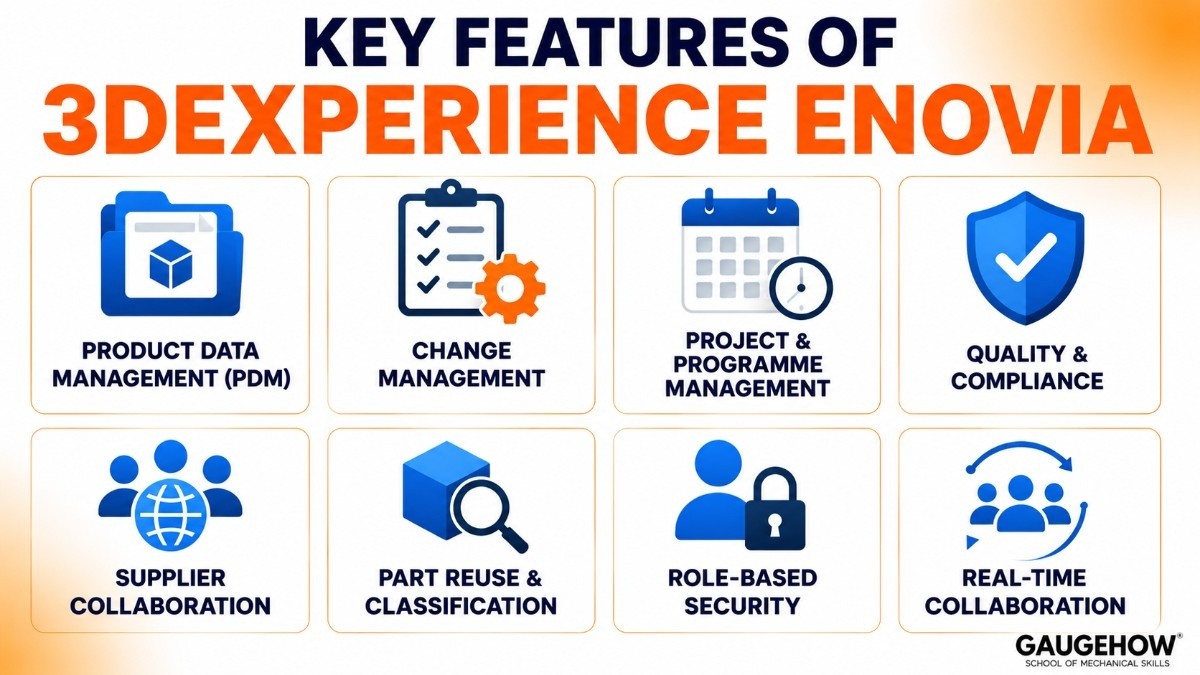
Here are the features that matter most for engineering teams, project managers, and IT teams in real-world use:
Product Data Management (PDM)
ENOVIA keeps all product data, parts, assemblies, and documents in one central system. It controls versions properly, so teams always work with the latest data and can track older revisions when needed.
Change Management
It manages engineering changes through structured workflows. Change requests, approvals, and impact checks happen in one place, helping teams avoid costly mistakes before they reach production.
Project and Programme Management
ENOVIA connects project schedules directly with product data. If one part is delayed, teams can quickly see how it affects timelines and other dependent tasks.
Quality and Compliance
The platform helps manage quality processes like audits, non-conformance tracking, and compliance records. This is especially useful for industries with strict standards and regulations.
Supplier Collaboration
Suppliers can securely access only the information they need. This makes design reviews, sourcing, and external collaboration faster and more controlled.
Part Reuse and Classification
Engineers can search existing approved parts and reuse them instead of redesigning from scratch. This reduces duplicate work, saves time, and lowers costs.
Role-Based Security
Different users get different levels of access based on their role. This protects sensitive product data and supports industries with strict security requirements.
Real-Time Collaboration
Because it runs on the 3DEXPERIENCE platform, teams can work together in real time without file-locking issues or constant check-in/check-out cycles. This makes collaboration smoother for global teams.
3DEXPERIENCE PLM Pricing and Licensing
3DEXPERIENCE ENOVIA does not publicly list its pricing. Costs depend on the roles, number of users, and deployment type.
Licensing Options
Role-based licensing
You pay for specific user roles, such as product management, change management, or collaboration tools.
On-premise licensing
A one-time license cost with yearly maintenance fees.
Cloud subscription
Annual per-user pricing is commonly used by new customers and growing businesses.
3DEXPERIENCE Works bundles
Designed for SOLIDWORKS users, these packages combine PLM and collaboration tools at more affordable monthly pricing.
Additional Costs
The software license is only part of the total investment. Companies also need to budget for:
Implementation and setup
Data migration
Customisation
User training
For large deployments, these costs can often be equal to or higher than the software license in the first year.
Free Trial and Discounts
Some cloud roles offer trial access
Students and startups may get discounted or free access through Dassault Systèmes programs
There is no full free version for enterprise users
Best For: Is ENOVIA Right for You?
Ideal Company Profile
Factor | Best fit |
|---|---|
Company size | Mid-market (200+ engineers) to large enterprise |
Industry | Aerospace, automotive, defence, industrial equipment, and medical devices |
CAD environment | Primarily CATIA, or CATIA + SOLIDWORKS (3DEXPERIENCE Works) |
Programme complexity | Multi-site, multi-discipline, global supply chains |
Compliance needs | Regulated industries with audit, change, and quality requirements |
ENOVIA vs Teamcenter 2026: Which PLM Platform Wins?
This is the comparison that keeps coming up, and for good reason — ENOVIA and Teamcenter are the two dominant enterprise PLM platforms globally. Here's an honest breakdown for 2026.
Architecture and Ecosystem
ENOVIA is designed to work exclusively within the Dassault 3DEXPERIENCE ecosystem. If your shop runs CATIA, that's a significant native advantage.
Teamcenter, by contrast, is part of Siemens' Xcelerator portfolio and is built with multi-CAD support from the ground up — CATIA V5, Creo, NX, SOLIDWORKS, and AutoCAD. If your company uses five different CAD tools, Teamcenter handles that more gracefully.
SAP Integration
Teamcenter wins here. Automotive OEMs with deep SAP investments typically prefer Teamcenter's more native SAP PLM bridge. ENOVIA-SAP integration is achievable but requires additional middleware and experienced integration partners.
Cloud and Modern Architecture
ENOVIA has the edge in cloud-native design. The 3DEXPERIENCE platform was rebuilt for cloud deployment more fundamentally than Teamcenter, which carries more architectural legacy from its on-premise origins (though Siemens has invested heavily in Teamcenter X as a SaaS offering).
User Experience
Both platforms are complex. Neither is plug-and-play. That said, the 3DEXPERIENCE interface — especially for CATIA users — tends to feel more unified and less like separate bolted-together applications. Teamcenter's interface is functional but more utilitarian.
The Bottom Line for 2026
Choose ENOVIA if you're in the Dassault CAD ecosystem, prioritise cloud-first deployment, or need deep virtual twin capabilities
Choose Teamcenter if you have a mixed CAD environment, heavy SAP reliance, or are coming from a Siemens NX design workflow
Both are mature, capable platforms.
The decision is less about which is "better" and more about which ecosystem you're already in — or committed to entering.
Pros and Cons of 3DEXPERIENCE ENOVIA
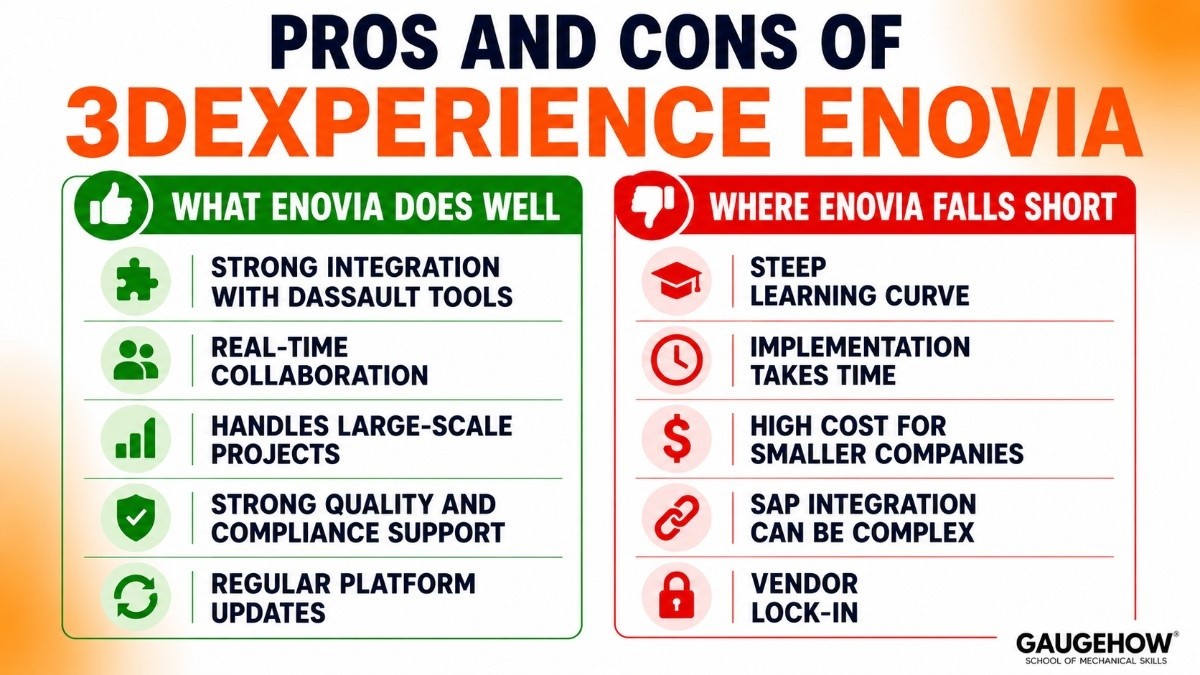
Like any enterprise PLM platform, ENOVIA has clear strengths and a few challenges. Here’s a simpler and more practical view.
What ENOVIA Does Well
Strong integration with Dassault tools
If your teams already use CATIA, SIMULIA, and DELMIA, ENOVIA connects everything smoothly in one system.
Real-time collaboration
Teams in different locations can work on the same product data at the same time. This makes global engineering collaboration faster and easier.
Handles large-scale projects
ENOVIA is built for complex products and large organizations. It can manage huge product structures without performance issues.
Strong quality and compliance support
It offers reliable tools for audit tracking, quality processes, and regulatory compliance, which is important for industries like aerospace, automotive, and medical devices.
Regular platform updates
Dassault Systèmes frequently improves the platform with cloud upgrades, AI features, and better virtual collaboration tools.
Where ENOVIA Falls Short
Steep learning curve
The platform is powerful, but it takes time to learn. New users usually need proper training before they can use it effectively.
Implementation takes time
Setting up ENOVIA is not quick. Mid-sized deployments can take months, while larger enterprise projects may take much longer.
High cost for smaller companies
For small and mid-sized businesses, enterprise licensing and implementation costs can be difficult to justify.
SAP integration can be complex
While integration with SAP is possible, it often requires extra tools, middleware, or expert implementation support.
Vendor lock-in
Once your product data and workflows are deeply connected to the Dassault ecosystem, moving to another PLM platform can be difficult and expensive.
Final Take
3DEXPERIENCE ENOVIA is a strong choice for large engineering companies, especially those already using Dassault software.
It offers powerful collaboration and product lifecycle management features, but it requires time, budget, and long-term commitment.
Integrations: What Does ENOVIA Connect To?
One of the most common questions from IT teams evaluating ENOVIA is: "Will this talk to the systems we already have?" Fair question.
ERP Systems
SAP S/4HANA and ECC: via CENIT FASTEC, Prostep OpenPDM, or custom middleware. Bi-directional sync of BOMs, change orders, and material masters
Oracle: via third-party connectors; less common but supported
Microsoft Dynamics: limited native support; typically requires custom API work
MES and Manufacturing Systems
DELMIA (Dassault's own MES): native, seamless
Siemens Opcenter / Teamcenter: via Prostep or custom integration
SAP ME/MII: achievable with the SAP integration layer described above
CAD and Engineering Tools
CATIA (V5 and 3DEXPERIENCE): native, no integration layer needed
SOLIDWORKS (3DEXPERIENCE Works): native for cloud-connected versions
Creo, NX, Inventor: via third-party translators; supported but not native
Collaboration and Enterprise Tools
Microsoft 365 / Teams: via 3DEXPERIENCE platform connectors
Jira and Confluence: community-built connectors available; not official
Salesforce: Dassault has a strategic CRM connector for customer experience management use cases
Deployment Options: Cloud, On-Premise, and Hybrid
3DEXPERIENCE Cloud (SaaS)
Hosted on Dassault's managed cloud infrastructure. This is the direction Dassault is pushing new customers toward and where the most active development happens. Benefits include:
No infrastructure management
Automatic updates to the latest release
Access from any device, anywhere
Ideal for new deployments and SMB customers on 3DEXPERIENCE Works
On-Premise
Still available and still chosen by large enterprises with data sovereignty requirements, ITAR obligations, or significant existing infrastructure investments. Requires a dedicated IT resource for maintenance, patching, and upgrades.
Moving off old on-premise versions (V5/V6) to the current 3DEXPERIENCE is a significant migration project that many companies are currently midway through.
Hybrid / Managed Private Cloud
Some enterprise customers run 3DEXPERIENCE in a managed private cloud — either through Dassault's own offering or on AWS/Azure infrastructure managed by implementation partners.
This gives the flexibility of cloud with the control of on-premise data residency.
Brownfield Readiness
One honest note for manufacturers evaluating this: if you're running legacy ENOVIA V5 or V6, migration to 3DEXPERIENCE is not a simple upgrade.
Data model changes, customisation rewrites, and integration rework make this a proper programme. It's worth scoping carefully before committing.
Top Alternatives to 3DEXPERIENCE ENOVIA
While ENOVIA is a powerful PLM platform, it may not be the right choice for every business. Here are some strong alternatives.
Siemens Teamcenter
Teamcenter is one of ENOVIA’s biggest competitors. It works well in companies using multiple CAD tools and offers strong integration with SAP.
Best for: Large manufacturers, automotive companies, and mixed-CAD environments.
PTC Windchill
Windchill is a trusted PLM solution, especially for teams using PTC Creo. It is also strong for IoT-connected product development.
Best for: Creo users and connected product companies.
Aras Innovator
Aras is popular because of its flexible licensing and high customization options.
Best for: Mid-sized businesses looking for lower upfront software costs.
Arena PLM
Arena is simpler and faster to deploy than enterprise PLM tools.
Best for: Electronics companies and smaller product teams.
SAP PLM
SAP PLM works best for businesses already using SAP ERP systems.
Best for: SAP-focused organizations.
ENOVIA PLM Interview Questions (And Honest Answers)
Getting ready for a PLM role? Whether you’re applying as a consultant, implementation engineer, or product manager, these are the questions that actually come up in ENOVIA interviews — with plain-English answers you can build on.
What’s the difference between EBOM and MBOM?
Think of it this way: the EBOM (Engineering BOM) is the product as your engineers designed it. The MBOM (Manufacturing BOM) is the same product translated into how it actually gets built on the factory floor — different sequence, different groupings, same parts.
ENOVIA manages both, plus the process of converting one into the other (called BOM transformation).
In complex manufacturing, that conversion step is where a lot of costly mistakes happen — and where ENOVIA earns its keep.
How does change management work in ENOVIA?
It follows a three-step structure most engineers quickly get used to:
A Change Request flags that something needs to change. An Engineering Change Order (ECO) defines exactly what’s changing in the product data.
An Engineering Change Notice (ECN) goes out once the change is approved, letting the wider team know.
Every step has approval routing built in, and nothing moves forward without sign-off. You also get a full audit trail — which matters a lot in regulated industries where you need to prove that the right people approved the right changes at the right time.
What are maturity states — and why do they matter?
Maturity states are basically traffic lights for your product data. A part in the “In Work” state can be edited freely. Once it hits “Released”, only a formal change process can modify it. “Obsolete” means it’s no longer used.
This sounds simple, but it’s one of the things that makes ENOVIA genuinely useful for large teams. Without enforced maturity states, someone will always manage to edit a “released” part at the worst possible moment.
How does ENOVIA handle multiple CAD tools?
Natively, ENOVIA is happiest with CATIA and SOLIDWORKS (via 3DEXPERIENCE Works). For everything else — Creo, NX, Inventor — you’re typically managing neutral formats like STEP or JT, with the metadata living in ENOVIA.
It works. It’s just not as seamless as the native Dassault stack. If your team uses five different CAD tools, be honest with yourself about the extra integration work involved.
What exactly is a “role” in ENOVIA licensing?
A role is a packaged set of permissions tied to a job function. A Product Leader role unlocks programme management dashboards. A Change Action Engineer role unlocks the change management workflows. You assign roles to users, and each role uses a licence.
The practical implication: you’re not buying one ENOVIA licence for everyone. You’re buying different role licences for different job types — which is either great (you only pay for what people use) or complicated (licence management becomes its own task).
Frequently Asked Questions
Is ENOVIA cloud-based?
Yes. ENOVIA is available as a cloud platform through the 3DEXPERIENCE platform.
How long does implementation take?
Most implementations take 9 to 18 months for large companies.
Smaller deployments can be completed faster.
Can ENOVIA integrate with SAP?
Yes, but it usually requires extra integration tools or expert setup.
What is the difference between ENOVIA and 3DEXPERIENCE?
Think of it this way:
3DEXPERIENCE is the full platform
ENOVIA is the PLM application inside it
Is ENOVIA good for small businesses?
For smaller companies, full enterprise ENOVIA can be expensive.
A better option is 3DEXPERIENCE Works, which is designed for growing businesses.
Should You Choose ENOVIA?
If your company already uses CATIA and other Dassault tools, ENOVIA is a strong choice.
It offers:
Powerful collaboration
Better product data control
Strong compliance tools
However, it also requires:
Higher investment
Longer setup time
Proper user training
The best choice depends on your company’s size, budget, and software ecosystem.
Simplify product lifecycle with 3DEXPERIENCE ENOVIA. Collaborate better, streamline workflows with the powerful PLM platform from Dassault Systemes.























