Teamcenter
teamcenter career

Teamcenter Career: Jobs, Salary & How to Get Started (2026)
If you've spent any time in aerospace, automotive, or industrial manufacturing, you've probably seen Teamcenter listed on job descriptions.
It shows up in roles at Boeing, Northrop Grumman, Deloitte, Siemens itself, and hundreds of tier-1 suppliers. And yet most engineering graduates have barely heard of it.
That gap is exactly where the opportunity sits. PLM skills — and Teamcenter in particular — are in steady demand, not well-covered by engineering curricula, and genuinely hard to learn on the job without guidance.
This guide explains what Teamcenter actually is, what roles it leads to, what it pays, and the most practical way to get started.
What Is Teamcenter PLM?
Teamcenter is Siemens' PLM (Product Lifecycle Management) software that helps companies organize and manage all product information in one place.
Think of it as a single source of truth for engineering teams. It stores CAD files, BOMs, design changes, documents, and manufacturing data so everyone works from the same information.
Teamcenter helps teams collaborate better, track product changes, manage approvals, and streamline product development from design to production.
It is used by many large manufacturers in industries such as aerospace, automotive, electronics, and industrial equipment.
For job seekers, Teamcenter is an important skill because companies need professionals who can manage the system, support users, customize workflows, and connect it with other business software.
Key Features — What You'll Actually Work With on the Job
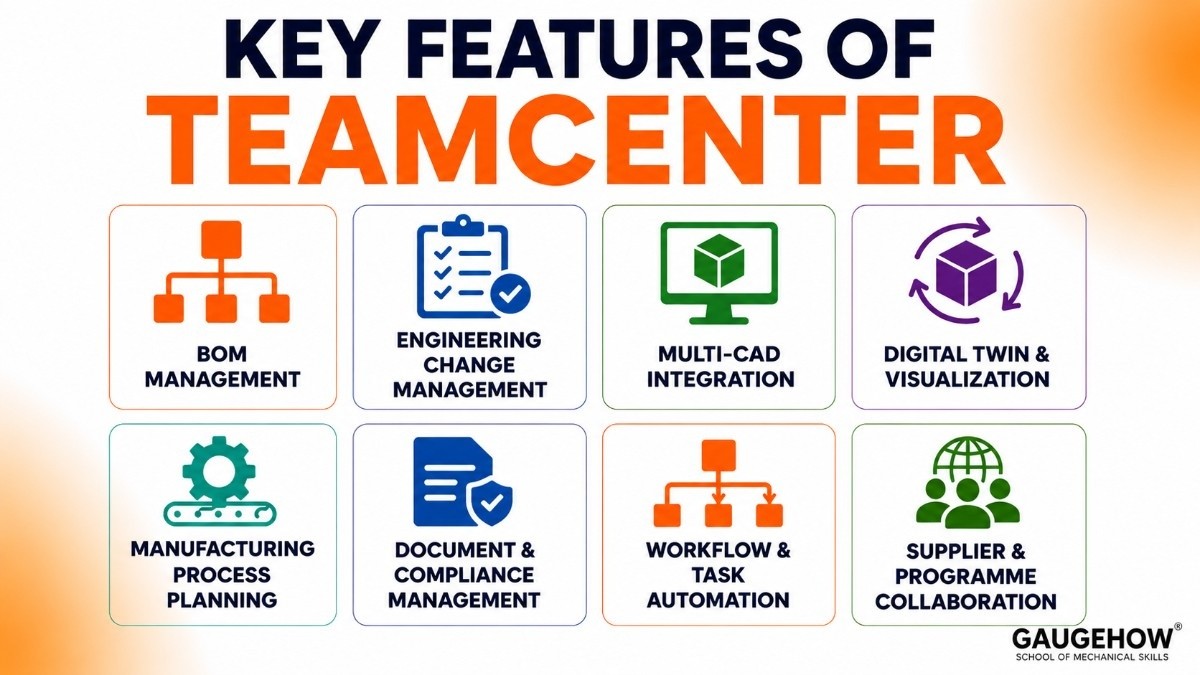
Understanding what Teamcenter does helps you understand what the job involves day to day. Here are the capabilities you'd actually use or support in a PLM role:
BOM management. A single, controlled bill of materials that engineering, manufacturing, and procurement all read from. Keeping the BOM accurate across design changes is one of the most common tasks in a PLM role.
Engineering change management. Formal workflows for proposing, reviewing, approving, and releasing changes to product data. Nothing gets changed without a traceable record, which matters enormously in aerospace and medical.
Multi-CAD integration. Teamcenter connects natively with Siemens NX and integrates with SolidWorks, CATIA, Creo, and other CAD tools, so product data flows in without manual re-entry.
Digital twin and visualization. The platform supports digital twin visualization so teams can review and collaborate on product designs without needing the native CAD tool.
Manufacturing process planning. Links product design to the manufacturing instructions — what operations, what tools, in what sequence. This is where PLM meets the factory floor.
Document and compliance management. Stores technical documents, specifications, and regulatory records. Critical for ITAR, ISO 9001, and similar compliance requirements.
Workflow and task automation. Routes documents and changes through approval processes automatically — reducing manual follow-up and keeping projects moving.
Supplier and programme collaboration. Extends data access to external partners in a controlled way, so suppliers work from the same product baseline as the internal team.
Teamcenter for Beginners: How to Actually Start Learning
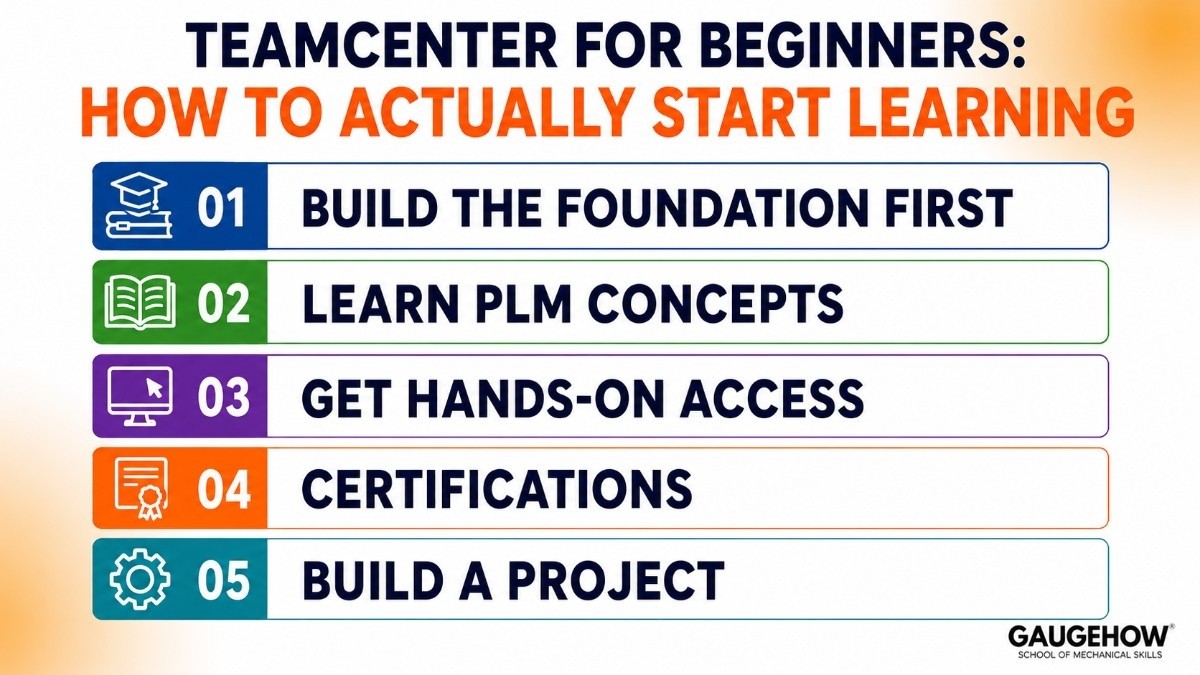
This is where most guides get vague. Here's a practical path.
Step 1 — Build the foundation first. You can't learn Teamcenter in a vacuum. Before touching PLM software, get fluent in at least one CAD tool (NX or SolidWorks) and understand manufacturing processes.
Understanding why a BOM exists and what an engineering change order does in the real world makes the software click immediately.
Our Digital Manufacturing course covers that manufacturing systems context directly — it's the fastest way to understand what Teamcenter is managing before you touch it.
Step 2 — Learn PLM concepts. BOM structures, engineering change workflows, product data management, and the difference between EBOM and MBOM. These concepts apply across every PLM tool, not just Teamcenter.
Step 3 — Get hands-on access. Siemens offers evaluation licenses and academic programs. Some universities have Teamcenter labs. The Siemens Xcelerator Academy has official training, though it's expensive. Look for employer-sponsored training if you're already in a manufacturing role.
Step 4 — Certifications. Siemens has Teamcenter-specific certification programs. They're not cheap, but they're recognised by employers, especially in aerospace and automotive. Combine them with a broader Industry 4.0 understanding to show you see PLM in its full context.
Step 5 — Build a project. Configure a simple BOM, create a workflow, and run a change order end-to-end. Any hands-on evidence beats a certification on its own.
Teamcenter vs Windchill: Which Should You Learn for Your Career?
This is a legitimate career decision, not just a software comparison — so let's answer it that way.
Teamcenter (Siemens) dominates in aerospace, defence, and European automotive. Boeing, Northrop Grumman, Volkswagen, and BMW are Teamcenter shops. It has the larger overall market share and deeper customisation options.
Windchill (PTC) is strongest in industrial equipment, life sciences, and IoT-connected manufacturing. PTC positions itself heavily around connected products and the digital thread.
Teamcenter | Windchill | |
|---|---|---|
Market strength | Aerospace, defence, auto | Industrial, IoT, life sciences |
Maker | Siemens | PTC |
Deployment | On-prem + Teamcenter X cloud | On-prem + PTC cloud |
Learning resources | Siemens Xcelerator Academy | PTC University |
Job volume (US) | Higher overall | Strong in specific verticals |
Which to learn first? If your target employers are in aerospace, defence, or German/European automotive, Teamcenter is the clear choice.
If you're targeting US industrial manufacturers or IoT-first companies, Windchill is strong. The good news: PLM concepts transfer between the two. Learn one deeply and picking up the other takes weeks, not months.
Teamcenter Career: Job Roles, Salary & Who's Hiring
This is the section most people come for, so here it is straight.
What roles use Teamcenter skills?
Teamcenter Administrator. Installs, configures, and maintains the Teamcenter environment. Manages users, permissions, workflows, and upgrades. Often, the entry-level path is for someone technical but not deep in engineering.
PLM Engineer / Specialist. Works between engineering and IT — configures PLM processes, trains users, troubleshoots data issues, and bridges the gap between how engineers want to work and how the system is set up.
Teamcenter Developer. Customises Teamcenter using Siemens' BMIDE (Business Modeller IDE) and the ITK/SOA APIs. More programming-heavy; good path for engineers with some coding background.
PLM Consultant. External or internal consultant implementing Teamcenter at a company, running change management, and advising on best practices. Often works at firms like Deloitte, Infosys, or Accenture, or at Siemens partner consultancies.
Digital Manufacturing Engineer. Uses Teamcenter as part of a broader digital manufacturing or Industry 4.0 role — connecting product design to factory execution systems.
What does it pay?
Based on current US job market data (ZipRecruiter, May 2026):
Role level
Typical annual salary (US)
Intern / Graduate
$35,000–$45,000
Entry-level PLM Engineer
$65,000–$85,000
Mid-level PLM Specialist
$85,000–$110,000
Teamcenter Developer
$90,000–$120,000
Senior PLM Consultant / Architect
$120,000–$160,000+
The typical range for a PLM Teamcenter professional is $70,000 to $120,000 annually, with senior or specialised roles going higher. Remote roles are actively hiring — the average for remote PLM Teamcenter positions currently sits around $50/hr, with experienced professionals earning $60–$67/hr.
Pricing — What Companies Pay for Teamcenter
This section matters for your career because the price tells you how seriously a company has invested — and therefore how much they need people to maintain and develop it.
Siemens doesn't publish Teamcenter prices publicly. Everything goes through quote and reseller. Third-party estimates put the picture together:
Item | Estimated cost |
|---|---|
License | ~$150–$300 per user/month |
Implementation | $10,000–$100,000+ depending on scale |
Annual maintenance | Included or ~15–20% of the license |
Teamcenter X (cloud/SaaS) | Subscription-based, contact Siemens |
Free trial | Not publicly offered |
A company running 100 users is spending millions over the lifecycle of the implementation. That investment creates long-term demand for internal PLM roles — they can't afford to have no one who knows the system.
Pros and Cons of Building a Teamcenter Career
The honest version — not the one on the vendor site.
Pros
Strong, steady job market — especially aerospace, automotive, and defence.
Skills transfer: Teamcenter concepts (BOM, change management, workflows) apply to Windchill and other PLM tools, too.
Good salary ceiling — senior and developer roles reach $130,000+.
Remote-friendly — many PLM implementation and consultant roles are fully remote.
Companies have invested heavily in Teamcenter for years, so jobs are long-term, not contract-only.
Cons
Steep learning curve. There's no official free version and limited hands-on access without an employer or training lab.
Niche certification path — Siemens' own training can be expensive and isn't as widely recognisable as, say, a SolidWorks certification.
Heavy enterprise environment — expect corporate IT processes, long implementation cycles, and plenty of meetings. Not for engineers who want to be on the shop floor every day.
The tools themselves (BMIDE, ITK API) are complex and poorly documented outside of official channels.
Best For — Industries Where This Career Path Pays Off
Not every industry runs Teamcenter. Targeting the right sector makes the difference between a clear career path and a frustrating job hunt.
Aerospace and defence — the single biggest Teamcenter user base. Teamcenter targets medium to large manufacturing companies across aerospace, automotive, electronics, machinery, and shipbuilding.
Aerospace in particular runs deeply on it — ITAR compliance requirements make Teamcenter's controlled data environment almost mandatory.
Automotive — major OEMs (BMW, Volkswagen, Ford, GM) and their Tier-1 suppliers run large Teamcenter implementations. Germany and the US are the densest hiring markets.
Industrial machinery and high-tech electronics — growing Teamcenter footprint as companies digitise their product development.
PLM consultancy — if you prefer variety, the consultancy path puts you inside 3–5 different company implementations a year.
Smaller companies and startups rarely use Teamcenter — the price and complexity don't suit them. If your target employers are mid-to-large manufacturers, the skill fits. If you want to work at a 20-person startup, look elsewhere.
Integrations — What Else You Need to Learn Alongside Teamcenter
In a PLM role, Teamcenter rarely runs in isolation. Here's what it connects to — and what you should know how to work with:
CAD tools (non-negotiable). Teamcenter integrates directly with Siemens NX and with other CAD systems, including SolidWorks, CATIA, and Creo. Most job descriptions ask for at least one. Our SolidWorks course is a solid starting point if you're building CAD fluency alongside PLM.
ERP systems — primarily SAP. Teamcenter integrates with ERP systems like SAP to create a full digital thread. Knowing how PLM and ERP exchange BOM data is a real differentiator.
MES (Manufacturing Execution Systems). Connects product designs to factory floor execution — relevant in digital manufacturing roles.
ALM (Application Lifecycle Management) tools. For companies building software-intensive products (vehicles, aerospace systems), Teamcenter links to requirements and software management tools.
Digital twin platforms. Teamcenter feeds into Siemens' broader digital twin ecosystem — relevant if you're interested in digital twin and simulation roles.
Deployment — Cloud, On-Premise & What That Means for Your Role
Teamcenter is available as an on-premise or cloud solution, with infrastructure requirements varying based on deployment size and modules used.
On-premise is still the majority. Most large aerospace and defence companies keep Teamcenter entirely internal for data security and compliance reasons. Administrator and developer roles in these environments deal with server maintenance, upgrades, and internal IT governance.
Teamcenter X is the newer cloud/SaaS version, hosted on Siemens' infrastructure. It removes the server burden and is faster to deploy — making it popular with mid-market manufacturers. Cloud roles tend to involve more configuration and less server management.
For your career: if you're going into a consultant role, expect to work across both. If you're targeting an in-house role at a large aerospace company, on-premise experience is more relevant.
Alternatives — Other PLM Tools Worth Knowing
A well-rounded PLM career isn't just one tool. Here are the others that appear on job descriptions:
Tool | Maker | Best for | Notes |
|---|---|---|---|
PTC | Industrial, IoT, life sciences | Teamcenter's main rival | |
Dassault Systèmes | Automotive, consumer goods | Closely tied to the CATIA ecosystem | |
Autodesk | Smaller teams, Autodesk CAD shops | More affordable, less enterprise | |
Aras Innovator | Aras | Mid-market, open-source-friendly | Lower cost, flexible architecture |
Odoo PLM | Odoo | Small businesses | Free tier available |
Knowing Teamcenter well, then having at least surface familiarity with Windchill and ENOVIA, makes you genuinely versatile in the PLM job market.
FAQ
Is Teamcenter a good career choice? Yes — particularly if you're targeting aerospace, automotive, or defence. Steady demand, good salaries ($70k–$120k+ typical), and a skills gap that works in your favour. The learning curve is real, but so is the payoff.
Do I need a software background to work with Teamcenter? Not necessarily. PLM Engineer and Administrator roles are accessible from a mechanical engineering background. Developer roles (BMIDE, ITK API customisation) need more programming comfort — Java, Python, or C++ experience helps.
Is Teamcenter cloud-based? It offers both. The traditional version is installed on-premises, which most large enterprises still use. Teamcenter X is the newer SaaS/cloud option hosted by Siemens — faster to deploy and increasingly common in mid-market companies.
How long does it take to learn Teamcenter? Enough to be useful in an entry-level role: 3–6 months of structured learning plus hands-on practice. Enough for a developer or senior consultant role: 2–3 years of real project experience.
Is there a free version of Teamcenter to learn on? Siemens doesn't offer a public free tier. Academic licenses and evaluation access exist through employer sponsorship or university programs. The Xcelerator Academy has paid courses.
The Bottom Line
A Teamcenter career is a niche choice in the best sense — genuinely in demand, well-paid, and not yet oversupplied with trained people. The engineers who land the strongest PLM roles aren't just Teamcenter-certified; they understand digital manufacturing and product development deeply enough to configure PLM systems that actually help their organisation.
A Teamcenter career starts with the right skills. Learn PLM job roles, salary scope, and how to get started in digital manufacturing. (135 chars)























