PowerMill
what is powermill

What Is PowerMill CAM Software?
PowerMill is advanced CAM software used to create precise CNC machining toolpaths for complex manufacturing operations.
Developed by Autodesk, it is designed to help manufacturers program CNC machines for:
High-speed machining
3-axis milling
Multi-axis machining
Complex surface finishing
Toolpath optimization
PowerMill is especially known for handling difficult geometries that require accurate tool control and collision-safe machining.
It is widely used in aerospace, automotive, mold manufacturing, and precision engineering.
Why Manufacturers Use PowerMill
Many CNC programmers choose PowerMill because it gives more control over complex machining operations.
Its value comes from:
Better toolpath precision
Faster cycle times
Reduced manual programming effort
Improved surface quality
Safer multi-axis machining
This is why it remains a trusted solution for demanding machining environments.
Key Features of PowerMill CAM Software
Advanced Toolpath Generation
PowerMill creates highly efficient machining paths for complex part geometry.
This improves machining accuracy and reduces unnecessary tool movement.
Collision Avoidance
The software automatically detects and avoids collisions involving:
Tool holders
Fixtures
Machine components
This protects expensive machines and tooling.
High-Speed Machining Strategies
It supports optimized cutting strategies for faster material removal while maintaining part quality.
Multi-Axis Programming
PowerMill provides strong simultaneous multi-axis control.
This is essential for:
Aerospace blades
Impellers
Complex molds
Medical implants
Toolpath Editing
Programmers can manually refine tool motion for precise control.
Simulation and Verification
Users can test machining processes before sending code to production machines.
Automation Tools
Repeated programming tasks can be automated to save time.
How Much Does Autodesk PowerMill Cost?
PowerMill pricing is not publicly fixed because Autodesk usually offers customized pricing based on business requirements.
The final cost depends on:
Subscription duration
Number of users
Required machining modules
Business size
Advanced feature requirements
Subscription Model
PowerMill is mainly available through annual subscription licensing.
This usually includes:
Software access
Updates
Technical support
Enterprise Licensing
Larger manufacturers may receive custom pricing packages based on deployment scale.
Trial Availability
Autodesk often offers trial access so users can evaluate the software before purchasing.
Additional Costs to Consider
Beyond the base license, costs may include:
Training
Custom postprocessor development
Implementation support
Hardware upgrades
These are important for full deployment planning.
PowerMill Tutorial: How Beginners Start
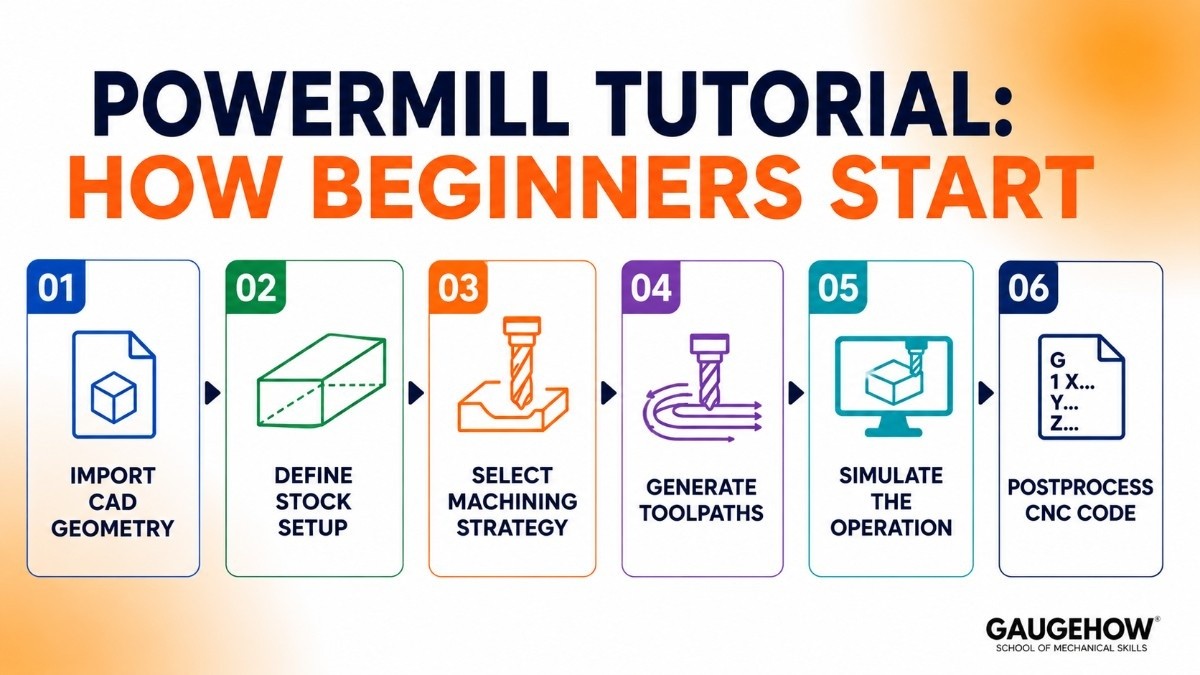
If you are searching for a PowerMill tutorial, the learning process becomes much easier when you follow the software step by step.
Step 1: Import CAD Geometry
The first step is to import your 3D part model into PowerMill. This gives the software the exact shape and dimensions needed to create accurate machining paths for the CNC machine.
Step 2: Define Stock Setup
Next, you define the raw material size, orientation, and workpiece position. This helps the software understand how the part will sit on the machine and ensures proper machining alignment.
Step 3: Select Machining Strategy
Choose the machining operation based on the part requirement, such as roughing for fast material removal, finishing for surface quality, or multi-axis cutting for complex curved parts.
Step 4: Generate Toolpaths
PowerMill calculates optimized tool movement paths based on tool selection, material type, and cutting parameters to improve efficiency and machining precision.
Step 5: Simulate the Operation
Simulation allows you to check tool motion, detect possible collisions, and verify that the machining process will run safely before sending the program to the actual CNC machine.
Step 6: Postprocess CNC Code
The final step converts the toolpath into machine-specific NC code that your CNC machine can read and execute accurately during production.
Because PowerMill includes advanced controls and deep machining options, beginners usually learn faster through guided practice, tutorials, and real machining projects.
PowerMill 5 Axis Capabilities
One of PowerMill’s strongest areas is 5-axis machining.
It helps manufacturers machine complex parts with better precision.
Why PowerMill Performs Well in 5-Axis
Smooth Tool Orientation Control
Maintains optimal cutting angles.
Better Surface Finishing
Creates smoother finishes on curved surfaces.
Collision-Safe Motion
Reduces crash risks during complex movement.
Faster Complex Machining
Improves efficiency for challenging geometries.
This makes it ideal for the aerospace and mold industries.
PowerMill vs Mastercam
Comparing PowerMill vs. MasterCam is common when evaluating CAM solutions.
Feature | Autodesk PowerMill | Mastercam |
|---|---|---|
Learning Curve | Moderate to advanced | Easier for beginners |
Multi-Axis Strength | Excellent | Strong |
Toolpath Control | Highly advanced | Flexible |
Cost | Premium | Moderate |
Ease of Adoption | Requires training | Faster learning |
Choose PowerMill if:
You need advanced precision and complex 5-axis machining.
Choose Mastercam if:
You want broader usability with easier onboarding.
Pros and Cons
Pros
Excellent 5-axis machining
Advanced collision avoidance
Strong toolpath control
High-quality surface finishing
Reliable simulation
Cons
Premium pricing
Steeper learning curve
Requires experienced users for full benefit
These are important trade-offs to consider.
Best For
PowerMill is ideal for:
Aerospace Manufacturers
Complex precision components.
Mold and Die Shops
Detailed surface finishing work.
Automotive Production
Advanced machining workflows.
Large CNC Facilities
High-performance machining at scale.
Integrations
PowerMill integrates with:
CAD systems
CNC controllers
Manufacturing execution systems (MES)
ERP workflows
Tool management software
This supports connected manufacturing environments.
Deployment Options
PowerMill is generally deployed as:
On-Premise Software
Installed locally for high-performance machining tasks.
Brownfield Manufacturing Ready
Works well with existing CNC infrastructure.
It is not primarily cloud-native.
Alternatives to PowerMill
If PowerMill does not fit your budget or workflow, consider:
Siemens NX CAM
SolidCAM
Each serves different manufacturing needs.
Frequently Asked Questions
Is Autodesk PowerMill cloud-based?
PowerMill is mainly installed on local systems rather than fully cloud-based. This gives manufacturers better processing speed, secure machine data handling, and stable performance for complex CNC operations.
Is PowerMill expensive?
Yes, PowerMill is considered premium CAM software because of its advanced machining tools and professional-grade capabilities. Its pricing is usually best suited for businesses handling complex or high-value manufacturing work.
Is PowerMill good for beginners?
Beginners can learn PowerMill, but it may take time because of its advanced toolpath controls and detailed machining settings. Users with some CNC programming knowledge usually adapt faster.
PowerMill vs Mastercam: which is better?
PowerMill is stronger for advanced multi-axis machining and precise toolpath control. Mastercam is often easier to learn and works well for general CNC programming needs.
Does PowerMill support 5-axis machining?
Yes, PowerMill is widely used for advanced 5-axis machining in industries like aerospace and mold manufacturing. It provides precise tool orientation control for machining complex part geometries.
Final Verdict
If your shop handles complex CNC machining, Autodesk PowerMill is worth serious consideration.
Its pricing may be higher than many alternatives, but the investment often pays off through:
Better machining precision
Faster programming
Reduced errors
Stronger 5-axis performance
For manufacturers focused on advanced production, PowerMill remains one of the most capable CAM platforms available.
PowerMill is a CAM software used to program complex shapes for high-speed and 5-axis CNC machining. It is a tool for mold-making and aerospace parts.























