ESPRIT
ESPRIT CAM tutorial

What Is Esprit CAM Software?
ESPRIT CAM software is an advanced CAD/CAM programming solution designed for CNC milling, turning, mill-turn, and multi-axis machining.
Developed by Hexagon Manufacturing Intelligence, ESPRIT helps manufacturers generate highly optimized CNC programs for complex machining tasks.
It is known for its digital twin simulation technology, which allows programmers to verify machine behavior before running operations on the actual CNC machine. This reduces setup errors, tool crashes, and costly downtime.
ESPRIT is widely used in industries where precision and process reliability are critical.
Esprit CAM Tutorial: A Practical Guide to Learning Advanced CNC Programming
If you are learning CNC programming and looking for professional CAM software, ESPRIT CAM is one of the strongest options available.
It is widely used in precision manufacturing because of its advanced machining capabilities, accurate simulation, and machine-specific optimization.
This Esprit CAM tutorial explains what the software does, how it works, and why many manufacturers use it for high-precision machining.
Whether you are new to CAM programming or comparing tools for your shop, this guide will help you understand where ESPRIT fits.
Why Learn ESPRIT CAM?
Learning ESPRIT can open opportunities in advanced manufacturing.
It is commonly used for:
Aerospace machining
Medical component manufacturing
Automotive precision parts
Mold and die machining
Complex 5-axis part programming
Unlike entry-level CAM systems, ESPRIT focuses heavily on machine-aware programming, which means the software understands actual CNC machine kinematics.
Key Features of ESPRIT CAM Software
Digital Twin Simulation
ESPRIT creates a virtual representation of the CNC machine.
This allows:
Collision detection
Axis movement verification
Machine limit checking
Program validation before machining
This reduces expensive shop-floor errors.
Intelligent Toolpath Optimization
The software automatically creates efficient tool motion paths to reduce cycle time.
Benefits include:
Faster machining
Better surface finish
Reduced tool wear
More stable cutting
Multi-Channel Programming
Useful for advanced turning and mill-turn machines.
It synchronizes:
Main spindle
Sub spindle
Turrets
Tool handoff operations
Feature-Based Machining
Automatically detects machinable features such as:
Holes
Pockets
Slots
Threads
This speeds up programming.
Full Machine Simulation
Users can simulate complete machining processes with real machine movement.
This improves confidence before running programs.
Post Processor Customization
ESPRIT offers machine-specific postprocessors for highly accurate NC code generation.
ESPRIT CAM Tutorial
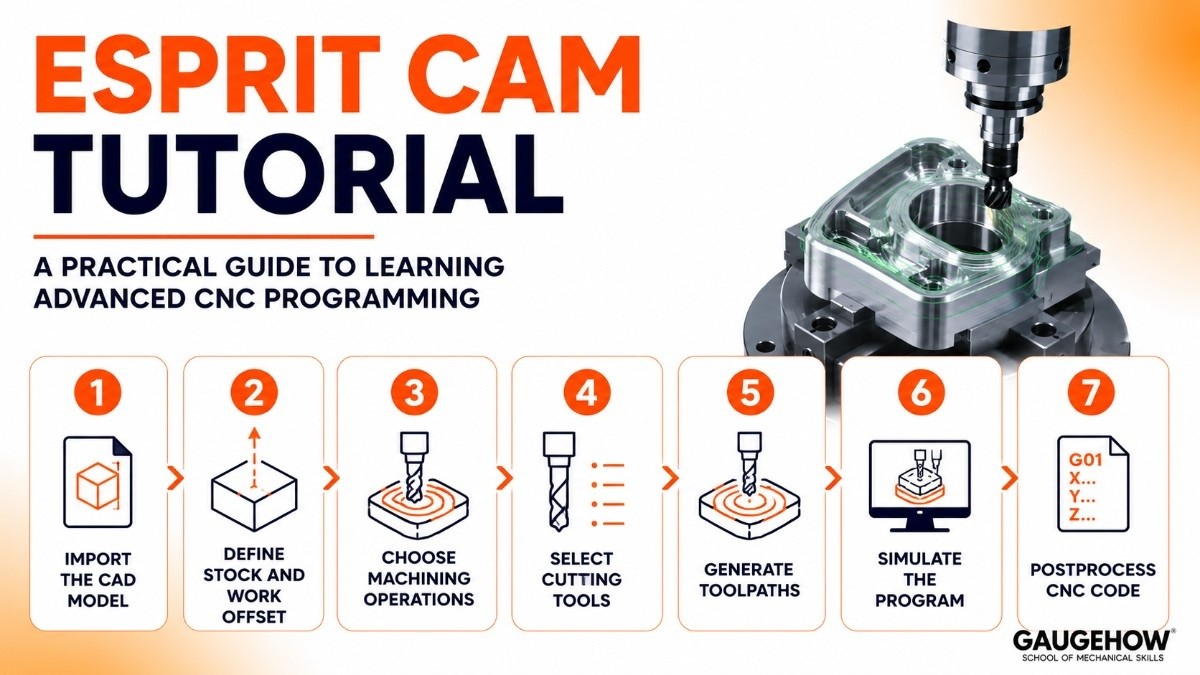
If you are new to ESPRIT CAM, learning the workflow step by step makes the software much easier to understand. Below is the practical sequence most CNC programmers follow when creating a machining program.
Step 1: Import the CAD Model
Start by importing the 3D part model into ESPRIT. The software supports various CAD file formats, allowing users to bring in component geometry for machining preparation.
At this stage, it is important to check model accuracy and confirm that all surfaces are clean and ready for programming.
Step 2: Define Stock and Work Offset
Next, create the raw material stock and define the work coordinate system. This step helps the software understand the exact starting position of the material on the machine.
Proper stock setup ensures accurate toolpath calculation and reduces setup errors during machining.
Step 3: Choose Machining Operations
Select the machining strategies based on the part geometry and production requirements.
This may include roughing for bulk material removal, finishing for surface quality, drilling for holes, contouring for edge shaping, or simultaneous 5-axis milling for complex freeform surfaces.
Step 4: Select Cutting Tools
Choose the appropriate cutting tools from the tool library, such as end mills, ball nose cutters, drills, or specialty tools.
You also need to define spindle speed, feed rate, depth of cut, and other machining parameters to match the material and machine capability.
Step 5: Generate Toolpaths
Once tools and operations are selected, ESPRIT automatically calculates optimized toolpaths.
The software considers machine kinematics, cutting conditions, and geometry complexity to generate efficient paths that improve machining speed while maintaining precision.
Step 6: Simulate the Program
Run a full machining simulation to verify the tool movement and machine behavior.
This step helps identify possible collisions, over-travel errors, or inefficient motion before sending the program to the CNC machine, reducing the risk of costly mistakes.
Step 7: Postprocess CNC Code
After a successful simulation, generate the final NC code using the correct machine-specific postprocessor.
This converts the toolpath data into instructions the CNC machine can execute accurately for production.
Esprit CAM for 5 Axis Milling
One of ESPRIT’s biggest strengths is 5-axis machining.
For manufacturers handling complex geometry, ESPRIT provides precise control over:
Simultaneous Tool Orientation
The software calculates optimized tool angles automatically.
Collision-Free Tool Motion
It adjusts tool positioning to avoid holder and machine collisions.
Smooth Surface Finishing
Advanced toolpath strategies improve surface quality on freeform parts.
Efficient Material Removal
Roughing and finishing paths are optimized for speed and stability.
This makes ESPRIT highly effective for aerospace blades, impellers, and complex mold surfaces.
Esprit CAM vs Mastercam
A common comparison is Esprit CAM vs Mastercam.
Both are strong CAM platforms, but they serve different needs.
Feature | ESPRIT CAM | Mastercam |
|---|---|---|
Learning Curve | Moderate to advanced | Easier for beginners |
5-Axis Strength | Very strong | Strong |
Mill-Turn Capability | Excellent | Good |
Machine Simulation | Advanced digital twin | Strong simulation |
Custom Machine Support | Extensive | Good |
Cost | Premium enterprise pricing | Mid-to-premium pricing |
Choose ESPRIT if:
You work with advanced mill-turn or highly complex multi-axis machining.
Choose Mastercam if:
You want easier learning and broader general CNC adoption.
Esprit CAM Post Processor Download
The Esprit CAM post-processor download is usually available through:
Official vendor support
Licensed reseller portals
Machine builder integrations
Since postprocessors are machine-specific, they are typically customized for exact CNC configurations.
It is important not to use generic posts for production machines, as this can cause machine errors.
Pricing
ESPRIT pricing depends on licensing options and selected modules.
Perpetual License
One-time purchase with annual maintenance.
Best for established manufacturing shops.
Subscription Model
Yearly or flexible access plans.
Good for scaling operations.
Modular Add-Ons
Advanced features like:
5-axis machining
Mill-turn
Wire EDM
Swiss machining
They are often priced separately.
Trial Access
Demo versions may be available through resellers.
Pros and Cons
Pros
Strong digital twin simulation
Excellent mill-turn support
Advanced 5-axis capabilities
Machine-specific optimization
Reliable postprocessing
Cons
Expensive for small shops
Requires training to master
Setup can be complex initially
These trade-offs are normal for industrial-grade CAM software.
Best For
ESPRIT works best for:
Large Production Facilities
Complex machining operations at scale.
Aerospace Manufacturers
High-precision 5-axis components.
Medical Device Manufacturing
Tight tolerance production.
Mill-Turn Machine Shops
Advanced synchronized machining.
Integrations
ESPRIT integrates with:
CNC machine controllers
CAD platforms
Manufacturing execution systems (MES)
ERP systems
Tool management software
This supports connected manufacturing workflows.
Deployment Options
ESPRIT is primarily:
On-Premise
Installed directly on workstations.
Brownfield Ready
Works well with existing shop-floor machine environments.
It is generally not a cloud-native CAM platform.
Alternatives to ESPRIT CAM
If ESPRIT is not the right fit, consider:
Each serves different machining requirements.
Frequently Asked Questions
Is ESPRIT CAM cloud-based?
ESPRIT is mainly designed as an on-premise CAM software, which means it is installed directly on local systems inside manufacturing facilities. This setup offers better machine-level control, faster processing for simulation-heavy tasks, and stronger data security. While some companies integrate it into connected manufacturing environments, it is not a fully cloud-native platform.
Is ESPRIT good for beginners?
ESPRIT can be challenging for complete beginners, especially those new to CNC programming concepts. It is usually better for users who already understand machining basics and want to move into advanced 5-axis or mill-turn programming.
ESPRIT CAM vs Mastercam: which is better?
ESPRIT is generally stronger for machine-aware simulation, digital twin accuracy, and complex mill-turn operations. Mastercam is often easier to learn and is widely preferred by shops that need flexible programming for general milling and turning applications.
Does ESPRIT support 5-axis milling?
Yes, ESPRIT offers strong simultaneous 5-axis milling capabilities for machining complex curved surfaces and precision components. It helps optimize tool orientation, improve surface finish, and reduce the risk of collisions during machining.
Where can I get the ESPRIT CAM post-processor download?
The ESPRIT CAM post-processor download is usually available through official resellers or licensed support channels. Since postprocessors are customized for specific CNC machines, downloading the correct version is important for safe and accurate NC code generation.
Final Verdict
If your goal is advanced CNC programming, especially for multi-axis machining, ESPRIT CAM is a powerful solution.
It is especially valuable for manufacturers that need:
Accurate simulation
Complex machine support
Advanced 5-axis control
Reliable postprocessing
For serious industrial machining, ESPRIT remains one of the most capable CAM systems available today.
ESPRIT is a powerful, high-performance CAD/CAM software used by manufacturers to program, simulate, and optimize CNC machine tools.























