HyperMILL
Best 5 axis CAM Software 2026

Best 5-Axis CAM Software: Why HyperMill Leads Advanced CNC Programming
Modern manufacturing depends on speed, precision, and smarter toolpaths. That is exactly where 5-axis CAM software becomes essential. Among all available options, hyperMILL stands out as one of the most advanced solutions for complex CNC machining.
If you work with aerospace parts, medical components, molds, or high-precision production, choosing the right CAM platform directly affects machining quality, cycle time, and shop-floor efficiency.
This guide explains what HyperMill is, how it compares with competitors, and why many manufacturers consider it one of the best 5-axis CAM platforms available today.
Overview: What Is hypermill?
Hypermill is a high-end CAD/CAM software platform designed for advanced CNC programming, especially complex 5-axis machining.
Developed by OPEN MIND Technologies, it helps manufacturers create optimized toolpaths for milling, drilling, turning, and mill-turn operations.
Unlike entry-level CAM systems, HyperMill is built for industries where precision and automation matter most. It handles everything from simple 2.5D jobs to highly complex simultaneous 5-axis machining strategies.
Its strongest value lies in reducing programming effort while improving surface finish, tool life, and machine efficiency.
What Makes HyperMill One of the Best 5-Axis CAM Software Options?
5-axis machining is not just about moving tools across multiple axes. It requires intelligent collision avoidance, smooth tool orientation, accurate simulation, and efficient machine control.
This is where HyperMill performs exceptionally well.
Advanced Toolpath Intelligence
hypermill automatically calculates optimized motion paths to reduce unnecessary machine movement.
This means:
Better surface quality
Faster cycle times
Lower tool wear
Reduced risk of collisions
Reliable Collision Avoidance
Collision control is one of the most important factors in multi-axis machining.
Hypermill includes:
Automatic holder collision avoidance
Tool tilt optimization
Machine kinematic checks
Safe retract and repositioning logic
These features are especially useful when machining deep cavities or complex aerospace geometries.
Excellent Surface Finishing
For mold and die manufacturing, surface finish matters.
Hypermill uses refined finishing strategies that create:
Smooth tool transitions
Consistent scallop height
Reduced polishing requirements
That translates into less manual finishing work.
Hypermill Used For?
Many people search for what HyperMill is because they hear about it in advanced manufacturing environments.
In simple terms, HyperMill is used to create CNC programs for:
3-axis milling
5-axis simultaneous machining
High-speed machining
Mill-turn programming
Electrode design and machining
Blade and impeller machining
It is widely used in industries where part complexity is high.
Best-fit industries include:
Aerospace
Medical device manufacturing
Automotive
Mold and die
Precision engineering
Key Features of HyperMill
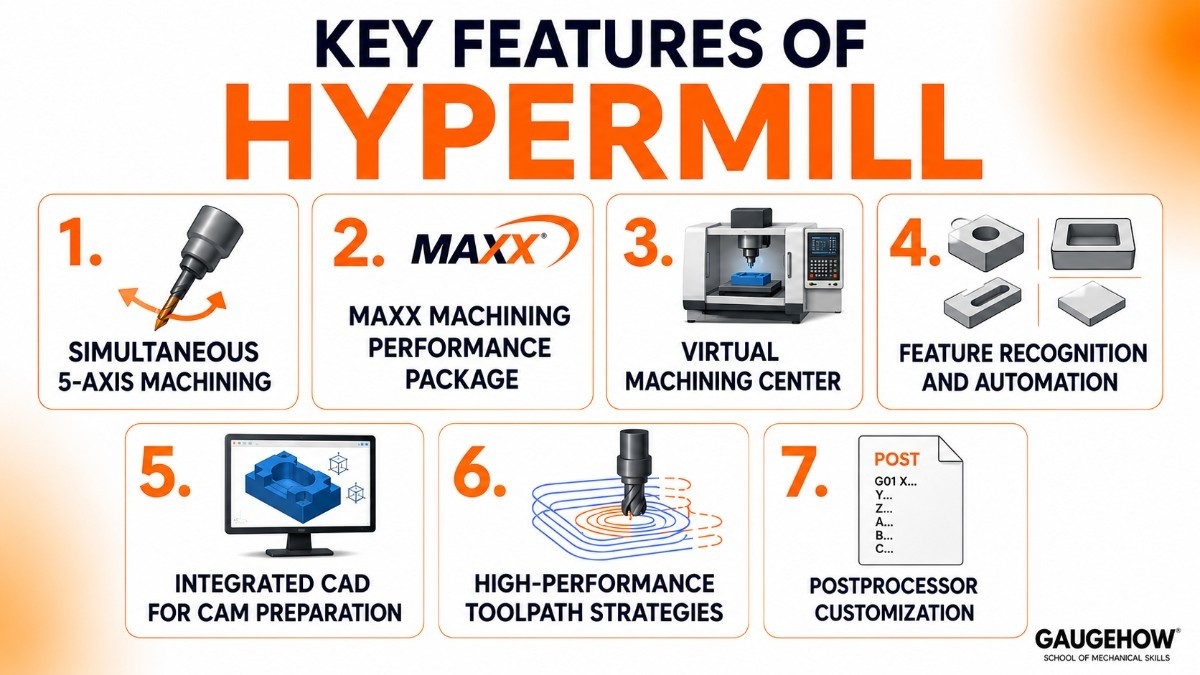
Here are the capabilities that make HyperMill stand out.
1. Simultaneous 5-Axis Machining
Supports advanced tool orientation control for highly complex geometries.
2. MAXX Machining Performance Package
This optimization suite improves:
Roughing efficiency
Finishing quality
Rest machining precision
3. Virtual Machining Center
A full digital twin environment for machine simulation.
This helps programmers verify programs before sending them to the CNC machine.
4. Feature Recognition and Automation
Automatically identifies machinable features like:
Holes
Pockets
Slots
Faces
This reduces manual programming time.
5. Integrated CAD for CAM Preparation
Users can edit geometry directly without switching platforms.
6. High-Performance Toolpath Strategies
Includes:
Trochoidal roughing
Tangential linking
Adaptive cutting paths
Rest material optimization
7. Postprocessor Customization
Supports machine-specific postprocessing for reliable NC code generation.
Hypermill vs Fusion 360
A common comparison is HyperMill vs Fusion 360.
Both are strong CAM solutions, but they target different users.
Feature | hypermill | Autodesk Fusion 360 |
|---|---|---|
Target Users | Professional manufacturing shops | Startups, small shops, and education |
5-Axis Capability | Highly advanced | Good but less specialized |
Simulation Depth | Industrial-grade virtual machining | Solid simulation tools |
Automation | Extensive | Moderate |
Learning Curve | Steeper | Easier |
Cost | Premium enterprise pricing | More affordable subscription |
Choose HyperMill if:
You need advanced precision for complex production.
Choose Fusion 360 if:
You need affordable CAM for lighter manufacturing workflows.
For serious 5-axis production, HyperMill usually offers deeper functionality.
Hypermill Tutorial: How Beginners Start
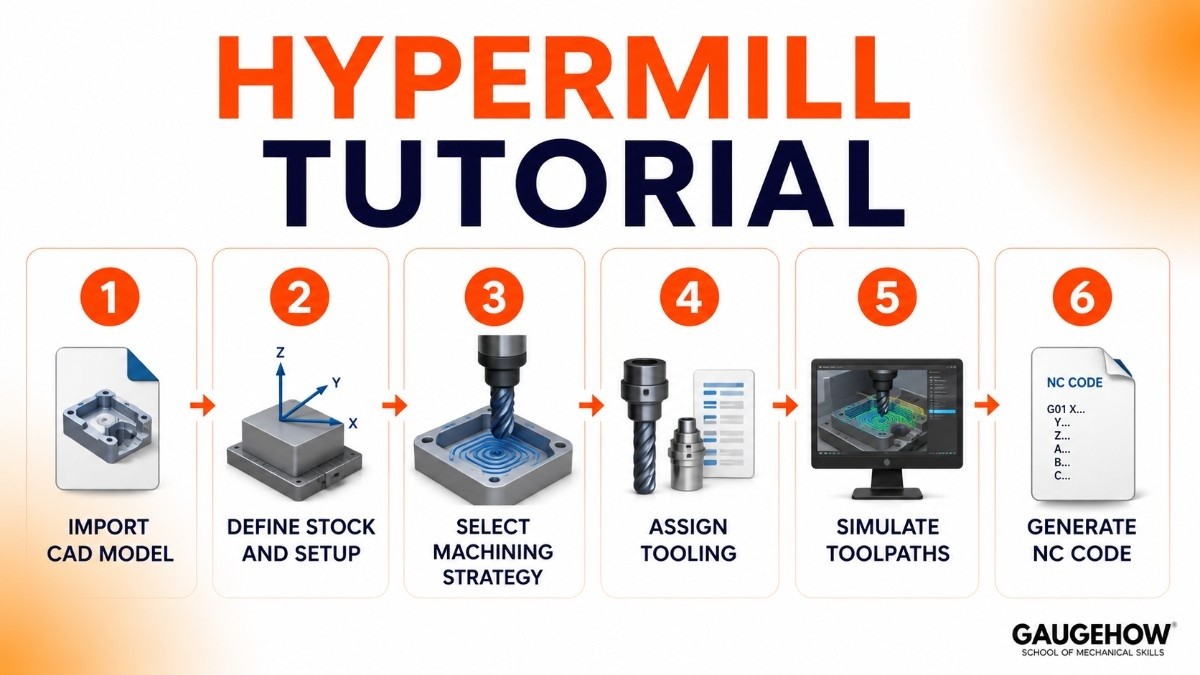
If you are searching for a hypermill tutorial, the learning path usually follows these steps.
Step 1: Import CAD Model
Load the part geometry.
Step 2: Define Stock and Setup
Set workpiece orientation and machine coordinate system.
Step 3: Select Machining Strategy
Choose roughing, finishing, drilling, or simultaneous 5-axis operation.
Step 4: Assign Tooling
Select cutters, holders, and machining parameters.
Step 5: Simulate Toolpaths
Verify collisions and machining motion.
Step 6: Generate NC Code
Postprocess for your CNC machine.
The software has a learning curve, but once mastered, it becomes highly efficient.
Pricing
Hypermill pricing is generally customized.
The cost depends on:
Number of modules
Machine configuration
Postprocessor complexity
Licensing type
Typical options include:
Modular Licensing
Pay only for required modules.
Perpetual License
Higher upfront investment.
Subscription Model
Flexible yearly payment.
Trial / Demo Access
Available through authorized resellers.
Because pricing is customized, manufacturers usually request a direct quote.
Pros and Cons
Pros
Industry-leading 5-axis capabilities
Excellent simulation accuracy
Strong automation tools
High-quality surface finishing
Reliable collision avoidance
Cons
Premium pricing
Steeper learning curve
May be excessive for basic CNC work
These trade-offs are common for enterprise-grade CAM software.
Best For
Hypermill works best for:
Large Manufacturing Plants
Handling complex, high-volume machining.
Aerospace Suppliers
Complex surface machining.
Mold and Die Shops
Superior finishing quality.
Medical Component Manufacturers
Precision multi-axis production.
Integrations
Hypermill connects well with:
Major CAD systems
CNC controllers
Shop-floor simulation systems
ERP/MES workflows
Digital manufacturing environments
This makes it suitable for connected manufacturing operations.
Deployment Options
Hypermill supports:
On-Premise Deployment
Ideal for secure industrial environments.
Hybrid Manufacturing Workflows
Works well in brownfield manufacturing setups.
This flexibility is important for established factories.
Alternatives to hypermill
If hypermill is not the right fit, consider:
Each serves different production needs.
Frequently Asked Questions
Hypermill vs Autodesk Fusion 360: which is better?
The better choice depends on your machining requirements. Hypermill is stronger for industrial-grade 5-axis machining, advanced automation, and highly complex part programming.
Fusion 360 is often a better fit for startups, students, and smaller workshops because it is easier to learn, more affordable, and offers a simpler workflow for general CNC programming.
Is hyperMILL cloud-based?
Hypermill is mainly designed as an on-premise CAM solution, which means it is installed directly on local workstations or company servers.
This setup is preferred by manufacturers because it offers better control over machine data, security, and performance. Some businesses can integrate it into hybrid digital manufacturing environments, but it is not a fully cloud-native platform like some newer CAM tools.
Is Hypermill suitable for small shops?
Yes, HyperMill can be used by small machine shops, especially those handling high-precision or complex 5-axis machining work.
However, its advanced features and enterprise-level pricing may be more than what a basic CNC shop needs. Smaller shops often choose it when they work on aerospace, medical, or custom precision components, where accuracy matters more than software cost.
Is HyperMill difficult to learn?
Hypermill has a moderate to steep learning curve because it offers many advanced machining strategies and detailed control options. Beginners may need time to understand toolpath settings, simulation tools, and machine configuration.
However, once users become familiar with the workflow, it becomes highly efficient and can significantly reduce programming time for complex parts.
hyperMILL is open mind's high-end 5-axis CAM software. See its features, pricing, and how it compares to Mastercam and Fusion 360.























