Dynamics 365
Dynamics 365 2026

Dynamics 365 2026: The Complete Beginner's Guide to Microsoft's ERP and CRM Platform
What Is Dynamics 365?
Microsoft Dynamics 365 is a cloud software platform that combines two things businesses need most — ERP (back-office operations) and CRM (customer management) — in one place.
Most companies run their finances in one tool, their sales pipeline in another, and their customer service in a third. Getting them to talk to each other is slow, expensive, and error-prone. Dynamics 365 solves this by putting everything — finance, supply chain, sales, customer service, HR, and manufacturing — on one shared system.
Microsoft built it in 2016 by combining older products (Dynamics AX, NAV, and CRM) into a single cloud platform. Today, over 500,000 organisations worldwide use it — from small accounting firms to global manufacturers operating across 30 countries.
What Does It Actually Do?
Here is the simplest way to understand it:
Without Dynamics 365, a typical business looks like this:
Sales closes a deal → someone emails the warehouse manually
Finance pulls month-end reports from three different exported spreadsheets
Customer service cannot see a customer's order history because it is in a different system
Management reports are five spreadsheets stitched together every week
With Dynamics 365, it looks like this:
Sales closes a deal → inventory, finance, and fulfilment update automatically
Finance works from live data, not last night's export
Customer service sees every order, invoice, and support ticket in one screen
Management dashboards are live, always accurate, always up to date
Who builds and maintains it:
Made by Microsoft, hosted on Microsoft Azure
Two major updates per year — April (Wave 1) and October (Wave 2) — delivered automatically
No manual upgrades needed
Dynamics 365 Modules: What's Inside the Platform?
Microsoft Dynamics 365 is a collection of ERP and CRM applications that work together on a single cloud platform. Businesses can choose only the modules they need and expand as they grow.
Dynamics 365 Module Overview
Module | Primary Function | Best For |
|---|---|---|
Business Central | All-in-One ERP | Small & Mid-Size Businesses |
Finance | Financial Management | Large Enterprises |
Supply Chain Management | Manufacturing & Logistics | Manufacturers & Distributors |
Commerce | Retail & E-Commerce | Retail Businesses |
Project Operations | Project Management & Billing | Professional Services |
Sales | Sales Pipeline Management | Sales Teams |
Customer Service | Customer Support & Case Management | Service Teams |
Field Service | Technician Scheduling & Work Orders | Field Service Organizations |
Customer Insights | Customer Data & Marketing Analytics | Marketing Teams |
ERP Modules
Business Central
An all-in-one ERP solution for finance, inventory, purchasing, sales, and basic manufacturing operations.
Finance
Advanced financial management software designed for global enterprises with complex accounting requirements.
Supply Chain Management
Manufacturing, warehouse, inventory, and logistics management for larger organizations.
Commerce
Unified retail management across physical stores, online channels, and customer service operations.
Project Operations
Project planning, resource management, time tracking, billing, and profitability analysis.
CRM Modules
Sales
Lead management, opportunity tracking, forecasting, and sales automation.
Customer Service
Case management, knowledge bases, SLA tracking, and omnichannel support.
Field Service
Scheduling, dispatching, mobile workforce management, and service operations.
Customer Insights
Customer data platform for segmentation, personalization, marketing, and customer analytics.
Bottom Line
Dynamics 365 combines ERP and CRM applications into a modular platform. Small businesses often start with Business Central, while larger enterprises typically use Finance and Supply Chain Management alongside CRM modules such as Sales and Customer Service.
Key Features
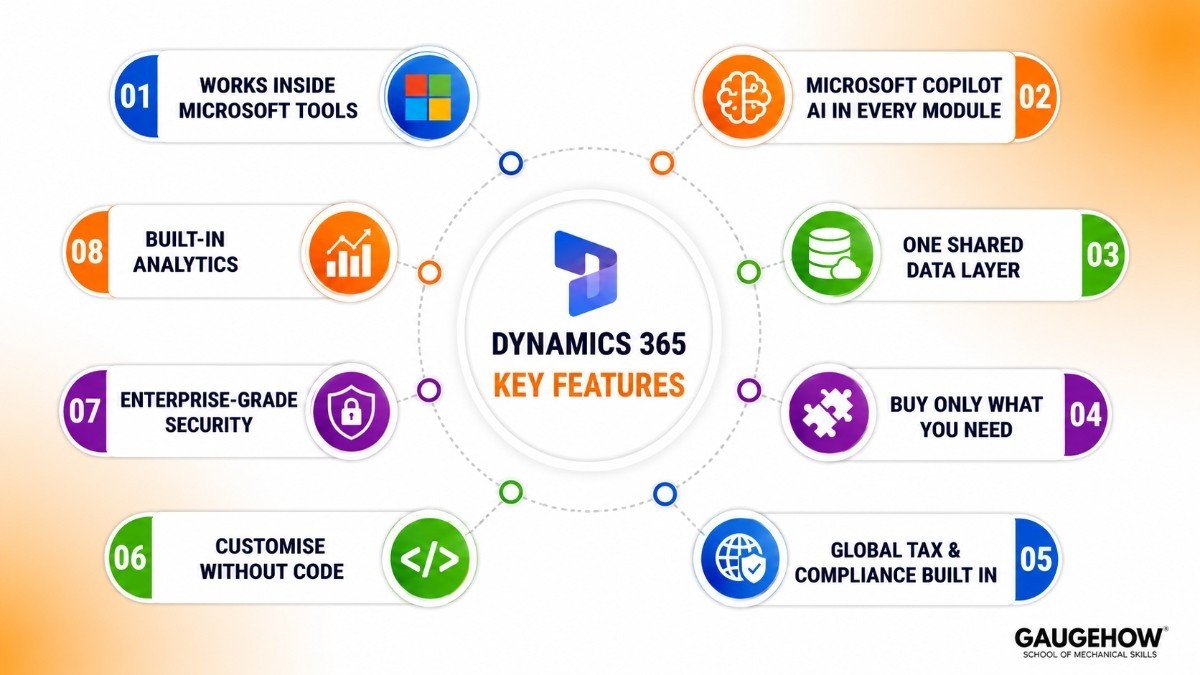
1. Works Inside Microsoft Tools You Already Use
Opens customer records directly inside Outlook — no switching between apps
View deals and service cases inside Microsoft Teams
Live data flows into Power BI dashboards automatically — no exports needed
Extend the platform using Power Apps, Power Automate, and Copilot Studio — without writing code
2. Microsoft Copilot — AI in Every Module
Microsoft's AI assistant built directly into each Dynamics 365 module
In Sales: summarises calls, drafts follow-up emails, flags at-risk deals
In Finance: spots unusual transactions, summarises reports, helps with budgeting
In Supply Chain: predicts stock shortages, flags delivery risks
In Customer Service: suggests responses from the knowledge base, summarises case history
In Business Central: reconciles bank statements, writes product descriptions automatically
Important: Copilot reads your actual business data — not the internet — so answers are relevant to your company
3. One Shared Data Layer (Dataverse)
Every module stores data in one place called Microsoft Dataverse
When sales closes a deal, finance and operations see it immediately
No duplicate records, no manual syncing, no arguments about which system is correct
4. Buy Only What You Need
Start with one module, add more as the business grows
Base plus attach pricing — adding a second module for an existing user costs less than the full licence price
No need to replace the whole system when the company expands
5. Global Tax and Compliance Built In
Finance includes pre-built rules for 40+ countries — tax, VAT/GST, payroll, and statutory reports
Microsoft updates these automatically when laws change — no manual patch required
6. Customise Without Code
Business users — not IT developers — can build custom screens, automate workflows, and create AI agents
Customisations survive Microsoft's software updates (unlike older ERP systems where updates break everything)
7. Enterprise-Grade Security
Built on Azure — certified for ISO 27001, GDPR, HIPAA, FedRAMP, and many more
Single login via Microsoft Entra ID — same credentials as a laptop, email, and Teams
Control exactly who can see what, down to individual fields
8. Built-In Analytics
Power BI dashboards sit inside Dynamics 365 screens — live, no export needed
Pre-built reports for finance (cash flow, budget vs actual), supply chain (delivery performance), and sales (pipeline health)
Dynamics 365 Training for Beginners 2026
Good news: most of the best Dynamics 365 training resources are free.
Start Here: Microsoft Learn (Free)
learn.microsoft.com — Microsoft's official training platform, structured by module and role
Hands-on sandbox labs included — you practice in a real environment, not just watch slides
All content is free and tied directly to certification exams
Best beginner learning paths:
"Get started with Dynamics 365 Business Central" — navigation, finance basics, core workflows
"Introduction to Dynamics 365 Finance" — financial management concepts and module overview
"Dynamics 365 Sales fundamentals" — leads, pipeline, and customer management
Dynamics 365 Finance vs Business Central: Which One Do You Need?
This is the most common question — and it matters because these are two completely different products. Choosing the wrong one is an expensive mistake.
The Simple Difference
Business Central = Microsoft's ERP for smaller, simpler businesses (built from Dynamics NAV)
Dynamics 365 Finance = Microsoft's ERP for large enterprises with complex global operations (built from Dynamics AX)
Side-by-Side Comparison
Business Central | Dynamics 365 Finance | |
|---|---|---|
Business size | Under 300 users / under $500M revenue | 300+ users / $100M+ revenue |
Price | $80–$110/user/month | $170–$220/user/month |
Go-live time | 3–6 months | 6–18 months |
Multi-country accounting | Basic | Advanced — built for it |
Manufacturing depth | Basic | Deep (paired with Supply Chain Mgmt) |
5-year cost | Lower | 3–4× more than Business Central |
Built from | Dynamics NAV | Dynamics AX |
Which Should You Choose?
Go with Business Central if:
Under 300 users and revenue under $500M
You need to be live quickly — within 6 months
Simple financial structure — one or two entities
Coming from Dynamics NAV, Dynamics GP, or QuickBooks
Go with Dynamics 365 Finance if:
Multiple legal entities across different countries
Complex intercompany accounting, treasury, or consolidated reporting
Replacing SAP, Oracle, or an older Dynamics AX system
Need enterprise manufacturing alongside financial management
Critical warning: There is no upgrade path between Business Central and Finance. They use different code and different data structures. If you outgrow Business Central, you need a brand-new Finance implementation — not an upgrade. Get this decision right the first time.
Pricing
Microsoft does not publish a public price list. The figures below are based on publicly available list prices and partner market data for 2026.
Business Central
Licence | What it includes | Monthly price per user |
|---|---|---|
Essentials | Finance, purchasing, inventory, projects | $80 |
Premium | Everything in Essentials + manufacturing + service | $110 |
Team Member | Read-only + basic data entry | $8 |
Finance and Operations
Module | Approximate price |
|---|---|
Dynamics 365 Finance | $170–$180/user/month |
Supply Chain Management | $170–$180/user/month |
Additional modules for same user | Significantly discounted |
CRM Modules
Module | Monthly price per user |
|---|---|
Sales Professional | $65 |
Sales Enterprise | $105 |
Customer Service Enterprise | $95 |
Field Service | $95 |
Customer Insights | From $1,500/tenant/month |
Free Trial?
Yes — most modules offer a 30-day free trial with no credit card needed
Business Central is the easiest to try — live demo environment with sample data, ready in minutes
What Makes the Total Cost Go Higher
Implementation partner fees — typically 1×–3× your first year's software cost
Data migration — moving from older Dynamics GP or NAV systems takes real effort
Training — most projects underinvest here, and it is one of the top reasons post-go-live fails
Copilot add-on — full Microsoft 365 Copilot costs an extra $30/user/month on top of Dynamics
Power Platform Premium — advanced automation and custom apps need additional licensing
Microsoft Dynamics 365 Pros and Cons
Microsoft Dynamics 365 is a powerful ERP and CRM platform, especially for organizations already using Microsoft products. However, like any enterprise software, it has strengths and limitations.
Pros of Microsoft Dynamics 365
Seamless Microsoft Ecosystem Integration
Dynamics 365 works naturally with Microsoft 365, Teams, Outlook, and Azure. Employees can work within familiar tools, reducing training time and improving productivity.
Flexible and Scalable Deployment
Organizations can start with a few modules and expand over time. This phased approach makes adoption easier and helps businesses control costs as they grow.
Practical AI with Microsoft Copilot
Dynamics 365 includes built-in AI capabilities through Copilot. Features such as bank reconciliation, meeting summaries, forecasting, and anomaly detection help automate routine work and improve decision-making.
Automatic Cloud Updates
As a cloud-based platform, Dynamics 365 receives regular updates automatically. Businesses always have access to the latest features, security patches, and performance improvements.
Low-Code Customization
Using Microsoft's Power Platform, users can create workflows, dashboards, apps, and automations without extensive coding knowledge, reducing dependency on developers.
Cons of Microsoft Dynamics 365
Complex Enterprise Implementations
Large deployments involving Finance and Supply Chain Management can take 12–18 months or longer. Success often depends heavily on implementation planning and partner expertise.
Business Central Has Scalability Limits
Business Central works well for small and mid-sized companies. However, organizations that outgrow it typically require a migration to Dynamics 365 Finance, which is a separate implementation project.
Licensing Can Be Confusing
The licensing structure includes base licenses, attached licenses, storage costs, Copilot features, and Power Platform add-ons. Without careful planning, costs can increase quickly.
CRM Functionality Trails Salesforce
For businesses focused solely on CRM, Salesforce generally offers deeper sales automation, broader integrations, and a larger ecosystem of specialized partners.
Partner Quality Varies
Microsoft relies on implementation partners rather than providing direct implementations. Choosing an experienced partner is critical, as project outcomes can vary significantly based on partner expertise.
Bottom Line
Microsoft Dynamics 365 is an excellent choice for organizations invested in the Microsoft ecosystem and looking for a scalable ERP and CRM platform. Its AI capabilities, integration strengths, and flexibility are major advantages. However, businesses should carefully evaluate implementation complexity, licensing costs, and partner selection before making a decision.
Best For
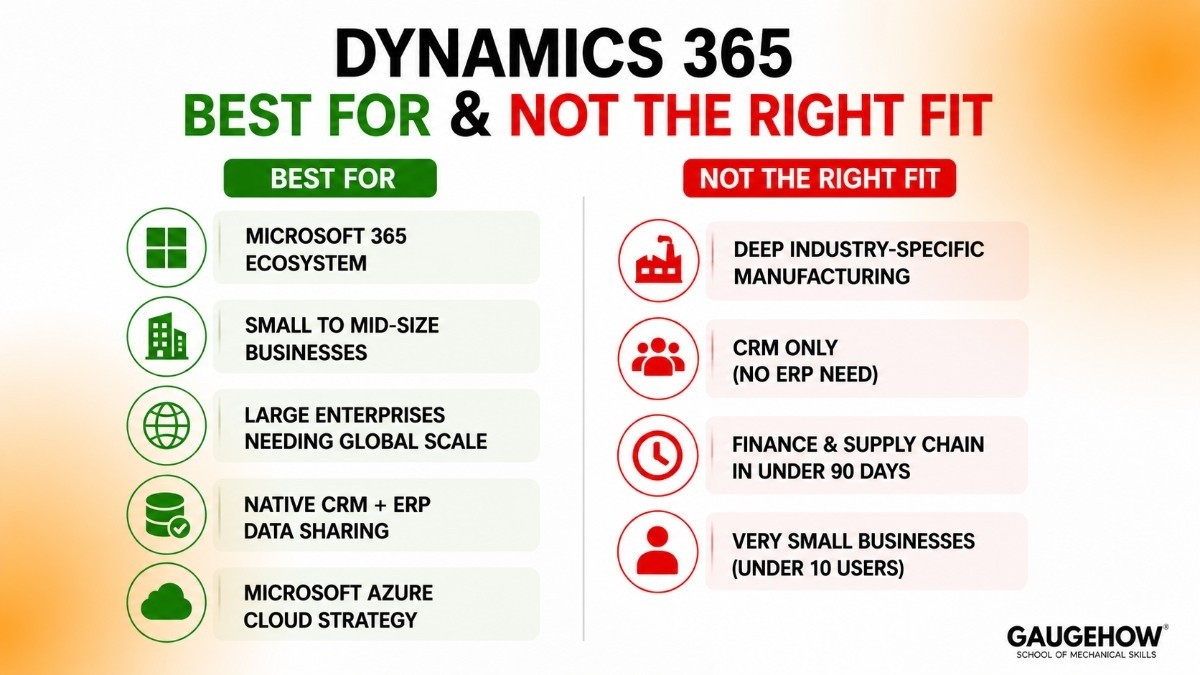
Dynamics 365 is a great fit when:
You already use Microsoft 365 and want your business software in the same ecosystem
You are a small to mid-size business looking for a solid all-in-one ERP (Business Central)
You are a large enterprise needing connected finance, operations, and customer management globally
You want CRM and ERP to share data natively — not be integrated through middleware
Your cloud strategy is built on Microsoft Azure
It is probably not the right fit if:
You need deep, industry-specific manufacturing logic — Infor CloudSuite and Epicor Kinetic go deeper here
You only need CRM with no ERP requirement — Salesforce is still the specialist choice
You need Finance and Supply Chain live in under 90 days — the timeline does not support it
You are a very small business (under 10 users) — QuickBooks or Zoho may be more practical and cost-effective.
Certifications in 2026: What Is Current
Microsoft retired the MB-910 and MB-920 fundamentals exams at the end of 2025. Here is what is active now:
Exam | What it covers | Level |
|---|---|---|
MB-800 | Business Central Functional Consultant | Associate |
MB-310 | Dynamics 365 Finance Functional Consultant | Associate |
MB-330 | Supply Chain Functional Consultant | Associate |
MB-210 | Dynamics 365 Sales Functional Consultant | Associate |
MB-230 | Customer Service Functional Consultant | Associate |
AB-900 | Copilot and Agent Administration Fundamentals (new 2026) | Fundamentals |
AB-210 | Dynamics 365 Sales AI Consultant (beta May 2026) | Associate |
Best starting point for beginners in 2026: Take AB-900 first. It was released in 2026 as the new entry-level credential, it is free on Microsoft Learn, and it reflects what the platform looks like today — AI-first, Copilot-embedded — better than the retired fundamentals exams ever did.
Other Resources Worth Knowing
Udemy — paid courses with hands-on labs; filter for anything updated in 2025 or 2026
LinkedIn Learning — shorter, module-specific videos — good for a focused skill rather than full certification prep
YouTube — the Dynamics 365 partner community produces a large volume of free walkthroughs, especially for Business Central
D365Training.com — independent site maintained by a Dynamics consultant; particularly useful for navigating the certification changes
Why Learning This Is Worth It
500,000+ organisations use Dynamics 365 — skills are directly transferable across industries and company sizes
New AI certifications launching throughout 2026 (AB-210, AB-250, AB-410) — getting certified early in new credential categories consistently leads to better job opportunities
Business Central = SMB-market roles; Finance + Supply Chain = enterprise roles; Sales + Customer Insights = commercial and marketing roles
Integrations
Dynamics 365 connects to other systems through native connectors, the Power Platform connector library (1,000+ tools), and an open API.
Category | Examples |
|---|---|
Microsoft native | Outlook, Teams, SharePoint, OneDrive, Power BI, Azure, Copilot Studio |
Pre-built connectors | SAP, Salesforce, ServiceNow, Workday (via Power Automate) |
ERP and finance | Oracle Financials, Sage |
HR and payroll | ADP, Ceridian, Workday HCM |
E-commerce | Shopify, Magento, BigCommerce (via AppSource) |
Warehouse and IoT | Azure IoT Hub, RFID scanners, barcode readers |
Shipping and logistics | FedEx, UPS, DHL (via AppSource) |
EDI | TrueCommerce, SPS Commerce, Cleo |
Developer APIs | OData REST API, Dataverse Web API, Azure API Management |
AppSource — Microsoft's app marketplace for Dynamics 365 — has over 4,000 partner-built add-ons covering industry-specific features and niche integrations not included natively.
Deployment Options
Cloud (Standard for All New Customers)
Microsoft hosts and manages everything on Azure
Updates are automatic — Wave 1 (April) and Wave 2 (October) every year
You can preview upcoming changes in a sandbox before they go live in production
On-Premise
Business Central still supports on-premise for organisations with strict data rules or air-gapped environments
Finance and Supply Chain can technically go on-premise, but Microsoft actively discourages it — new features go to cloud first
Older products (Dynamics GP, AX) are on-premise only and no longer receiving new features
Hybrid
Some organisations run cloud Dynamics 365 alongside on-premise legacy systems during a migration
Azure bridges the two during the transition period
This is a temporary state — not a long-term recommended architecture
Migrating from Older Dynamics Products
Migration | Difficulty | Notes |
|---|---|---|
Dynamics NAV → Business Central | Moderate | Most common migration right now; good tooling and partner support |
Dynamics GP → Business Central | More complex | Different data structures; migration tooling available |
Dynamics AX → Finance + Supply Chain | Complex | Not an upgrade — treat it as a new implementation |
Non-Microsoft ERP → Dynamics 365 | Complex | Full data migration required; Azure Data Factory helps with extraction |
Alternatives Worth Comparing
Salesforce
Best pure CRM on the market — deeper sales and service functionality, 5,000+ AppExchange apps. Trade-off: no native ERP, higher cost at scale, no Microsoft ecosystem integration. Best for organisations that only need CRM.
SAP S/4HANA
The enterprise ERP leader for very large global organisations. Deeper customisation, larger partner network, stronger manufacturing industry templates. Trade-off: much higher cost, 12–36 month implementations, steeper learning curve.
NetSuite (Oracle)
The most common Business Central alternative at mid-market. Strong cloud ERP with a longer cloud-native track record. Tends to win on multi-subsidiary financial consolidation; Business Central tends to win on Microsoft ecosystem fit.
Epicor Kinetic
The strongest choice for mid-market discrete manufacturers (machines, metal parts, electronics). Deeper shop floor execution and engineer-to-order logic than Business Central in the manufacturing segment.
Infor CloudSuite
Best for industry-specific vertical needs — especially aerospace and defense, healthcare supply chain, and fashion and apparel. Pre-configured editions for these industries outperform Dynamics 365's more general approach.
Frequently Asked Questions
Is Dynamics 365 cloud-based?
Yes — and mostly cloud-only for new customers:
All new deployments default to Microsoft Azure cloud
Business Central has an optional on-premise version for specific requirements
Finance and Supply Chain can be on-premise, though Microsoft steers customers toward cloud
Legacy products (Dynamics GP, NAV, AX) are on-premise only and no longer getting new features
What is the difference between Dynamics 365 Finance and Business Central?
They are different products for different business sizes — not versions of the same product:
Business Central — for smaller organisations (under 300 users, under $500M revenue), lower cost, faster to implement, built on Dynamics NAV
Dynamics 365 Finance — for large enterprises with global, multi-entity financial complexity, built on Dynamics AX, costs 3–4× more over five years
No upgrade path exists between them — outgrowing Business Central means a full new Finance implementation
How long does a Dynamics 365 implementation take?
Depends heavily on the module and complexity:
Business Central (standard): 3–6 months
Business Central (heavy customisation): 6–9 months
Finance and Supply Chain: 6–18 months
Full enterprise multi-module: 12–24+ months
Biggest causes of delays: messy data migration, scope creep, and underestimated change management
Can Dynamics 365 replace Salesforce?
For many businesses, yes — with caveats:
If Microsoft ecosystem integration and total cost matter most: yes, Dynamics 365 Sales is a solid replacement
If pure CRM depth and a large third-party app marketplace are the priority: Salesforce still leads
Microsoft 365 users typically adopt Dynamics 365 25–40% faster because the interface feels familiar
Honest verdict: Dynamics 365 wins the all-in-one platform comparison; Salesforce wins the pure-CRM-only comparison
What certifications are available for Dynamics 365 in 2026?
Microsoft changed the certification landscape significantly at end of 2025:
MB-910 and MB-920 (fundamentals) were retired in December 2025
New for 2026: AB-900 (Copilot and Agent Fundamentals), AB-210 (Sales AI Consultant — beta May 2026)
Still active: MB-800 (Business Central), MB-310 (Finance), MB-330 (Supply Chain), MB-210 (Sales), MB-230 (Customer Service)
Best beginner entry point: AB-900 on Microsoft Learn — free, no prerequisites
How does Dynamics 365 Copilot work?
Copilot is Microsoft's AI assistant embedded directly into each module:
Powered by Azure OpenAI (same technology as ChatGPT) but reads your business data, not the internet
Context-specific per module — Sales Copilot handles deals, Finance Copilot handles transactions, Service Copilot handles cases
Base Copilot features are included in some licences; full capability requires a $30/user/month Microsoft 365 Copilot add-on
In 2026, Microsoft is rolling out agentic AI — Copilot that acts autonomously (reconciles accounts, processes approvals, sends supplier communications) without needing a human prompt for every step
Final Thoughts
Dynamics 365 in 2026 is a mature, well-integrated platform. The pieces that were rough in the early years — the module connectivity, the interface consistency, the AI layer — have all improved significantly.
For students:
500,000+ organisations using this platform means real job demand at every level and in every industry
The new 2026 AI certifications (AB-900, AB-210) are worth doing early — first movers in new credential categories consistently land better opportunities
Business Central skills serve the SMB market; Finance and Supply Chain serve enterprise; Sales and Customer Insights serve every commercial organisation
For buyers:
Pick the right module from the start — the Business Central vs Finance decision has no shortcut or undo
Choose your implementation partner as carefully as you choose the software — partner quality is the biggest variable in project outcomes
Budget honestly: software + implementation + training + migration + year-two support costs — not just the per-user licence number
When you choose the right module, pick a qualified partner, and go in with realistic expectations, Dynamics 365 delivers what it promises — one connected system where finance, operations, sales, and customer data actually work together.
Dynamics 365 in 2026 — the complete guide to Microsoft's ERP and CRM platform. Modules, pricing, Copilot AI, and comparisons explained clearly.























