Epicor Kinetic
Epicor ERP Kinetic

Epicor ERP Kinetic: The Complete Guide for 2026
Primary keyword: Epicor ERP Kinetic Meta description: Everything you need to know about Epicor ERP Kinetic in 2026 — features, pricing, training resources, honest pros and cons, and how it compares to SAP. Written for beginners and buyers alike.
Overview
Epicor ERP Kinetic is a cloud-native enterprise resource planning platform built specifically for manufacturers, distributors, and retailers.
Developed and maintained by Epicor Software Corporation, it emerged from a major rebrand and re-architecture of Epicor ERP around 2021. The "Kinetic" name reflects the platform's shift toward a modern, browser-based interface and a microservices-friendly architecture — a significant departure from the older thick-client system many longtime users remember.
Today, more than 23,000 companies in over 150 countries rely on it to run production floors, manage supply chains, and close financial books.
Gartner has named it a Leader in its Magic Quadrant for Cloud ERP for Product-Centric Enterprises three years running (as of 2025), which tells you something about where the product stands relative to peers.
If you are a student exploring ERP systems, a procurement manager evaluating options, or an IT professional doing due diligence, this guide breaks down everything you need to know in plain language — no sales jargon.
What Does Epicor Kinetic Actually Do?
Think of it as the central nervous system of a manufacturing business. Instead of running separate spreadsheets for inventory, a different system for accounting, and yet another tool for tracking production jobs, Kinetic connects all of these into one unified platform.
A job shop receiving a customer order, for example, can automatically generate a bill of materials, schedule production tasks, trigger material purchases, track shop floor activity in real time, and invoice the customer — all without re-entering data between systems. That is the core promise of any ERP, but Kinetic delivers it with deep manufacturing-specific logic baked in, rather than layering manufacturing features onto a generic finance platform.
Key Features
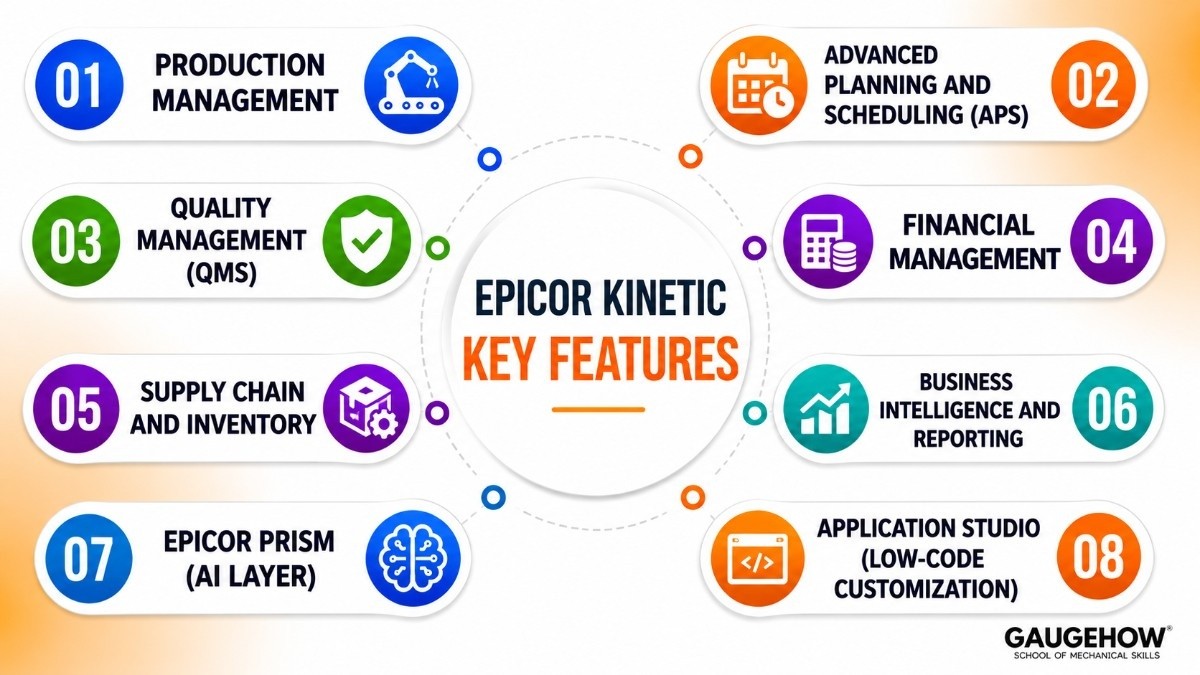
1. Production Management and Shop Floor Control
Kinetic gives manufacturers detailed visibility into what is being built, by whom, and at what stage. Work orders, routing steps, labor tracking, and machine utilization are all captured in real time through its Manufacturing Execution System (MES) layer. Supervisors can see bottlenecks before they cause delays.
2. Advanced Planning and Scheduling (APS)
The built-in APS engine goes beyond basic MRP. It accounts for finite capacity — meaning it understands that Machine A cannot run two jobs simultaneously — and reschedules dynamically when priorities shift. This is genuinely useful for job shops and engineer-to-order environments where every order is different.
3. Quality Management (QMS)
Rather than bolting quality onto production as an afterthought, Kinetic embeds inspection checkpoints, non-conformance tracking, and corrective action workflows directly into the production process. This matters especially for aerospace, defense, and medical device manufacturers dealing with ISO and AS9100 compliance requirements.
4. Financial Management
The finance module covers general ledger, accounts payable and receivable, fixed assets, cash management, and multi-currency operations. A standout is the Global Engines feature — a configurable tax and statutory compliance layer that adapts to different jurisdictions without requiring custom code.
5. Supply Chain and Inventory
Real-time inventory visibility across multiple warehouses, supplier portal integration (via SourceDay), automated purchase order generation, and demand forecasting make this one of the stronger modules in the suite. Lot and serial number tracking is built in, not an add-on.
6. Business Intelligence and Reporting
Business Activity Queries (BAQs) are one of the more practical features for day-to-day users. They are essentially saved, configurable database queries that non-technical staff can build and run without writing SQL. The platform also connects to standard BI tools through its REST API for teams that want Power BI or Tableau on top.
7. Epicor Prism (AI Layer)
Launched more recently, Prism is Epicor's AI framework embedded within Kinetic. It supports conversational queries in natural language ("What is our on-time delivery rate for Q1?"), predictive demand forecasting, and automated workflow suggestions. As of 2026, it is still maturing, but the foundation is solid.
8. Application Studio (Low-Code Customization)
Users can modify screens, add fields, and build custom workflows using a drag-and-drop interface — without touching the underlying source code. This is important because customizations survive software upgrades, which has historically been a painful problem with on-premise ERP systems.
Pricing
Epicor does not publish a fixed price list, which is common among enterprise ERP vendors. Pricing is negotiated based on several factors.
How the Pricing Model Works
Kinetic is sold primarily as a subscription (SaaS) model for cloud deployments and a perpetual license model for on-premise. Most new customers today are steered toward the cloud subscription route.
Costs are driven by:
Number of named users (not concurrent)
Which modules are included (production, finance, quality, field service, etc.)
Deployment type (multi-tenant cloud vs. single-tenant vs. on-premise)
Implementation and consulting services (billed separately, typically by a partner)
Estimated Ranges (Based on Third-Party Research, 2025–2026)
Tier | Company Profile | Estimated Annual Cost |
|---|---|---|
Entry / Core Bundle | 10–30 users, finance + production basics | $30,000–$80,000/year |
Mid-Market | 50–150 users, full suite | $100,000–$300,000/year |
Enterprise | 500+ users, multi-site, global | $500,000+/year |
Implementation costs (configuration, data migration, training, go-live support) typically add 1x–2.5x the first-year license cost, especially for mid-market and enterprise deployments.
Is There a Free Trial?
Epicor does not offer a self-serve free trial. You can request a guided demo through their website or a certified partner, which gives you a hands-on look at a configured environment. Some partners offer sandbox access during a scoping engagement.
Epicor Kinetic vs SAP: Key Differences
This comparison comes up constantly because SAP is the most recognized name in ERP and Epicor Kinetic is frequently positioned as the manufacturing-specialist alternative.
Dimension | Epicor Kinetic | SAP S/4HANA |
|---|---|---|
Target size | Mid-market (50–5,000 employees) | Large enterprise (1,000+ employees) |
Manufacturing depth | Very strong — built for it | Strong, but more general-purpose |
Implementation time | 6–14 months typical | 12–36 months typical |
Total cost of ownership | Lower — significantly | Higher — significantly |
CRM and HR | Moderate (often supplemented) | Comprehensive |
Ecosystem of partners | Smaller, but focused | Very large, global |
Ease of use | Moderate learning curve | Steeper learning curve |
AI capabilities | Epicor Prism (growing) | SAP Business AI (mature) |
Bottom line: If you are a mid-size manufacturer who does not need the entire SAP ecosystem and wants a platform where manufacturing is the first-class priority, Kinetic often delivers more value per dollar.
If you are a multi-billion dollar enterprise needing a single platform to run every business function globally, SAP's breadth becomes more relevant.
Pros and Cons
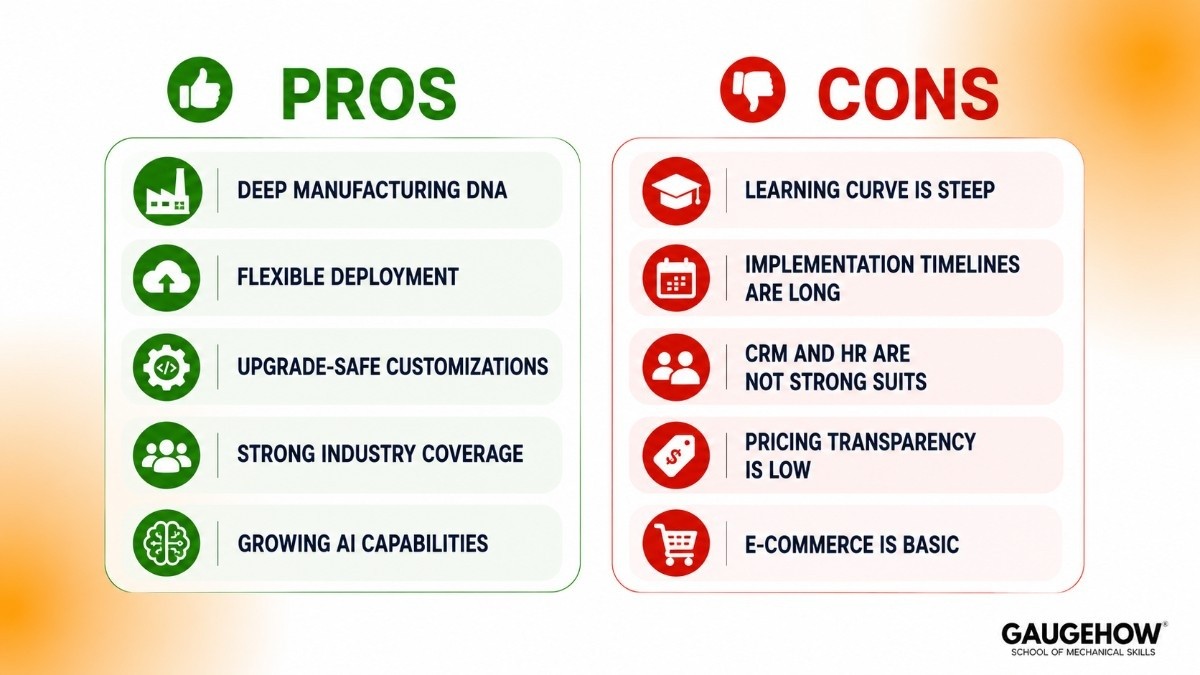
Being honest about both sides is more useful than a vendor brochure.
Strengths
Deep manufacturing DNA. Few ERP platforms match Kinetic's depth in discrete manufacturing, mixed-mode, and engineer-to-order scenarios. It was built for this, not retrofitted.
Flexible deployment. Cloud, single-tenant cloud, and on-premise options exist. For manufacturers with strict data sovereignty requirements or poor connectivity at remote plants, on-premise is still a viable path.
Upgrade-safe customizations. Application Studio keeps customizations in a separate layer, so they survive version updates — a genuine differentiator from older ERP architectures.
Strong industry coverage. Automotive, aerospace and defense, electronics, medical devices, metal fabrication, furniture, and plastics all have industry-specific configurations available.
Growing AI capabilities. The Prism platform is among the more practically implemented AI layers in manufacturing ERP — not just a marketing label.
Weaknesses
Learning curve is steep. New users consistently report that the system takes time to get comfortable with, even with the newer Kinetic interface. This is not a SaaS tool you can pick up in a weekend.
Implementation timelines are long. A mid-market deployment commonly takes six to twelve months. Rushing this is one of the most common reasons Kinetic projects struggle.
CRM and HR are not strong suits. The customer relationship management and human resources modules are rated "moderate" by independent analysts.
Companies with serious needs in these areas often run a separate best-of-breed tool alongside Kinetic.
Pricing transparency is low. Without a published price sheet, smaller companies sometimes get deep into conversations before discovering the total cost of ownership exceeds their budget.
E-commerce is basic. The native e-commerce functionality covers fundamentals but requires third-party integrations (Magento, Shopify, etc.) for anything beyond catalog display and order capture.
Best For
Kinetic is a strong fit when:
You are a discrete manufacturer — making defined, countable products (parts, assemblies, machinery) rather than process goods like chemicals or food
Your company has 50 to 2,000 employees — the sweet spot is mid-market, though larger deployments exist
You operate in regulated industries — aerospace, defense, medical devices, automotive — where traceability and quality compliance are non-negotiable
You run engineer-to-order or job shop workflows, where every job is custom and no two orders are identical
You need multi-site or international operations managed from one system
Your IT team has capacity (or you have a reliable partner) to handle a real implementation, not a plug-and-play setup
It is probably not the right fit if you are a small business under 20 people, a pure services company, a process manufacturer (brewing, pharmaceuticals formulation), or a retailer without any manufacturing component.
Training and Getting Started
Official Epicor Kinetic Training
Epicor provides structured learning through the Epicor Learning Center, accessible at learning.epicor.com.
Courses are organized by module and role — so a production scheduler, a finance controller, and a system administrator each follow different paths.
Formats include self-paced online courses, live virtual instructor-led sessions, and in-person workshops at Epicor events. Certifications are available for consultants and administrators.
For Students and Beginners
If you are learning Kinetic for the first time — perhaps as part of a supply chain, operations management, or ERP implementation course — the recommended starting path is:
Start with navigation and concepts. Get comfortable with dashboards, BAQs, and how data flows between modules before diving into transactions.
Follow the order-to-cash and procure-to-pay cycles. These two workflows touch most major modules and give you a map of how the system connects.
Use Epicor's own documentation. The Epicor Knowledge Base and the built-in Knowledge Assistant (an AI-powered help tool trained on Kinetic documentation) are genuinely useful for step-by-step questions.
Epicor Kinetic Tutorial Resources (Community and Third-Party)
Beyond official channels, a solid ecosystem of tutorials exists:
EpicCare Portal — Epicor's official support and documentation hub
Epicor Community forums — active user community with Q&A threads
YouTube — certified Epicor partners publish walkthrough videos covering specific modules
LinkedIn Learning — some foundational ERP courses apply to understanding Kinetic's architecture
Integrations
Kinetic connects to external systems through a combination of native connectors and its open REST API.
Category | Examples |
|---|---|
Supplier collaboration | SourceDay (native), EDI via TrueCommerce |
E-commerce | Magento, Shopify, WooCommerce (via middleware) |
CRM | Salesforce, HubSpot (via API or iPaaS) |
BI and analytics | Power BI, Tableau, Qlik |
CAD and PDM | SolidWorks, Autodesk (via partner connectors) |
Payroll and HR | ADP, Paychex (via integration) |
WMS / Warehouse | Third-party WMS for complex 3PL operations |
IoT and shop floor | OPC-UA compatible devices, barcode scanners |
The REST API is well-documented and supports custom integrations for teams with development resources. Business Activity Queries (BAQs) can also expose structured data views to external tools without direct database access.
Deployment Options
Cloud (Multi-Tenant SaaS)
The standard new-customer path. Epicor manages the infrastructure, handles updates, and provides uptime guarantees. Updates roll out on Epicor's schedule — you get new features automatically but lose some control over timing.
Cloud (Single-Tenant)
Your instance runs on dedicated infrastructure in Epicor's cloud. More isolation, slightly higher cost, and more control over update timing. Common for larger customers or those in regulated industries.
On-Premise
Installed on your servers, managed by your IT team. Still supported, still sold, but fewer new features reach on-premise configurations first. Updates require internal IT effort.
Suitable for manufacturers with air-gapped networks, strict data residency laws, or poor internet connectivity at plant sites.
Brownfield Readiness
Kinetic has a reasonable track record with brownfield migrations — moving from older Epicor versions (like Epicor 10 or ERP 9) or from non-Epicor systems.
The older Epicor classic interface is still available as a fallback for users transitioning from legacy versions, which eases change management. Migrations from SAP, SYSPRO, or Infor are more complex and typically require a partner specializing in data migration.
Alternatives Worth Comparing
If Kinetic is on your shortlist, these platforms are commonly evaluated alongside it:
1. SAP S/4HANA (or SAP Business One for SMBs)
The scale-up option. SAP dominates large enterprise manufacturing but carries significantly higher cost and complexity. SAP vs Epicor Kinetic — see the dedicated comparison section below.
2. Microsoft Dynamics 365 Supply Chain Management
The Microsoft ecosystem play. If your business is already deep in Azure, Teams, and Power BI, Dynamics 365 SCM integrates tightly. Weaker in pure shop floor depth compared to Kinetic; stronger in CRM and office productivity.
3. Acumatica Manufacturing Edition
Strong competitor in the mid-market. Known for unlimited-user pricing (you pay for compute, not seats), which makes it cost-competitive for companies with many part-time system users. Cloud-native from inception.
4. Infor CloudSuite Industrial (SyteLine)
A direct competitor with similar manufacturing depth. Backed by Koch Industries and runs on AWS. Strong in industrial machinery and process-adjacent manufacturing. Compare head-to-head if you are also evaluating Infor.
5. SYSPRO
A purpose-built SMB manufacturing ERP, starting at roughly $75 per user per month. Simpler to implement than Kinetic, lower total cost for smaller manufacturers, but less depth in complex multi-site or engineer-to-order scenarios.
Frequently Asked Questions
Is Epicor Kinetic cloud-based? Yes — the current primary deployment model is cloud SaaS, and Epicor actively develops new features for cloud first. On-premise is still available and supported, but the long-term roadmap is cloud-oriented.
What is the difference between Epicor ERP and Epicor Kinetic? They are the same product. "Epicor Kinetic" is the current brand name for what was previously called "Epicor ERP." The rebrand in 2021 accompanied a significant upgrade to the user interface and cloud architecture.
Some legacy documentation and older installations still reference the older name.
Can small businesses use Kinetic? Technically yes, but it is economically difficult to justify for businesses under 30–40 employees. The licensing cost, implementation investment, and ongoing IT requirements are calibrated for mid-market operations. Smaller manufacturers are better served by Acumatica, SYSPRO, or JobBOSS².
What training is available for Kinetic in 2026? Epicor's Learning Center offers role-based courses, certifications, and live sessions. Community forums, partner-produced YouTube tutorials, and the built-in AI Knowledge Assistant are also useful supplemental resources. Most implementations include some training as part of the partner engagement.
How does Epicor Kinetic handle compliance for regulated industries? Quality Management is built into the core platform — not a separate module. Inspection plans, non-conformance records, corrective and preventive actions (CAPA), and audit trails are native features. Specific certifications like AS9100 (aerospace), IATF 16949 (automotive), and ISO 13485 (medical devices) are supported through configuration rather than custom development.
Final Verdict
Epicor ERP Kinetic is a genuinely capable platform for manufacturers who need more than a generic accounting system but are not yet at the scale where SAP or Oracle make economic sense.
Its manufacturing depth, flexible deployment, and growing AI capabilities make it a strong candidate in 2026 for mid-size discrete manufacturers.
The caveats are real: expect a meaningful implementation investment, budget for proper training, and be clear-eyed about the modules where competitors do better (CRM, HR, e-commerce).
Go in with a realistic timeline and a good implementation partner, and the platform delivers.
For students learning ERP: Kinetic is worth understanding deeply because the concepts it embodies — production planning, shop floor execution, inventory control, and financial integration — are universal across manufacturing ERP systems. Master the logic here and the principles transfer.
Epicor Kinetic is a cloud ERP built for discrete manufacturers. Complete guide to features, pricing, modules, and how it compares to SAP and Dynamics 365.























