Fusion Generative Design
autodesk fusion 360 generative design

Autodesk Fusion 360 Generative Design: Complete Guide for Engineers in 2026
What is Autodesk Fusion 360 Generative Design?
Autodesk Fusion 360 generative design is an AI-powered design technology that automatically creates multiple optimized design options based on engineering goals and constraints.
Developed by Autodesk, it helps engineers create lighter, stronger, and more efficient product designs. Instead of manually building every design concept, the software explores thousands of possible solutions based on the inputs you define. This makes product development faster and helps engineers discover design ideas that traditional methods may miss.
Overview
Autodesk Fusion 360 Generative Design is a cloud-based design exploration tool that uses artificial intelligence and simulation to generate optimized product designs.
It allows engineers to define materials, manufacturing methods, loads, and constraints. The software then creates multiple design outcomes that meet those requirements. This makes it useful for product optimization, lightweighting, and advanced engineering problem-solving.
Key Features of Fusion Generative Design
AI-Powered Design Exploration
The software generates multiple design options automatically.
Engineers can compare different design solutions based on performance, weight, strength, and manufacturability.
Manufacturing Constraint Control
Users can define manufacturing methods such as:
CNC machining
Additive manufacturing
Casting
Milling
This ensures generated designs can actually be manufactured.
Cloud-Based Processing
All heavy calculations run in the cloud.
This means even standard engineering workstations can process complex generative studies without needing expensive hardware.
Simulation-Driven Optimization
The platform evaluates designs against real-world conditions such as:
Load cases
Stress limits
Safety factors
Material constraints
This helps improve design reliability.
Material Selection
Engineers can test different materials within the same study.
This makes it easier to balance cost, weight, and performance.
Design Comparison Tools
Generated options can be compared side by side.
This allows teams to select the most practical design based on engineering goals.
CAD Integration
Generated outcomes can be directly edited inside Autodesk Fusion 360.
This simplifies the transition from concept to production-ready design.
How to Use Fusion Generative Design
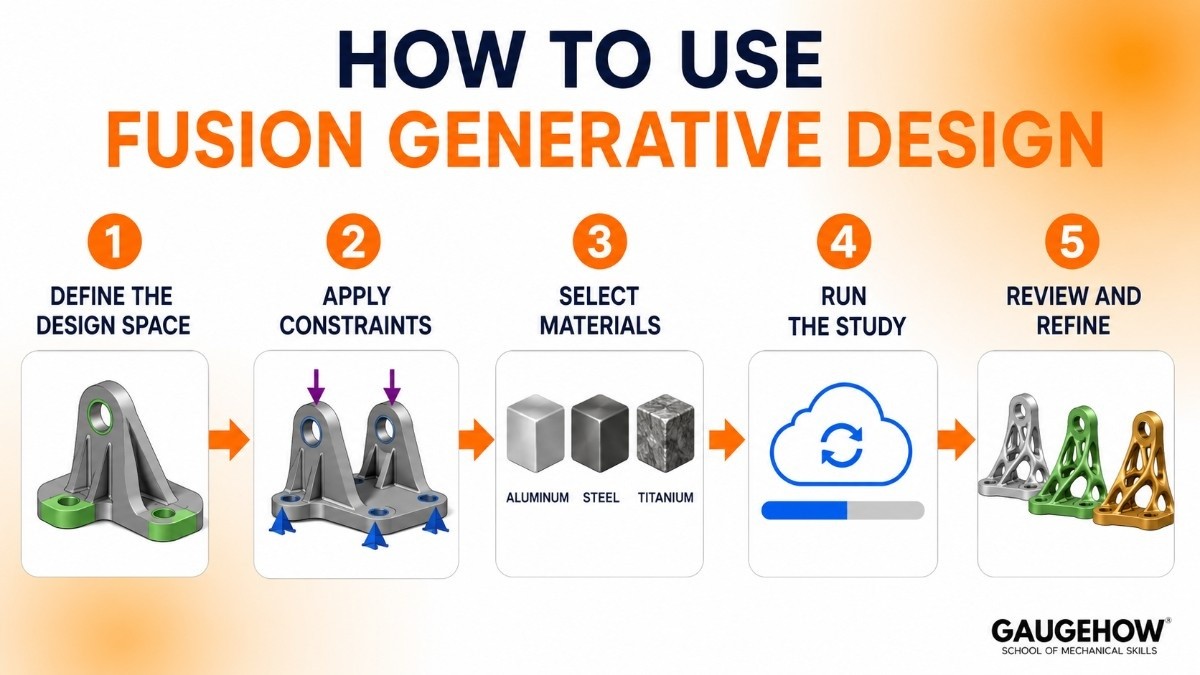
Define the Design Space
Start by creating the geometry that must remain unchanged.
This includes connection points, mounting surfaces, and critical design regions.
Apply Constraints
Add loads, supports, manufacturing rules, and design requirements.
These inputs guide the design engine.
Select Materials
Choose the material options you want the system to evaluate.
Different materials create different design outcomes.
Run the Study
The software uses cloud computing to generate multiple design solutions.
Processing time depends on complexity.
Review and Refine
Compare the generated designs and refine the chosen option for production.
Best Practices for Fusion 360 Generative Design
Start with Clear Constraints
The better your engineering inputs, the better your design results.
Poor constraints often create impractical designs.
Limit Material Options
Testing too many materials at once can make analysis harder.
Focus on realistic manufacturing choices.
Validate with Simulation
Always test the selected design before manufacturing.
Generative outputs still require engineering validation.
Focus on Manufacturability
Choose manufacturing methods that match your actual production capabilities.
Fusion Generative Design Tutorial for Beginners
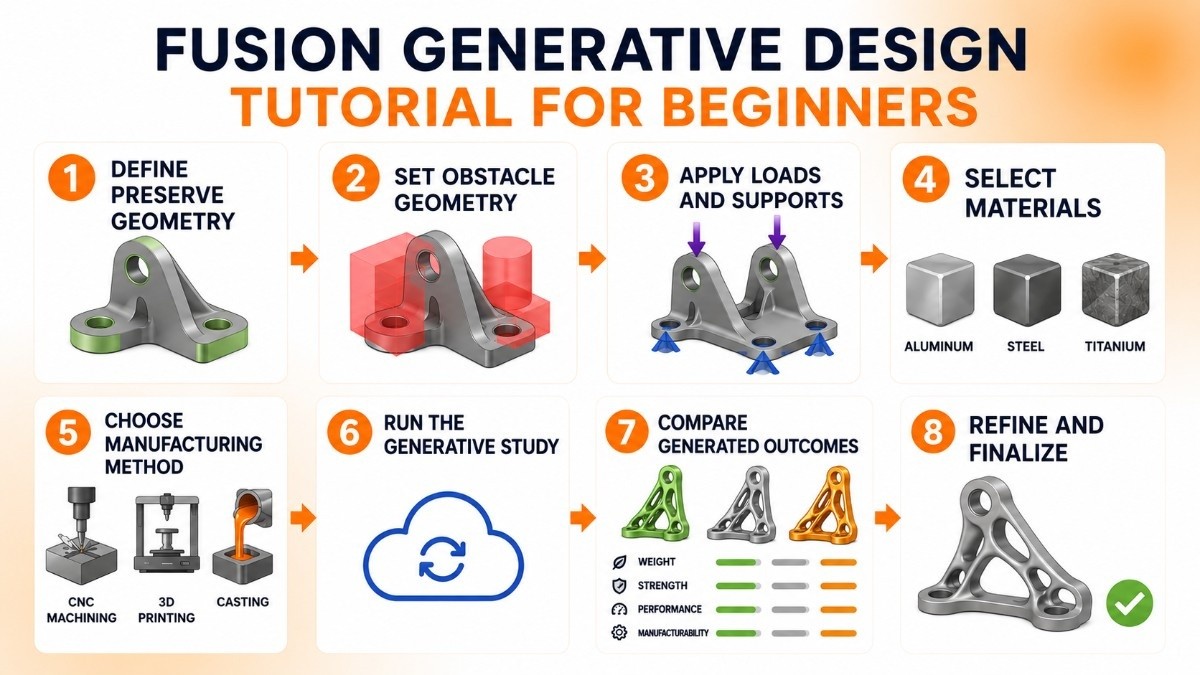
If you are new to Autodesk Fusion 360 Generative Design, start with simple parts like brackets or fixtures. This helps you understand the workflow before working on complex assemblies.
Step 1: Define Preserve Geometry
This is the part of the design that must stay unchanged.
Examples include:
Mounting holes
Connection points
Fixed surfaces
These areas are protected and cannot be modified by the software.
Step 2: Set Obstacle Geometry
Obstacle geometry defines the spaces where material cannot be placed.
This ensures the final design does not interfere with nearby components or movement.
Step 3: Apply Loads and Supports
You need to tell the software how the part will work in real life.
This includes:
Where force is applied
How much load the part will carry
Where the part is fixed or supported
This helps generate realistic designs.
Step 4: Select Materials
Choose the material you want to test.
Common options include:
Aluminum
Steel
Titanium
Material choice affects strength, weight, and cost.
Step 5: Choose Manufacturing Method
Tell the software how the part will be made.
Options may include:
CNC machining
3D printing
Casting
This ensures the generated design can actually be manufactured.
Step 6: Run the Generative Study
Once everything is set, run the study.
The software uses cloud processing to generate multiple design options based on your requirements.
Step 7: Compare Generated Outcomes
Review all design results and compare them based on:
Weight
Strength
Performance
Manufacturability
Choose the design that best fits your engineering goals.
Step 8: Refine and Finalize
After selecting the best result, refine the design for production.
You can edit and optimize it further inside Fusion 360 before manufacturing.
Once you understand these steps, you can move to more advanced and complex product designs.
Autodesk Fusion 360 Generative Design Pricing
Pricing depends on your subscription plan.
Standard Fusion 360 Subscription
Includes access to core CAD, CAM, and CAE tools.
Some advanced generative design capabilities may require cloud credits.
Cloud Credit Model
Certain simulation and generative studies use cloud credits.
The number required depends on study complexity.
Free Access
Educational users and students often get free access through Autodesk education programs.
Trial access is also available.
Pros and Cons
Pros
Faster Design Exploration
Engineers can test more design possibilities in less time.
Lightweight Optimization
Excellent for reducing material usage.
Cloud Processing
No need for expensive local hardware.
Strong CAD Integration
Works directly inside Fusion 360 workflows.
Cons
Learning Curve
New users need time to understand constraints and setup.
Cloud Credit Costs
Heavy use can increase operational costs.
Internet Dependency
Cloud processing requires reliable connectivity.
Not Ideal for Every Design
Simple parts may not need generative design.
Best For
Autodesk Fusion 360 Generative Design works best for:
Small to Mid-Sized Manufacturing Teams
Companies looking for affordable advanced design tools.
Aerospace and Automotive
Ideal for lightweight structural optimization.
Product Development Teams
Useful for innovation-focused engineering projects.
Additive Manufacturing Workflows
Perfect for designs intended for 3D printing.
Integrations
Fusion 360 connects with:
Autodesk ecosystem tools
ERP systems through APIs
Manufacturing simulation tools
CNC machining workflows
Cloud collaboration platforms
Deployment Options
Cloud-Based Deployment
Runs entirely in the cloud.
No local server setup is needed.
Brownfield Readiness
It can fit into existing CAD workflows without major infrastructure changes.
This makes adoption easier for growing engineering teams.
Alternatives to Fusion Generative Design
nTopology
Strong for lattice and advanced manufacturing design.
Altair Inspire
Great for structural optimization.
Siemens NX
Enterprise-grade generative engineering.
Solid Edge
Good for integrated design workflows.
PTC Creo
Strong simulation and optimization capabilities.
Frequently Asked Questions
Is Fusion Generative Design cloud-based?
Yes.
All major design generation calculations run in the cloud.
Is Fusion 360 good for beginners?
Yes.
Its interface is easier to learn than many enterprise engineering tools.
Fusion Generative Design vs topology optimization?
Generative design explores multiple complete design options.
Topology optimization improves an existing design.
Does Fusion 360 require cloud credits?
Some advanced generative studies may require cloud credits.
This depends on the plan and study complexity.
Is Fusion Generative Design worth it?
For engineering teams focused on lightweight design, faster innovation, and advanced optimization, it offers strong value.
Final Thoughts
Autodesk Fusion 360 Generative Design is one of the most accessible AI-driven engineering design tools available today.
It helps engineers create smarter, lighter, and more manufacturable products without requiring enterprise-level infrastructure. For teams exploring modern product development methods, it is a powerful solution worth learning in 2026.























