nTop
nTop software

nTop Software: Features, Pricing, Tutorials & Honest Review (2025)
If you work in aerospace, medical devices, or advanced manufacturing, you have probably heard the name nTopology — or its newer brand, nTop. This guide covers everything you need to know: what it does, how much it costs, how it stacks up against tools like Ansys, and whether it is the right fit for your team.
What Is nTop Software?
nTop (formerly nTopology) is a computational design and engineering software built for creating complex, high-performance parts that traditional CAD tools simply cannot handle. It was founded in 2015 and is headquartered in New York.
At its core, nTop uses a technology called implicit modeling — a fundamentally different way of representing geometry compared to standard boundary-representation (B-rep) CAD.
This makes it possible to design intricate lattice structures, conformal cooling channels, and topology-optimized parts without the file size and performance issues that bog down traditional tools.
It is used across industries where part performance is critical and where additive manufacturing (3D printing) is part of the production process.
Key Features of nTop
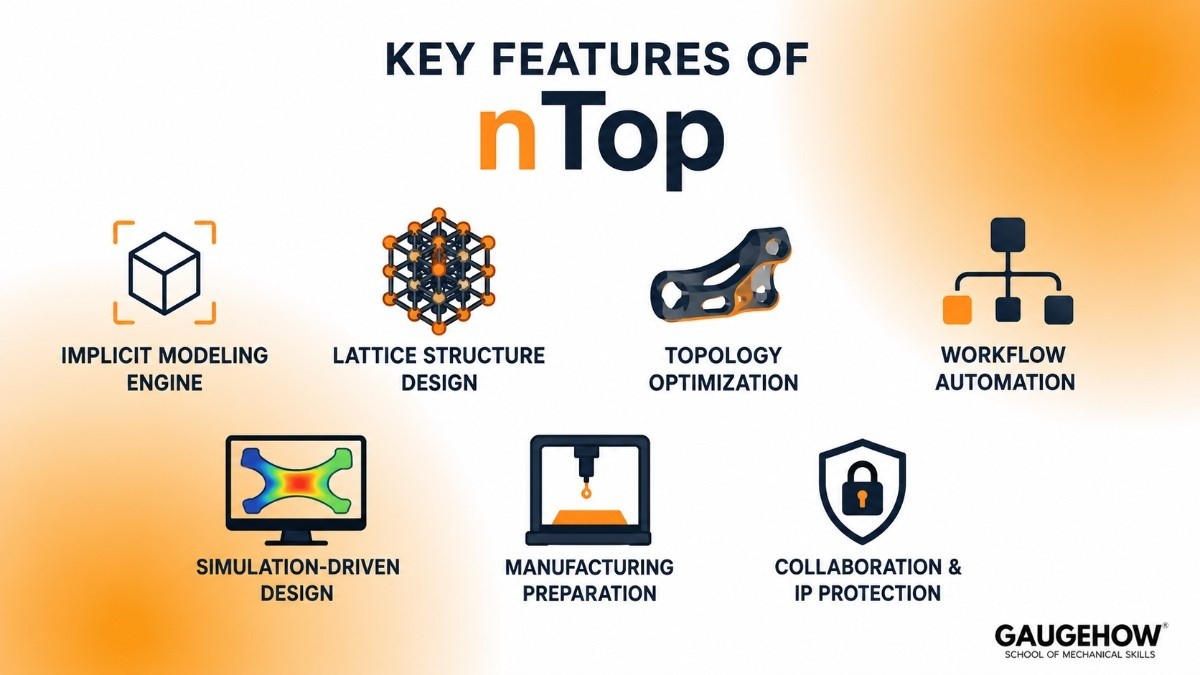
Implicit Modeling Engine
Unlike traditional CAD, nTop represents geometry as mathematical functions. This means you can work with extremely complex shapes — like organic lattices or variable-density meshes — without slowdowns or file corruption.
Lattice Structure Design
nTop is widely regarded as the best tool available for designing lattice structures at scale. You can control cell size, wall thickness, and density gradients across a part — all driven by simulation data.
Topology Optimization
Feed in load cases and boundary conditions, and nTop will generate the most material-efficient shape for the job. This is particularly useful for weight reduction in aerospace and automotive parts.
Workflow Automation
nTop lets you build reusable, parametric workflows using a node-based interface (similar to visual scripting). Once a workflow is set up, the same logic can be applied to hundreds of different part geometries automatically.
Simulation-Driven Design
nTop connects design directly to performance data. You can import FEA results and use them to drive geometry changes — for example, automatically thickening walls where stress is highest.
Manufacturing Preparation
The software includes tools for build orientation, support structure generation, and export to formats required by metal 3D printing systems (EOS, SLM Solutions, Desktop Metal, and others).
Collaboration and IP Protection
Workflows can be packaged and shared across a team without exposing the underlying logic — useful for organizations that want to protect proprietary engineering methods.
nTop Pricing
How nTop Charges
nTop uses a subscription-based licensing model sold directly through their sales team. There is no publicly listed price on their website — you need to contact them for a quote.
Pricing Tiers (Estimated)
Based on publicly available information and user reports:
Individual / Academic License — Available at a significantly reduced rate for students and researchers. Some universities have site licenses.
Professional License — Typically in the range of $10,000–$20,000 per seat per year for commercial use.
Enterprise / Site License — Custom pricing for teams, includes workflow sharing, support, and volume discounts.
Is There a Free Version?
There is no permanently free version of nTop for commercial use. However, nTop does offer:
A free trial (you need to request access through their website)
Academic licenses for qualifying institutions
Occasional evaluation access for enterprise prospects
nTop Software Free Download
You cannot download a standalone free version of nTop. The trial is managed and requires approval from the nTop team. If you are looking to evaluate the software, go to ntop.com and request a trial directly. Be aware of third-party sites claiming to offer a free download — these are not official and may contain malware.
nTop Tutorials: Where to Learn

If you are just getting started, here are the best places to find nTop tutorials:
Official Resources
nTop Academy — Free courses available at support.ntop.com, covering everything from basic navigation to advanced lattice design
nTop YouTube channel — Short video tutorials and feature walkthroughs
nTop documentation — Comprehensive reference library at support.ntop.com
Community and Third-Party
LinkedIn Learning occasionally features nTop content from practitioners
University research groups regularly publish workflows and case studies using nTop
The nTop community forum is an active space for asking questions and sharing workflows
The learning curve is real, but the official training materials are well-structured and frequently updated. Most engineers report becoming productive within a few weeks of dedicated learning.
Pros and Cons
What nTop Does Well
Handles complex geometry that crashes or slows other tools
Purpose-built for additive manufacturing design workflows
Workflow automation saves significant time on repetitive design tasks
Strong customer support and onboarding resources
Consistently praised in user reviews for technical depth
Where It Falls Short
Steep learning curve — the node-based interface is unfamiliar to engineers coming from traditional CAD
High cost — not practical for small shops or freelancers
No free tier — evaluation requires going through a sales process
Limited traditional CAD features — it is not a replacement for SolidWorks or CATIA for standard part modeling
Large file exports can be difficult to manage downstream
Who Is nTop Best For?
Ideal Industries
Aerospace and defense (lightweighting, topology optimization)
Medical devices (implants, prosthetics, custom orthopedics)
Automotive (thermal management, structural brackets)
Consumer products with complex geometry
Ideal Team Size and Setup
nTop is best suited for mid-to-large engineering teams that already have an additive manufacturing workflow in place and are looking to push part performance further. It is not a first-CAD-tool — it sits alongside existing CAD and simulation software as a specialist tool.
Small teams and startups may find the cost hard to justify unless additive manufacturing is central to their business.
Integrations
nTop is designed to slot into an existing engineering stack, not replace it. Key integrations include:
CAD tools — Import from SolidWorks, CATIA, NX, Creo via STEP or IGES
Simulation — Import FEA results from Ansys, Abaqus, and Nastran to drive geometry
3D printing systems — Direct export to EOS, SLM Solutions, Trumpf, Desktop Metal, and others
Ansys — nTop and Ansys have a documented integration allowing simulation-driven design in a connected workflow
nTop API — Available for teams that want to automate or integrate nTop into their own pipelines and PLM systems
Deployment
Cloud or On-Premises?
nTop is primarily a desktop application that runs on Windows. It does not currently offer a browser-based or cloud-hosted version for general use.
System Requirements
nTop is computationally intensive. You will need a modern workstation with a capable multi-core processor, a dedicated GPU, and at least 32 GB of RAM for complex parts.
Brownfield Readiness
nTop is designed to work with existing engineering data. If you have legacy CAD files, simulation outputs, or manufacturing specs, you can import them and build nTop workflows around them without starting from scratch.
nTop vs Ansys
This is one of the most common comparisons engineers make before choosing nTop.
nTop | Ansys | |
|---|---|---|
Primary use | Computational design, AM-ready geometry | Structural, thermal, and fluid simulation |
Topology optimization | Yes, geometry-focused | Yes, simulation-focused |
Lattice design | Industry-leading | Limited |
Simulation | Import results; does not run FEA natively | Full FEA, CFD, multiphysics |
AM workflow | Native | Add-on (Additive Suite) |
Best together? | Yes — they are complementary, not competing |
The honest take: nTop and Ansys are not direct competitors. Most serious engineering teams use both. Ansys handles the physics simulation; nTop handles the geometry response to that simulation. If you are trying to choose one, consider what your actual bottleneck is — geometry or analysis.
Alternatives to nTop
Materialise Magics
A widely used software for build preparation and support generation in metal 3D printing. Less focused on design, more focused on print-ready file management.
Ansys Additive Suite
Ansys's native offering for additive manufacturing simulation and build optimization. Strong on the simulation side, weaker on geometry manipulation compared to nTop.
Autodesk Fusion 360 (with Generative Design)
A more accessible entry point for generative design. Lower cost, broader feature set, but less powerful for complex lattice work and high-performance AM parts.
MSC Apex
An engineering software platform with generative design capabilities, aimed at aerospace and automotive. Closer to a full simulation environment than nTop.
Siemens NX
A premium PLM and CAD platform with topology optimization built in. Better suited for organizations already in the Siemens ecosystem.
Frequently Asked Questions
Is nTop the same as nTopology?
Yes. The company rebranded from nTopology to nTop in 2022. The software, team, and technology are the same — only the name changed.
Can nTop replace SolidWorks or CATIA?
No. nTop is not a general-purpose CAD tool. It does not handle assemblies, drawings, or standard part modeling the way SolidWorks or CATIA does. It is a specialist tool used alongside those platforms, not instead of them.
Is nTop cloud-based?
No. nTop currently runs as a Windows desktop application. There is no browser-based version available for standard use.
How does nTop handle very large or complex parts?
This is one of nTop's biggest strengths. Because it uses implicit modeling (math-based geometry), it handles complexity that would crash a traditional B-rep CAD tool. File sizes stay manageable even for highly detailed lattice structures.
Does nTop work with metal 3D printers?
Yes. nTop has direct integrations with major metal 3D printing platforms including EOS, SLM Solutions, Trumpf, and Desktop Metal. It can export in the formats those machines require.
Is there an nTop free trial available?
Yes, but it requires a request through nTop's website. There is no self-service download. Contact their team at ntop.com to request evaluation access.
How does nTop compare to Altair Inspire?
Both nTop and Altair Inspire are used for design optimization, but they focus on different stages of the workflow. Altair Inspire is widely used for topology optimization, concept development, and early-stage simulation. nTop is typically used later in the process for lattice design, advanced geometry generation, and preparing complex parts for additive manufacturing.
Final Thoughts
nTop is a genuinely powerful tool — but it is not for everyone. If your team is doing serious additive manufacturing and you are hitting the limits of what traditional CAD can model, it is worth a serious look. If you are just exploring 3D printing or working on standard machined parts, the cost and learning investment probably does not make sense yet.
The best next step is to request a trial directly from nTop and bring a real engineering challenge to that evaluation. That will tell you more than any review.
nTop is a computational design software that helps engineers create complex, high-performance parts faster - built for aerospace and manufacturing teams.























