Mitutoyo MCOSMOS
Mitutoyo MCOSMOS

MCOSMOS: A Beginner's Guide to Mitutoyo's CMM Measuring Software
If you're studying quality engineering, manufacturing, or metrology, you'll come across MCOSMOS sooner or later.
It runs on some of the most precise measuring machines in the world, and you'll find it in factories that make automotive parts, medical devices, and aerospace components.
Most of what's online about it reads like a product brochure. This guide is different. Here's a plain-language look at what MCOSMOS is, how it works, what it costs, and how it compares to its biggest rival.
What Is MCOSMOS?
MCOSMOS is Mitutoyo's modular CMM software suite that controls coordinate measuring machines and turns measurement data into usable quality information.
A coordinate measuring machine, or CMM, is a precision device with a touch probe that physically measures the exact shape and dimensions of a manufactured part.
MCOSMOS is the software that tells the machine where to probe, collects the results, checks them against the design tolerances, and produces reports.
What makes it stand out is its modular design. Instead of one giant program you buy all at once, MCOSMOS is a family of interrelated modules.
You start with the core and add only the extras you actually need, like scanning, gear measurement, or CAD integration. That keeps costs manageable and the interface clean.
Key Features
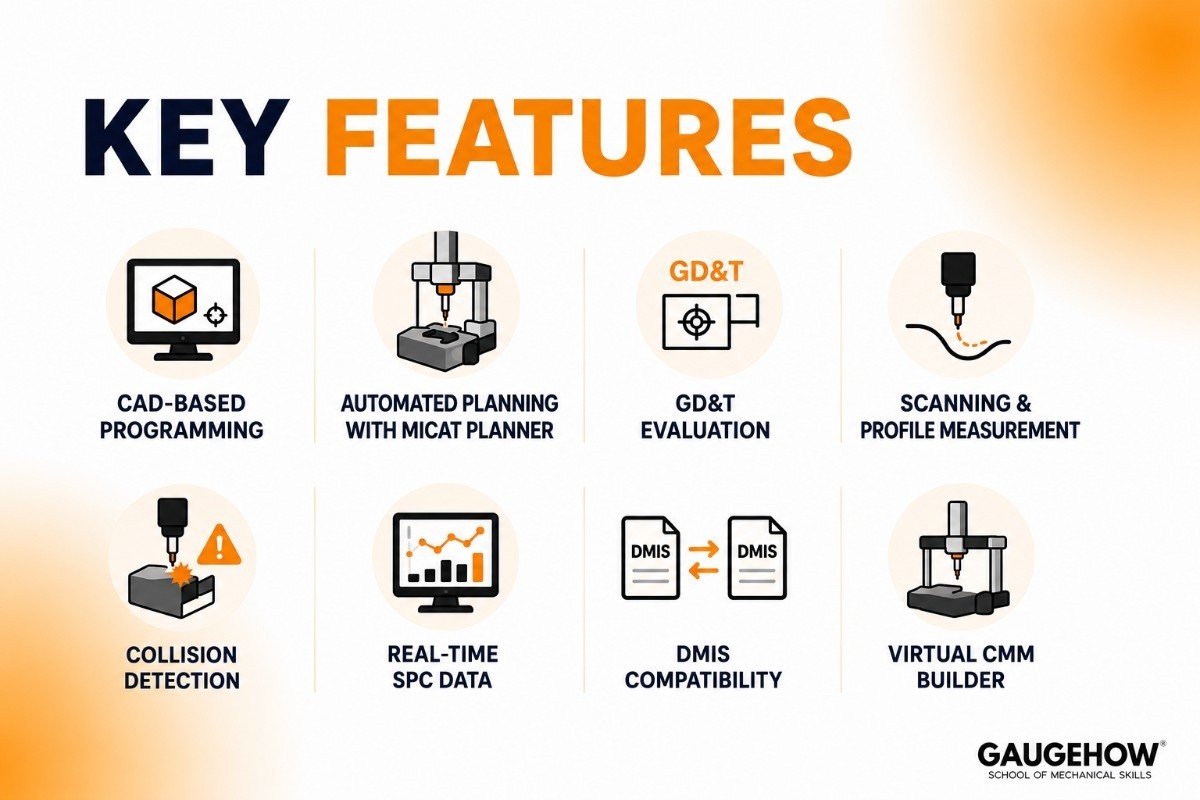
Here's what MCOSMOS actually does, in plain terms:
CAD-based programming. The CAT1000 module lets you load a 3D CAD model, click the features you want to measure, and build a measurement routine visually. No memorizing codes.
Automated planning with MiCAT Planner. Load a CAD model, pick your CMM, position the part virtually, and MiCAT generates the measurement program for you. This is a serious time-saver for new parts.
GD&T evaluation. It checks Geometric Dimensioning and Tolerancing rules, the industry standard for defining how precise a part's shape and position must be.
Scanning and profile measurement. The SCANPAK module handles contour scanning with continuous probes, letting you check curved profiles against tolerance zones.
Collision detection. CAT1000P simulates probe paths automatically and flags any moves that would crash the probe into the part before you run the program on the real machine.
Real-time SPC data. MeasurLink captures measurement results as the CMM runs and feeds them into statistical process control charts, helping you spot trends before they become defects.
DMIS compatibility. The Pure DMISPAK module lets MCOSMOS exchange programs with other DMIS-based software, useful if your factory runs a mix of CMM brands.
Virtual CMM builder. CMM System Manager lets you create a digital replica of your machine for simulation, so you can test programs offline without tying up the real CMM.
MCOSMOS Tutorial: How to Get Started
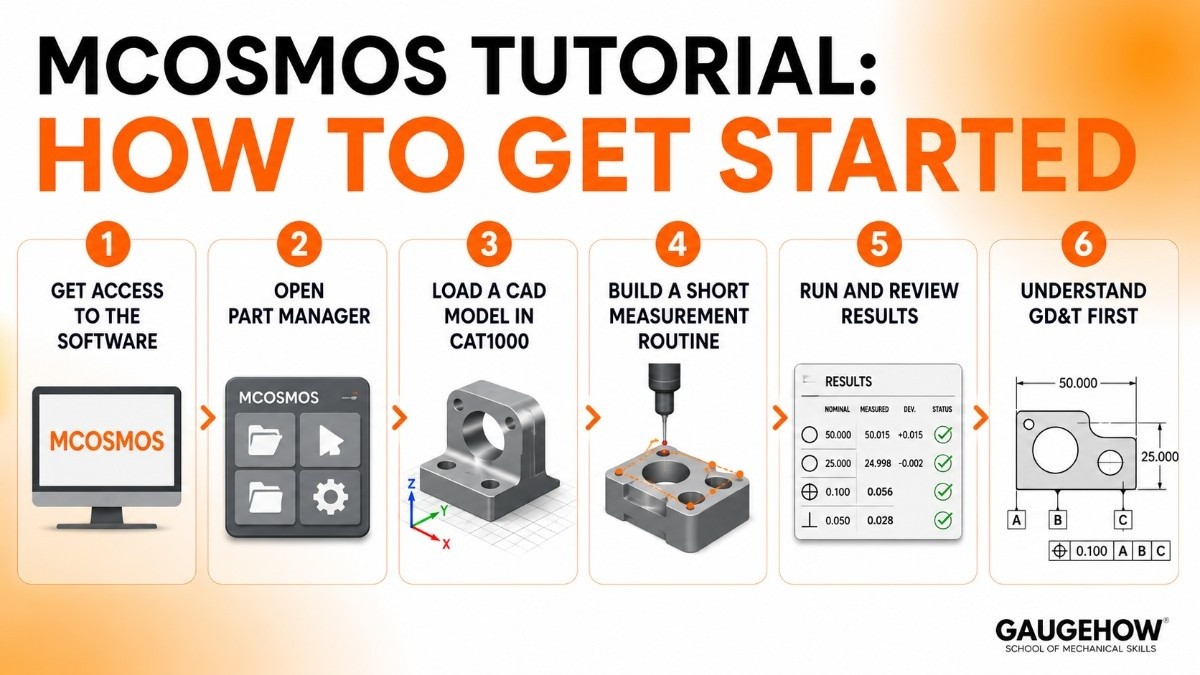
You don't need formal classroom training to take your first steps. Here's the basic path:
Get access to the software. MCOSMOS is typically supplied with a Mitutoyo CMM. If you're a student, check whether your school's metrology lab has it installed.
Open Part Manager. This is the main control center. Everything in MCOSMOS starts here: loading programs, managing data, and launching modules.
Load a CAD model in CAT1000. Import a simple IGES or STEP file and practice clicking on features like holes, planes, and cylinders. The software will show you what each feature looks like in 3D.
Build a short measurement routine. Add a few features, define their tolerances, and run a simulation to check for collisions. You don't need a real part to do this step.
Run and review results. Once you have access to an actual CMM, run your routine on a physical part and look at the output report. Results show measured values, nominal values, deviations, and pass/fail status.
A genuinely useful tip for beginners: spend time understanding GD&T before you dive deep into the software. MCOSMOS evaluates GD&T rules, but if you don't understand what a perpendicularity or true position callout means on a drawing, the software results won't make sense.
The measurement knowledge comes first; the software is just the tool.
MCOSMOS vs PC-DMIS
This is the comparison most metrology engineers argue about. Both are serious, widely used CMM programs, and the choice between them comes up constantly when shops buy a new machine.
MCOSMOS is modular and works best tightly paired with Mitutoyo hardware. Its programming approach is visual and structured, and engineers who use it often describe it as logical once you learn how it thinks.
The MiCAT Planner module makes first-article programming noticeably faster than writing routines by hand.
PC-DMIS (made by Hexagon) is the most widely deployed CMM software in the world, with over 70,000 seats. It's code-driven and extremely flexible.
It runs on Hexagon machines and can be retrofitted onto most other brands, which makes it the default choice for shops with mixed equipment.
Here's an honest side-by-side:
MCOSMOS | PC-DMIS | |
|---|---|---|
Made by | Mitutoyo | Hexagon |
Best hardware fit | Mitutoyo CMMs | Hexagon CMMs + most others |
Programming style | Visual, modular, menu-driven | Code-based, script-capable |
Learning curve | Moderate | Steeper |
Automation depth | Good | Excellent |
Multi-brand support | Limited | Very broad |
The short version: choose MCOSMOS if you run Mitutoyo hardware and want a clean, modular system.
Choose PC-DMIS if you have mixed brands, need heavy automation, or your team already knows it. Many large factories actually run both, each on the equipment it fits.
Pricing
Let's be straight about this because it's what most buyers really want to know.
Mitutoyo does not publish public prices for MCOSMOS. There's no online shopping cart and no flat monthly fee. Pricing works like this:
Bundled with a CMM
In most cases, MCOSMOS comes packaged with the purchase of a Mitutoyo CMM. The software cost is folded into the machine quote. This makes it hard to price the software independently.
Modular add-ons
The core software is the starting point. Modules like SCANPAK, MiCAT Planner, CAT1000, and GEOPAK Gear are priced as extras. You pay only for what you need, but each add-on adds to the total.
Training
Mitutoyo and its resellers offer on-site and classroom training. Prices vary by location, trainer, and course level, and aren't listed publicly. Third-party trainers like ARC Metrology also offer MCOSMOS courses at competitive rates.
No free tier
Unlike some general-purpose tools, there's no free version you can download and practice on at home. Students typically access it through a school's lab.
The honest takeaway: this is professional industrial software priced for businesses. Get a written quote that lists exactly which modules are included, and factor in training costs, which add up.
Pros and Cons
Pros
Tight integration with Mitutoyo CMMs means setup is smooth and reliable.
Modular structure lets you buy only what you need.
MiCAT Planner dramatically speeds up first-article programming from CAD.
Logical, structured interface that makes sense once you learn its pattern.
Backed by Mitutoyo, the world's largest precision measurement company.
Cons
Works best with Mitutoyo hardware; less flexible for mixed-brand shops than PC-DMIS.
No public pricing, so budgeting requires talking to sales first.
Editing a program while in Learn Mode is restricted, which frustrates engineers used to more flexible software.
No free trial or home version, making it hard for students to practice independently.
Listing the downsides isn't a knock on the product. It's what separates an honest guide from a sales page.
Best For
MCOSMOS fits a specific profile well.
By company size, it works for small precision shops up to large manufacturers, especially those already running Mitutoyo CMMs.
By industry, the strongest fits are automotive, aerospace, medical devices, precision engineering, and electronics, anywhere tight tolerances and reliable quality records are non-negotiable.
By use case, it's ideal for dimensional inspection and GD&T verification where the team values a logical, guided workflow over raw scripting power. It's less ideal for shops with multiple CMM brands that need one universal program to run everything.
Integrations
MCOSMOS integrates into a factory's quality workflow in a few clear ways.
On the hardware side, it connects to the full range of Mitutoyo CMMs (including Crysta-Apex and LEGEX series), touch-trigger and scanning probes, and vision systems.
The DMISPAK module also allows limited interoperability with non-Mitutoyo machines.
On the software side, MeasurLink collects CMM measurement data in real time and feeds it into SPC (statistical process control) dashboards. Results can be stored locally or on a networked SQL server, making the data accessible to quality managers across the factory.
From there, feeding results into ERP or MES systems (the business and production software factories use) is possible through data exports and API connections, but it's configuration work, not a single click.
Deployment: On-Prem and Edge
MCOSMOS runs on-premise, installed on a Windows PC connected directly to the CMM on the shop floor. The measurement happens locally, with no dependency on the internet, which is exactly what you want for a production-critical system.
There's no cloud deployment model. This is firmly factory-floor software, and that's appropriate for its use case.
Fast, reliable, local results matter more than remote access when a CMM is running inspection cycles on a production line.
On brownfield readiness (adding new software to equipment a factory already has), MCOSMOS fits naturally into Mitutoyo setups. If your CMMs are already Mitutoyo, upgrading or adding MCOSMOS modules is straightforward.
For non-Mitutoyo hardware, the fit is less natural, and a brand-neutral option like PC-DMIS usually makes more sense.
Alternatives to MCOSMOS
MCOSMOS isn't the only option. Depending on your hardware and goals, these are worth comparing:
Hexagon PC-DMIS — the most widely used CMM software globally, strong for automation and mixed-brand setups.
ZEISS CALYPSO — excellent visual GD&T and fast operator onboarding, designed for ZEISS hardware.
PolyWorks (InnovMetric) — strong for 3D scanning, portable arms, and reverse engineering.
Renishaw MODUS — built for Renishaw measurement hardware and probe systems.
Verisurf — a CAD-based metrology program that works across many machine types.
(Links above are placeholders — point each to your own detailed comparison or review page.)
Frequently Asked Questions
What is MCOSMOS used for? It's used to program and operate Mitutoyo coordinate measuring machines, measuring the dimensions of manufactured parts and checking them against design tolerances and GD&T requirements.
Is MCOSMOS the same as GEOPAK? GEOPAK is the original measuring module that sits at the core of MCOSMOS. The broader MCOSMOS suite wraps GEOPAK with a full modular platform including CAD tools, scanning, SPC, and planning. So GEOPAK is inside MCOSMOS, not a separate product.
Is MCOSMOS hard to learn? It has a moderate learning curve. The interface is logical once you understand its structure, and MiCAT Planner makes programming easier for beginners. Learning GD&T basics before you start will make the whole experience much smoother.
How much does MCOSMOS cost? Mitutoyo doesn't publish prices. MCOSMOS is typically bundled with a CMM purchase, and add-on modules are quoted separately. Contact Mitutoyo or an authorized reseller for a written quote.
MCOSMOS vs PC-DMIS — which is better? MCOSMOS is the better fit for Mitutoyo hardware, with a cleaner modular structure and faster CAD-based programming. PC-DMIS is more flexible for mixed-brand setups and deeper automation. The best choice depends on your machines and your team.
Is MCOSMOS cloud-based? No. It runs on-premise on a Windows PC connected to the CMM. Results can be networked and shared across a factory, but the core software is a local, shop-floor application.
Mitutoyo MCOSMOS, CMM software that helps measure parts, inspect quality, and improve accuracy in manufacturing. See its features, uses, and benefits.























