Polyworks
Polyworks

PolyWorks: A Beginner's Guide to the Universal 3D Metrology Software
If you're studying manufacturing, quality engineering, or metrology, you'll come across PolyWorks at some point. It shows up in car factories, aerospace facilities, and precision engineering labs around the world.
And unlike most measuring software, it works with almost every type of measuring device on the market.
This guide explains what PolyWorks is, how it works, what it costs, and how it compares to its main rival. It's written in plain language so anyone, student or working engineer, can follow along.
What Is PolyWorks?
PolyWorks is a universal 3D metrology software platform that lets manufacturers measure, inspect, and analyse parts using any type of measuring device from a single interface.
It's made by InnovMetric Software Inc., a Canadian company founded in 1994 and based in Quebec City. InnovMetric has around 650 professionals working across 18 offices in 43 countries, and it has been carbon-neutral since 2007.
The company invented the concept of a universal metrology platform, meaning one software that works equally well whether you're using a coordinate measuring machine (CMM), a portable measuring arm, a laser tracker, or a 3D scanner.
That universality is the big idea. Most competing software is tied to one hardware brand. PolyWorks works with all of them, which means engineers only need to learn one program regardless of which device they pick up.
PolyWorks Software: The Product Family
Before going further, it helps to know that "PolyWorks" is actually a family of products, not a single tool.
The main ones you'll encounter are:
PolyWorks|Inspector™ — the core inspection product for measuring parts and checking quality. This is what most people mean when they say "PolyWorks."
PolyWorks|Modeler™ — a reverse engineering tool that converts 3D scan data into usable CAD surfaces.
PolyWorks|DataLoop™ — a data management platform for sharing measurement results across teams and sites.
PolyWorks|AR™ — a mixed-reality tool using Microsoft HoloLens to project measurement results onto the actual part.
PolyWorks|Reviewer™ — a free app anyone can use to open and review PolyWorks inspection reports on any device.
Most of this guide focuses on PolyWorks|Inspector, since that's the product most engineers work with day-to-day.
PolyWorks Inspector: Key Features
Here's what PolyWorks|Inspector actually does, in concrete terms, without the sales language:
Works with every measurement device. CMMs, portable arms, laser trackers, structured-light scanners, and total stations all connect through one universal interface. You don't need separate software for each device.
GD&T inspection. It evaluates Geometric Dimensioning and Tolerancing, the standard way of defining how precisely a part must be made. It imports GD&T data directly from CAD files.
CAD-based inspection planning. You load your 3D CAD model, define what to measure, and PolyWorks builds the inspection routine. PTB-certified mathematical algorithms (certified by the German national metrology institute) run the calculations.
Colour deviation maps. After measuring a scanned part, the software produces colour-coded maps showing exactly where the part deviates from the design, which makes defects easy to spot and communicate to teams.
Offline programming. You can write and test measurement routines without tying up the actual machine, which saves expensive machine time.
Collision detection and avoidance. The sequence editor checks for potential probe collisions in real time and adjusts paths automatically.
Macro programming. A built-in scripting language lets advanced users automate repetitive tasks and build custom inspection workflows.
Free report viewer. PolyWorks|Reviewer lets anyone on your team open and explore inspection reports on any device, without needing a paid licence.
3D Metrology Software: Where PolyWorks Fits
The term "3D metrology software" covers a broad range of tools for measuring three-dimensional objects. Most of those tools fall into one of two camps.
The first camp is hardware-specific: software tied to one brand's machines, like ZEISS CALYPSO for ZEISS CMMs or Mitutoyo MCOSMOS for Mitutoyo machines. These tools work brilliantly within their own ecosystem but become awkward when you bring in a different brand of device.
The second camp is universal, and PolyWorks is the leading example. One interface handles all your devices and all your inspection tasks. If your lab has a Hexagon CMM, a FARO arm, a Leica tracker, and a Creaform scanner, PolyWorks controls all four.
This matters most for larger manufacturers who have built up a mixed fleet of equipment over many years. It's also why all eight of the world's largest automakers standardise on PolyWorks for body-in-white and assembly inspection.
PolyWorks Tutorial: How to Get Started
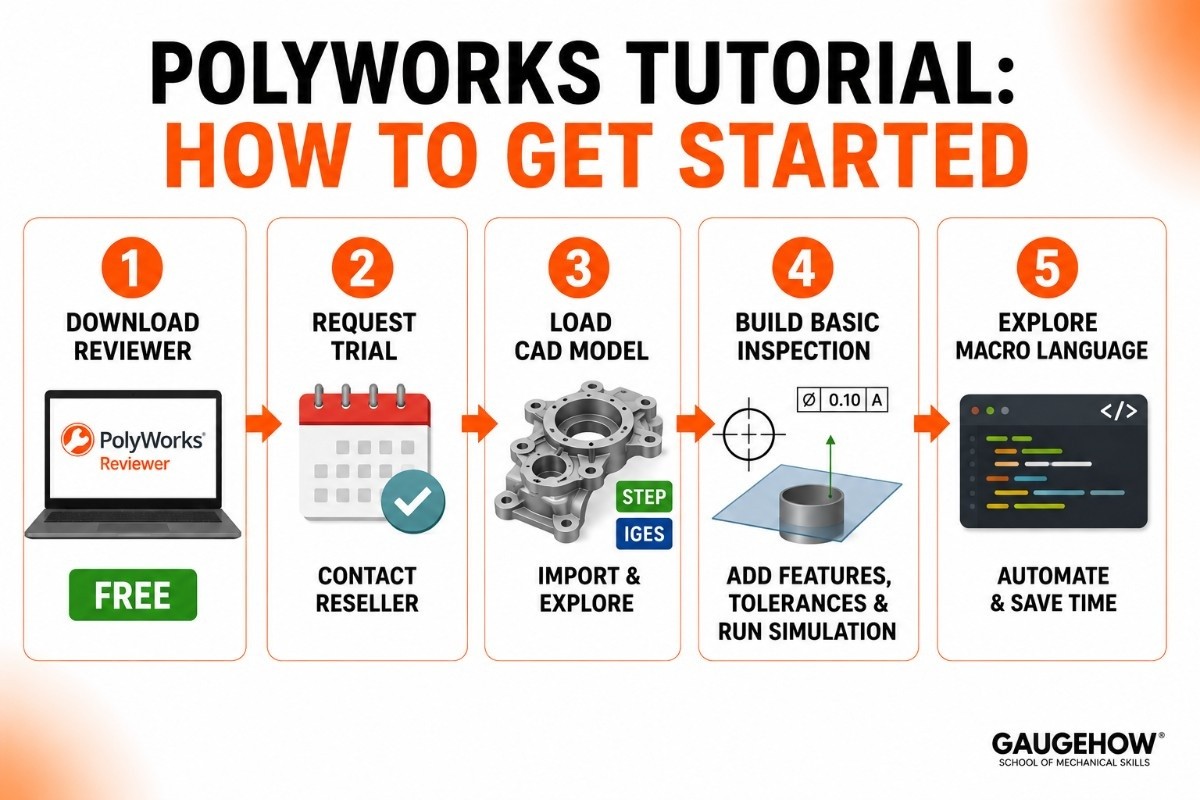
You don't need a classroom course to take your first steps. Here's the basic path:
Download PolyWorks|Reviewer for free. Before you spend anything, download the free Reviewer app from InnovMetric's website. It lets you open real inspection project files and explore the interface without a paid licence. This is the best way to see whether PolyWorks is right for your workflow.
Request a trial of PolyWorks|Inspector. InnovMetric and its resellers offer evaluation access. Contact a local reseller to get set up.
Load a CAD model. Import a STEP or IGES file and explore how the software handles features, GD&T controls, and alignment.
Build a basic inspection. Add a few features (circles, planes, cylinders), define tolerances, and run a simulation. You don't need a physical part to practise this step.
Explore the macro language. Once you're comfortable with manual inspection, look at the scripting tools. Even simple macros save significant time on repetitive tasks.
A genuine tip for beginners: PolyWorks has a reputation for being easier to learn than PC-DMIS, particularly for engineers coming from a scanning background. But the macro language has real depth, so if your goal is advanced automation, budget time to learn it properly.
PolyWorks vs PC-DMIS
This is the comparison that metrology engineers debate most. Both are serious platforms used at the highest levels of manufacturing.
PolyWorks is genuinely device-agnostic. It handles scanning data as naturally as point probing, which is why it dominates in environments with 3D scanners, portable arms, and laser trackers. The interface is consistent regardless of the device, and the colour deviation maps make scan-based inspection reports visually clear.
PC-DMIS (made by Hexagon) is the most widely installed CMM software in the world, with over 70,000 declared seats. It's extremely powerful for traditional CNC CMM automation, deep scripting, and running complex routines on Hexagon and third-party machines. Its strength is programmatic control at scale.
Here's an honest side-by-side:
PolyWorks | PC-DMIS | |
|---|---|---|
Made by | InnovMetric | Hexagon |
Device support | All brands and all types | Primarily CMMs, Hexagon-focused |
Best for | Mixed-device shops, scanning | High-volume CNC CMM automation |
Learning curve | Moderate | Steeper |
Scan data handling | Excellent | Limited |
Colour deviation maps | Built-in, strong | Less central |
Free viewer | Yes (Reviewer) | No |
The short version: choose PolyWorks if you have multiple device types, work with scanned point clouds, or want one platform for the whole quality department. Choose PC-DMIS if your shop runs primarily Hexagon CMMs and needs deep automation and scripting. Many large factories run both.
Pricing
Let's be honest about this because it's what most buyers need to know.
InnovMetric does not post a public price list on its website. However, an authorised reseller lists PolyWorks|Inspector at approximately $15,000. That's a real benchmark, even if InnovMetric's official price may differ based on your modules and region.
Here's how the model generally works:
PolyWorks|Inspector
The core inspection product. Priced per licence. Optional add-on modules (for specific device types or advanced features) are quoted separately.
PolyWorks|Modeler
The reverse engineering product. Typically quoted separately from Inspector. You can buy one, the other, or both.
PolyWorks|Reviewer — Free
Anyone can download and use the Reviewer app at no cost. It opens and explores PolyWorks inspection reports. This is genuinely free, not a crippled trial. It's a smart way to evaluate the platform before committing.
Training
InnovMetric and authorised resellers (including Hexagon's own training centre, which offers PolyWorks courses) run classroom and on-site training. Expect to pay in the range of $2,800–$3,300 per course level, in line with other professional metrology training.
The honest takeaway: this is enterprise-level software priced for businesses. The free Reviewer is a genuine on-ramp for students and curious engineers.
Pros and Cons
Pros
Truly universal — works with every major device brand and type, which no other platform in this guide fully matches.
Strong for scan-based inspection: colour maps, point cloud processing, and deviation analysis are built-in strengths.
PTB-certified algorithms, so your measurement results carry formal traceability.
Free Reviewer app lowers the barrier for teams who need to share results without paying per seat.
Trusted at the highest levels of automotive and aerospace manufacturing.
Cons
No official public pricing, so you have to contact sales to get a formal quote.
The macro language has real depth; advanced automation takes meaningful time to learn.
Primarily sold through resellers, so support quality varies by region.
Less suited to simple, single-device CMM shops where a dedicated CMM software may be cheaper and more straightforward.
Listing the downsides isn't criticism. It's what makes this guide more useful than a vendor page.
Best For
PolyWorks fits a specific kind of operation well.
By company size, it works for mid-size manufacturers up to global enterprises, particularly those with quality departments managing multiple measuring devices.
By industry, the strongest fits are automotive (especially body-in-white, powertrain, and assembly), aerospace, energy, and consumer products manufacturing, anywhere large and complex parts are inspected with a combination of devices.
By use case, it shines when your quality floor has multiple device brands, when you work heavily with 3D scanners and point clouds, or when you want one program covering the whole metrology team. It's less ideal for a small shop with one CMM brand that wants the cheapest effective option.
Integrations
PolyWorks is built to connect into the wider digital manufacturing environment.
On the device side, it supports virtually all major measurement hardware through its universal digitising hub. That includes CMM brands from Hexagon, ZEISS, Mitutoyo, and others, plus portable arms from FARO and Romer, laser trackers from Leica and API, and scanners from Creaform, Zeiss, and GOM.
On the software side, PolyWorks|DataLoop connects measurement data into the broader digital thread, making results accessible company-wide. InnovMetric also offers dedicated interoperability tools that connect PolyWorks to industry-standard CAD, PLM, and ERP platforms. Linking to MES systems for real-time quality feedback into production requires some integration configuration, usually done by your IT or quality systems team.
Deployment: On-Prem, Edge, and Cloud
PolyWorks runs primarily on-premise, installed on Windows PCs connected to measuring devices on the shop floor. The core inspection and measurement work happens locally for speed and reliability.
PolyWorks|DataLoop extends that reach by letting teams share results and access projects remotely, including from mobile devices. This gives it a light hybrid capability: local processing for the hard measurement work, network-accessible results for teams and managers.
There's no full cloud-hosted deployment model today. This is expected for production metrology, where you need the software right next to the machine, not dependent on an internet connection.
On brownfield readiness, PolyWorks performs well precisely because of its device independence. You can add it to an existing floor full of mixed hardware without replacing anything. That makes it one of the friendlier choices for factories that have accumulated equipment from multiple vendors over many years.
Alternatives to PolyWorks
PolyWorks isn't the only option. Depending on your devices and goals, these are worth comparing:
Hexagon PC-DMIS — world's most widely installed CMM software, excellent for CNC automation on Hexagon and mixed hardware.
ZEISS CALYPSO — visual, operator-friendly inspection, best within ZEISS's own CMM ecosystem.
Mitutoyo MCOSMOS — modular and logical, designed for Mitutoyo CMMs.
Geomagic Control X (3D Systems) — a strong alternative for scan-based inspection and reverse engineering.
Verisurf — CAD-based metrology software with broad device support, popular in aerospace.
(Links above are placeholders — point each to your own detailed comparison or review page.)
Frequently Asked Questions
What is PolyWorks used for? It's used to inspect and measure manufactured parts for quality control, checking dimensions and GD&T tolerances using any type of 3D measurement device — CMMs, portable arms, laser trackers, and 3D scanners — all through one interface.
Is PolyWorks free? PolyWorks|Inspector is paid software. However, PolyWorks|Reviewer is genuinely free — anyone can download it to open and explore PolyWorks inspection reports on any device, with no licence required.
How much does PolyWorks cost? An authorised reseller lists PolyWorks|Inspector at approximately $15,000. InnovMetric doesn't publish an official list price, so contact a reseller for a formal quote that includes your specific modules and region.
PolyWorks vs PC-DMIS — which should I choose? Choose PolyWorks if you have multiple device types, work with 3D scanners, or want one platform for your whole metrology floor. Choose PC-DMIS if you primarily run Hexagon CMMs and need deep CNC automation and scripting.
Is PolyWorks cloud-based? The core software runs on-premise on shop-floor PCs. PolyWorks|DataLoop adds the ability to share and access results remotely, but there's no fully cloud-hosted version of the inspection platform.
What is PolyWorks|Inspector? It's the main PolyWorks product — a 3D dimensional analysis and quality control solution covering planning, execution, analysis, and reporting for all types of measuring devices and industries.
PolyWorks by InnovMetric is the universal 3D metrology software trusted by the world's top automakers for CMM, arm, scanner and tracker inspection.























