GOM Inspect
GOM Inspect

GOM Inspect: A Beginner's Guide to the Free 3D Inspection Software
If you're studying engineering, quality control, or 3D scanning, GOM Inspect is one of the first tools you should know about.
It's been downloaded over 158,000 times, it's free, and it's used in some of the most demanding factories and laboratories in the world.
This guide explains what GOM Inspect is, how it works, what it now costs (spoiler: the base version is still free), and how it compares to its main rivals.
Written in plain language so students and newcomers can follow along without a factory background.
Overview: What Is GOM Inspect?
GOM Inspect is a free 3D inspection software that analyses scan data from optical measuring systems and checks manufactured parts against their CAD design.
It was originally developed by GOM GmbH, a German metrology company founded in 1990. In 2019, ZEISS acquired GOM and integrated it into its industrial quality division.
Then in October 2023, GOM Inspect was officially renamed to ZEISS INSPECT Optical 3D. The technology, the features, and the free-download model all remain the same — only the name changed.
So if you see "GOM Inspect" and "ZEISS INSPECT" used interchangeably online, that's why. Older tutorials, university guides, and forum posts still use the GOM name because the rebrand is recent. This guide covers both.
The software takes 3D scan data — the kind produced by structured-light scanners, laser scanners, or CT machines — and turns it into clear, colour-coded inspection reports that show exactly where a part matches its design and where it doesn't.
Is GOM Inspect Free?
Yes. The base version of GOM Inspect, now called ZEISS INSPECT Optical 3D, is completely free to download and use.
This is genuinely rare in industrial metrology software. Most tools in this space cost thousands of dollars per licence.
GOM Inspect has always bucked that trend, and ZEISS has kept the free model after the rebrand.
Here's what you get for free and what costs money:
ZEISS INSPECT (Free Version)
The free download includes a broad set of inspection tools: importing STL and scan data, CAD comparison, colour deviation maps, GD&T evaluation, mesh editing, and basic reporting.
For most students and small teams, this is enough to do real work.
ZEISS INSPECT Pro (Paid Version)
The Pro version adds advanced features on top of the free base:
Parametric inspection — inspection plans that update automatically when the CAD model changes.
Scripting — automate repetitive tasks using Python or the built-in scripting tools.
Trend analysis — track how measurements change across a batch of parts over time.
100+ apps — extend the software with free and paid apps for specific tasks like blade inspection, weld analysis, and digital assembly.
Pro pricing is not publicly listed. You request a quote through ZEISS or an authorised reseller. For students, the free version covers almost everything you need.
Key Features
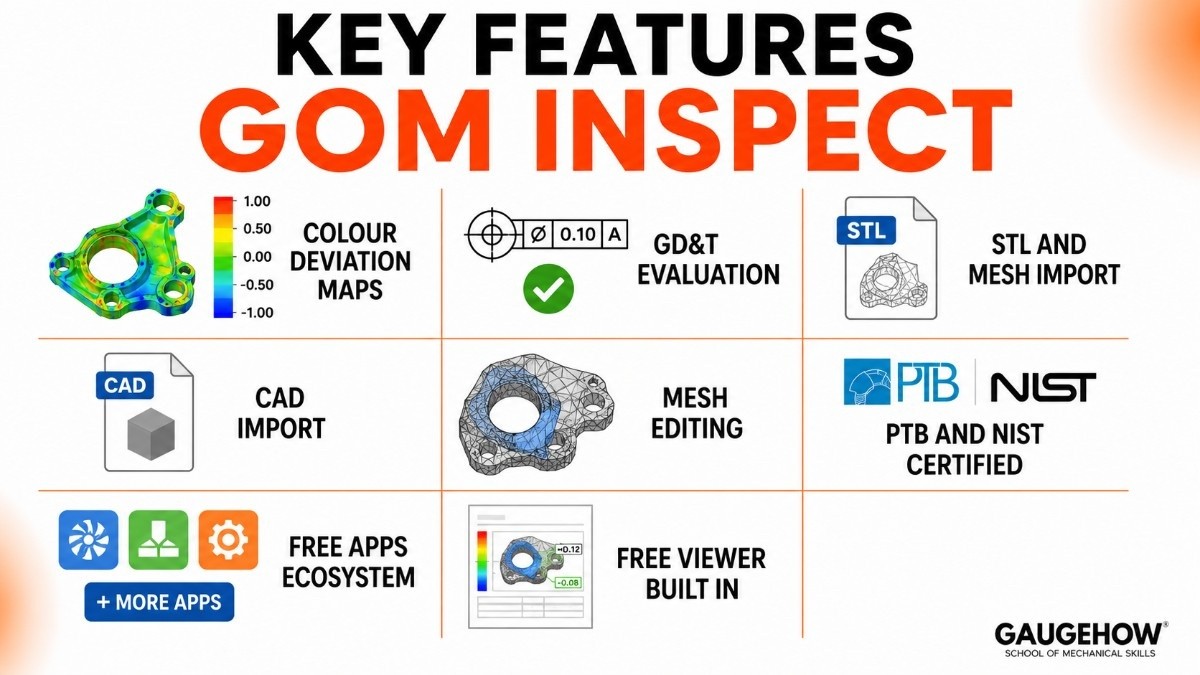
Here's what GOM Inspect actually does, in plain terms:
Colour deviation maps. After comparing a scanned part to its CAD model, the software produces a colour-coded surface map showing where the part is too big, too small, or just right. This is the feature most people see first.
GD&T evaluation. It checks Geometric Dimensioning and Tolerancing rules — the standard way drawings define how precise a shape must be — and shows pass/fail results for each control.
STL and mesh import. It reads standard scan file formats (STL, ASCII, PLY, PSL) from almost any scanner, so you're not locked to one hardware brand.
CAD import. Load your 3D design file, align it to the scan, and run the comparison. It supports most common CAD formats.
Mesh editing. Fill holes, smooth surfaces, and clean up noisy scan data before inspection.
PTB and NIST certified. The software's mathematical results are independently verified by both the German (PTB) and American (NIST) national measurement institutes.
This means the numbers it produces are traceable and trusted for formal quality records.
Free apps ecosystem. The Pro version and some free apps let you add specific capabilities — from turbine blade analysis to weld inspection — without buying a completely different tool.
Free viewer built in. Inspection reports can be opened and explored by anyone with the free software, so you don't need to pay extra seats just to share results with colleagues.
GOM Inspect Tutorial: How to Get Started
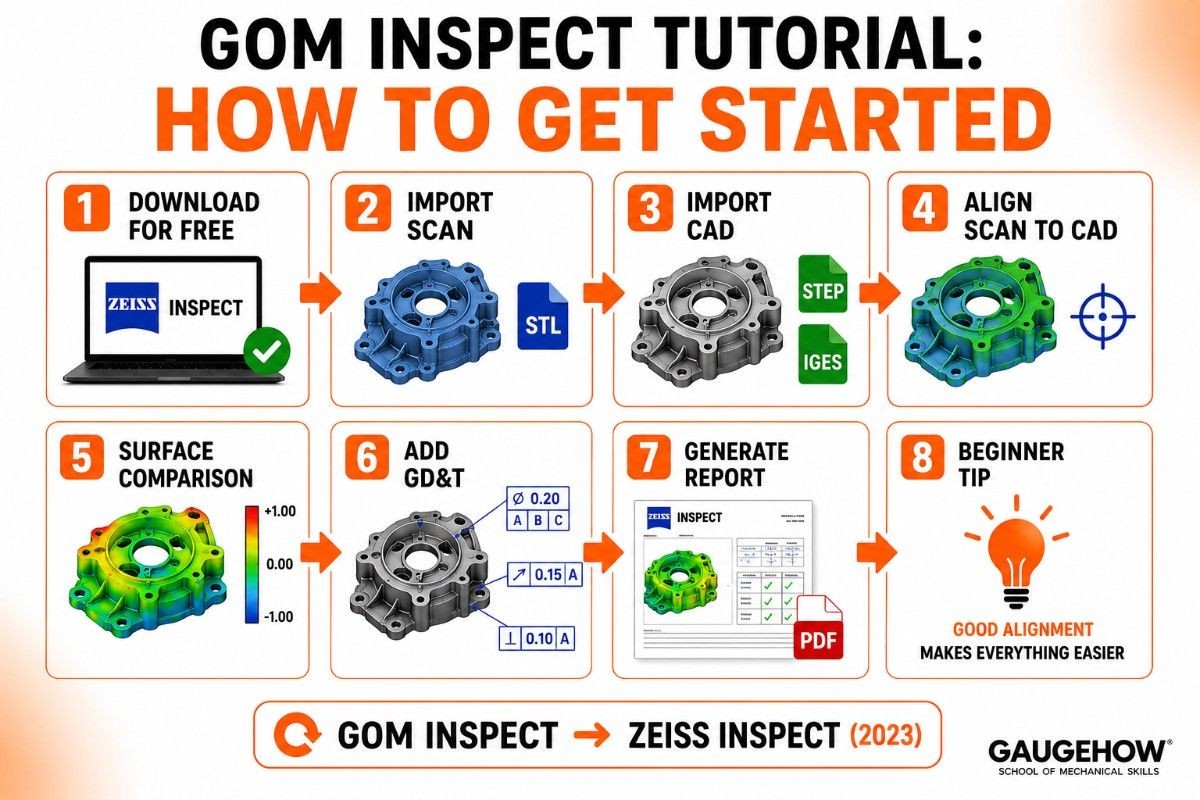
You don't need a course to take your first steps. Here's the basic path from download to first inspection:
Download ZEISS INSPECT for free. Go to the ZEISS or GOM website and download the free version. No credit card, no trial period. It's free indefinitely.
Import a scan file. Open an STL file from any 3D scanner. If you don't have one yet, GOM provides sample data you can practice with.
Import your CAD model. Load the STEP or IGES file of the part's design. This is what the scan gets compared against.
Align the scan to the CAD. The software offers several alignment options — best-fit, RPS alignment, or manual. This step tells the software how the scan and the design should line up.
Create a surface comparison. Run the deviation analysis to get your colour map. Red and blue areas show the biggest deviations; green is within tolerance.
Add GD&T controls. Select specific features like holes, planes, or cylinders and assign the tolerances from your drawing.
Generate a report. Export a PDF report showing the colour map, GD&T results, and any labels you've added.
A genuine tip for beginners: alignment is the step most people get wrong first. A good alignment makes everything else easier.
Spend time understanding the difference between best-fit and RPS (Reference Point System) alignment before you move on.
GOM Correlate: The Motion Analysis Companion
GOM Correlate is a closely related product worth knowing about because it often comes up alongside GOM Inspect. It was renamed to ZEISS INSPECT Correlate in the same 2023 rebrand.
Where GOM Inspect analyses static shapes (does this part match its CAD?), GOM Correlate analyses movement and deformation (how does this part bend, stretch, or strain when a force is applied?).
It uses digital image correlation (DIC) — a technique that tracks tiny patterns on a surface to measure displacement and strain across a part under load.
If you're studying structural testing, materials science, or crash testing, GOM Correlate is the tool you'd use. The two programs are complementary rather than competing, and both are part of the same ZEISS INSPECT family.
Free 3D Inspection Software: How GOM Inspect Compares
Most people searching for free 3D inspection software end up finding GOM Inspect, and for good reason. Here's how it sits in the broader landscape.
Most inspection tools in this space are paid, starting from a few thousand dollars up to $15,000 or more for platforms like PolyWorks Inspector.
GOM Inspect is the only tool in the professional category that offers a genuinely full-featured free version — not a crippled trial, not a 30-day demo, but a permanent free download with real inspection capability.
Its closest rivals in the free and low-cost space are:
MeshLab — open-source, strong for mesh processing, but not designed for industrial GD&T inspection.
FreeCAD — free, good for design, but not a dedicated inspection tool.
Autodesk Meshmixer — free for mesh editing and repair, but limited inspection tools.
For proper industrial inspection with colour maps, GD&T evaluation, and certified results, GOM Inspect has no real free competitor. That's the honest picture.
Pricing
Here's the full picture on cost, because it's the question most people have:
Free version (ZEISS INSPECT Optical 3D)
Completely free. Download from ZEISS's website. No trial limits, no seat expiry. Includes mesh import, CAD alignment, colour deviation maps, GD&T evaluation, and reporting. This is what 158,000+ people have downloaded.
Pro version (ZEISS INSPECT Pro)
Paid, with no public list price. You contact ZEISS or an authorised reseller for a quote. The Pro version adds parametric inspection, scripting, trend analysis, and access to the full app ecosystem. This is for professional quality labs that need automation and advanced reporting.
Apps
Over 100 apps are available to extend the software. Many are free; some specialist ones (like airfoil analysis) are paid. Apps are managed from inside the software.
Training
ZEISS and authorised resellers offer on-site and classroom training. Costs vary by region and course level. Third-party trainers also offer GOM Inspect training, often at lower prices than official courses.
The honest takeaway: for students and small teams, the free version is genuinely capable. Upgrade to Pro only when you hit a specific workflow limit that the free version can't handle.
Pros and Cons
Pros
The base version is completely free and genuinely capable — not a limited trial.
PTB and NIST certified, so results are trusted for formal quality records.
Works with scan data from almost any hardware brand, not locked to ZEISS scanners.
Colour deviation maps are visually clear and easy to present to non-technical teams.
Free viewer means anyone on your team can open reports without paying extra.
Cons
Advanced automation (parametric inspection, scripting) requires the paid Pro version.
The 2023 rebrand from GOM to ZEISS INSPECT means older tutorials and guides use a different name, which can confuse beginners.
Works best with scan data (structured-light, laser, CT); it's not designed as a primary CMM programming tool the way PC-DMIS or CALYPSO is.
Pro pricing isn't public, so budgeting for the paid version requires a sales conversation.
Pointing out the downsides is what separates this guide from a vendor page.
Best For
GOM Inspect fits a clear profile.
By company size, it works for everyone from individual students and small engineering consultancies up to large automotive and aerospace manufacturers. The free version removes the size barrier entirely.
By industry, the strongest fits are automotive (body-in-white, stamped parts), aerospace (turbine blades, airfoils, complex surfaces), consumer electronics, and research and education. Anywhere optical 3D scanning is the primary measurement method.
By use case, it's ideal for scan-based dimensional inspection — checking whether a scanned part matches its CAD design, producing colour maps for engineering review, and generating formal inspection reports.
It's less ideal for traditional tactile CMM programming (use PC-DMIS or CALYPSO for that) or for reverse engineering from scratch (PolyWorks Modeler or Geomagic Design X are better fits).
Integrations
GOM Inspect connects into a quality workflow in a few clear ways.
On the hardware side, it reads scan data from all major structured-light scanner brands (including ZEISS ATOS, Creaform, Artec, and others) and accepts standard file formats (STL, PLY, ASCII, PSL). It works with CT scan data too, through ZEISS INSPECT X-Ray.
On the software side, it imports CAD models from most major formats and exports reports as PDFs.
The Pro version's scripting tools and app ecosystem allow connections to broader quality management and ERP systems, though this typically needs setup by your IT or quality team rather than being a one-click integration.
Results can be shared freely using the built-in viewer, which means scan reports reach engineering and management teams without everyone needing a paid licence.
Deployment: Download, On-Prem, and Offline
GOM Inspect is a desktop application that runs locally on a Windows PC. You download it, install it, and it runs offline.
There's no cloud subscription, no monthly fee, and no dependency on an internet connection to run inspections.
This is exactly what you want for production metrology — fast, reliable, and local. A scanner feeds data into the software; the software runs the analysis; results are stored and shared on your network.
There's no cloud-based version of GOM Inspect or ZEISS INSPECT today.
For brownfield readiness (adding new software to an existing setup), ZEISS INSPECT is one of the easiest tools to add because it accepts standard scan file formats from almost any existing scanner hardware. You don't need to replace your measuring equipment to start using it.
Alternatives to GOM Inspect
GOM Inspect isn't the only option. Depending on your goals, these are worth comparing:
PolyWorks Inspector (InnovMetric) — the universal 3D metrology platform for CMMs, arms, trackers, and scanners; paid, starting around $15,000.
Geomagic Control X (3D Systems / Hexagon) — a strong scan-based inspection tool with good integration into the Geomagic reverse-engineering family.
Creaform VxInspect — included with Creaform scanners, easy to use, but less capable for complex GD&T.
FARO CAM2 — inspection software bundled with FARO measuring arms and scanners.
MeshLab — a free, open-source mesh processor; good for mesh editing but not designed for formal industrial inspection.
Frequently Asked Questions
Is GOM Inspect still free after the ZEISS rebrand? Yes. The base version, now called ZEISS INSPECT Optical 3D, is still completely free to download and use with no time limit. Only the name changed in October 2023; the free model continues.
What is the difference between GOM Inspect and GOM Inspect Pro? The free version covers import, alignment, colour maps, GD&T evaluation, and basic reporting.
The Pro version adds parametric inspection, scripting for automation, trend analysis across batches, and access to specialist apps. Pro pricing is quote-based through ZEISS.
Is GOM Inspect cloud-based? No. It's a desktop application that runs locally on a Windows PC, fully offline after installation. There's no cloud subscription or internet dependency to run inspections.
GOM Inspect vs PolyWorks — which should I choose? Choose GOM Inspect (ZEISS INSPECT) if you work primarily with optical scan data, want a free starting point, or are in automotive/aerospace surface inspection.
Choose PolyWorks if you need to run one platform across CMMs, portable arms, laser trackers, and scanners in a mixed-device environment.
Does GOM Inspect work with any 3D scanner? It works with data from most major scanner brands, accepting standard formats like STL, ASCII, PLY, and PSL. It integrates most smoothly with ZEISS and GOM scanners (ATOS, GOM Scan, T-SCAN) but is not hardware-locked.
GOM Inspect, a 3D inspection and metrology software used for quality control,and part measurement. Learn its features,uses,and benefits for manufacturing.























