RoboDK
RoboDK

RoboDK: A Beginner's Guide to Robot Simulation and Offline Programming
If you're studying robotics, automation, or manufacturing engineering, RoboDK is one of the most useful tools you can learn.
It lets you simulate industrial robots, write programs for them, and test everything on your computer before a single real robot moves. Companies like Airbus, NASA, GM, and Siemens trust it for real production work.
This guide explains what RoboDK is, how it works, what it costs, and how it compares to its main rivals. Written in plain language so students and newcomers can follow along without a factory background.
What Is RoboDK?
RoboDK is a robot simulation and offline programming software that lets you program industrial robots from your computer, without needing to be on the factory floor.
It's made by RoboDK Inc., a Canadian company founded in 2015 and based in Montreal.
The company was co-founded by Albert Nubiola, and it's grown into one of the world's leading robot simulation platforms, with over 5,000 customers in industries ranging from aerospace to food production.
The big idea behind RoboDK is that it works with any robot. Most robot simulation tools are locked to one manufacturer — ABB's software only for ABB robots, FANUC's only for FANUC.
RoboDK supports over 1,400 robot models from 80+ manufacturers in one interface. That hardware independence is what makes it genuinely useful whether you're a student experimenting at home or an engineer managing a mixed-brand production floor.
RoboDK Software: What It Actually Is
RoboDK is more than a programming editor — it's a complete robotics workspace on your computer. Here's what's inside:
Robot simulation — build a 3D model of your robot cell, run movements, and spot problems before touching real hardware
Offline programming (OLP) — write and test robot programs at your desk, then send them to the controller without stopping production
Post processors — automatically translate your program into the native language each robot brand needs (ABB RAPID, FANUC LS, KUKA SRC, UR script, and more)
CAD/CAM integration — import 3D models in STEP, IGES, and STL formats, and convert CNC files like G-code directly into robot paths
Robot calibration — improve real-world robot accuracy by 2–10x, certified to ISO 9283 standard
RoboDK API — control and automate everything using Python, C#, C++, Visual Basic, or MATLAB
RoboDK Academy — a completely free online training platform with video walkthroughs and hands-on projects
RoboDK CAM — generates robot machining programs straight from CAD files, cutting deployment time by up to 40%
Key Features
Here's what RoboDK actually delivers, in plain terms:
Works with any robot brand — 1,400+ robot models from 80+ manufacturers including ABB, FANUC, KUKA, Universal Robots, and Yaskawa, all in one interface
No coding needed to start — the visual interface guides you through every step; advanced users can go deeper with the Python API
Collision detection — automatically flags when a robot arm would hit a fixture, cross an axis limit, or hit a singularity, and suggests a fix
Digital twin — import real CAD files of your production cell and build an exact virtual replica for testing before installation
CAD to robot path — convert G-code toolpaths into robot programs for machining, 3D printing, and cutting applications
Multi-robot simulation — synchronise multiple robots, rails, rotary tables, and positioners working together in one cell
50+ post processors built in — covers most commercial controllers out of the box, with the option to write custom ones
Python API — run simulations, generate paths, and connect RoboDK to external systems or sensors through code
RoboDK for Beginners: How to Get Started
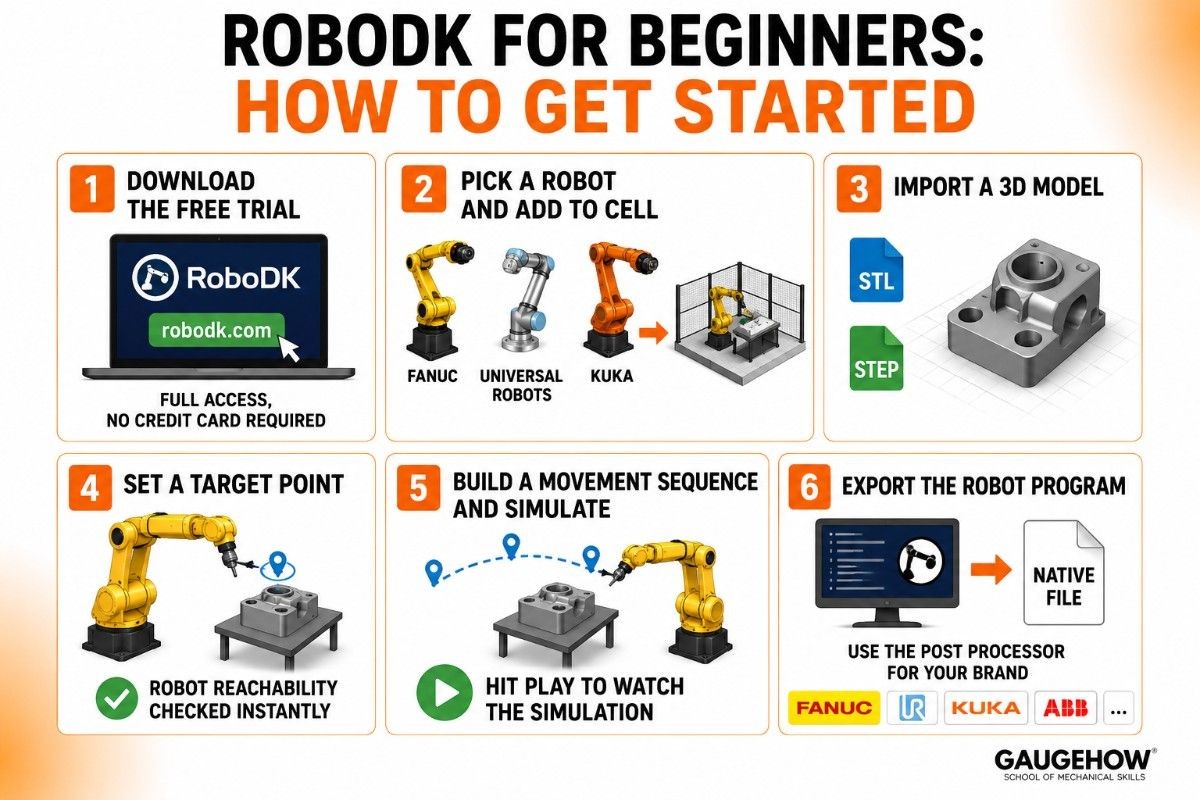
No robotics background needed. Follow these steps to go from download to your first working simulation:
Step 1 — Download the free trial at robodk.com — full access, no credit card required
Step 2 — Pick a robot from the library (FANUC arc welder, Universal Robots cobot, KUKA arm — whatever interests you) and add it to your virtual cell
Step 3 — Import a 3D model as your workpiece or workspace in STL or STEP format
Step 4 — Set a target point by clicking in the 3D space where you want the robot to move; RoboDK instantly checks whether it can reach it
Step 5 — Build a movement sequence by adding more target points and connecting them into a program, then hit play to watch the simulation run
Step 6 — Export the robot program using the post processor for your brand, generating a native file ready to run on the real controller
RoboDK Tutorial: Learning the Core Workflow
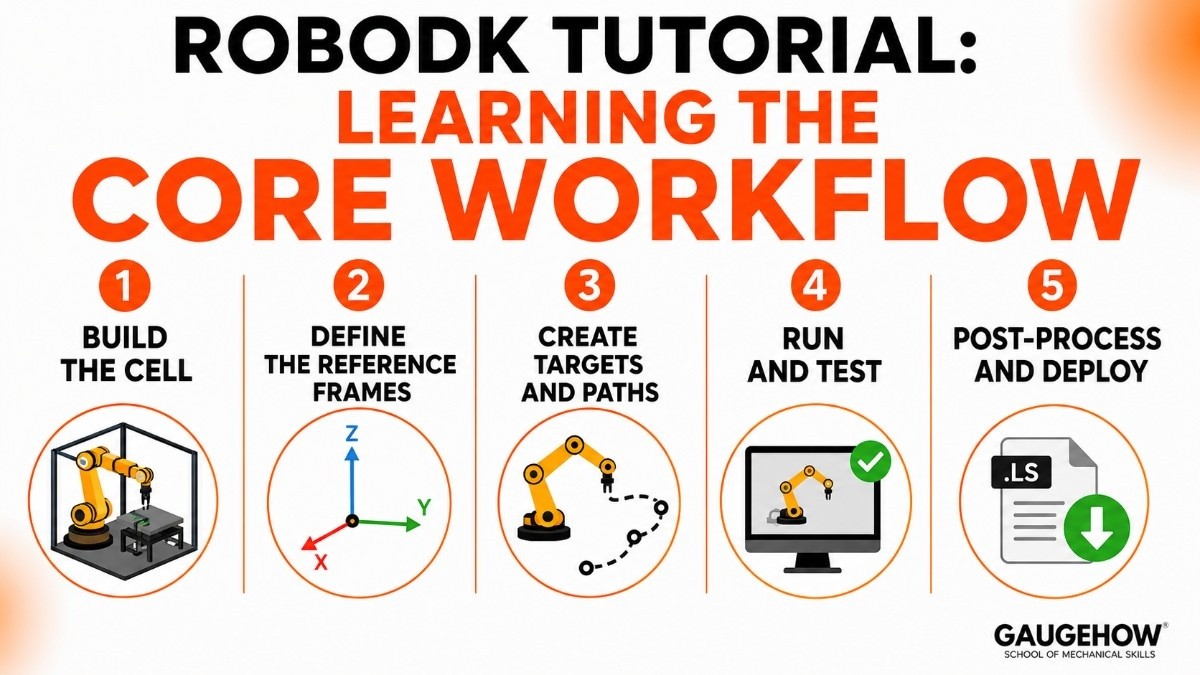
Once you've done the basics, the core RoboDK workflow for most applications follows a consistent pattern. Understanding it makes every new project easier.
Step 1 — Build the cell. Import your robot, tooling, fixtures, and workpiece as 3D models. Position everything to match the real physical layout. This is your digital twin.
Step 2 — Define the reference frames. Tell the software how the robot, the tool, and the workpiece relate to each other in space. Getting this right is the single most important step for accurate results.
Step 3 — Create targets and paths. Either click to create individual target points, or import a path from CAD/CAM software. RoboDK uses these to build the movement sequence.
Step 4 — Run and test. Simulate the full sequence. Fix any collisions, singularities, or reachability issues the software flags.
Step 5 — Post-process and deploy. Select your robot brand's post processor, generate the native program file, and transfer it to the controller.
This five-step loop applies whether you're programming a welding robot, a painting arm, or a machining cell. Master it once and you have a repeatable process for any application.
RoboDK Python: Programming with the API
For students who code, the RoboDK Python API is one of the best features in the platform.
It lets you control everything in RoboDK from a Python script — creating robot stations, generating target points, running simulations, reading joint positions, and connecting the simulation to external hardware or algorithms.
Here's a simple example of what the API can do:
This tells the robot to move to a named target with a joint movement — just five lines of Python.
The API is available in Python, C#, C++, Visual Basic, and MATLAB. For students, Python is the easiest entry point and the most widely supported in the community.
You'll find tutorials on RoboDK's blog, in the official documentation, and across YouTube. It's also useful for connecting RoboDK to computer vision systems, machine learning models, or custom sensors.
RoboDK CAM: Robotic Machining Made Easier
RoboDK CAM is the platform's newest major module, launched in 2026. It's designed for robotic machining — using a robot arm to mill, drill, grind, or cut parts instead of a traditional CNC machine.
Before RoboDK CAM, setting up a robotic machining application meant a lot of manual path programming. RoboDK CAM generates the toolpath directly from your CAD file, converts it to a collision-free robot program, and can cut deployment time by up to 40%.
For students interested in robotics + manufacturing overlap, this is the most current area of the platform to explore. Robotic machining is a growing application in aerospace, automotive, and heavy industry, and the tooling and software to support it is still maturing.
RoboDK vs RobotStudio
This is the comparison most engineers ask about when they're evaluating robot simulation software.
ABB RobotStudio is ABB's own simulation and offline programming tool. It's built on the actual ABB virtual controller, which means simulations are extremely accurate for ABB robots.
The basic version is free, which makes it accessible. But — and this matters — it only works well for ABB robots. If your production cell mixes ABB with FANUC or KUKA, RobotStudio becomes limiting.
RoboDK supports every major brand in one interface. It's not tied to one controller ecosystem, so one licence covers your whole mixed-brand floor.
The trade-off is that brand-specific features (like advanced ABB motion options that only RobotStudio knows about) may not be as deep.
Here's an honest side-by-side:
RoboDK | ABB RobotStudio | |
|---|---|---|
Made by | RoboDK Inc. | ABB |
Robot support | 1,400+ models, 80+ brands | ABB robots only |
Best for | Mixed-brand cells, any brand | ABB-only installations |
Free version | Free trial + free viewer | Free basic version |
Python API | Full API | Limited |
Price (paid) | ~$3,495 perpetual | Premium plans, ABB-specific |
CAD/CAM | Yes (including RoboDK CAM) | Limited |
The short version: choose RoboDK if you work with multiple robot brands, want a Python API, or need CAD-to-robot-path capability.
Choose RobotStudio if your whole floor runs ABB and you want the deepest possible accuracy for that specific hardware. Many professional robotics engineers keep both.
Pricing
This is one of the clearest pricing situations in industrial software, which makes it easy to plan for.
Free Trial
A fully featured trial version is available for free download. No credit card, just download and start. The trial is time-limited but gives access to all features so you can test it on a real project.
Free Online Viewer
A limited free version is available online for viewing RoboDK files without a full licence.
RoboDK Academy — Free
A complete self-paced online training platform launched in 2025. Video walkthroughs, step-by-step tutorials, and hands-on projects — entirely free.
Perpetual Licence
One-time purchase of approximately $3,495 USD (prices may vary by region and version). Includes one year of software updates and support. After the first year, updates are optional.
Subscription
Monthly subscription ranging from approximately $150 to $1,250 per month, depending on the plan and add-ons. Good for project-based work or teams that want the latest version without a large upfront cost.
The honest takeaway: for students, the free trial and RoboDK Academy cover almost everything you need to learn the software properly. For professionals, the perpetual licence at ~$3,495 is competitive compared to vendor-locked tools that often charge more for a single brand.
Pros and Cons
Pros
Supports 1,400+ robot models from 80+ brands — genuinely hardware-agnostic.
Public, transparent pricing at a competitive level for industrial software.
Free trial and free Academy mean students can learn without spending anything.
Python API opens up automation, research, and integration possibilities.
Active community, good documentation, and regular updates including new products.
Cons
Brand-specific simulation depth isn't as accurate as a vendor's own tool (RobotStudio for ABB, ROBOGUIDE for FANUC).
The free trial is time-limited, so longer projects eventually need a paid licence.
Post processor setup for unusual or older controllers can take time to configure.
The interface has a lot of options; beginners can feel overwhelmed before they find the right starting point.
Listing the downsides is what makes a guide trustworthy compared to a product page.
Best For
RoboDK fits a clear profile.
By company size, it works for solo engineers and students up to large enterprises. The pricing model scales — a student uses the free trial, a small integrator buys one perpetual licence, a large manufacturer buys multiple seats or a subscription.
By industry, the strongest fits are automotive, aerospace, electronics, food and beverage, metal fabrication, and any facility that uses multiple robot brands.
It's also widely used in universities and research labs because of the Python API and affordable entry point.
By use case, it excels at offline programming for welding, machining, 3D printing, painting, palletising, and pick-and-place.
It's especially strong when you're setting up a new cell and want to validate the robot's reach, cycle time, and collision safety before the hardware arrives.
Integrations
RoboDK connects into the broader automation stack in several clear ways.
On the hardware side, it exports native programs for all major controllers — ABB RAPID, FANUC LS, KUKA SRC, Motoman JBI, Universal Robots URP and script, and many others. External axes (rails, rotary tables, positioners) are fully supported and can be synchronised in the simulation.
On the software side, the Python API allows integration with computer vision systems, machine learning models, MATLAB, and custom sensors. CAD/CAM platforms (like Mastercam and others) can feed toolpaths directly into RoboDK.
For ERP and MES integration, the API provides the connection layer — your application code uses it to trigger robot programs, log results, or respond to production events.
Deployment: Desktop, Cloud, and Edge
RoboDK is primarily a desktop application that runs on Windows. A lighter version runs on Linux and macOS (with some limitations), and an online version provides basic viewing and editing from a browser.
The software runs locally on your machine, so your robot programs and simulations don't depend on an internet connection once installed. This is appropriate for production environments where reliability matters more than cloud flexibility.
On brownfield readiness (adding new software to existing factory setups), RoboDK is one of the most practical tools available.
Because it supports so many controller brands with built-in post processors, you can add it to a factory running legacy robots from multiple vendors without replacing anything. It works around the equipment you have, not the other way around.
Alternatives to RoboDK
RoboDK isn't the only option. Depending on your robot brand and use case:
ABB RobotStudio — ABB's own simulation tool, free basic version, deep accuracy for ABB robots only.
FANUC ROBOGUIDE — FANUC's offline programming suite, best-in-class for FANUC cells.
KUKA.Sim — KUKA's simulation tool, strong for KUKA-specific digital twin and virtual commissioning.
Visual Components — a Finnish platform for broader digital factory simulation including robotics, conveyors, and material flow.
Gazebo / ROS — open-source simulation in the ROS ecosystem, popular in research and academic robotics.
Frequently Asked Questions
What is RoboDK used for? It's used to simulate industrial robots and program them offline — writing and testing robot programs on a computer before deploying them to a real machine, avoiding production downtime and reducing the risk of collisions.
Is RoboDK free? There's a free trial with full features for a limited time, a free online viewer, and RoboDK Academy (free training).
The full software requires a paid licence: approximately $3,495 for a perpetual licence or $150–$1,250/month for a subscription.
Does RoboDK work with FANUC, ABB, and KUKA robots? Yes. RoboDK supports 1,400+ robot models from 80+ manufacturers including FANUC, ABB, KUKA, Universal Robots, Yaskawa, Stäubli, and many more, all from the same interface.
Is RoboDK good for beginners? Yes, more so than most industrial robot tools. The graphical interface requires no programming to get started, RoboDK Academy provides free structured training, and the Python API gives advanced learners room to grow.
It's one of the most beginner-friendly professional robot simulation tools available.
RoboDK vs RobotStudio — which should I choose? Choose RoboDK if you work with multiple robot brands, want a Python API, or need hardware-agnostic offline programming.
Choose RobotStudio if your whole facility uses ABB robots and you want the deepest simulation accuracy for that specific hardware.
Can RoboDK generate G-code for robotic machining? Yes. RoboDK converts CNC programs including G-code and APT-CLS files into robot programs.
The newer RoboDK CAM module (2026) takes this further by generating robot machining paths directly from CAD files.
RoboDK, offline robot programming and simulation software that helps automate industrial robots, reduce setup time, and improve manufacturing efficiency.























