ABB RobotStudio
RobotStudio

RobotStudio: A Beginner's Guide to ABB's Robot Simulation Software
If you're learning industrial robotics, RobotStudio is one of the first tools you'll come across. It's ABB's official software for simulating and programming their robots, and it's used in factories, universities, and research labs all over the world.
ABB calls it the world's most used offline programming tool for robotics — and with ABB being one of the biggest robot manufacturers on the planet, that's a claim backed by real numbers.
This guide explains what RobotStudio is, how it works, what it costs, and how it compares to its main rivals. Written in plain language so students and newcomers can follow along without a robotics background.
Overview: What Is RobotStudio?
RobotStudio is ABB's official robot simulation and offline programming software that lets engineers build, test, and program ABB robot systems virtually before deploying them on the factory floor.
It's made by ABB, a Swiss-Swedish industrial technology company and one of the world's largest manufacturers of industrial robots. RobotStudio has been the standard tool for ABB robot programming for decades.
What makes it different from most simulation tools is its foundation: the ABB Virtual Controller. Instead of a simplified mock-up, RobotStudio uses an exact digital copy of the real software that runs inside ABB robots on the factory floor.
That means what you see in the simulation matches what the real robot will do — closely enough to write full programs offline and run them on the machine with confidence.
Key Features
Here's what RobotStudio actually delivers, without the marketing language:
ABB Virtual Controller. The simulation runs on the same software as the real robot controller. Programs written in RobotStudio use real configuration files and behave exactly like they would on the shop floor.
Offline programming. Write, test, and optimise robot programs at your desk without stopping production. Finished programs transfer directly to the robot controller.
RAPID editor. A built-in editor for ABB's RAPID programming language, with syntax suggestions, auto-complete, and instant error feedback — similar to Microsoft Visual Studio in feel.
Collision detection. Automatically spots when a robot arm would hit a fixture, tool, or itself during a programmed movement, and flags it before it becomes a real problem.
Virtual Commissioning. Replicate your production cell digitally and solve technical issues before the physical installation begins, saving significant time on-site.
Digital twin. Build a live, real-time simulation of your production system that mirrors what's happening on the actual floor.
PowerPacs. Add-on packages for specific applications — WeldPro for welding, PickMaster for picking, and others — that extend the base software with application-specific tools.
RobotStudio Cloud. A cloud-based version that lets teams collaborate on robot cell designs in real time from any device, anywhere.
RobotStudio Tutorial: How to Get Started
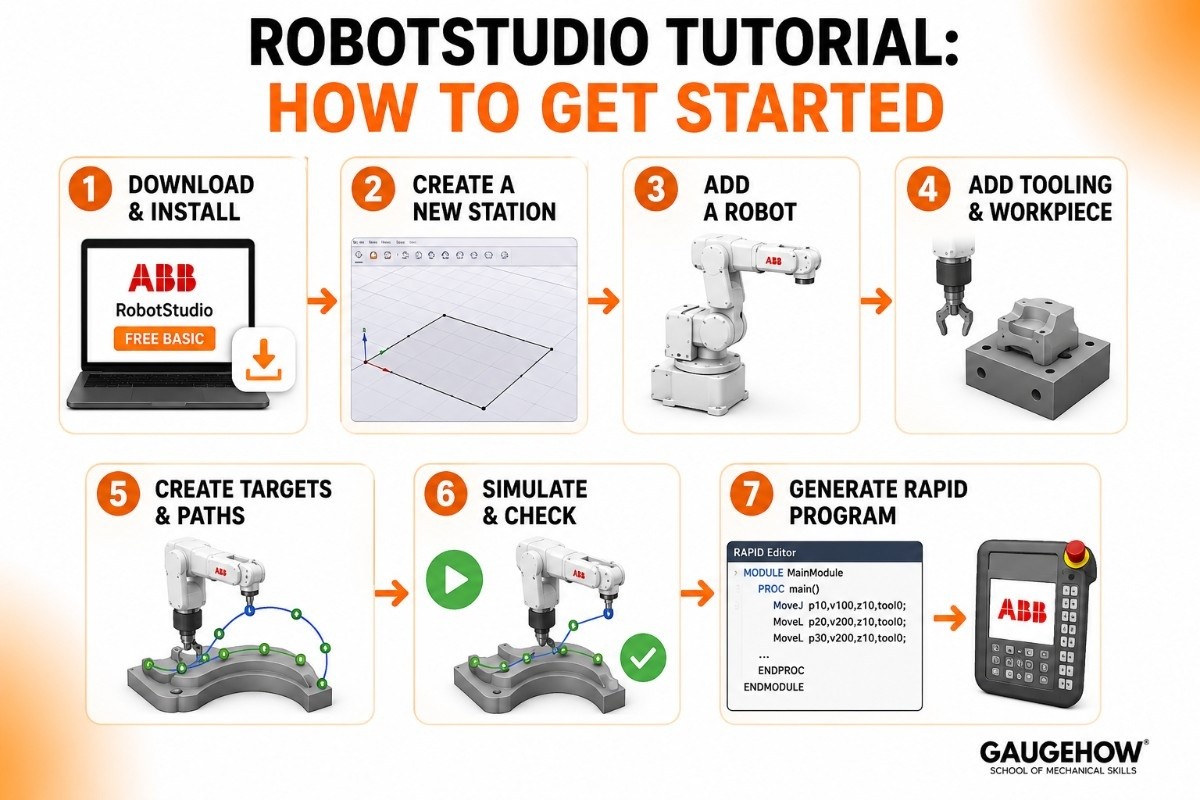
You don't need a robotics engineering degree to take your first steps. Here's the basic path from download to your first working simulation:
Step 1 — Download and install. Get the free Basic version from ABB's website. No payment required. Install it on a Windows PC and open the software.
Step 2 — Create a new station. A "station" is RobotStudio's word for a robot cell. Start a new one and it opens a blank 3D workspace.
Step 3 — Add a robot. Browse ABB's built-in robot library and place a robot into your station — an IRB 2400 for general use, a YuMi for collaborative work, or whichever model interests you.
Step 4 — Add tooling and a workpiece. Import a 3D model of your tool and the object the robot will work on. RobotStudio accepts STEP, IGES, and SAT files.
Step 5 — Create targets and paths. Click on the surface of your workpiece to place targets — points where you want the robot's tool to move. Connect them into a path.
Step 6 — Simulate and check. Run the simulation. Watch for any collision warnings or axis-limit errors the software flags. Fix them before moving on.
Step 7 — Generate the RAPID program. RobotStudio converts your path into RAPID code automatically. Review it in the RAPID editor, then sync it to a real robot controller when you're ready.
A genuine tip for beginners: when you first open RobotStudio, the interface looks complex because it has so many options. Ignore most of them at the start.
Focus only on: adding a robot, creating a target, and running a simulation. That three-step loop teaches you more than any menu exploration will.
RobotStudio RAPID: Understanding ABB's Programming Language
Every ABB robot is programmed in RAPID — ABB's own programming language. Understanding it is essential if you want to go beyond basic simulation and actually write robot programs.
RAPID is structured and readable, similar in style to Visual Basic. A simple move command looks like this:
The first line moves the robot to a joint position (MoveJ — faster, less precise path). The second moves in a straight line (MoveL — precise, good for welding or cutting).
The numbers after define speed and zone (how closely the robot follows the exact point before moving on).
RobotStudio's built-in RAPID editor makes this approachable. It highlights syntax, suggests completions, and flags errors as you type.
You can write and test RAPID code in the virtual environment, which is far safer and cheaper than learning on a real robot.
For students, RAPID is worth learning because ABB is one of the largest robot brands in the world.
Understanding RAPID opens doors to programming real ABB systems in automotive plants, electronics factories, and research facilities.
ABB RAPID Programming: A Practical Overview
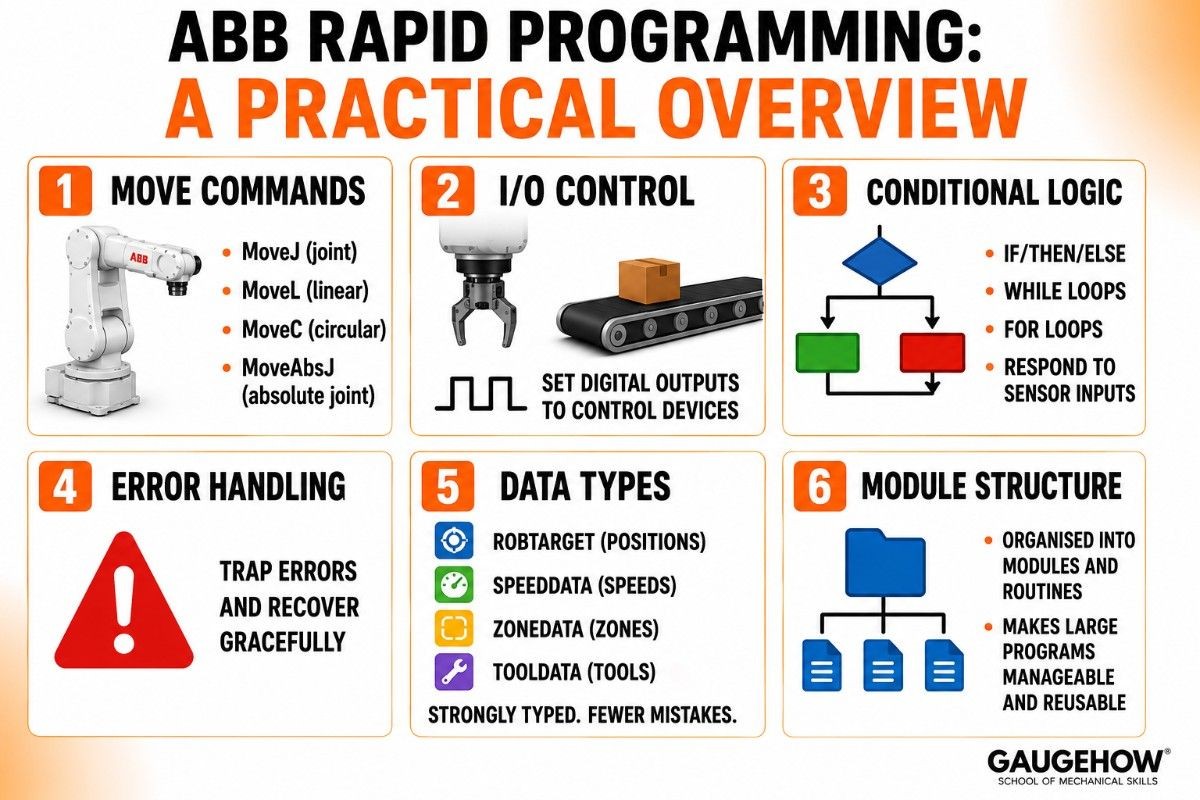
RAPID is more capable than it first appears. Once you understand the basics, here's what you can do with it:
Move commands — MoveJ (joint), MoveL (linear), MoveC (circular), MoveAbsJ (absolute joint position)
I/O control — set digital outputs to trigger grippers, conveyors, or safety signals
Conditional logic — IF/THEN/ELSE, WHILE loops, FOR loops — standard programming constructs that make robots respond to sensor inputs
Error handling — trap unexpected situations and recover gracefully without operator intervention
Data types — positions (robtarget), speeds (speeddata), zones (zonedata), tools (tooldata) are all strongly typed, which reduces programming mistakes
Module structure — programs are organised into modules and routines, making large programs manageable and reusable
The learning curve is real but manageable. Most engineers get comfortable with RAPID within a few weeks of regular practice in RobotStudio.
RobotStudio vs RoboDK
This is the comparison most robotics students and engineers ask about. Both are serious offline programming tools, but they take different approaches.
Here's an honest side-by-side:
RobotStudio | RoboDK | |
|---|---|---|
Made by | ABB | RoboDK Inc. |
Robot support | ABB robots only | 1,400+ models, 80+ brands |
Simulation accuracy (ABB) | Exact — uses real controller | Very good but not native |
Free version | Yes (Basic) | Yes (trial, time-limited) |
RAPID editor | Built-in, excellent | Generates RAPID as output |
Python API | Limited | Full API |
Price (paid) | Undisclosed annual fee | ~$3,495 perpetual |
Cloud collaboration | Yes (RobotStudio Cloud) | No |
The short version: choose RobotStudio if you work exclusively with ABB robots and want the deepest, most accurate simulation for that hardware.
Choose RoboDK if you work with multiple brands, need a Python API, or want transparent pricing. Many engineers have both installed.
RobotStudio Free Trial
One of the most commonly asked questions about RobotStudio is how much it costs and what's free. Here's the clear answer.
Basic Version — Free, No Time Limit
The Basic version of RobotStudio is free to download and use with no expiry. It includes:
Robot simulation in 3D
Virtual jogging and editing
Basic station building
Connection to real ABB robots for monitoring
This is enough for students learning the interface, building simulations, and practicing RAPID.
Premium Version — Paid, 30-Day Free Trial
The Premium version unlocks the full power of RobotStudio:
Offline programming — write programs and transfer them to real controllers
Advanced simulation tools including path optimisation and cycle time analysis
PowerPac add-ons for specific applications (welding, picking, painting)
RobotStudio Cloud for team collaboration
Virtual Commissioning tools
ABB describes Premium as available at a "low annual fee" but does not publish prices publicly. You request a quote from your local ABB sales office or authorised distributor. The 30-day free trial gives full Premium access before committing.
The honest takeaway: the free Basic version is genuinely useful for learning. The Premium version is priced for professional use — budget for a quote conversation before planning a project around it.
Pros and Cons
Pros
Best-in-class simulation accuracy for ABB robots thanks to the real Virtual Controller.
Free Basic version with no time limit — great for students and evaluation.
Excellent built-in RAPID editor makes ABB programming accessible.
RobotStudio Cloud adds real-time team collaboration most OLP tools don't offer.
Backed by ABB — a global leader with extensive training resources and support.
Cons
Works only for ABB robots — no support for FANUC, KUKA, or other brands.
Premium pricing is not public, requiring a sales conversation before budgeting.
Steeper learning curve than some alternatives like RoboDK for non-ABB users.
PowerPac add-ons are priced separately, so full functionality costs more than the base Premium price.
Listing the downsides is what separates an honest guide from a vendor page.
Best For
RobotStudio fits a clear profile.
By company size, it works for everyone from students to large enterprises — the free Basic version removes the barrier for learners, while Premium scales to multi-site enterprise teams via Cloud licensing.
By industry, the strongest fits are automotive (welding, painting, assembly), electronics (pick and place, handling), food and beverage, logistics, and pharmaceuticals — any industry where ABB robots are already deployed or being considered.
By use case, it excels at offline programming for ABB robot installations, virtual commissioning of new cells, and training new operators in a safe virtual environment.
It's less ideal for shops with multiple robot brands, where a brand-agnostic tool like RoboDK is more practical.
Integrations
RobotStudio integrates into the wider automation environment in clear ways.
On the hardware side, it connects directly to ABB robot controllers (IRC5, OmniCore) for live monitoring, program transfer, and online editing.
External axes (rails, positioners, rotary tables) from ABB are fully supported in the simulation.
On the software side, RobotStudio accepts 3D CAD files (STEP, IGES, SAT) from most major design tools. RobotStudio Cloud integrates into team workflows for sharing and co-designing robot cells.
For ERP, MES, and production system integration, the robot programs generated in RobotStudio communicate with factory systems through the ABB controller's I/O interfaces and communication protocols — typically configured at the application level by your systems integrator.
Deployment: Desktop, Cloud, and On-Prem
RobotStudio runs in two main modes.
RobotStudio Desktop is a Windows application installed locally on your PC. It runs offline — no internet needed once installed — and connects directly to ABB controllers via a network cable or USB. This is the standard setup for most engineers.
RobotStudio Cloud is a browser-based collaborative version. Teams can design, share, and co-edit robot cell designs from any device without installing software.
This is newer and growing, particularly useful for distributed teams working across sites.
On brownfield readiness (adding the software to an existing factory setup), RobotStudio is naturally compatible with any installation running ABB hardware.
If your existing ABB robots run IRC5 or OmniCore controllers, RobotStudio works with them out of the box. For non-ABB hardware, you'd need a different tool.
Alternatives to RobotStudio
RobotStudio isn't the only option. Depending on your robot brand and goals:
RoboDK — a hardware-agnostic offline programming tool supporting 1,400+ robots from 80+ brands; great for mixed-brand environments and Python API use.
FANUC ROBOGUIDE — FANUC's official OLP and simulation suite, best-in-class for FANUC robot installations.
KUKA.Sim — KUKA's simulation and OLP tool, strongest for KUKA robot cells.
Visual Components — a broader digital factory simulation platform covering robots, conveyors, and full production line modelling.
Gazebo / ROS — open-source simulation in the ROS ecosystem, popular in academic and research robotics.
(Links above are placeholders — point each to your own detailed comparison or review page.)
Frequently Asked Questions
What is RobotStudio used for? It's used to simulate ABB robot cells, write and test robot programs offline using the RAPID language, validate cell designs before physical installation, and train operators in a safe virtual environment — all without stopping real production.
Is RobotStudio free? The Basic version is completely free with no time limit. It includes simulation, jogging, and basic editing. The Premium version, which adds offline programming, PowerPacs, and cloud features, requires a paid subscription with pricing available on request from ABB.
What programming language does RobotStudio use? ABB robots are programmed in RAPID — ABB's own programming language. RobotStudio includes a full RAPID editor with syntax highlighting, auto-complete, and error feedback built in.
RobotStudio vs RoboDK — which should I choose? Choose RobotStudio if you work exclusively with ABB robots and want the most accurate simulation for that hardware.
Choose RoboDK if you work with multiple robot brands, need a Python API, or want transparent public pricing. Many engineers use both.
Is RobotStudio cloud-based? RobotStudio is available in both a desktop version (local Windows install) and a cloud version (RobotStudio Cloud) for real-time team collaboration from any browser. The desktop version works fully offline.
Can I learn RAPID programming without a real ABB robot? Yes — RobotStudio's free Basic version includes the RAPID editor and Virtual Controller, so you can write, run, and test RAPID programs entirely in simulation without any physical hardware.
ABB RobotStudio, robot simulation and offline programming software that helps design, test, and optimize robotic automation without disrupting production.























