Mechanical Engineer Resume: Format, Template & Examples
A mechanical engineer resume should show role fit, technical skills, relevant projects, and clear proof of work on one easy page. Recruiters want to see tools, engineering exposure, and readable results fast, so your file should make shortlisting easy rather than forcing someone to guess.
Getting shortlisted becomes difficult when similar profiles start looking the same on paper. One crowded page, one vague project entry, or one generic summary can hide work that is actually useful for the role.
For students and early-career applicants, that is usually where the real problem begins. Coursework, CAD practice, internships, and project work may already be there, but the resume still fails because the information is not presented in a clean and convincing order.
In a good resume, every section should help the reader understand your profile faster. Contact details should be easy to find, skills should be grouped clearly, and projects should show what you handled rather than only naming the topic. Once those basics are set properly, the page starts feeling much stronger.
Learn Mechanical Engineering basics to advance while getting yourself ready for Interviews. Mechanical Engineering Courses Online will shape your career while moving deep into this field.
In this guide, you will learn how to build a resume that reads clearly, shows relevant engineering exposure, and gives recruiters enough proof to take your application seriously.
What A Mechanical Engineer Resume Must Prove
In most applications, recruiters are not trying to read your entire background from top to bottom. They are checking whether your resume shows the kind of work, tools, and technical readiness that fit the opening.
For a mechanical engineering role, the page should make three things easy to understand.
One part should show your core academic base. Another part should show software, design, production, quality, or project exposure that matches the role. Along with that, the page should feel organised enough that a recruiter can scan it without effort.
The table below will help you check each section more practically before you finalise the resume.
Resume Section | Mistakes | Changes To Apply | Recruiter Signal |
Header | Casual email, missing LinkedIn, extra personal details | Keep name, phone, email, city, LinkedIn, and portfolio only | Easy to contact and professionally presented |
Summary | Generic ambition lines, no role match, no tools mentioned | Add target role, strongest tools, and one clear proof line | Candidate understands role fit |
Education | Too much school detail, no relevant coursework | Keep degree, college, year, GPA if strong, and role-related subjects | Core qualification is clear |
Skills | Long mixed list with no order | Group skills into software, engineering basics, and practical exposure | Skills are easier to scan and trust |
Projects | Topic-only descriptions, no contribution, no outcome | Write task, tool, contribution, and result in one flow | A candidate can apply knowledge |
Experience | Duty-only bullets, no method, no value | Show action, tool or method, and result or purpose | Candidate can contribute to the structure |
Certifications | Unrelated certificates, weak relevance | Keep only role-supporting certifications | Candidate has focused on learning effort |
Formatting | Crowded layout, design-heavy template, weak spacing | Use clean headings, standard fonts, and ATS-safe order | Resume feels readable and dependable |
Once that editing logic is clear, the rest of the resume becomes much easier to improve.
What Recruiters Notice In The First 10 Seconds
During the first scan, recruiters usually spend more time on the upper half of the page than anywhere else. That quick review often decides whether the resume looks relevant enough to continue reading.
At that stage, the focus is not on every detail. Hiring teams usually notice the summary, visible technical skills, project or internship relevance, and overall page clarity.
When those parts look aligned, the profile feels easier to shortlist. When those parts look generic, the page starts losing value very early.
Here are the signals most recruiters catch almost immediately:
Role direction in the summary
Visible software and technical skills
Quality of internship or project proof
Section order and readability
Signs that the resume was tailored for the job
What To Include In Each Section
Contact Information
In a good resume, contact details should be the easiest part to find. Start with your full name, mobile number, professional email address, current city, and LinkedIn profile if it is updated.
For design roles, a portfolio link also helps because it gives employers a fast way to see CAD models, drawings, project files, or documentation samples. Along with that, it makes the page feel more complete without adding clutter.
Full postal address, date of birth, photograph, and extra personal details usually do not help shortlisting. Those items take space, and they rarely improve hiring decisions for engineering roles.
Summary Or Objective
In most applications, the summary is one of the first things a recruiter notices. Keep it short, role-linked, and specific enough to sound useful.
Use a short summary when you already have internship, project, or training proof. Keep it to two or three lines. Focus on role fit, tools, and the strongest evidence you can offer.
Use a mechanical engineer resume objective only when your experience is still limited and you need a short line to explain your direction. At this stage, avoid generic career-goal language. A better line should show what you can contribute, not only what you want.
A stronger summary sounds like this:
Mechanical engineering graduate with hands-on CAD modelling, project documentation, and basic analysis exposure. Comfortable with SolidWorks, AutoCAD, and engineering drawings. Looking for a design, production, or graduate trainee role where structured technical work and learning matter.
Education
For students and freshers, education still carries real weight, so this section should stay clean and relevant. List your degree, college, graduation year, and GPA only when it supports your application.
For design roles, add coursework such as machine design, CAD, strength of materials, or GD&T basics. For production or quality roles, subjects like manufacturing, metrology, industrial engineering, and process-related work fit better.
Academic honours help only when they are real and relevant. One clean line is enough.
Skills For Mechanical Engineer Resume
A good skills for mechanical engineer resume separates software tools, engineering fundamentals, and practical exposure. That split helps recruiters scan faster, and it also stops your strengths from getting buried inside one long list.
In a good resume, grouped skills feel more believable than a crowded paragraph. You can structure the section like this:
Software
SolidWorks, AutoCAD, CATIA, ANSYS Basics, MATLAB
Engineering Basics
Engineering Drawing, GD&T Basics, Material Selection, Design Calculations, Manufacturing Processes
Practical Exposure
BOM Preparation, Technical Documentation, Drawing Interpretation, Workshop Practice, Excel Reporting
Across project sections and skill sections, clarity matters more than quantity. A shorter list with real relevance usually performs better than a longer list filled with broad terms.
Projects
On fresher resumes, projects often carry the page, so they need real detail. Give the project name, your role, the tools used, and the outcome. Avoid writing only what the project was about. A better line should show what you actually handled.
Across project sections, one useful pattern works well. State the task, mention the method or tool, explain your contribution, and close with the result. Even college work starts sounding stronger when written in that order.
Experience
For students and freshers, experience can include internships, training, workshop exposure, freelance drafting, and part-time technical work. What matters more is not the label. What matters is whether the line shows real involvement.
Start each bullet with an action. Then add the method or technical context. Close with a result, improvement, or support given.
A weak line says:
Worked on pump assembly drawings.
A stronger line says:
Created and updated pump assembly drawings in SolidWorks, checked dimensions against part requirements, and improved drawing clarity for design review and release.
That second version is stronger because it shows work, tool, and value in one line.
Certifications
At this stage, certifications should support the role rather than decorate the page. CAD, GD&T, FEA basics, PLC basics, metrology, quality tools, and manufacturing software can help when they match the target job.
Random certificates usually add noise rather than value, so keep this section selective.
Formatting
During the first scan, layout quality affects trust more than people realise. Freshers should usually stay within one page. Candidates with meaningful experience can extend to two pages when the extra content earns it.
The best resume format for mechanical engineer applications is simple, left-aligned, readable, and built with standard headings that ATS tools and recruiters can scan easily. Choose one font, one heading style, and consistent spacing. When no file format is stated in the job post, PDF is usually a safe final version because it keeps the layout stable.
Mechanical Engineer Resume Template
Use this mechanical engineer resume template as a practical content model, not as a decorative placeholder. A strong sample should feel real, easy to scan, and close to what a student, fresher, or early-career engineer would actually submit.
Image-Based Visual Sample
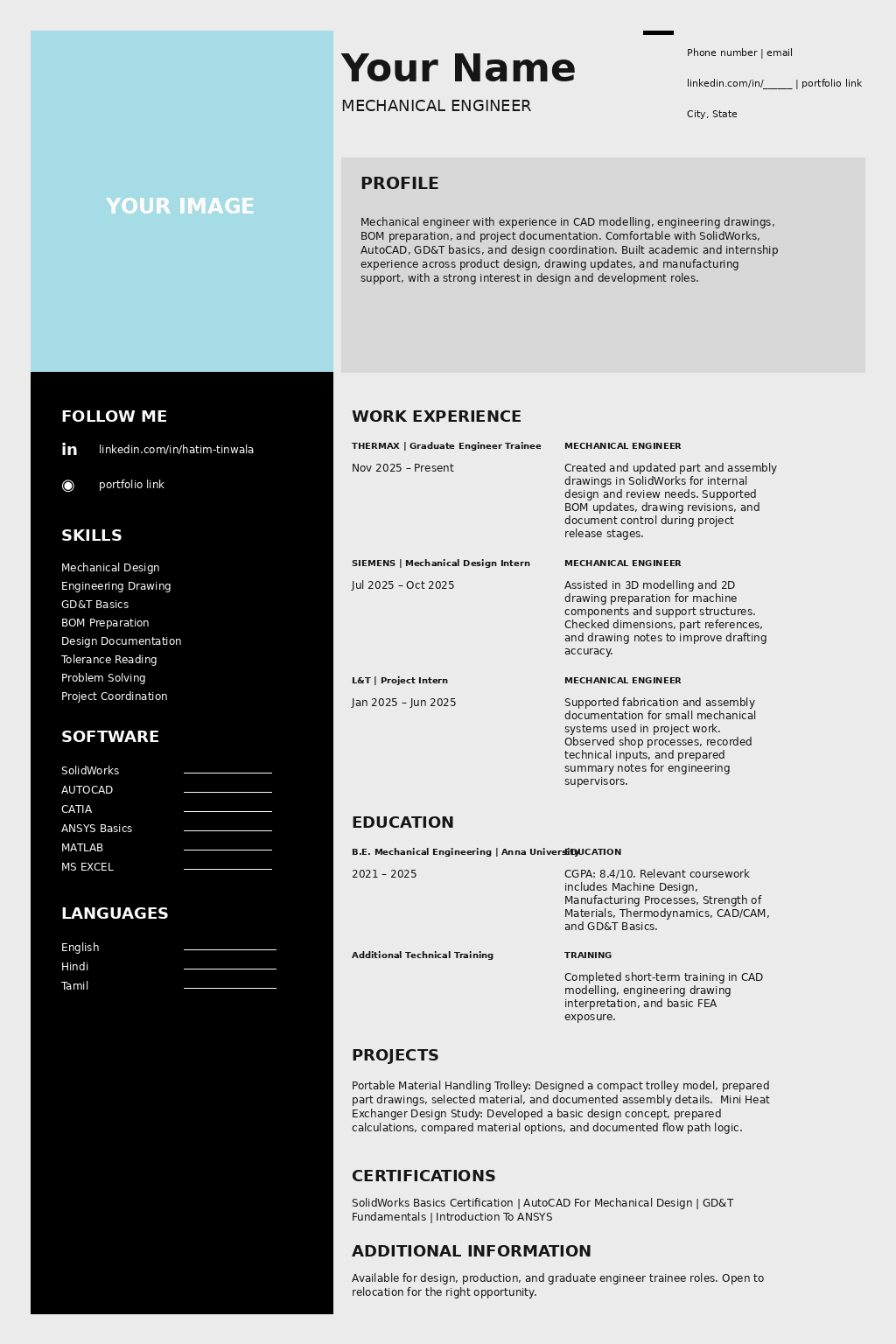
ATS-Safe Text Version
Your Name
Mechanical Engineer
City, State
Phone Number | Email
linkedin.com/in/_____| portfolio link
Profile
Mechanical engineer with experience in CAD modelling, engineering drawings, BOM preparation, and project documentation. Comfortable with SolidWorks, AutoCAD, GD&T basics, and design coordination. Built academic and internship experience across product design, drawing updates, and manufacturing support, with a strong interest in design and development roles.
Work Experience
Thermax | Graduate Engineer Trainee
Nov 2025 – Present
Created and updated part and assembly drawings in SolidWorks for internal design and review needs.
Supported BOM updates, drawing revisions, and document control during project release stages.
Coordinated with senior engineers to resolve minor fit, tolerance, and dimension mismatches before release.
Prepared technical documentation for equipment subassemblies and supported cross-team communication on change updates.
Siemens | Mechanical Design Intern
Jul 2025 – Oct 2025
Assisted in 3D modelling and 2D drawing preparation for machine components and support structures.
Checked dimensions, part references, and drawing notes to improve drafting accuracy.
Supported design file organisation and revision tracking for ongoing internal projects.
Helped document component changes and update project sheets for design review meetings.
L&T | Project Intern
Jan 2025 – Jun 2025
Supported fabrication and assembly documentation for small mechanical systems used in project work.
Observed shop processes, recorded technical inputs, and prepared summary notes for engineering supervisors.
Assisted with vendor drawing checks and internal coordination during project execution.
Helped maintain inspection and technical records related to part readiness and material use.
Education
B.E. Mechanical Engineering | Anna University
2021 – 2025
CGPA: 8.4/10
Relevant Coursework: Machine Design, Manufacturing Processes, Strength of Materials, Thermodynamics, CAD/CAM, GD&T Basics
Additional Technical Training
Completed short-term training in CAD modelling, engineering drawing interpretation, and basic FEA exposure.
Key Skills
Mechanical Design
Engineering Drawing
GD&T Basics
BOM Preparation
Design Documentation
Tolerance Reading
Problem Solving
Project Coordination
Software
SolidWorks
AutoCAD
CATIA
ANSYS Basics
MATLAB
MS Excel
Projects
Portable Material Handling Trolley
Designed a compact trolley model for workshop movement, prepared part drawings, selected material, and documented assembly details for academic evaluation.
Mini Heat Exchanger Design Study
Developed a basic design concept, prepared calculations, compared material options, and documented flow path logic for a classroom design submission.
Certifications
SolidWorks Basics Certification
AutoCAD For Mechanical Design
GD&T Fundamentals
Introduction To ANSYS
Languages
English
Hindi
Tamil
Additional Information
Available for design, production, and graduate engineer trainee roles.
Open to relocation for the right opportunity.
Fresher Version
A fresher version of this template should place more weight on projects, software confidence, workshop exposure, internships, and certifications. When full-time experience is missing, the resume should still show proof of applied work through college projects, capstone work, lab assignments, drafting practice, and technical training.
Experienced Version
An experienced version should move work experience above projects and give more space to achievements, responsibility level, design ownership, production coordination, documentation quality, or maintenance results. Once experience becomes stronger, projects can stay shorter and more selective.
One useful template should do two jobs at once. It should show a polished sample, and it should also show readers how to build a safer ATS-ready version for actual applications.
Writing Experience Lines More Clearly
In resume writing, the problem usually starts when a line mentions only the task and stops there. Recruiters want a little more than that. A stronger line should show the work handled, the tool or method used, and the reason that work mattered.
For internship entries, project work, and CAD support roles, that small change makes a very visible difference.
Instead of writing only the task, build the line in this order:
action handled
tool, method, or technical context
result, purpose, or support given
Here are three cleaner examples.
Internship Example
Before: Assisted in design work during internship.
After: Supported drawing updates during internship, checked marked changes against existing sheets, and prepared revised files for internal review.
Project Example
Before: Completed a project on heat exchanger design.
After: Developed a mini heat exchanger design study, prepared basic calculations, compared material options, and documented the final design logic for academic submission.
Design Or CAD Example
Before: Worked on SolidWorks models.
After: Built and revised SolidWorks part models, corrected feature issues after review, and prepared cleaner outputs for documentation and presentation.
Across all three examples, the same pattern remains useful. A recruiter can see the task, the technical context, and the value without reading between the lines. That makes even early-stage experience look more credible.
Resume For Mechanical Engineer Fresher
For a fresher, the resume does not need to imitate a full-time industry profile. A better approach is to present academic work, internships, software use, and project responsibility in a way that feels practical and believable.
On fresher resumes, project quality matters a lot. Internship exposure matters as well, but even short training, lab work, workshop practice, design assignments, and competition work can add real value when the wording is clear.
What matters most is not the label of the section. What matters more is whether the line shows contribution, tool use, and technical seriousness.
That is why this section should give proper space to the strongest evidence already available in your profile.
The strongest fresher resumes usually rely on four things. First comes project quality. Second comes internship or workshop exposure. Third comes software confidence. Fourth comes the ability to explain technical work clearly.
That is why a fresher should give proper space to:
Academic projects with clear contribution
Internships, even when the role was short
CAD, CAE, drafting, or documentation exposure
Competition teams, fabrication work, or lab assignments
Certifications that support the target role
No full-time job does not mean no real value. A fresher profile becomes stronger when coursework is converted into proof.
Compare these two lines.
Weak:
Completed machine design project in final year.
Better:
Designed a compact fixture model in SolidWorks, prepared basic dimensions and material notes, and submitted the final drawing set for academic evaluation.
Weak:
Learned AutoCAD and GD&T basics.
Better:
Used AutoCAD for 2D drafting practice and applied GD&T basics while reading and preparing classroom drawing exercises.
That is how a student page starts feeling employable. It stops sounding like subject coverage, and it starts sounding like usable engineering exposure.
ATS Tips And Common Mistakes
For online applications, ATS readability matters, but formatting alone will not solve the problem. Recruiters still need to see relevant terms placed near real proof.
In a better resume, section names stay standard, wording stays simple, and job-description terms appear where the page actually supports them.
SolidWorks should not sit only in a skill list if project or internship work can show how it was used. The same applies to GD&T, AutoCAD, BOM preparation, technical documentation, and similar terms.
The mapping example below will help you place keywords more naturally.
Job Description Term | Resume Placement | Better Wording |
SolidWorks | Skills, project bullet, internship bullet | Built and revised SolidWorks part models for classroom and internship work |
GD&T | Skills, coursework, and drawing-related projects | Applied GD&T basics while reading and preparing engineering drawings |
BOM Preparation | Experience or internship bullet | Supported BOM updates and document revisions during project release work |
AutoCAD | Skills and project section | Used AutoCAD for 2D drafting, layout correction, and drawing practice |
Technical Documentation | Experience, project, or internship bullet | Prepared technical notes, drawing files, and revision support records |
In most applications, resumes lose strength because the wording stays too broad. A recruiter may see the section title, but not the proof. A better line connects the term with a real task.
Common mistakes still hurt shortlisting fast:
Crowded layout and weak spacing
One generic resume used for every company
Skill lists with no grouping or priority
Project bullets with no tool and no result
Decorative templates with poor ATS readability
Final Check Before You Apply
Before sending the resume, take one final look at it as though you are the recruiter seeing it for the first time. At that stage, the page should already make role fit, technical skills, and project proof easy to understand.
For most students and freshers, improvement does not come from adding more lines. Improvement usually comes from cleaning weak wording, grouping skills properly, and making project or internship work sound clearer.
Once those parts are corrected, the resume starts looking more focused and more professional. That is the version you should send.
FAQs
Should A Mechanical Engineer Resume Be One Page Or Two Pages?
Freshers and early-career candidates should usually stay within one page. A two-page resume is fine only when your work history, projects, and certifications are strong enough to justify the extra space.
What Should A Mechanical Engineer Fresher Put Instead Of Work Experience?
Use academic projects, internships, workshop exposure, lab work, competition teams, certifications, and software-based work. The goal is to show applied engineering ability, not pretend you already have full-time experience.
Which Skills Should Be Added To A Mechanical Engineer Resume?
Add skills that match the target role, such as SolidWorks, AutoCAD, GD&T basics, BOM preparation, manufacturing processes, ANSYS basics, MATLAB, technical documentation, and drawing interpretation. Keep the list relevant and grouped clearly.
Should I Use A Resume Objective Or A Summary?
Use a summary when you already have projects, internships, or relevant technical proof. Use an objective only when your experience is still limited, and you need one short line to explain direction.
Is PDF Better Than Word For A Mechanical Engineer Resume?
Use the format requested in the job post first. When no format is specified, PDF is usually better for keeping layout stable, but an ATS-friendly Word version is also smart to keep ready.