Cognex
how does machine vision work

How Does Machine Vision Work? A Student's Complete Guide
What is Machine Vision?
Machine vision is the technology that lets computers and machines "see" — capturing images with cameras and using software to understand what's in them.
Think of it like giving a robot eyes and a brain at the same time. A camera takes a picture of a product on a factory line. The software then looks at that image and answers questions: Is this part the right shape? Is there a scratch on it? Does this barcode scan correctly? All of this happens in a fraction of a second — faster than any human inspector ever could.
Cognex machine vision is the world's most widely-used version of this technology. Founded in 1981 near Boston, USA, Cognex makes the cameras, sensors, and AI software that factories use to automate visual inspection.
With over 4.5 million systems installed in more than 30,000 factories worldwide, it's the go-to name in industrial vision.
How Does Machine Vision Work?
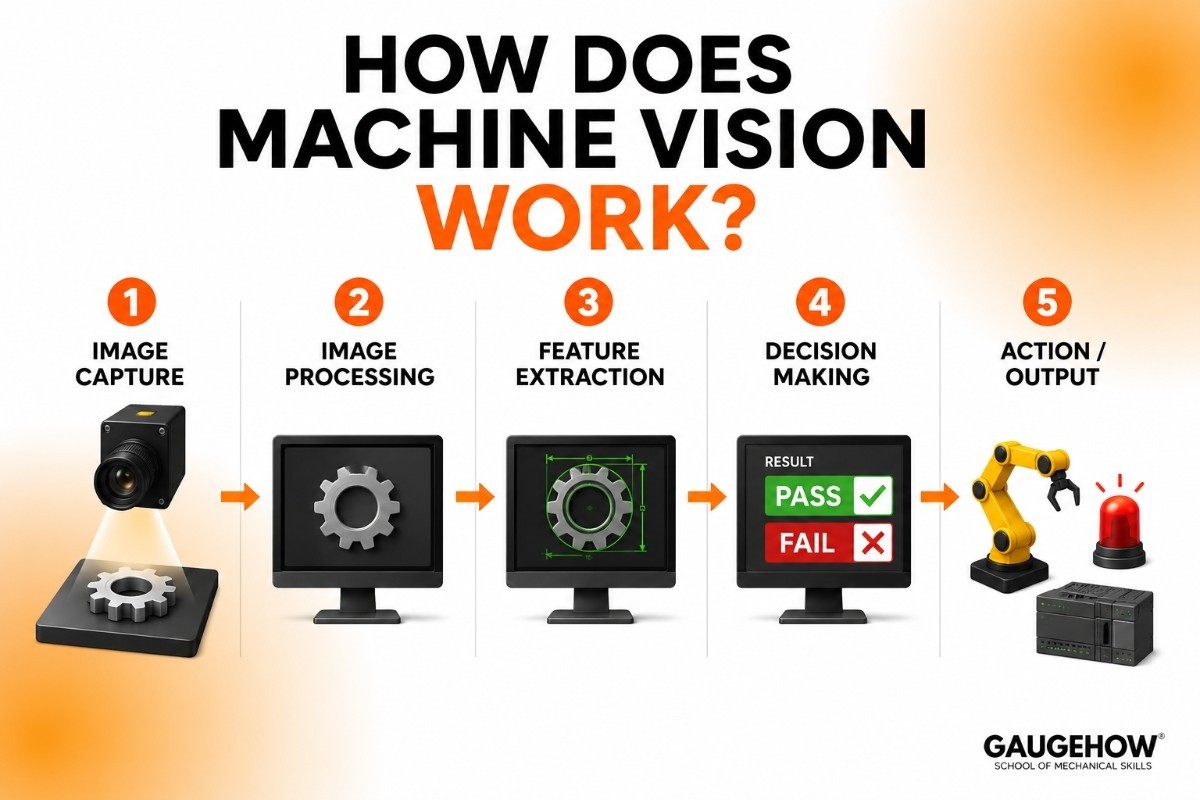
The process follows a clear pipeline. Every machine vision system — whether from Cognex or anyone else — goes through these five stages:
1.Image capture
A camera takes a photo or video of the object. This could be a regular 2D camera, a 3D depth sensor, or a high-speed line-scan camera for fast-moving products. The lighting setup matters enormously — good light = sharp image = better results.
2.Image processing
The raw image is cleaned up — noise is removed, contrast is enhanced, and the important areas are highlighted. Think of it like adjusting a blurry photo before printing it.
3.Feature extraction
The software looks for specific things in the image — edges, shapes, colors, text, barcodes, or patterns. It measures dimensions, detects positions, or reads codes.
4.Decision making
The system compares what it found against a set of rules (or an AI model). It decides: Pass or Fail? Pick or place? Which direction should the robot move?
5.Action / output
The result is sent to a robot, PLC (the factory computer), or alarm system. A bad part is rejected, a robot picks up the right component, or a quality report is logged automatically.
The magic of Cognex machine vision is that it does all five steps in milliseconds — at full factory speed, without slowing down the production line.
Key Features of Cognex Machine Vision
Here are the eight capabilities that matter most — explained without the marketing fluff:
🔍Defect detection
Spots surface flaws, scratches, cracks, and missing parts that human eyes would miss — even on shiny or reflective surfaces.
📦Barcode & ID reading
Cognex DataMan readers can decode damaged, dirty, or tiny barcodes, QR codes, and DPM codes on metal parts — at conveyor speed.
🤖Robot guidance
Tells a robotic arm exactly where an object is in 3D space so it can pick, place, or assemble parts with millimeter precision.
📐Measurement & gauging
Measures dimensions, gaps, angles, and tolerances at micron-level accuracy — replacing physical measuring tools on the line.
🧩Assembly verification
Checks that every screw, clip, seal, and label is present and in the right position before a product ships.
🧠AI-powered deep learning
Uses Cognex ViDi suite to train custom AI models on your own defect images — no coding required. Handles complex, unpredictable flaws.
Manufacturers exploring dedicated AI inspection platforms often compare Cognex ViDi with Landing AI, which focuses specifically on deep-learning-based visual inspection and defect detection for manufacturing environments.
📷3D vision
Measures depth, volume, and 3D shape — not just flat 2D images. Essential for stacking, bin-picking, and complex part shapes.
💻Easy-to-use software
Cognex In-Sight uses a spreadsheet-style interface, so technicians (not just programmers) can set up inspections in hours.
Cognex Vision System Price:
One of the most common questions manufacturers ask when evaluating machine vision technology is: How much does a Cognex vision system cost?
The answer depends on the application, camera type, inspection complexity, software requirements, and integration needs.
Cognex offers a wide range of machine vision products, from simple barcode readers to advanced AI-powered inspection systems.
Typical Cognex Vision System Price Range
System Type | Estimated Price Range |
|---|---|
Handheld Barcode Readers | $500 – $3,000 |
Fixed-Mount Barcode Readers | $1,000 – $5,000 |
Entry-Level Vision Sensors | $1,500 – $5,000 |
Cognex In-Sight Smart Cameras | $3,000 – $15,000+ |
Advanced AI Vision Systems | $10,000 – $50,000+ |
Fully Integrated Machine Vision Solutions | $20,000 – $100,000+ |
Prices vary by configuration, software licensing, optics, lighting, installation, and system integration requirements.
Is there a free trial?
Yes — Cognex offers a free 30-day trial of In-Sight Explorer (their main software) and VisionPro on their website. The ViDi deep learning suite also has a trial. You can test on sample images before committing to hardware.
Cognex Tutorial — Getting Started in 5 Steps
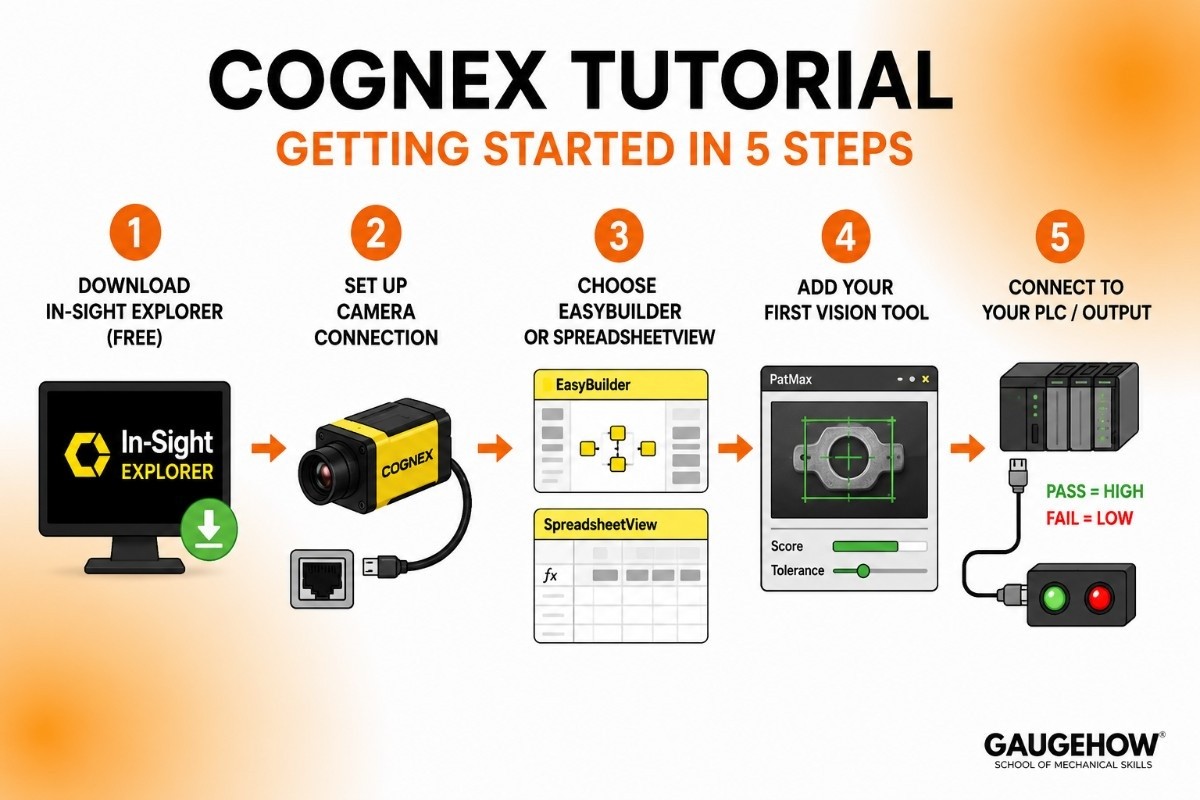
New to Cognex? Here's the fastest path from zero to your first working inspection:
1.Download In-Sight Explorer (free)
Go to cognex.com → support → downloads. Install In-Sight Explorer — it's the main software for programming all In-Sight cameras. A free 30-day emulator lets you run everything without physical hardware.
2.Set up your camera connection
Connect your In-Sight camera via Ethernet. The software auto-discovers it. Set the IP address using the Network Configuration Tool. You'll see a live image within minutes.
3.Choose EasyBuilder or SpreadsheetView
EasyBuilder is a wizard-based interface for beginners (click through prompts, add inspection tools, done). SpreadsheetView gives full control with formula-style programming — great once you get comfortable.
4.Add your first vision tool
Start with PatMax (pattern matching) — drag a region around your reference object, set tolerances, and test it on 20–30 sample images. Cognex's training library on their website has step-by-step video tutorials for every tool.
5.Connect to your PLC / output
Set a discrete I/O output (a simple wire signal) for Pass = high voltage, Fail = low voltage. Or use EtherNet/IP to send results directly to your Siemens or Allen-Bradley PLC. Your first working inspection system is ready.
Cognex vs Basler
Both Cognex and Basler are popular machine vision brands, but they serve different needs.
Quick Comparison
Feature | Cognex | Basler |
|---|---|---|
Smart Cameras | ✓ | Limited |
Industrial Cameras | ✓ | ✓ |
Easy Setup | ✓ | Requires More Integration |
AI Inspection | ✓ | Available Through Software Partners |
Best For | Factory Inspection | Custom Vision Projects |
Which Is Better?
Choose Cognex if you want a complete machine vision solution for manufacturing and quality control.
Choose Basler if you need industrial cameras and plan to build a custom machine vision system.
Bottom Line
Cognex focuses on complete machine vision systems for factories.
Basler focuses on industrial cameras for custom machine vision applications.
Pros & Cons — The Honest Version
Every guide that only lists pros is trying to sell you something. Here's a balanced view:
Pros
Industry's most proven reliability — 40+ years in production environments
Huge community, documentation, and certified integrator network worldwide
ViDi deep learning works without any coding background
In-Sight spreadsheet interface is genuinely beginner-friendly
Handles the widest range of applications — from simple presence checks to complex 3D inspection
Strong PLC/robot integration with all major brands
Free software trials available before any hardware purchase
Cons
Premium pricing — noticeably more expensive than Basler, Keyence, or open-source alternatives
Closed ecosystem — Cognex hardware works best with Cognex software; mixing brands adds complexity
VisionPro SDK has a steep learning curve for developers new to machine vision
Customer support response can be slow for non-enterprise accounts
Some newer competitors offer better cloud connectivity out of the box
Annual software maintenance fees add up over time
Why we include cons
Listing honest drawbacks makes this guide more trustworthy than a vendor page. If you're a student or engineer evaluating Cognex, the cons above are real considerations that should factor into your decision.
Cognex Alternatives
If you're considering Cognex for machine vision, several alternatives offer similar capabilities for industrial inspection, automation, barcode reading, and quality control.
1. Keyence
One of the biggest competitors to Cognex. Keyence offers smart cameras, vision sensors, barcode readers, and inspection systems that are known for easy setup and strong technical support.
2. Basler
Best known for industrial cameras. Basler is a good choice for companies building custom machine vision systems and looking for flexible hardware options.
3. Teledyne DALSA
Provides industrial cameras, frame grabbers, image sensors, and machine vision software for advanced inspection applications.
4. Omron
Offers machine vision systems, smart cameras, and vision sensors that integrate well with factory automation equipment.
5. SICK
Known for machine vision sensors, barcode readers, and industrial automation solutions used in manufacturing and logistics.
6. Matrox Imaging
Provides machine vision software, frame grabbers, and imaging hardware for custom inspection and automation projects.
Which Alternative Is Best?
Keyence – Best for easy deployment and factory inspections.
Basler – Best for industrial cameras and custom vision systems.
Teledyne DALSA – Best for advanced imaging applications.
Omron – Best for automation-focused manufacturing environments.
SICK – Best for logistics, barcode reading, and sensor-based inspection.
Matrox Imaging – Best for developers building custom vision solutions.
Instrumental → Electronics inspection and manufacturing quality section.
Best For — Who Should Actually Use Cognex?
Cognex is not the right choice for everyone. Here's where it genuinely shines:
🚗Automotive
Body welding inspection, VIN reading, engine part gauging
💊Pharma & medical
Blister pack inspection, label verification, syringe assembly
📱Electronics
PCB inspection, solder joint verification, component placement
📦Logistics & e-commerce
High-speed barcode reading, parcel sorting, DIM weighing
🍫Food & beverage
Fill level checks, cap inspection, date code reading
🔩General manufacturing
Any high-volume assembly line needing automated quality control
Not ideal for:
Very small workshops or startups with budgets under $1,000
Research labs that need fully open-source, hackable systems (OpenCV + Basler may suit better)
Applications needing thermal or hyperspectral imaging (Teledyne or FLIR are stronger here)
Integrations — What Can Cognex Connect To?
One of Cognex's biggest selling points is how well it plays with the rest of a factory's ecosystem.
PLC / industrial control systems
Siemens S7 / TIA PortalAllen-Bradley (Rockwell)Mitsubishi MELSECOmron NJ/NXBeckhoff TwinCATFANUC CNC
Robots
FANUCKUKAABBUniversal Robots (UR)Yaskawa MotomanDENSO
Communication protocols
EtherNet/IPPROFINETOPC-UAModbus TCPRS-232 / RS-422MQTT (IIoT)
MES / ERP & data systems
SAP MESRockwell FactoryTalkSiemens OpcenterSQL databasesCustom REST APIs
Cognex also has an In-Sight software development kit (SDK) that lets developers build custom integrations using C#, VB.NET, or Python wrapper libraries.
Deployment Options — Cloud, On-Prem, or Edge?
Primary mode
Edge / embedded
Processing happens inside the camera itself or a connected PC — no internet required. This is how 95% of Cognex systems are deployed. Ultra-low latency, works in air-gapped factories.
For analytics
On-premises server
VisionPro and ViDi run on industrial PCs in the factory. Results and images are stored locally. Common for high-throughput lines with multiple cameras.
Emerging option
Cloud-connected
Cognex Edge Intelligence (CEI) platform lets you stream inspection data to the cloud for dashboards and fleet management. Not real-time inspection — used for monitoring and reporting.
Brownfield readiness
Cognex is well-suited to brownfield deployments — meaning existing factories that weren't designed with vision in mind.
Most systems can be retrofitted without stopping production, and the wide range of mounting options, lighting accessories, and flexible communication protocols makes integration into legacy lines practical.
Frequently Asked Questions
What is the difference between machine vision and computer vision?
Computer vision is the technology that helps computers understand images and videos. It is used in areas like facial recognition, self-driving cars, and medical imaging.
Machine vision is a type of computer vision used in factories. It helps inspect products, find defects, read barcodes, and automate quality control.
Is Cognex cloud-based?
Not completely.
Most Cognex systems process images directly on the camera or a local computer. This allows inspections to happen quickly and reliably.
Cognex also offers cloud tools for monitoring and analytics, but inspection decisions are made on-site.
Cognex vs Keyence: Which one should you choose?
Both are popular machine vision brands.
Choose Keyence for simple inspections and quick setup.
Choose Cognex for advanced inspections, AI-powered vision, and custom applications.
The right choice depends on your inspection needs and budget.
How long does it take to set up a Cognex vision system?
Setup time depends on the project.
Basic inspections can be set up in a few hours.
AI-based inspections may take a few days or weeks.
Large production line systems can take several months to deploy.
What is the difference between Cognex In-Sight and VisionPro?
In-Sight is a smart camera with built-in vision software. It is easy to install and works well for most inspection tasks.
VisionPro is machine vision software that runs on a PC. It offers more flexibility and advanced features for complex applications.
Can beginners learn Cognex machine vision?
Yes.
Cognex offers free training courses, tutorials, and software tools for beginners. Students and engineers can learn machine vision basics, image inspection, and automation concepts without prior experience.
It is one of the most popular platforms for learning industrial machine vision.
Cognex gives machines the power to see. Using AI-powered cameras and smart software, it spots defects, reads barcodes, and guides robots.























