Landing AI
Data Centric AI

Data-Centric AI: A Simple Guide for Students (and How Landing AI Puts It to Work)
If you're learning about artificial intelligence, you've probably heard that bigger models and more data make AI smarter.
That's only half the story. A different idea, called data-centric AI, says something simpler: the quality of your data often matters more than the size of your model.
This guide explains what data-centric AI means in plain language, then shows how a real company, Landing AI, builds tools around the idea.
By the end, you'll understand the concept and see how it works in practice, from no-code computer vision to pulling data out of PDFs.
Overview: What Data-Centric AI Means
Data-centric AI is the practice of improving an AI system by improving its data, instead of only tweaking the model.
Think of it like cooking. Most people assume a better recipe makes a better dish. But if your ingredients are old or mislabeled, no recipe will save the meal.
Data-centric AI focuses on the ingredients, your training data, making sure they're clean, correctly labeled, and consistent.
The idea was popularized by Andrew Ng, a well-known AI researcher who taught the famous machine-learning course on Coursera and co-founded Google Brain.
He argues that for most real-world projects, "improving the data is more important than improving the model." Ng founded a company called Landing AI to turn that philosophy into practical software, which is why it's the perfect example to learn from.
What Is Landing AI?
Landing AI is a company that builds visual AI tools using a data-centric approach. It was founded by Andrew Ng in 2017.
Its main idea is to help regular companies, not just big tech firms, use AI to understand images and documents. A factory might use it to spot defects on a production line.
An insurance team might use it to read information off scanned forms. Landing AI's tools are built so people without a deep AI background can still get useful results, mostly by focusing on good data rather than complex code.
Today the company has two main products: LandingLens, a platform for building computer vision models, and Agentic Document Extraction (ADE), a newer tool that reads complex documents and turns them into structured data.
Key Features
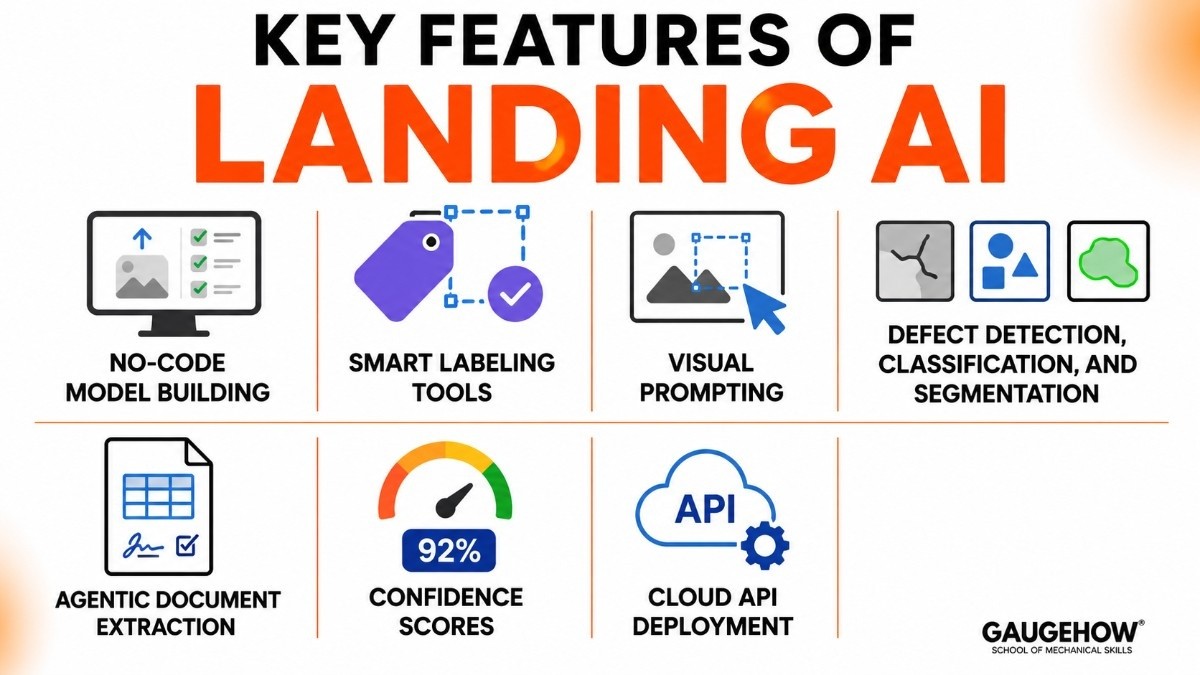
Here's what Landing AI actually offers, in concrete terms:
No-code model building. You can train an image-recognition model by uploading examples and labeling them, no programming required.
Smart labeling tools. The platform helps you label images consistently and even flags labels that look wrong, which is the heart of the data-centric method.
Visual Prompting. You "show" the AI what to look for by marking a few areas on an image, similar to how you'd prompt ChatGPT with text. The model learns from just a handful of examples.
Defect detection, classification, and segmentation. Common factory tasks like finding scratches, sorting parts into categories, or outlining objects in an image.
Agentic Document Extraction. Reads messy documents, tables, checkboxes, signatures, even handwriting, and outputs clean, structured data.
Confidence scores. Results come with a score showing how sure the AI is, so you know which answers to double-check.
Cloud API deployment. Once a model works, you can publish it to a web address (an API) and use it in your own app within seconds.
No-Code Computer Vision
Computer vision means teaching a computer to "see", to understand what's in a picture. Normally this takes a lot of coding and AI knowledge. No-code computer vision removes that barrier.
With LandingLens, the workflow looks like this. You upload images. You draw boxes or marks to show the AI what matters, like circling a crack on a metal part. The platform trains a model on your examples. Then you test it, fix any bad labels, and retrain.
Notice that you improve results by fixing the data (better labels, clearer examples), not by writing better algorithms. That's data-centric AI in action.
This matters for students and small teams because you can build a working vision system in an afternoon, using only a web browser.
How to Extract Data from PDF Using AI
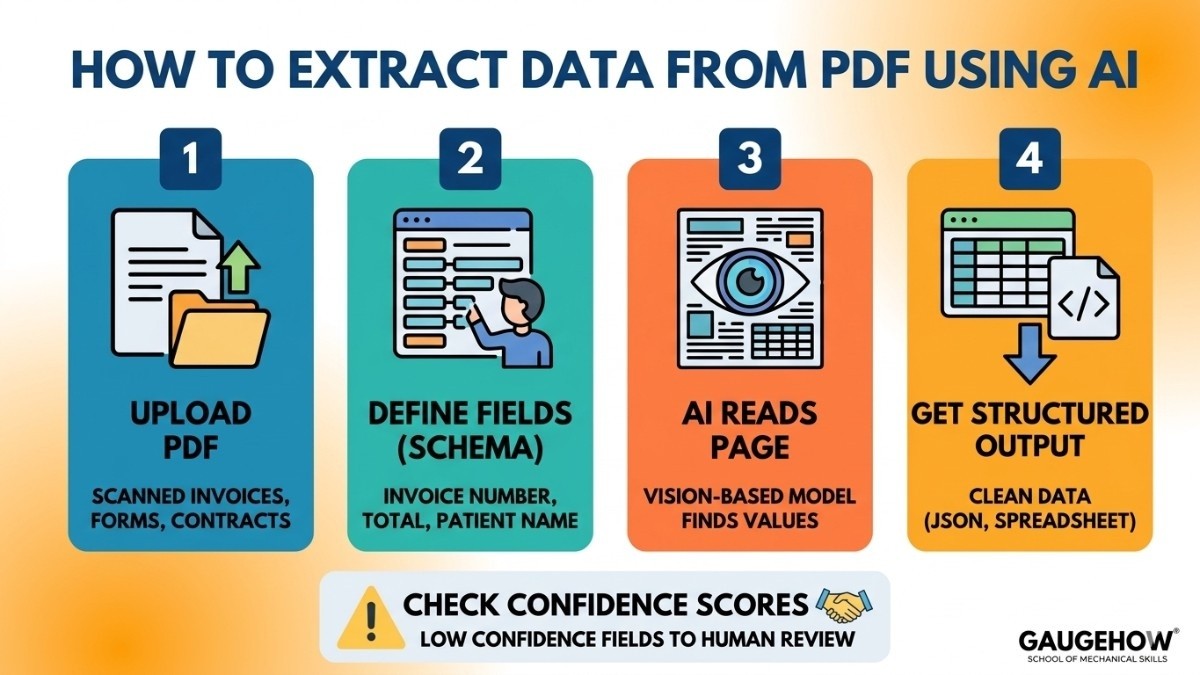
Reading data from PDFs is harder than it sounds. A PDF might have tables, stamps, handwritten notes, or weird layouts that confuse normal software.
This is where AI document extraction helps, and it's what Landing AI's Agentic Document Extraction is built for.
Here's the basic process most AI extraction tools follow:
Upload the document. A scanned invoice, a medical form, a contract, whatever you need.
Tell the AI what to find. You define the fields you want, like "invoice number," "total amount," or "patient name." This is often called a schema.
Let the AI read it. A vision-based model looks at the whole page, understands the layout, and finds the values, even in tricky tables or handwriting.
Get structured output. The result comes back as clean data (usually JSON), which you can drop straight into a spreadsheet or database.
Check the confidence scores. Low-confidence fields can be sent to a human for a quick review.
The big shift here is that the AI "reads" the page visually, the way a person does, instead of relying on fixed templates. That's why it handles documents it has never seen before.
Landing AI Pricing
Pricing is what most people really want to know, so let's be clear and honest about it.
Landing AI uses a usage-based (credit) model rather than one flat fee, and it doesn't publish a full public price list. The general structure looks like this:
Free / trial tier
You can start for free to test the tools. This is great for students and small experiments, with limits on how much you can process.
Pay-as-you-go / credits
Beyond the free tier, you buy credits and pay based on how much you use (for example, per document processed). Costs scale with your volume.
Enterprise
Large companies get custom plans and have to "contact sales" for a quote, which usually includes higher limits and support.
The honest takeaway: it's friendly to try but harder to predict at scale. Because the pricing is credit-based and partly hidden behind sales calls, competitors often advertise simpler flat-rate plans.
If budget certainty matters to you, ask for a clear estimate based on your real document volume before committing.
Pros and Cons
A fair look at both sides, because no tool is perfect.
Pros
Beginner-friendly: you don't need to code or be an AI expert.
Built on a smart, proven idea (data-centric AI) backed by a respected founder.
Works well with small datasets, which suits real companies that don't have millions of images.
Handles both images and complex documents.
Fast to go from idea to a working model.
Cons
Pricing isn't fully transparent and can get expensive as you scale.
It's more API-first, so building full automation can still need a developer.
The free tier has limits that you'll outgrow quickly on real projects.
It's specialized for visual and document tasks, not a general all-purpose AI tool.
Listing the downsides isn't criticism. It's the difference between an honest guide and a sales page.
Who Landing AI Is Best For
Landing AI fits a few clear groups.
By company size, it works for everyone from small and mid-size manufacturers up to large enterprises (its customers include big names like Foxconn, Denso, and Stanley Black & Decker).
By industry, the strongest fits are manufacturing (electronics, semiconductors, automotive, pharmaceuticals) for visual inspection, and document-heavy fields like finance, insurance, and healthcare for data extraction.
By use case, it's ideal when you have a visual or document problem, limited AI staff, and you'd rather improve your data than hire a team of machine-learning engineers. It's less ideal for tiny one-off tasks where a free, simple tool would do.
Integrations
Landing AI is built to plug into systems you already use, mainly through its API (a web connection that lets two programs talk).
For computer vision, you can connect trained models to your existing cameras and edge devices, and feed results into factory systems like an MES (Manufacturing Execution System) or PLC controllers through the API.
For document extraction, the API sends structured data into your apps, databases, or business tools.
One honest note: Landing AI is API-first, not a plug-and-play connector library. So linking it to your ERP, MES, or sensors usually means a developer wires up the connection. The flexibility is there; it just isn't always one click.
Deployment: Cloud, On-Prem, and Edge
You can run Landing AI in three ways:
Cloud: the easiest option, run everything through Landing AI's servers with no setup.
On-premises: run it inside your own company's servers, which industries with strict privacy rules (like healthcare) often need.
Edge devices: run models directly on small devices near the camera or machine, for fast results without sending data to the cloud.
On brownfield readiness (a fancy term for "working with the older equipment a factory already has"), Landing AI does well.
Because it's software-and-data focused and not tied to one camera brand, you can often add it to existing lines without ripping out and replacing your current hardware. That keeps upgrade costs down.
Alternatives to Landing AI
Landing AI isn't the only option. Depending on your goal, these are worth comparing:
Roboflow — a popular platform for building computer vision models, with a big free tier loved by students and developers.
MVTec HALCON — a powerful, code-based machine vision library for demanding industrial inspection (steeper learning curve).
Cognex VisionPro / ViDi — an industrial heavyweight, strong inside Cognex's own camera ecosystem.
Azure Document Intelligence — Microsoft's service for extracting data from documents, good if you're already on Azure.
Keyence — known for high-end vision hardware and smart sensors that handle inline defect detection with rapid processing.
Instrumental — an AI-native manufacturing quality platform that optimizes assembly lines by catching unexpected flaws with minimal image data.
Frequently Asked Questions
What is data-centric AI in simple terms? It's the practice of improving an AI system by improving the quality of its training data (cleaning it, labeling it correctly, making it consistent) instead of only changing the model. Better ingredients, not just a better recipe.
What's the difference between data-centric and model-centric AI? Model-centric AI focuses on tweaking the algorithm to get better results. Data-centric AI keeps the model steady and improves the data instead. In many real projects, fixing the data gives bigger gains.
What is Landing AI used for? It's used to build visual AI applications, mainly spotting defects on production lines (computer vision) and pulling structured data out of complex documents (document extraction).
Is Landing AI free? There's a free tier to get started and test the tools, which is perfect for learning. Beyond that, it uses paid, usage-based pricing, and large companies get custom enterprise plans.
Is Landing AI cloud-based? Yes, it can run in the cloud, but it also supports on-premises and edge-device deployment for teams with privacy or speed requirements.
Can Landing AI extract data from PDFs? Yes. Its Agentic Document Extraction tool reads complex PDFs, including tables, checkboxes, and handwriting, and returns clean, structured data you can use in other apps.
Landing AI, is a platform for visual inspection, and quality control. See how manufacturers use AI to improve accuracy and reduce manual inspections.























