Siemens TIA Portal
Tia portal system requirements
TIA Portal System Requirements: What Your PC Actually Needs
Before you get excited about programming Siemens PLCs, there is one practical question worth answering: will TIA Portal even run on your laptop? It is a big, demanding piece of software, and plenty of students hit the install wall — a download that crawls, a machine that freezes, a project that takes forever to compile.
This guide lays out the real TIA Portal system requirements in plain terms, walks you through installing it without the usual headaches, and covers the basics like cost and free options along the way. The goal: get you from "can my PC handle this?" to a working install with zero surprises.
What is TIA Portal?
TIA Portal (Totally Integrated Automation Portal) is Siemens' engineering software for programming and configuring industrial automation systems.
Made by Siemens, it pulls PLC programming, screen (HMI) design, and drive setup into one program, and it replaced the older STEP 7 and standalone WinCC tools. The current release is V20. In short, it is the software you use to build the control logic behind machines and factory lines.
What is TIA Portal used for?
In quick terms, it covers a handful of core jobs:
PLC programming for Siemens controllers like the S7-1200 and S7-1500
HMI and SCADA design through WinCC for operator screens
Drive configuration for SINAMICS motors
Network setup for PROFINET and PROFIBUS communication
Simulation with PLCSIM, so you can test without real hardware
Diagnostics for finding and fixing faults on a live system
That mix of tasks is exactly why the software is heavy — and why your hardware matters.
TIA Portal system requirements
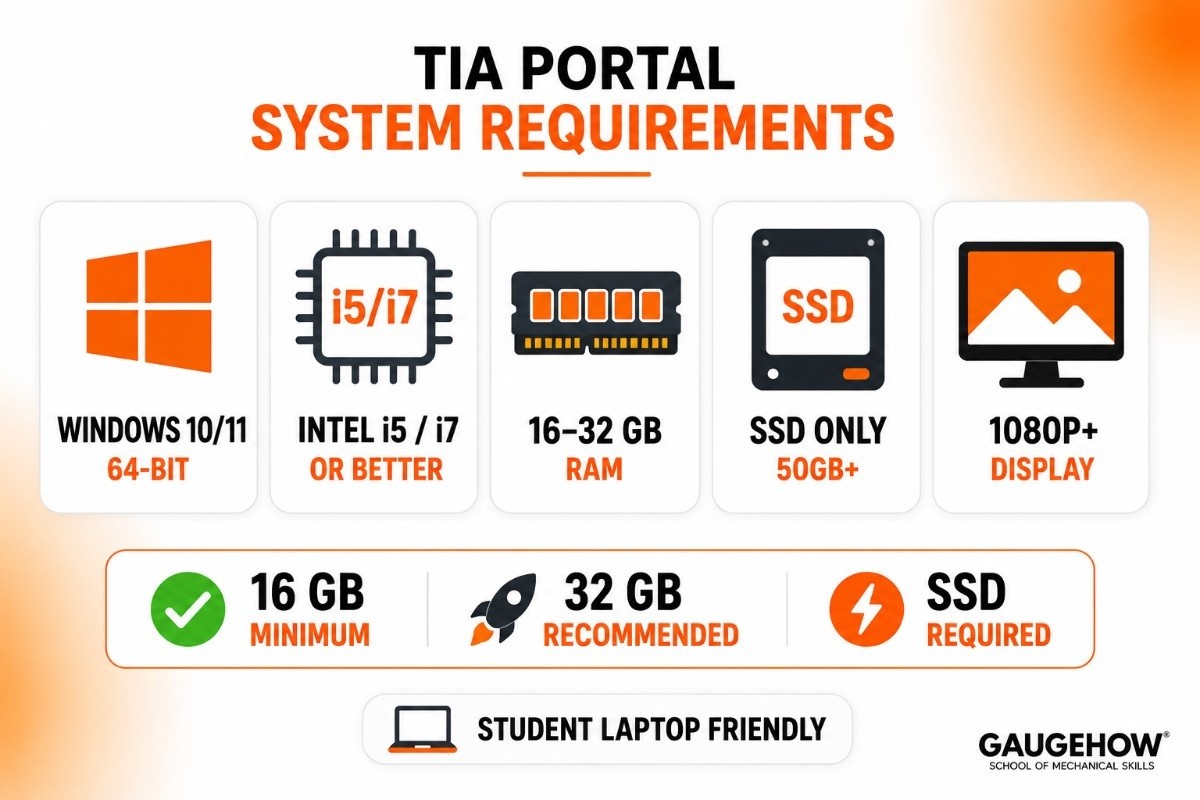
Here is the part you came for. TIA Portal is resource-hungry, especially the recent versions. Exact figures shift a little between versions and editions, so always check the readme for your specific version, but the table below is a reliable rule of thumb for V19 and V20.
Component | Minimum (will run) | Recommended (runs well) |
|---|---|---|
Operating system | Windows 10 64-bit (Pro/Enterprise) | Windows 11 64-bit (Pro/Enterprise) |
Processor | Intel Core i5 | Intel Core i7 or better |
RAM | 16 GB | 32 GB |
Storage | 50 GB free, SSD | 100 GB+ free, fast SSD/NVMe |
Display | 1920 × 1080 | 1920 × 1080 or higher |
A few honest notes on this:
RAM is the thing that hurts most
Eight gigabytes might technically launch older versions, but with TIA Portal V20 you will struggle the moment a project gets real. 16 GB is the practical floor, and 32 GB is where it actually feels comfortable. If you can upgrade one thing on an older laptop, make it the RAM.
An SSD is not optional
TIA Portal reads and writes a lot during compile and save. On a spinning hard drive, those waits become painful. An SSD turns minutes into seconds, so treat it as a requirement, not a nice-to-have.
Can you run it on a normal student laptop?
Yes, if it is reasonably modern — a recent i5 or i7, 16 GB of RAM, and an SSD will handle learning and small projects fine. You do not need a gaming rig. Where people get burned is trying to run it on an old 8 GB machine with a hard drive.
What about a virtual machine?
You can run TIA Portal inside a virtual machine (VMware or Hyper-V), which is handy for keeping different versions cleanly separated. Just give the VM enough RAM and cores, because the overhead makes a weak setup feel even weaker.
How to install TIA Portal
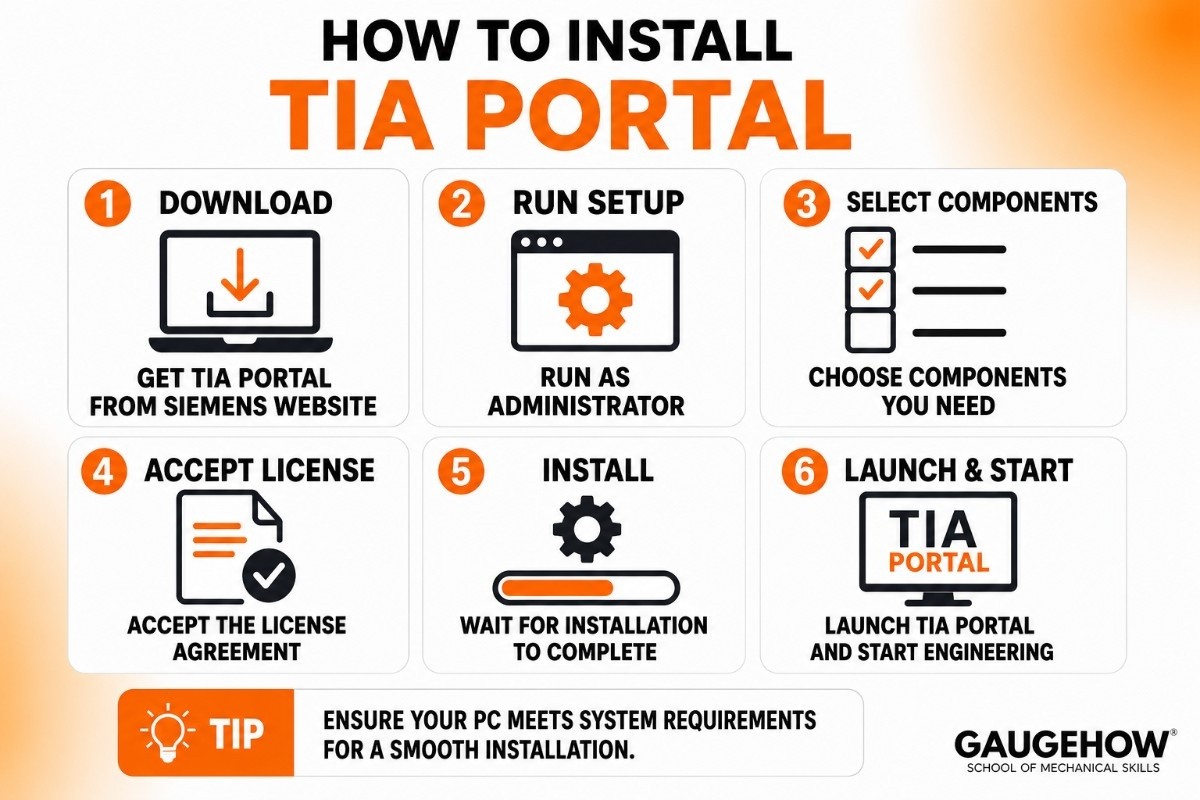
Once your PC clears the requirements, installation is straightforward — it is just long. Here is the path.
Step 1: Prepare your PC
Make sure you have enough free disk space, administrator rights, and a stable internet connection. Close other programs, and it helps to temporarily pause antivirus, which sometimes interferes with the installer.
Step 2: Get the official files
Download the trial (or your licensed version) from the Siemens website, or use your school's media. The installer is large and often comes in parts, so let it finish downloading fully before you start.
Step 3: Run the setup
Right-click the setup and run it as administrator. You will choose which components to install — STEP 7 for PLCs, WinCC for HMIs — and your languages. Only install what you need to save space.
Step 4: Expect restarts and patience
The installer will likely ask to restart your PC partway through. Let it. A full install can take anywhere from 30 minutes to over an hour, so do not start this right before class.
Step 5: Handle the license
Licensing is managed through the Automation License Manager, which installs alongside the software. Activate your trial or enter your license key here.
Step 6: Install PLCSIM separately
If you want to simulate programs without real hardware — and as a student, you do — install PLCSIM. It is a separate download and installer from the main TIA Portal package.
A common beginner mistake: skipping a requested restart or running setup without admin rights, which leads to a half-broken install. Follow the prompts in order and you will be fine.
Is TIA Portal free?
No, but you can use it free temporarily. Siemens provides a fully functional 21-day trial you can download to learn on. There is no permanent free edition.
If you are at a university or technical college, ask whether your department has licenses through Siemens' education program — many do, which gives you legitimate access at no personal cost. Avoid the "free full version" download sites; they are usually pirated and often carry malware.
TIA Portal price and licensing
TIA Portal is paid, professional software with a per-license model. Pricing is split mainly by capability: STEP 7 Basic (entry level, for the S7-1200 only) is the cheapest, while STEP 7 Professional (the full controller range, including S7-1500) costs more. WinCC editions add on top depending on your HMI needs.
Exact prices vary by region and reseller, but expect Basic in the hundreds and Professional in the low thousands in your local currency. As a student, you should not need to buy anything — the trial and education licenses cover learning.
Pros and cons of TIA Portal
A balanced look, with the hardware angle in mind.
Pros
The industry-standard tool for Siemens PLCs, so the skill is highly employable.
All-in-one: PLCs, HMIs, drives, and networking in one program.
PLCSIM lets you practice with no physical hardware.
A massive community and endless tutorials to learn from.
Cons
Demanding on hardware — weak PCs struggle, as the requirements above show.
Licenses are expensive outside of trials and education.
Siemens-only; it does not program other brands.
A long, restart-heavy installation that can frustrate first-timers.
Who is TIA Portal best for?
TIA Portal suits anyone in a Siemens-based automation environment, from a single small machine to a full factory line — common in automotive, packaging, food and beverage, and water treatment. For students, it is one of the most career-relevant tools to learn, especially in Europe and Asia where Siemens hardware dominates.
Integrations: what TIA Portal connects to
TIA Portal works at the control layer of a plant. It connects to:
Siemens hardware: SIMATIC PLCs, HMI panels, and SINAMICS drives.
Industrial networks: PROFINET, PROFIBUS, OPC UA, and Modbus.
Higher-level systems: through OPC UA, which bridges to MES and SCADA.
Engineering tools: PLCSIM for simulation and TIA Portal Openness (an API) for automation and version control like Git.
To be clear, it talks to the machines and the control network — it is not itself an MES or ERP product, but it connects upward to them through standard protocols.
Deployment: cloud, on-premise, and brownfield
TIA Portal is on-premise desktop software — it installs and runs on your own Windows PC. There is no full cloud version, though recent releases add some cloud-based collaboration features. There is no Mac version either.
For brownfield work (existing equipment), it is well-equipped: a built-in migration tool brings older STEP 7 classic projects into the modern environment, and STEP 7 Professional still supports legacy S7-300 and S7-400 controllers. That makes it practical for both new installs and upgrades to lines already running.
TIA Portal vs CODESYS and other alternatives
Comparing TIA Portal to other options shows where it fits.
TIA Portal vs CODESYS
CODESYS is a hardware-independent programming environment that runs on PLCs from many brands, and its development software is free to download. The trade-off is simple: CODESYS is free and flexible across hardware, while TIA Portal is paid but tightly tied to Siemens. For learning on a budget, CODESYS is a great free start. For Siemens-specific jobs — which most automation roles in many regions are — TIA Portal is what employers expect. A bonus on the hardware side: the free CODESYS software is also lighter on your PC than TIA Portal.
Other tools worth knowing
Rockwell Studio 5000 — for Allen-Bradley PLCs, common in North America.
Mitsubishi GX Works3 — for Mitsubishi PLCs.
Schneider EcoStruxure Machine Expert — Schneider Electric's automation software.
Frequently asked questions
How much RAM do I need for TIA Portal?
16 GB is the practical minimum for recent versions, and 32 GB is recommended for smooth work on larger projects.
Can TIA Portal run on Windows 11?
Yes. TIA Portal V20 supports Windows 11 64-bit (Pro and Enterprise editions). Older versions may need a specific update for Windows 11.
Does TIA Portal work on a Mac?
Not natively. It is Windows-only, though you can run it on a Mac through a Windows virtual machine if the VM has enough resources.
Is TIA Portal free?
No, but there is a fully functional 21-day trial, and many schools offer free licenses through education programs.
How long does TIA Portal take to install?
Anywhere from about 30 minutes to over an hour, with one or more restarts along the way, depending on which components you install.
Do I need PLCSIM, and is it included?
PLCSIM is the simulator that lets you test without hardware. It is a separate download and install from the main TIA Portal package, and it is well worth having as a student.
Final thoughts
TIA Portal's system requirements come down to a simple checklist: a modern i5 or i7, at least 16 GB of RAM (32 GB if you can), and an SSD with plenty of free space. Hit those, follow the install steps in order, and add PLCSIM so you can practice without hardware. Once it is running, grab the free 21-day trial or your school's license and build a small ladder-logic project — that first working simulation is where the learning really starts.
Siemens TIA Portal is an automation engineering software platform that helps users program, configure, and monitor PLCs, HMIs, and industrial systems.























