Simcenter
Simcenter 3D

What Is Simcenter and Why Is It Important in Engineering Simulation?
Simcenter 3D is advanced engineering simulation software used to test, analyze, and improve product designs before they are physically manufactured.
It is developed by Siemens as part of the Siemens Xcelerator platform.
Simcenter helps engineers understand how products will behave under real-world conditions such as pressure, heat, vibration, motion, and structural loads. Instead of building multiple physical prototypes, engineers can use digital simulations to test designs faster and more accurately.
This saves time, reduces cost, and improves product performance.
Overview of Simcenter Simulation Software
Simcenter is a simulation and testing software platform designed to support engineering analysis and product development.
It allows engineers to create digital models and simulate product behavior before manufacturing starts.
With Simcenter, companies can test:
Structural strength and deformation
Understand whether a product can handle real operating loads.
Thermal performance
Study how heat affects a design.
Motion and vibration behavior
Analyze movement and dynamic response.
Fluid flow simulation
Evaluate airflow and liquid movement.
Simcenter is widely used because it combines simulation tools with digital engineering workflows.
Key Features of Simcenter 3D Software
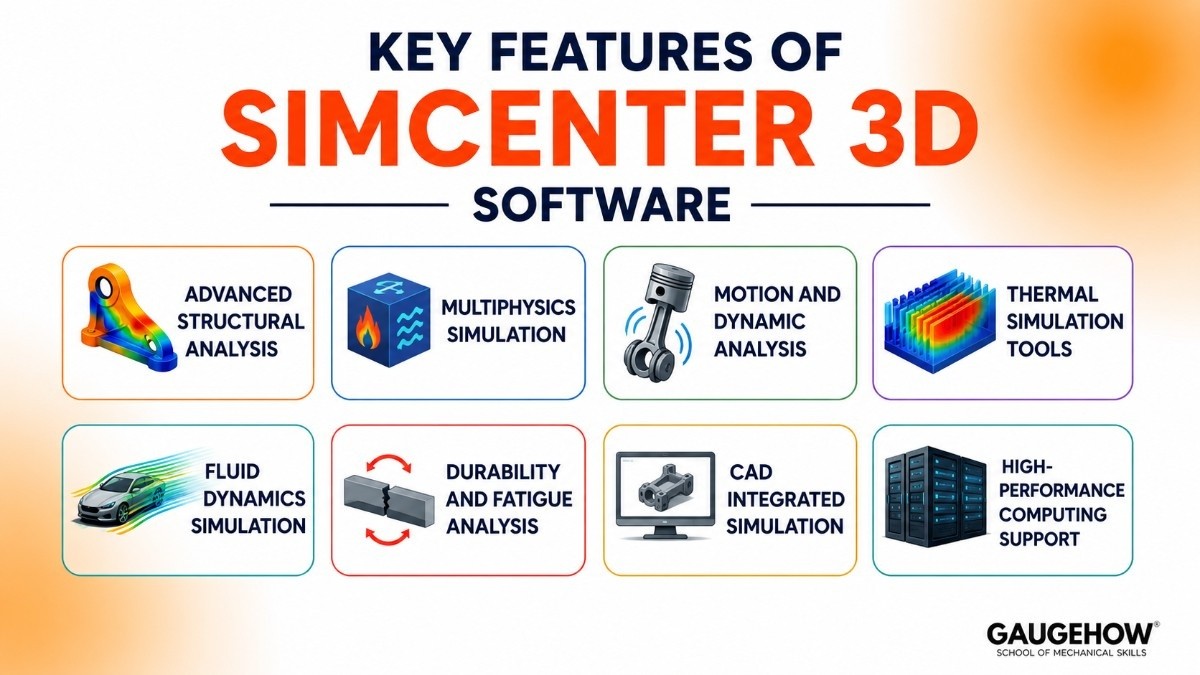
Advanced Structural Analysis
Simcenter can simulate stress, strain, and deformation to check product strength.
It helps engineers validate whether designs can perform safely.
Multiphysics Simulation
It combines multiple physical effects, like thermal and structural analysis, in one model.
This gives more realistic simulation results.
Motion and Dynamic Analysis
Engineers can simulate moving parts and vibration behavior.
This is useful for automotive and machinery design.
Thermal Simulation Tools
Simcenter predicts temperature distribution and heat transfer performance.
This is important for electronics and mechanical systems.
Fluid Dynamics Simulation
It helps simulate airflow and fluid movement around products.
This supports aerodynamic design improvement.
Durability and Fatigue Analysis
Engineers can predict how long a product will perform under repeated loads.
CAD Integrated Simulation
Works closely with engineering design workflows for faster validation.
High-Performance Computing Support
Large simulations can run efficiently using advanced computing resources.
Pricing and Licensing Models
Siemens does not publish set pricing sheets because the software is highly customized based on which modules your business needs. However, the purchasing structure is broken down into clear categories:
Licensing Models
Perpetual Licenses: You pay a large upfront fee to own the software version forever, combined with an optional annual maintenance fee for updates and tech support.
Subscription Licenses: An annual or monthly pay-as-you-go model that lowers upfront costs and gives you automatic access to the latest versions.
Value-Based Token Licensing: A highly flexible option where you buy a pool of "tokens." Different programs in the Simcenter suite consume a certain number of tokens while running. When an engineer closes the software, the tokens go back into the pool for someone else to use.
Free Trials
Siemens offers 30-day free cloud-based trials for specific modules like Simcenter 3D, Simcenter Amesim, and Simcenter FLOEFD. These trials run directly inside your web browser, meaning you do not have to download massive files or own a high-powered computer just to test the software.
Pros and Cons of Simcenter
The Pros
The Digital Thread: It connects seamlessly with Siemens NX (for design) and Teamcenter (for data management). If you change a bolt size in the design phase, your simulation model updates automatically.
Unmatched CFD Power: Simcenter STAR-CCM+ is widely considered one of the best fluid dynamics tools on the planet, handling massive, complex simulations with ease.
True 1D-to-3D Testing: It bridges the gap between simple system logic (1D) and highly detailed geometric shapes (3D) better than almost any competitor.
The Cons
Extremely Expensive: The total cost of ownership is high. Between licenses, computing hardware, and annual maintenance, it can easily price out smaller machine shops or startups.
Steep Learning Curve: This is not software you can master in a weekend. It requires serious engineering knowledge and specialized training to configure properly.
Heavy Hardware Requirements: If you run simulations on-premise, you will need expensive workstations or dedicated server clusters packed with high-end GPUs and RAM to get fast results.
Who is Simcenter Best For?
Ideal Plant and Company Size
Simcenter is built for mid-sized to large enterprise manufacturers that have dedicated, in-house simulation engineering departments. It is rarely the right fit for small mom-and-pop machine shops due to its price and complexity.
Top Industries
Automotive & Transportation: Designing electric vehicle batteries, crash safety systems, and cabin comfort.
Aerospace & Defense: Testing jet engine heat management, wing aerodynamics, and satellite structural strength.
Electronics & Semiconductor: Simulating microchip overheating, circuit board drops, and smartphone thermal management.
Primary Use Case
It is best used when a company needs to validate complex, multi-layered products where mechanical parts, electronics, and fluid flows constantly interact with one another.
Integrations and Deployment
Systems Integration
Simcenter does not live on an island; it connects directly into a factory's core technology stack:
PLM and ERP Systems: It is natively integrated into Siemens Teamcenter and can feed data out to major Enterprise Resource Planning (ERP) systems like SAP to keep track of material costs and product changes.
Shop Floor Data (MES/Sensors): Through integration platforms like Siemens Opcenter (Manufacturing Execution System) and Industrial Edge gateways, Simcenter can ingest live sensor data from actual factory equipment. This allows you to compare real-world machine vibration or temperature against your virtual simulation model in real-time.
Deployment Options
On-Premise: Installed on local engineering workstations or internal corporate server clusters for companies that want strict data control.
Cloud (SaaS): Can be deployed on cloud networks like AWS or Azure, allowing engineers to rent massive computing power dynamically when running heavy simulations.
Edge/Brownfield Readiness: It is highly compatible with older ("brownfield") factories. By using edge computing boxes, you can pull data from decades-old factory machines via standard protocols (like OPC UA or MQTT) and feed that information directly into Simcenter to optimize existing production lines.
Competitors and Alternatives
If you are looking at alternatives to Simcenter, engineers commonly evaluate ANSYS, Abaqus, COMSOL Multiphysics, and Altair HyperWorks depending on their simulation requirements, industry, and engineering workflows:
Ansys Suite: The closest direct rival to Simcenter. It offers incredible, deep simulation capabilities but lacks Siemens' built-in physical testing hardware division.
Dassault Systèmes SIMULIA: Powered by the Abaqus solver, it is the gold standard for highly complex structural crushing and bending tests. It integrates tightly with CATIA design software.
COMSOL Multiphysics: An excellent alternative for academic researchers and specialized engineers who need to write custom mathematical formulas to solve unique physics problems.
Autodesk Fusion: A light, cloud-focused alternative that bundles CAD design and basic simulation together. It is much cheaper and easier to use, making it ideal for small businesses, though it lacks Simcenter's enterprise-grade power.
Frequently Asked Questions (FAQ)
Is Simcenter cloud-based?
It offers flexible deployment. While most core simulations are traditionally run on high-powered on-premise computers, Siemens offers cloud-based processing options and browser-based software trials so you can offload heavy mathematical calculations to remote servers.
What is the difference between Simcenter and Ansys?
When comparing Simcenter vs Ansys, the main difference comes down to ecosystem integration. Ansys focuses almost purely on simulation software and can plug into any design tool. Simcenter is part of the larger Siemens Xcelerator portfolio, meaning it integrates flawlessly with Siemens design tools (NX) and data managers (Teamcenter), while also including physical hardware for real-world lab testing.
Do I need to use Siemens NX to run Simcenter?
No. While Simcenter works best alongside Siemens NX CAD software, Simcenter 3D and its fluid simulation modules can import geometry and files from almost any major 3D design software, including SolidWorks, Creo, and CATIA.
Can Simcenter simulate electrical systems?
Yes. Simcenter has specific tools tailored for electromagnetics and electronics cooling. It can simulate how electric motors operate, map high-frequency antenna performance, and predict where heat will build up on a printed circuit board (PCB).
Simcenter is engineering simulation software that helps engineers analyze designs, test product performance, and improve accuracy through virtual testing.























