ANSYS
what is ansy

What Is Ansys? A Simple Guide for Engineering Students
Imagine you could test a car part, a phone case, or an airplane wing on your computer before building a single real one. That's exactly what Ansys lets engineers do. If you're an engineering student, you'll probably meet this software sooner or later. Let's break it down in plain words.
Overview: What Is Ansys?
Ansys is engineering simulation software that tests how a design will behave in the real world before it's ever built.
In simple terms, you build a digital model of a part, tell the software what forces, heat, or fluid flow it will face, and Ansys predicts what happens — where it bends, heats up, cracks, or leaks.
It's made by Ansys, Inc., a company with more than 50 years of history that became part of Synopsys in 2025.
Alongside platforms such as Simcenter and Altair HyperWorks, Ansys is considered one of the leading engineering simulation solutions used across multiple industries. Engineers in cars, planes, electronics, and energy all rely on it.
Think of Ansys as a crystal ball for engineering designs.
Key Features of Ansys
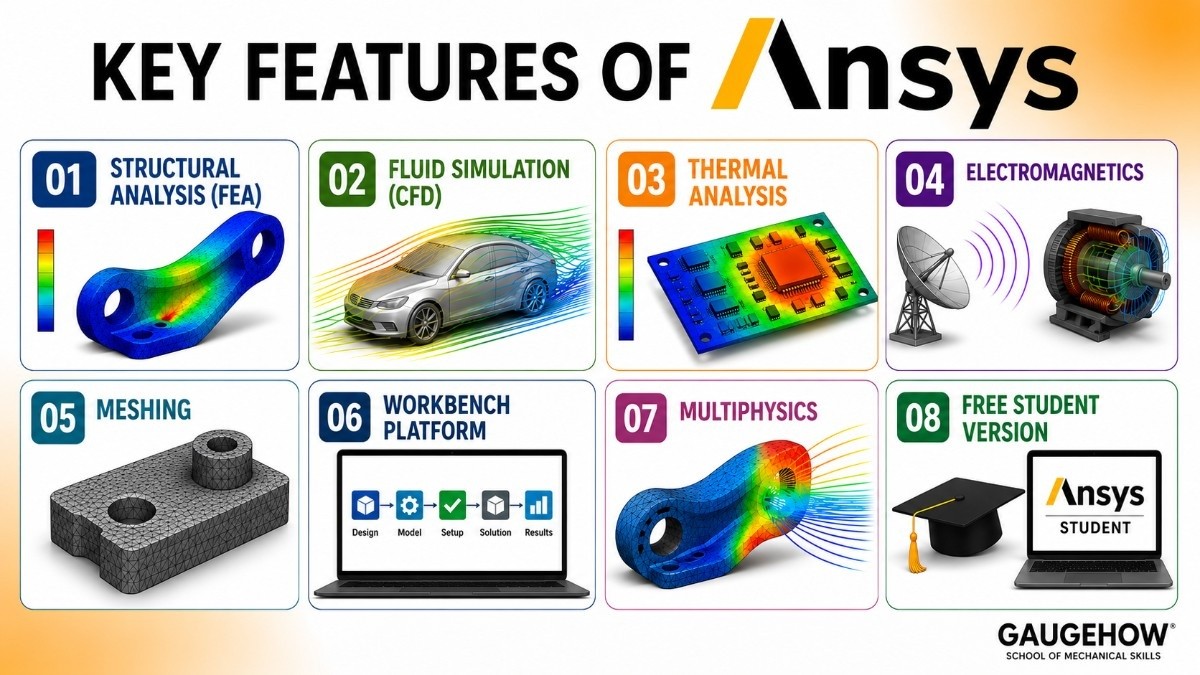
Here's what Ansys actually does, minus the buzzwords:
Structural analysis (FEA). It shows how parts bend, stretch, or break under load.
Fluid simulation (CFD). Its Fluent tool models how air, water, and gases flow.
Thermal analysis. It predicts how heat spreads through a design.
Electromagnetics. Tools like HFSS and Maxwell simulate antennas, motors, and circuits.
Meshing. It splits your model into tiny pieces so the math can be solved accurately.
Workbench platform. A central hub that ties all the different tools together.
Multiphysics. It can combine effects, like heat and stress, in one study.
Free student version. A no-cost option so students can learn the basics at home.
What Is Ansys Used For?
Ansys is used to answer one big question: "Will this design work?"
Engineers use it to make parts lighter without making them weak, to stop products from overheating, and to improve how fluids move through pumps, engines, and pipes. It saves huge amounts of money because problems get caught on screen instead of in an expensive physical prototype.
You'll find it across many fields: aerospace, automotive, electronics, medical devices, and energy.
How to Use Ansys
You don't need to be an expert to understand the basic workflow. Almost every Ansys study follows the same path:
Set up the project in Ansys Workbench and pick your analysis type.
Build or import the geometry (your 3D model).
Create a mesh to break the model into small elements.
Apply boundary conditions — the loads, supports, or flows acting on the part.
Solve and let Ansys run the calculations.
Review the results with color maps that show stress, temperature, or flow.
A quick tip for students
Start with a simple shape, like a beam or a plate. It's much easier to learn each step when the model isn't complicated.
Ansys Fluent Tutorial for Beginners
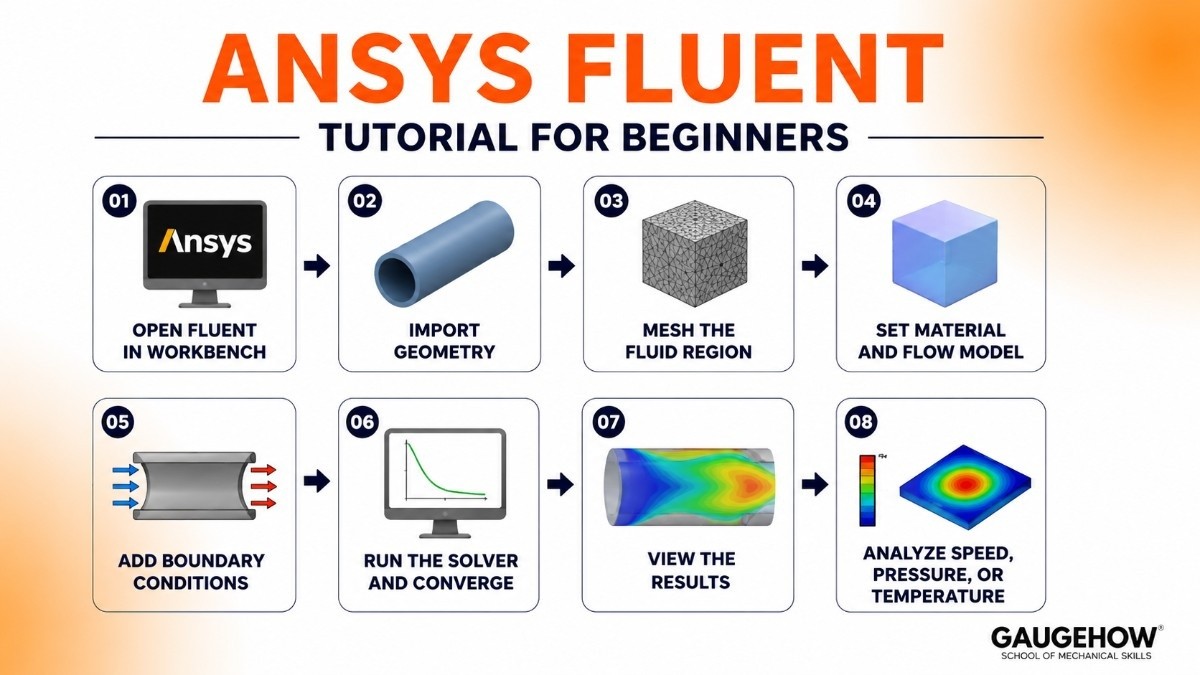
Fluent is the tool for simulating fluids — air, water, and gas. Here's the beginner path to your first flow simulation:
Open Fluent from inside Workbench.
Import your geometry, like a pipe or a wind tunnel box.
Mesh the fluid region so the software has a grid to calculate on.
Set the material (for example, air) and turn on a flow model.
Add boundary conditions: an inlet velocity, an outlet, and the walls.
Run the solver and watch the residuals drop as it converges.
View the results — color plots of speed, pressure, or temperature.
Don't worry if the words feel new. Each one makes sense after your first full run-through.
How to Do Mesh in Ansys
Meshing means cutting your model into thousands of small shapes so Ansys can do the math on each one. A good mesh gives accurate results; a bad one gives errors.
Here's the basic approach:
Open the Mesh section in Workbench.
Click Generate Mesh to create a default mesh first.
Check the element size — smaller elements mean more detail but slower solving.
Add refinement in areas that matter, like sharp corners or thin walls.
Check the mesh quality metrics so no elements are too stretched.
Re-generate and move on once the quality looks good.
A simple rule for students: start coarse, then refine only where you need accuracy.
Pricing: Is Ansys Free?
This is the part students search for most, so let's be clear.
The full commercial version of Ansys is expensive — it's sold to companies through quotes, not fixed public prices, and licenses can run into thousands of dollars per year.
But there's good news if you're learning:
Ansys Student is free. It's a no-cost version with some size limits, perfect for coursework and self-study.
Free trials are available for some products if you want to test before buying.
University licenses mean many students already have full access through their school labs.
So as a student, you can almost certainly use Ansys for free.
Pros and Cons of Ansys
No software is perfect. Here's the honest view.
Pros
Extremely powerful and accurate.
Covers many physics types in one ecosystem.
Trusted by top companies worldwide.
A free student version to learn on.
Cons
Expensive for full commercial use.
A steep learning curve for beginners.
Needs a fairly powerful computer.
The student version has model-size limits.
Who Is Ansys Best For?
Ansys fits anyone who needs to predict real-world behavior before building something.
It's ideal for large companies in aerospace, automotive, and electronics that run complex, high-stakes simulations every day. It's also a core tool for universities and engineering students learning the fundamentals of stress, heat, and fluid flow.
If your work or studies involve serious engineering analysis, Ansys is built for you.
Ansys Integrations
Ansys connects to the tools engineers already use.
CAD software: It links with SolidWorks, Creo, NX, and Autodesk Inventor to import models.
File formats: It reads common geometry files like STEP and IGES.
Scripting: It supports Python (PyAnsys) and APDL for automation.
Other Ansys tools: Workbench ties its many modules together in one place.
Ansys Deployment: Cloud or On-Premises?
Ansys can run on your own computer, on company servers, or in the cloud.
Most students and small teams run it locally on a workstation. Larger companies often use on-premises servers or cloud computing to handle big, heavy simulations that need lots of power. Because it imports standard CAD and geometry files, it fits into setups that companies already have, without forcing a full change of tools.
Ansys vs Abaqus
This is the most common simulation comparison, so let's keep it clear.
Ansys is known for its wide range of tools and its friendly Workbench interface. It's strong across structures, fluids, heat, and electromagnetics, which makes it a flexible all-rounder, and many find it easier to start with.
Abaqus, made by Dassault Systèmes, is famous for advanced structural and nonlinear analysis — things like crash tests, large deformations, and tricky material behavior. Many researchers prefer it for those tough problems.
The short version: pick Ansys if you want a broad, all-in-one toolset that's approachable. Pick Abaqus if your focus is deep, complex structural and nonlinear work.
Ansys Alternatives
If Ansys isn't the right fit, here are solid options to explore:
Abaqus — strong in advanced structural and nonlinear analysis.
COMSOL Multiphysics — great for coupling many physics types in one model.
SolidWorks Simulation — beginner-friendly analysis built into SolidWorks CAD.
Simcenter — A Siemens-based simulation platform that combines structural, thermal, fluid, and testing capabilities within a broader digital engineering ecosystem.
Autodesk CFD — fluid and thermal simulation in the Autodesk family.
Frequently Asked Questions (FAQ)
Is Ansys free? The full version isn't, but Ansys Student is free with some size limits, and many universities provide full access.
What is Ansys used for? Testing how designs behave under stress, heat, and fluid flow before they're physically built.
Is Ansys owned by Synopsys? Yes. Synopsys completed its acquisition of Ansys in 2025, though the Ansys products keep their names.
Is Ansys hard to learn? It has a steep learning curve, but the student version and step-by-step tutorials make the basics manageable.
What's the difference between Ansys and Abaqus? Ansys is a broad all-rounder; Abaqus specializes in advanced structural and nonlinear analysis.
Do I need a powerful computer for Ansys? For simple student projects, a normal modern laptop works. Large simulations need more RAM and a strong processor.
Ansys-the premier CAE platform for high-fidelity physics simulation and virtual prototyping.it is used in industries-aerospace, automotive and electronics.























