Onshape
Onshape Login

Overview
Onshape is a fully browser-native, cloud-centric 3D CAD, CAM, and Product Data Management (PDM) platform. Unlike traditional CAD platforms such as PTC Creo, SolidWorks, Siemens NX, and CATIA, Onshape was designed from the ground up as a cloud-native engineering platform.
Developed by PTC, it eliminates the inefficiencies of legacy, file-based desktop design engines by unifying professional-grade parametric mechanical design, real-time multi-user collaboration, and full release lifecycle tracking into a single, cloud-hosted master database.
Key Features
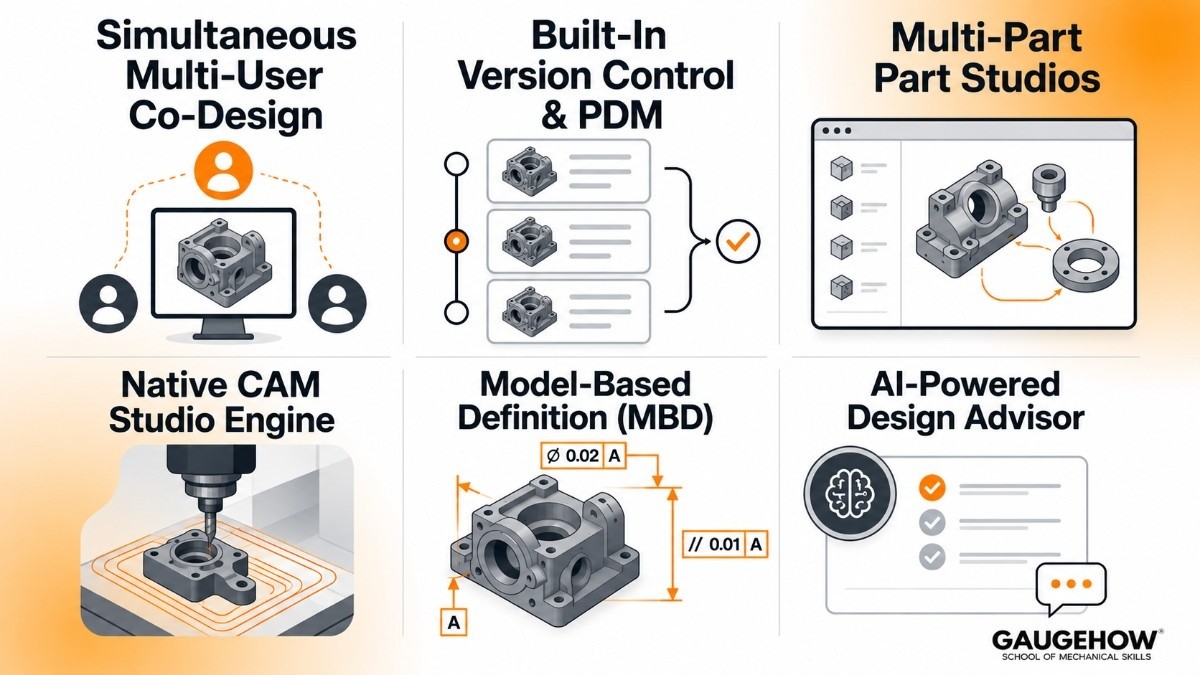
Simultaneous Multi-User Co-Design: Allows multiple mechanical design engineers to view, sketch, and modify the exact same geometric part model or assembly structure concurrently without risking data overwrites.
Built-In Version Control & PDM: Eliminates external local PDM vault requirements by tracking every geometric change in a permanent history tree, supporting branching, merging, and formal release approval workflows natively.
Multi-Part Part Studios: Enables design engineers to construct multiple related parametric parts within a single modeling workspace, establishing solid, shared-sketch interdependencies without complex top-down assembly file logic.
Native CAM Studio Engine: Generates high-fidelity 2.5-axis to 3-axis CNC machining toolpaths, high-speed adaptive clearing, and workholding configurations directly from live cloud-native model geometry.
Model-Based Definition (MBD): Embeds Geometric Dimensioning and Tolerancing (GD&T) metrics and manufacturing metadata straight onto the 3D solid model, minimizing 2D blueprint drafting bottlenecks.
AI-Powered Design Advisor: Utilizes an integrated machine learning help system to troubleshoot broken constraints, suggest modeling practices, and deliver contextual engineering solutions.
Onshape Login: Accessing the Workspace
The onshape login pipeline is the direct gateway to your digital engineering thread. Because the system is entirely database-driven, authenticating through the secure login portal completely removes the need for local desktop client installations, license key validations, or localized server updates.
Engineers, machinists, and external manufacturing stakeholders can access full-scale 3D modeling pipelines by signing in via any modern web browser across Windows, macOS, Linux, or ChromeOS platforms, maintaining production continuity.
Onshape: What is it in CAD?
Understanding what is onshape in the context of computer-aided design (CAD) requires shifting away from local file paradigms. Traditional CAD tools rely on rigid files (like .sldprt or .step) that must be locked, saved, and checked out of a local server.
Onshape replaces files with a secure cloud architecture. When you design, you are editing database entries in real time, making file corruption mathematically impossible and giving teams instantaneous data traceability across global supply chains.
Onshape CAD: Modern Mechanical Prototyping
The operational core of onshape cad is optimized to accelerate agile manufacturing cycles. By housing advanced sheet metal layout engines, complex assembly configurations, and integrated finite element analysis (FEA) simulation suites under one roof, it allows mid-sized plants to scale design operations efficiently.
The platform works reliably on standard laptops and mobile devices, dropping hardware cost barriers by handling resource-intensive visual computations on remote cloud servers rather than local hardware.
Onshape Constraints Explained: Driving Intent
Mastering sketch mechanics requires getting the Onshape constraints explained clearly. Constraints are geometric rules applied to 2D sketch profiles to restrict movement and define design intent.
By applying parameters such as Coincident (locking two points together), Parallel (ensuring lines never intersect), or Equal (matching line lengths), engineers construct intelligent skeletons.
If a parent dimension is altered, these geometric constraints automatically guide the model to update predictably without breaking downstream holes or structural brackets.
What Does a Slot Tool Do in Onshape?
A frequent question for fabricators is: What does a slot tool do in Onshape? Found within the sketch toolbar, the slot tool automates the creation of elongated, oval-shaped cutouts commonly required for clearance adjustments, sliding linkages, or alignment bolt paths.
Instead of forcing you to sketch two separate parallel lines, add two tangent arcs, trim the overlapping inner elements, and apply multiple constraints manually, the slot tool generates the entire fully constrained geometry in a single click based on an input centerline or radius parameter.
Pricing
Onshape utilizes an annual subscription SaaS model. It eliminates hidden infrastructure expenses like PDM servers, local hardware upgrades, and IT support retainers.
Subscription Tier | Annual Cost | Target Audience & Core Capabilities |
Onshape Free | $0 | Non-commercial makers, personal hobbyists, and DIY fabricators. All documents are public. |
Onshape Standard | $1,500 / user | Individual product designers need private documents, core 3D modeling, and basic data management. |
Onshape Professional | $2,500 / user | Engineering teams requiring formal release workflows, integrated FEA simulation, native CAM Studio, and rendering. |
Onshape Enterprise | Custom Quote | Large multi-plant enterprises requiring advanced single sign-on (SSO), real-time analytics, and Arena PLM syncing. |
Pros & Cons
Pros:
Zero IT overhead—no installations, server maintenance, or complex license deployment issues.
True real-time collaboration with data histories that allow you to revert to any second of a design's history.
Runs smoothly on low-spec hardware (like Chromebooks) by processing rendering workflows in the cloud.
Cons:
Requires a continuous, high-quality internet connection; offline functionality is highly limited.
Lacks the ultra-advanced, deeply specialized Class-A surfacing suites found in high-end legacy automotive platforms.
API integration limits on lower plans can restrict data exchanges for custom engineering apps.
Best For
Onshape is the ideal choice for small-to-mid-sized medical device manufacturers, robotics startups, and contract industrial automation firms.
It is best suited for fast-paced, multi-disciplinary engineering groups where mechanical, electronic, and manufacturing professionals must collaborate closely on parts without experiencing version control delays.
Teams migrating from SolidWorks, Autodesk Fusion, or PTC Creo often choose Onshape to simplify collaboration and eliminate version-management bottlenecks.
Integrations
The cloud architecture uses open APIs to maintain direct connections with critical enterprise operations:
Arena PLM: Connects design milestones straight to enterprise Product Lifecycle Management (PLM) pipelines for sourcing and scaling.
ERP Systems: Automates multi-level bill of materials (BOM) data mapping straight to platforms like SAP and Oracle.
Quality Inspection Routing: Passes exact 3D models and MBD metadata directly into coordinate measuring machine (CMM) suites like PC-DMIS or ZEISS Calypso for quality verification.
Deployment
The software operates on a true cloud-native deployment strategy. There is no local executable code to install. Workstations access the platform via secure browsers, and updates are deployed automatically by PTC directly to the cloud servers every three weeks, eliminating downtime.
For high-security defense requirements, Onshape provides dedicated AWS GovCloud deployment pathways to satisfy regulatory compliance parameters.
Alternatives
SolidWorks
The desktop mechanical engineering standard, preferred by traditional shops heavily dependent on local server setups.
Autodesk Fusion
A hybrid cloud CAD/CAM platform popular with startups, prototyping teams, and small manufacturers.
PTC Creo
A powerful enterprise CAD platform known for advanced parametric modeling, simulation, and product development workflows.
Siemens NX
A high-end engineering platform that combines CAD, CAM, and CAE tools for aerospace, automotive, and industrial manufacturing.
CATIA
Widely used in aerospace and automotive industries for complex surface modeling and large-scale product engineering.
FAQ
1. Is Onshape completely cloud-based?
Yes. Every aspect of geometric generation, version management, rendering computation, and collaboration is processed on remote cloud infrastructure, accessed through a standard web browser.
2. Can I use Onshape for free?
Yes. The Onshape Free plan provides full professional CAD modeling tools for personal, non-commercial use, provided you are comfortable with all your design documents being public and searchable by other users.
3. Onshape vs SolidWorks: Which is better?
Onshape excels at real-time collaboration, built-in PDM data management, and flexible, installation-free browser deployment. SolidWorks remains superior for massive, highly complex local single-threaded assemblies and legacy configurations that do not require cloud integration.
4. What happens if I lose internet access during a design session?
Because Onshape relies on real-time cloud data entries, a loss of internet access temporarily halts your ability to modify geometry. However, your work is saved up to the exact second you lost connectivity, ensuring no progress is dropped when you reconnect.
This Onshape Cloud CAD Introduction and Interface Walkthrough provides a detailed visual overview of the platform's fileless design environment, helping new users navigate the dashboard and launch their first Part Studio project safely.
Onshape-the industry’s premier cloud-native 3D CAD and PDM platform developed by PTC.it eliminates the headaches of traditional file-based design software.