Azure IoT
what is azure iot

What is Azure IoT? A beginner's complete guide (2026)
Azure IoT is Microsoft's cloud platform for connecting physical devices — sensors, machines, vehicles to the internet, managing them remotely, and turning their raw data into real-time insights.
Think of it as the wiring between your hardware and the cloud.
Overview — what is Azure IoT?
One-line definition: Azure IoT is Microsoft's managed cloud platform that connects physical devices to the internet so you can collect their data, monitor their state, and control them remotely — at any scale.
In plain terms: a temperature sensor in a factory, a GPS tracker in a delivery truck, or a water-level monitor in a reservoir all generate data constantly.
Azure IoT is what gets that data to the cloud, routes it to the right places, and lets you respond in real time. It's made by Microsoft and lives inside the Azure ecosystem, so it connects naturally with Power BI, Azure Machine Learning, and Microsoft Fabric.
While Azure handles cloud ingestion, edge platforms like litmus extract raw floor data. Azure IoT scales once that shop-floor data is standardized.
The Azure IoT product family
Azure IoT isn't a single product — it's a collection of services. Here's a plain-language breakdown of the main ones:
IoT Hub
Core messaging layer. Devices talk to the cloud over MQTT, AMQP, or HTTPS. The service you'll work with most.
IoT Operations
Microsoft's new industrial edge platform. It runs Kubernetes natively on shop floors, directly challenging standalone IIoT platforms like PTC ThingWorx.
IoT Edge
Run cloud workloads on a local device. Good for offline scenarios or low-latency decisions that can't wait for the cloud.
Digital Twins
Virtual models of physical spaces. Model a building, assembly line, or entire city as a live, queryable graph.
Key features
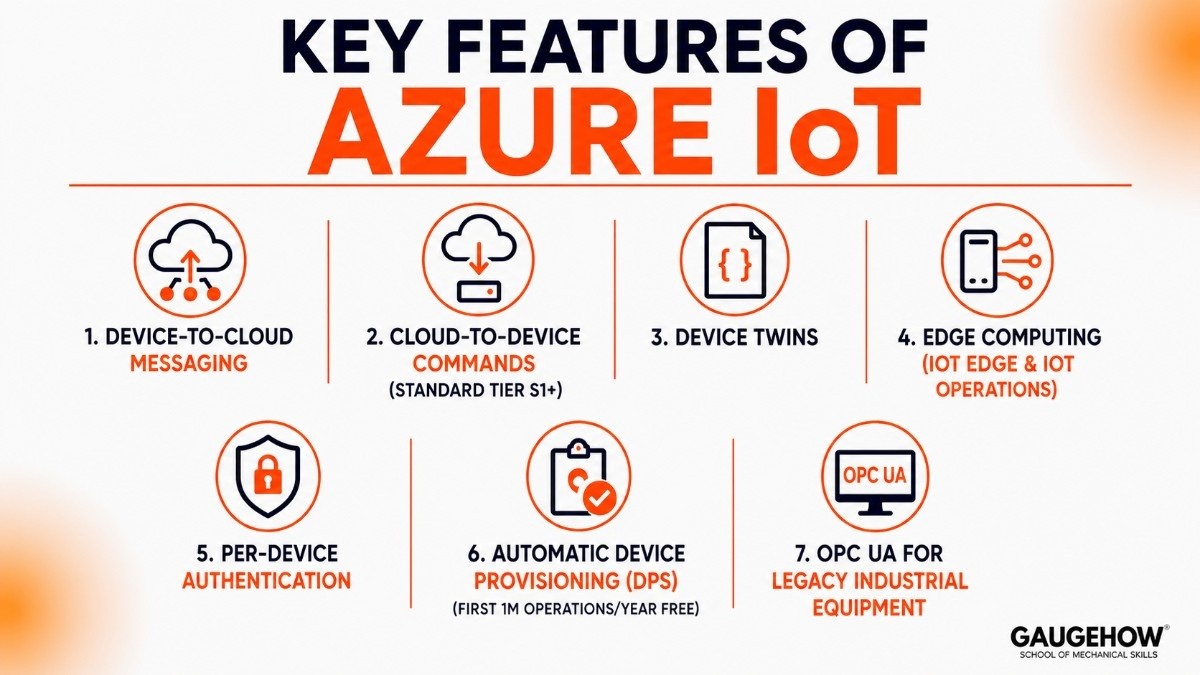
No marketing fluff — just what Azure IoT actually does and why it matters:
Device-to-cloud messaging
Devices send telemetry (temperature, pressure, GPS) over MQTT, AMQP, or HTTPS. IoT Hub handles routing, buffering, and fan-out to other services.
Cloud-to-device commands
Send instructions back to a specific device — "switch off pump #3" or "update firmware". Only available on Standard tier (S1+).
Device Twins
A JSON "shadow" in the cloud that mirrors each device's current and desired state. Keeps config in sync even when devices go offline and reconnect. (More on this in section 4.)
Edge computing
Deploy AI models and logic to a local gateway via IoT Edge or IoT Operations. Cuts latency and keeps things running when the internet drops.
Per-device authentication
Every device gets its own X.509 certificate or symmetric key. One compromised device can't impersonate others — critical for large fleets.
Automatic device provisioning (DPS)
Register thousands of devices automatically when they first come online — no manual registration per device. First 1M operations/year are free.
OPC UA for legacy industrial equipment
Azure IoT Operations includes OPC UA adapters to connect old PLCs and SCADA systems without replacing them. A real differentiator in manufacturing.
How to connect a device to Azure IoT Hub
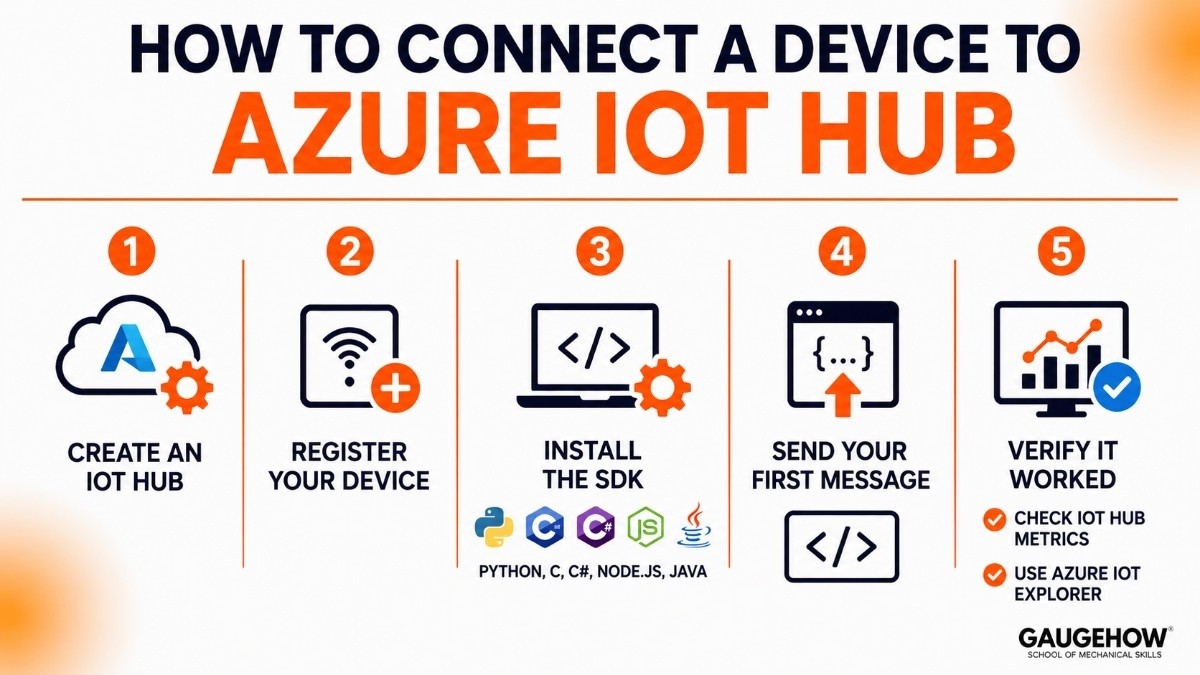
This is the first thing you'll do as a student. Five steps, takes about 15 minutes end-to-end.
Step-by-step guide
Create an IoT Hub
Azure Portal → "Create a resource" → search "IoT Hub" → Create. Pick the Free tier for development. Deploys in ~2 minutes. You can only have one Free Hub per subscription, so don't delete it.
Register your device
IoT Hub → Devices → + Add device → give it a name (e.g., myDevice01) → auto-generate keys → Save. Copy the Primary connection string that appears — you'll need it in your code.
Install the SDK
Azure IoT has SDKs for Python, C, C#, Node.js, and Java. For Python (easiest for beginners)
Send your first message
Paste the connection string from step 2 and run this:
Verify it worked
Azure Portal → IoT Hub → Overview — the "Device to cloud messages" metric should show 1. Alternatively, download Azure IoT Explorer (free Microsoft tool) to watch messages stream in real time.
Azure IoT Hub Device Twin Example
A Device Twin acts as a cloud-based representation of a physical device.
For example:
A temperature sensor installed in a factory may have:
Reported Properties
Current temperature
Device status
Firmware version
Desired Properties
Temperature threshold
Reporting frequency
Alert settings
When administrators update settings in Azure, the Device Twin automatically synchronizes those changes with the physical device.
This makes remote device management much easier.
Pros and Cons of Azure IoT
Pros
✅ Highly scalable
✅ Strong security framework
✅ Extensive Microsoft ecosystem integration
✅ Supports cloud and edge deployments
✅ Powerful analytics and AI capabilities
✅ Suitable for industrial IoT projects
Cons
❌ Can become expensive at large scale
❌ Learning curve for beginners
❌ Multiple Azure services may increase complexity
❌ Requires cloud expertise for advanced deployments
❌ Pricing structure can be difficult to estimate initially
Best for — who should use Azure IoT?
Azure IoT isn't the right choice for everyone. Here's where it genuinely shines, and where you might want to look elsewhere.
Strong fit
Industrial & manufacturing
Smart buildings
Fleet & asset tracking
Students & learning
Healthcare monitoring
Energy & utilities
Not a great fit if…
You're already committed to AWS or GCP — switching costs outweigh Azure's advantages
You need vendor-agnostic, open-source infrastructure (look at ThingsBoard or Eclipse Mosquitto)
You want a visual no-code builder — Azure IoT Hub requires writing device-side code
You're building a small prototype on a tight budget — AWS's first-year free tier is more generous
Integrations
Data & analytics
Microsoft Fabric — the primary data plane; ingests telemetry for real-time dashboards and AI-ready pipelines
Azure Stream Analytics — run SQL queries on incoming device data in real time
Azure Data Explorer — time-series queries at petabyte scale
Power BI — live streaming dashboards for operations teams
ERP & business systems
SAP — Azure-certified; common in large manufacturing deployments
Microsoft Dynamics 365 — native Microsoft stack, straightforward integration
Industrial & MES systems
PLCs & SCADA — any OPC UA-capable machine connects to IoT Operations without hardware changes
Siemens MindSphere — bridges via OPC UA adapters in IoT Operations
Rockwell FactoryTalk — MQTT and OPC UA adapters supported
Hardware & dev boards
Raspberry Pi, Arduino, ESP32, STM32 — all work with the Python or C SDK out of the box
Any device that speaks MQTT, AMQP, or HTTPS can connect — the protocol isn't proprietary
9. Deployment options
Model | Service used | Best for |
|---|---|---|
Cloud-connected | Azure IoT Hub | Devices with reliable internet that send data directly to Azure |
Edge computing | IoT Edge / IoT Operations | Local processing, offline scenarios, low-latency decisions |
Hybrid / Arc-managed | IoT Operations + Azure Arc | On-premises infrastructure managed centrally from Azure Portal |
Brownfield & legacy equipment readiness
This is where Azure IoT Operations earns its keep. Its OPC UA and MQTT adapters let you connect old factory machines PLCs, CNC machines, older SCADA systems without touching their firmware or replacing hardware.
You bolt on a small Kubernetes cluster running AKS Edge Essentials, and the old machine starts feeding data to Azure without knowing anything changed.
For a student or developer, this matters when you're working on projects involving real industrial equipment rather than new IoT sensors.
Azure IoT Alternatives
If Azure IoT is not the right fit, consider these alternatives:
Platform | Best For |
AWS IoT Core | AWS-focused organizations |
Siemens Insights Hub | Industrial manufacturing |
PTC ThingWorx | Industrial IoT applications |
IBM Watson IoT | AI-driven IoT projects |
Google Cloud IoT Alternatives | Data and analytics workloads |
AWS IoT vs Azure IoT
Feature | Azure IoT | AWS IoT |
Vendor | Microsoft | Amazon |
Device Management | Strong | Strong |
Enterprise Integration | Excellent | Excellent |
Edge Computing | Azure IoT Edge | AWS Greengrass |
Analytics | Native Azure ecosystem | Native AWS ecosystem |
Best For | Microsoft environments | AWS environments |
Infrastructure dictates your choice. For AWS-centric data architectures, AWS IoT SiteWise offers a more integrated telemetry plane. If you have an extensive footprint of Siemens PLCs, Siemens Insights Hub connects natively with zero translation layers needed.
Frequently Asked Questions
Is Azure IoT cloud-based?
Yes. Azure IoT is primarily a cloud-based platform, although Azure IoT Edge also supports local processing at the edge.
What is Azure IoT used for?
Azure IoT is used for device connectivity, remote monitoring, predictive maintenance, asset tracking, and industrial automation.
How do I connect a device to Azure IoT Hub?
You create an IoT Hub, register the device, configure authentication, install the Azure SDK, and start sending telemetry data.
What is a Device Twin in Azure IoT?
A Device Twin is a digital representation of a physical device that stores configuration settings, properties, and status information.
Is Azure IoT free?
Microsoft provides a free tier suitable for learning and small testing projects. Larger deployments require paid plans.
AWS IoT vs Azure IoT: Which is better?
Neither platform is universally better. Azure IoT is often preferred by organizations already using Microsoft technologies, while AWS IoT fits companies invested in the AWS ecosystem.
Final Thoughts
Azure IoT is one of the most complete IoT platforms available today. It combines device connectivity, cloud infrastructure, analytics, AI, security, and edge computing into a single ecosystem.
For students, it provides an excellent introduction to industrial IoT concepts. For enterprises, it offers the scalability and flexibility needed to manage thousands of connected devices across manufacturing, energy, transportation, healthcare, and smart building environments.
Azure IoT is Microsoft’s cloud platform for connecting devices and sensors. It collects data to help businesses monitor equipment, and improve operations.























