Litmus
what is litmus email testing

What is Litmus email testing? A complete guide (2026)
Litmus is a cloud-based email testing tool that shows you exactly how your emails look across 90+ inboxes before you hit send — catching broken layouts, spam triggers, and dead links before your subscribers ever see them.
Overview — what is Litmus?
One-line definition: Litmus is an email testing and analytics platform that previews your emails across 90+ clients, checks spam scores, validates links, and tracks post-send engagement — all in one dashboard.
Here's the problem it solves: an email can render in over 300,000 different ways depending on the email client, device, operating system, and screen size.
A campaign that looks perfect in Gmail on a Mac might completely break in Outlook 2019 on Windows. Litmus lets you catch those issues before sending.
It was founded in 2005 and is based in Boston, Massachusetts. The product targets email marketers, email developers, and digital agencies anyone responsible for making sure marketing and transactional emails look right when they land.
It's widely regarded as the industry standard for pre-send email quality assurance.
What the Litmus tool covers
Pre-send testing
Preview screenshots, spam checks, link validation, and accessibility checks before you hit send.
Team workflow
Share tests with teammates for review, leave comments, get sign-off — all inside Litmus.
Post-send analytics
Track email client share, read time, geo data, and engagement after your campaign goes out.
Email builder
Drag-and-drop builder and code editor for creating emails directly in the platform.
Key features
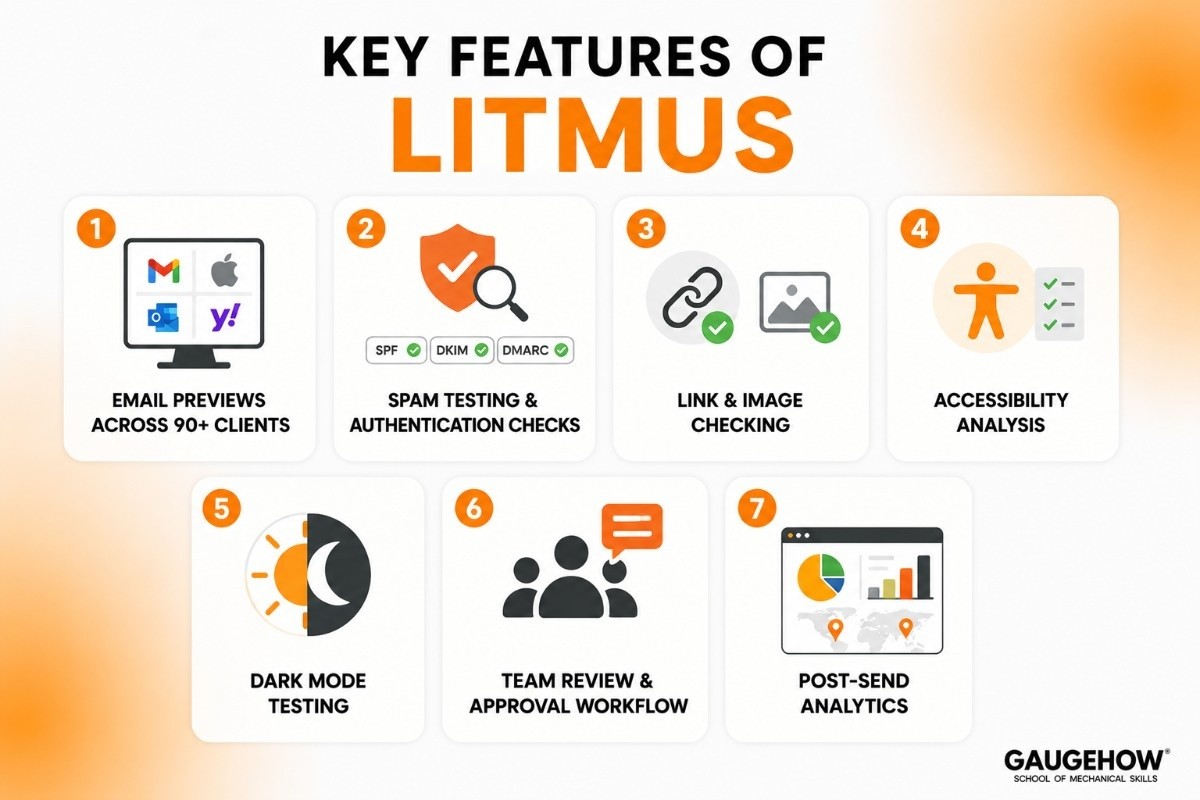
These are the things Litmus actually does well — no marketing spin:
Email previews across 90+ clients
Screenshot-based previews in Gmail, Apple Mail, Outlook (all versions), Yahoo Mail, Samsung Email, and dozens of mobile clients. Each preview is a real render, not a simulation.
Spam testing & authentication checks
Scans your email against 20+ major spam filters, checks if your domain is blocklisted, and validates SPF, DKIM, and DMARC records. 70% of emails have at least one spam-related issue before sending.
Link & image checking
Validates every URL in your email for broken links, missing UTM parameters, and tracking issues. Also checks for missing or broken images before they reach subscribers.
Accessibility analysis
Flags missing alt text, poor color contrast ratios, and other accessibility issues that make emails harder for visually impaired subscribers to read.
Dark mode testing
Toggle dark mode previews with one click — important because over a third of subscribers now read email in dark mode, which can completely change how colors and images appear.
Team review & approval workflow
Share a test link with teammates, leave inline comments on specific preview screenshots, and track sign-offs. Useful when multiple people need to approve an email before it sends.
Post-send analytics
After sending, Litmus tracks which email clients your subscribers actually used, how long they read the email, and where in the world they opened it — data your ESP typically doesn't provide.
3. Litmus email testing tutorial — step by step
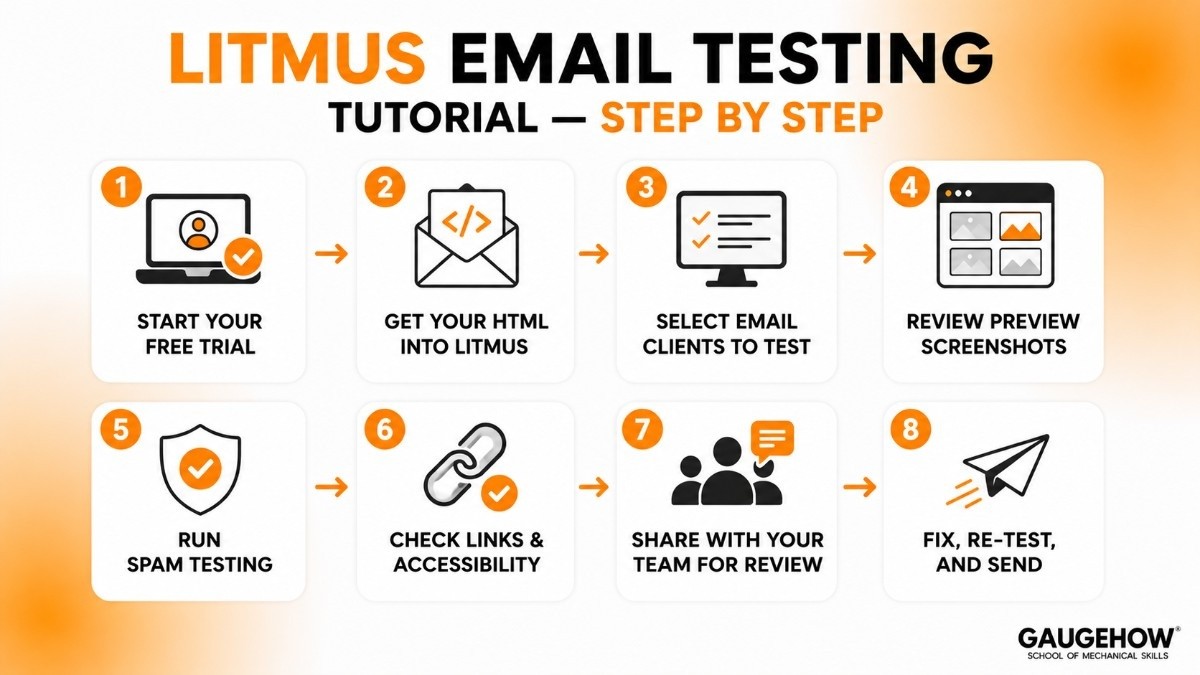
Litmus is a web app — no installation needed. Here's the actual workflow from start to send:
Start your free trial
Go to litmus.com and sign up for the 7-day trial. Full access to all features, no credit card required on most plans. Set up your account and invite your team.
Get your HTML into Litmus
Two ways: paste raw HTML directly into the Litmus editor, or send a test email to your unique Litmus inbox address (e.g. test-abc123@litmus.com). The second method works with any ESP — no integration needed.
Select email clients to test
Choose from 90+ email clients. You can test all of them at once, or pick a curated list based on your audience's actual usage (Litmus shows you this data in the analytics section). Most teams test 20–40 clients.
Review your preview screenshots
Litmus generates real screenshots (30 seconds to 2 minutes). Scan each one for layout breaks, image rendering issues, font fallbacks, and anything that looks off. Outlook 2019 and older versions are usually where problems appear first.
Run spam testing
Litmus checks your email against 20+ spam filters and validates your SPF, DKIM, and DMARC authentication records. It also flags if your sending domain is on any major blocklists — things that kill deliverability without any warning.
Check links & accessibility
The link checker validates every URL in your email — CTAs, social icons, unsubscribe links. The accessibility checker flags missing alt text and low-contrast color combinations. Both run automatically.
Share with your team for review
Use Litmus's review link to share a read-only view with teammates or clients. They can comment on specific previews and mark them as approved. No Litmus account needed to review — just a link.
Fix, re-test, and send
Fix any issues in your ESP or email editor, paste the updated HTML back into Litmus, and re-run just the affected clients. Once everything checks out, you're good to send.
Typical Pricing Structure
Plan Type | Best For |
|---|---|
Basic | Individual marketers |
Plus | Small marketing teams |
Enterprise | Large organizations |
Is There a Free Trial?
Litmus occasionally offers free trials or demos, but long-term access generally requires a paid subscription.
Litmus Price Increase: What Users Should Know
One of the most common concerns discussed by users is pricing. Some organizations have reported subscription cost increases over time, particularly when upgrading to higher-tier plans or adding more team members.
For smaller businesses, pricing can become a deciding factor when comparing Litmus with alternatives such as Email on Acid.
Pros and Cons of Litmus
Pros
✅ Excellent inbox rendering previews
✅ Strong collaboration features
✅ User-friendly interface
✅ Comprehensive email testing tools
✅ Accessibility and deliverability checks
✅ Trusted by enterprise marketing teams
Cons
❌ Pricing may be expensive for small businesses
❌ Some advanced features are locked behind higher plans
❌ Learning curve for beginners
❌ Primarily focused on email workflows rather than broader marketing automation
❌ Enterprise plans may exceed the budget of smaller teams.
Best for — who should use Litmus?
Litmus is a premium tool with premium pricing. It's not the right fit for everyone.
Strong fit
Enterprise email teams
Multi-brand agencies
Financial & regulated
High-volume senders
E-commerce brands
Teams of 10+
Not a great fit if…
You're a solo marketer or small team — $500/month is hard to justify; Email on Acid at $74/month covers the same core needs
You need developer-focused sandbox testing (Mailtrap or Mailosaur are built for that)
You're just starting out and need a free option (Mailtrap has a free plan)
You're primarily sending transactional emails (Litmus is optimised for marketing campaigns, not transactional flow testing)
Litmus Integrations
Litmus integrates with many popular marketing and productivity tools.
Email Platforms
Mailchimp
HubSpot
Salesforce Marketing Cloud
Marketo
Campaign Monitor
CRM Platforms
Salesforce
HubSpot CRM
Collaboration Tools
Slack
Microsoft Teams
Project Management Tools
Trello
Asana
Jira
While enterprise architectures feed operational data into ecosystems like Azure IoT or AWS IoT SiteWise, this platform operates strictly within the corporate marketing stack. It does not connect to shop-floor hardware, historians, or industrial sensors.
Deployment Options
Cloud-Based Deployment
Litmus is delivered as a cloud-based SaaS platform.
On-Premise Deployment
Not available.
Edge Deployment
Not applicable.
Browser-Based Access
Users can access Litmus through a web browser without installing local infrastructure.
Litmus vs Email on Acid — head-to-head
Email on Acid (now owned by Sinch) is the most common alternative people consider. Here's the honest comparison — especially important given the 2025 Litmus price hike:
Feature | Litmus | Email on Acid |
|---|---|---|
Starting price | $500/month (Core) | $74/month |
Email previews | 2,000/month cap (Core) | Unlimited |
Email clients supported | 90+ | 100+ |
Spam testing | 20+ filters | Yes |
Accessibility checks | Yes | Yes |
Post-send analytics | Advanced (read time, geo, client share) | Basic |
Team collaboration | Strong — review, comments, approvals | Basic |
Email builder | Yes | Yes |
Free tier | No | No |
Free trial | 7 days | 7 days |
Bottom line: Litmus is better if you need advanced team collaboration and post-send analytics and your team is large enough to justify $500/month.
Email on Acid is better if you need unlimited previews at a fraction of the cost. For most teams right now, Email on Acid is the better value.
Litmus Alternatives
If Litmus is not the right fit, consider these alternatives:
1. Email on Acid
Popular email testing and rendering platform.
2. Mailtrap
Useful for email testing during development.
3. Mailosaur
Focused on automated email testing.
4. PreviewMyEmail
Provides inbox preview testing across devices.
5. Testi@
A lightweight email rendering and testing solution.
Looking for the Industry 4.0 edge data platform instead? If you are evaluating industrial edge computing, data governance, and manufacturing analytics rather than email delivery, your core alternatives are Siemens Insights Hub and PTC ThingWorx.
Who Should Use Litmus?
Litmus is a good choice if you:
Send frequent email campaigns.
Need approval workflows.
Want inbox rendering previews.
Manage enterprise-level email marketing.
Need accessibility and deliverability testing.
It may be less suitable for very small businesses that only send occasional newsletters.
Frequently Asked Questions
Is Litmus cloud-based?
Yes. Litmus is a fully cloud-based SaaS platform accessed through a web browser.
What is Litmus used for?
Litmus is used to test, preview, review, and optimize email campaigns before sending them to subscribers.
Does Litmus improve email deliverability?
Litmus can help identify issues that may affect deliverability, such as broken links, spam triggers, and rendering problems.
Litmus vs Email on Acid: Which is better?
Both are strong email testing platforms. Litmus offers more collaboration and enterprise features, while Email on Acid is often considered more budget-friendly.
Is Litmus free?
Litmus is primarily a paid platform, though trial options may be available depending on the plan and promotion.
Is Litmus suitable for small businesses?
Yes, but smaller organizations should compare pricing carefully to ensure the platform fits their budget and email volume.
Final Thoughts
Litmus has become one of the most widely recognized email testing platforms because it solves a common marketing problem: making sure emails look and perform correctly before they reach customers.
Its combination of inbox previews, accessibility testing, collaboration tools, analytics, and quality assurance features makes it especially valuable for marketing teams that rely heavily on email campaigns.
For students learning email marketing, Litmus is also a great example of how professional organizations manage email quality, deliverability, and user experience at scale.
Litmus helps teams create, test, and optimize email campaigns. Preview emails, find issues before sending, and improve email performance.























