Ignition
Ignition SCADA

Ignition SCADA: The Complete Beginner's Guide (2026 Edition)
What Is Ignition SCADA? A Simple, Clear Definition
One-line definition: Ignition SCADA is an industrial software platform made by Inductive Automation that lets you monitor, control, and collect data from machines, sensors, and equipment across a facility — all from one central system.
Think of it this way. Imagine a water treatment plant. Hundreds of pumps, valves, sensors, and meters are running across the site at any given moment.
Someone needs to watch all of them, get alerts when something goes wrong, and keep a record of what happened and when. That is exactly what a SCADA system does — and Ignition is one of the most widely used platforms for doing it.
Inductive Automation, the company behind Ignition, is based in Folsom, California. They released the first version of Ignition in 2010, and it quickly changed how the SCADA industry thought about software pricing and deployment.
Before Ignition, most SCADA vendors charged per screen, per user, or per data point. Inductive Automation introduced a server-based unlimited licensing model — pay for the server once and connect as many devices, users, and screens as your hardware can handle. That single decision is the reason Ignition grew as fast as it did.
As of 2026, Ignition is used in more than 100 countries across industries ranging from oil and gas to food and beverage, water treatment, pharmaceutical manufacturing, and automotive.
How SCADA Actually Works
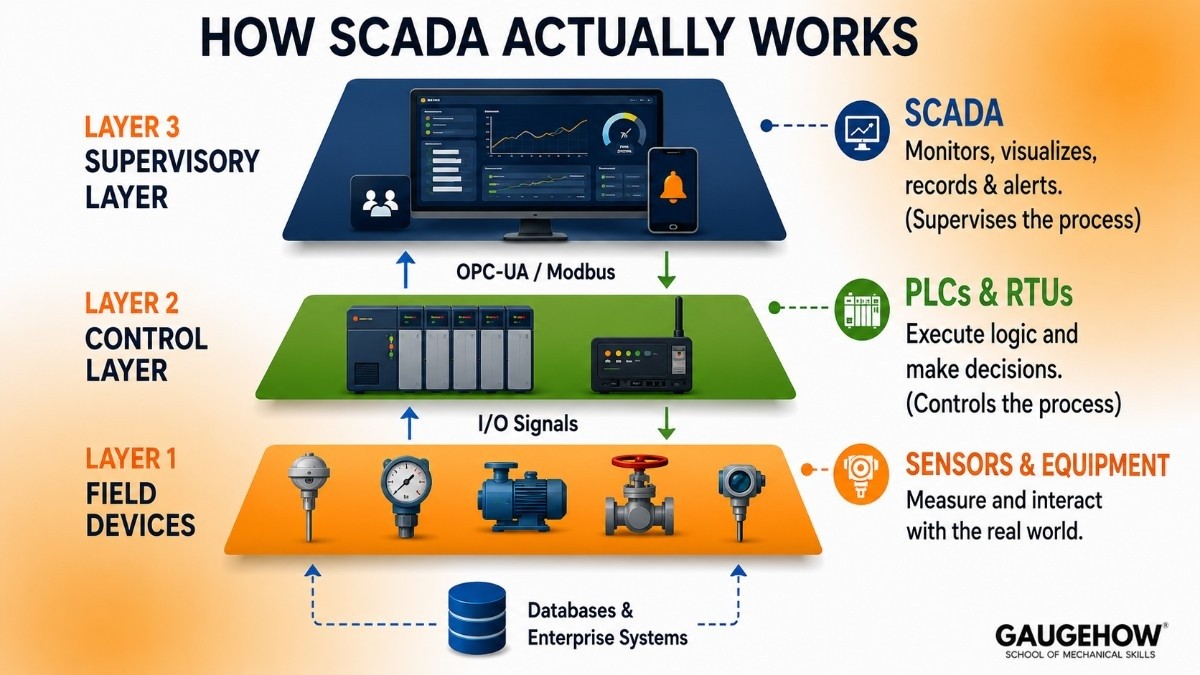
If you are new to this, a quick conceptual foundation helps everything else make more sense.
The three layers of industrial monitoring
Most industrial facilities are organized in three layers:
Layer 1 — The field devices. These are your sensors, PLCs (Programmable Logic Controllers), motors, valves, and instruments. They measure things like temperature, pressure, flow rate, and tank level. They also receive signals that tell them to open a valve or start a pump.
Layer 2 — The control layer. PLCs and RTUs (Remote Terminal Units) sit here. They run the actual logic — if the tank level is too high, close the inlet valve. If the temperature drops below the setpoint, turn on the heater.
Layer 3 — The supervisory layer. This is where SCADA lives. It does not run the process directly. It watches the whole system, displays real-time data to operators, records history, sends alarms, and sometimes adjusts setpoints or triggers commands. The word "supervisory" in SCADA means exactly that — it supervises, not controls.
Ignition sits at Layer 3. It connects downward to PLCs and sensors using communication protocols like OPC-UA and Modbus, and it connects upward to databases and enterprise systems like ERP software.
Key Features of Ignition SCADA
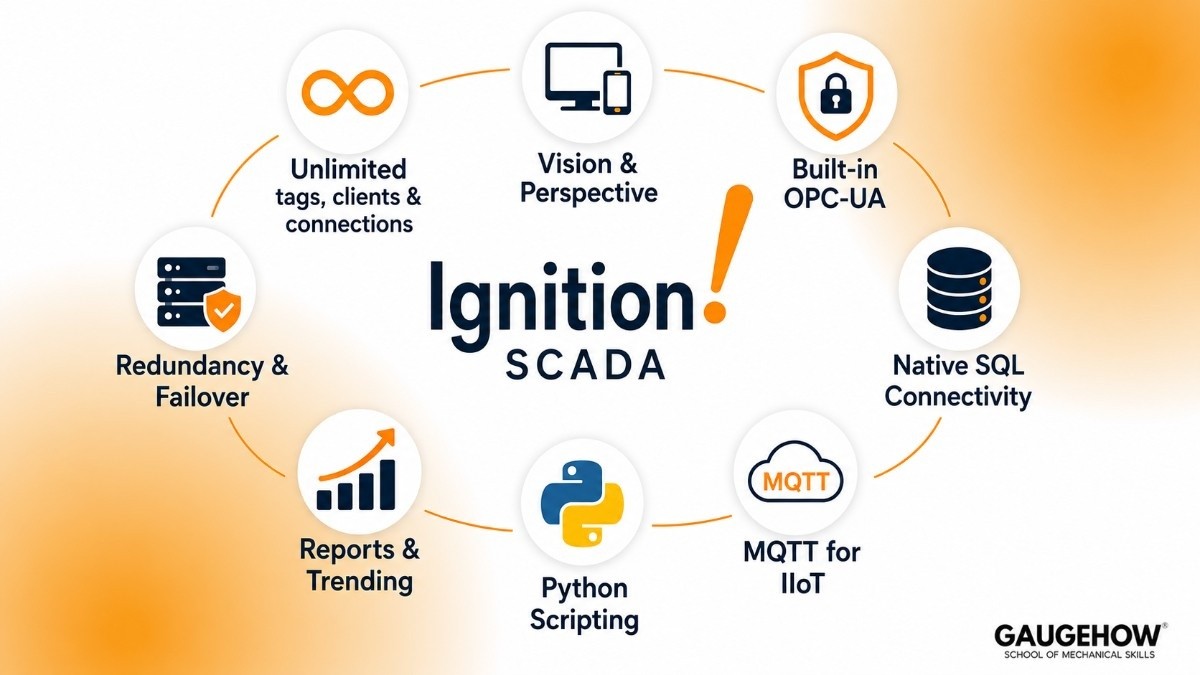
Here are the capabilities that actually matter — not a list copied from a product brochure.
1. Unlimited tags, clients, and connections per server license
This is the feature that made Ignition famous. Most SCADA platforms charge extra as you add more data points (called tags), more user screens, or more simultaneous connections. Ignition charges by the server.
Once you have a server license, there is no additional cost as your system grows. For students learning on a budget or for companies scaling a system, this is genuinely significant.
2. Two designer environments — Vision and Perspective
Ignition has two front-end modules for building operator screens:
Vision is the older, desktop-based module. It runs as a native application on a client machine. It is well-documented, and many existing systems still use it.
Perspective is the modern, browser-based module. Screens built in Perspective run in any web browser, on any device — desktop, tablet, or phone — without installing anything on the client machine. This is the direction the industry is moving.
For new projects, Perspective is the recommended choice. For students, learning both gives you a meaningful advantage in job interviews.
3. OPC-UA is built in as the default communication protocol
OPC-UA (Unified Architecture) is the industry-standard protocol for communicating between SCADA software and PLCs, sensors, and other field devices. Ignition ships with a built-in OPC-UA server, which means it can talk to equipment from Allen-Bradley, Siemens, Mitsubishi, Omron, Modbus devices, and many others right out of the box. You do not need a separate OPC server product.
4. Native SQL database connectivity
Every Ignition license includes direct connectivity to major SQL databases — Microsoft SQL Server, MySQL, PostgreSQL, Oracle, MariaDB, and IBM DB2. This lets you store historical process data in a standard relational database, which means you can query it with standard SQL tools, connect it to reporting software, or feed it into analytics platforms.
For engineers with database knowledge, this is a huge advantage over proprietary historians.
5. MQTT support for IIoT connectivity
MQTT is a lightweight messaging protocol that has become the standard for connecting remote and resource-constrained devices — sensors in the field, edge devices, and cloud systems.
Ignition supports MQTT through its Cirrus Link modules (available separately), enabling what is called a Unified Namespace — a modern architecture where all plant data flows through a single, structured message bus rather than dozens of point-to-point connections.
For students learning Industrial IoT concepts, understanding how Ignition integrates with MQTT is increasingly valuable.
6. Scripting with Python (Jython)
Ignition uses Jython — a Python 2.7 implementation running on the Java Virtual Machine — as its scripting language. You can write Python scripts to automate tasks, process data, send notifications, interact with databases, and add custom logic anywhere in the system.
For students who already know Python, this makes Ignition approachable quickly. Note: Ignition uses Python 2.7, not Python 3, which is a known limitation worth being aware of.
7. What-If reporting and historical trending
Ignition includes a reporting module that lets you build custom reports from historical data, schedule them for automatic delivery, and display trends on operator screens.
You can compare current performance to historical baselines, track KPIs over time, and generate shift reports automatically. This is not just visualization — it connects directly to the SQL historian, so every data point is queryable.
8. Redundancy and failover architecture
For mission-critical systems — water treatment, power generation, oil and gas pipelines — losing your SCADA system even for a few minutes is not acceptable.
Ignition supports redundant gateway configurations where a standby server takes over automatically if the primary server fails. This is a standard feature, not a premium add-on.
Ignition vs Wonderware (AVEVA): Which SCADA Platform Is Better?
Choosing between Ignition SCADA and Wonderware (now AVEVA System Platform) depends on your budget, infrastructure, and long-term goals.
Both are powerful SCADA platforms, but they serve different types of industrial environments.
Quick Comparison
Feature | Ignition SCADA | Wonderware / AVEVA |
|---|---|---|
Licensing | Per Server | Per I/O Point & Client |
Cost at Scale | Lower | Higher |
Operating Systems | Windows, Linux, macOS | Mainly Windows |
Deployment | Web-Based | Traditional + Web |
Scripting | Python | VB Script / .NET |
Learning Resources | Free Training | Mostly Paid Training |
Best For | New Projects, IIoT, Smart Factories | Legacy Process Plants |
Free Trial | Full Platform Available | Limited Demo |
Bottom Line
Ignition is usually the better choice for new SCADA projects due to its lower cost, flexibility, and modern architecture.
Wonderware (AVEVA) remains a strong option for large process industries and organizations already invested in the AVEVA ecosystem.
Ignition SCADA Pricing: What Does It Actually Cost?
This is the section most people come here for, so let's be direct.
Is Ignition SCADA free?
Partially, yes. You can download the full version of Ignition for free from the Inductive Automation website. By default, it runs in trial mode, which resets every two hours. You can manually reset the trial as many times as you want.
This means you can build and test a complete system — even a complex one — without paying anything. You just cannot run it continuously in a production environment without a license.
For students and learners, the trial mode is genuinely useful. There is no feature lockout, no watermark, no reduced tag count. You get the full platform to learn on.
Paid licensing model
Ignition is sold by the server, not by the number of users, screens, or tags. One server license covers unlimited connections. Here is an approximate breakdown of current pricing tiers:
License Type | What Is Included | Estimated Cost |
|---|---|---|
Ignition Platform (base) | Gateway server, OPC-UA, SQL connectivity, unlimited tags/clients | ~$3,000–$5,000 (one-time) |
Vision Module | Desktop-based HMI/SCADA screens | Included in some bundles; ~$1,000–$2,000 separately |
Perspective Module | Web/mobile-based screens | ~$1,000–$2,500 separately |
Reporting Module | Report builder and scheduler | ~$800–$1,500 |
Alarming and SMS modules | Advanced alarm routing and notification | ~$500–$1,000 each |
MQTT Engine / Transmission | IIoT and Sparkplug B connectivity | ~$1,000–$2,000 each |
Solution Suites (bundles) | Pre-bundled sets of modules for SCADA, IIoT, or MES | Most cost-effective option |
Note: Ignition also charges an annual maintenance fee for software updates and support (typically 15–20% of the original license cost per year). Pricing is available directly from Inductive Automation or authorized resellers and varies by region.
The real cost picture
For a typical mid-sized facility deploying a full SCADA system with Perspective screens, historian, alarming, and one or two protocol drivers, expect a total software cost in the range of $8,000–$20,000 for licenses.
Implementation and configuration by a certified integrator adds to that, and is often the larger expense.
Compared to Wonderware or Siemens WinCC — where licenses can run $30,000–$100,000+ for equivalent functionality — Ignition is significantly more affordable for most use cases.
Pros and Cons of Ignition SCADA
Pros
Unlimited licensing helps businesses scale without extra tags or client-based costs.
Strong learning resources through Inductive University make it easier for beginners to learn.
Active community support provides quick solutions and shared knowledge.
Cross-platform compatibility works on Windows, Linux, and macOS.
Open architecture connects easily with SQL databases, REST APIs, and third-party systems.
Cons
Uses Python 2.7 (Jython), which limits access to modern Python 3 libraries. Advanced features require extra paid modules, which can increase the total cost.
Too complex for small projects that only need basic HMI functions.
Requires technical expertise in networking, databases, and PLC integration for full deployment.
Best For: Who Should Use Ignition?
Ignition is not a universal fit for everything. Here is where it genuinely excels.
Plant and facility size
Ignition works well across a wide range — from a single-site operation with a few hundred tags to an enterprise deployment across dozens of facilities with millions of data points.
The unlimited licensing model means the cost does not scale with size, which gives it an advantage in both small and large deployments compared to tag-based competitors.
Industries where Ignition is used most
Water and wastewater treatment — One of Ignition's largest user bases. Water utilities across the US and internationally rely on it for remote monitoring of pump stations, treatment plants, and distribution networks.
Food and beverage manufacturing — Batch control, recipe management, OEE tracking, and regulatory record-keeping are well supported.
Oil and gas — Remote monitoring of wellheads, pipelines, and compression stations, often using MQTT over cellular connections.
Pharmaceutical manufacturing — Data integrity, audit trails, and 21 CFR Part 11 compliance support make it viable in regulated environments.
Automotive and discrete manufacturing — Machine monitoring, OEE dashboards, and production reporting.
Power generation and utilities — Substations, renewable energy systems, and microgrid monitoring.
Who gets the most value from the free trial?
Students and early-career engineers learning SCADA fundamentals. The trial resets every two hours but has zero feature restrictions — it is the full platform.
Pair it with Inductive University and the community forum, and you can build real competence without spending anything.
Integrations: What Does Ignition Connect To?
One of Ignition's strongest qualities is how broadly it connects to other systems. Here is a realistic picture of what is supported.
PLC and device connectivity (hardware layer)
Allen-Bradley / Rockwell Automation — Allen-Bradley driver suite included; covers ControlLogix, CompactLogix, MicroLogix, and more
Siemens — S7-300, S7-400, S7-1200, S7-1500 via Siemens Enhanced Driver (additional cost)
Mitsubishi, Omron, Schneider Electric — Native drivers available
Modbus TCP/RTU — Built-in, covers a wide range of legacy and modern devices
DNP3 — Common in utilities and water/wastewater applications
BACnet — Building automation and HVAC systems
OPC-UA (client and server) — The universal connector for modern industrial equipment
Database and enterprise connectivity
SQL databases — Microsoft SQL Server, MySQL, PostgreSQL, Oracle, MariaDB, IBM DB2
SAP, Oracle ERP, Microsoft Dynamics — Via REST API and SQL Bridge module; not native connectors, but commonly implemented
Historian databases — Can function as their own historian or connect to third-party historians
Cloud and IIoT connectivity
MQTT / Sparkplug B — Via Cirrus Link modules; connects to AWS IoT, Azure IoT Hub, Google Cloud IoT
REST API — Exposed by Ignition's WebDev module for custom integrations
Kafka, MongoDB — Via enterprise integration modules
Deployment Options: Cloud, On-Premise, and Edge
On-premise (most common)
The Ignition Gateway server runs on a server or PC at your facility. This is the traditional model and is still the most common. It gives you full control over your data and does not require internet connectivity for the system to function.
Cloud deployment
Ignition can run on cloud infrastructure — AWS, Microsoft Azure, or Google Cloud. The server is deployed on a virtual machine, and remote field sites connect to it.
This model is growing in oil and gas, water utilities, and any application with many geographically distributed sites. Inductive Automation also offers Ignition Cloud Edition as a managed cloud option.
Edge computing
Ignition Edge is a lightweight version of Ignition designed to run on edge devices — small computers installed close to the equipment.
It handles local data acquisition and can pass data up to a central Ignition server or cloud platform. It runs on hardware as small as a Raspberry Pi or an industrial edge computer.
Brownfield readiness
"Brownfield" means an existing facility with older equipment already installed — as opposed to a greenfield site built from scratch. Ignition is well-suited to brownfield deployments because it does not require replacing existing PLCs or field devices.
Its broad protocol support means it can communicate with legacy equipment that has been running for 10 or 20 years, while adding modern SCADA capabilities on top.
Alternatives to Ignition SCADA
Siemens WinCC
Siemens WinCC is a strong choice for plants already using Siemens PLCs. It offers smooth integration with Siemens hardware and reliable performance, but it is Windows-only and can become expensive for larger systems.
FactoryTalk View
FactoryTalk View is best suited for facilities using Allen-Bradley PLCs. It integrates well with Rockwell’s ecosystem, making setup easier, but it can be costly and limits flexibility with non-Rockwell equipment.
AVEVA System Platform
AVEVA System Platform is designed for large industrial operations. It is a mature and powerful platform, though it is more expensive and mainly suited for enterprises with complex process requirements.
Rapid SCADA
Rapid SCADA is a free, open-source option that is useful for students and beginners. It is great for learning SCADA basics, but lacks the advanced features needed for large industrial deployments.
Ubidots
Ubidots is a cloud-based monitoring platform built for IoT and remote monitoring. It is ideal for distributed systems like environmental sensors or solar monitoring, but is not a direct replacement for factory-focused SCADA systems.
Frequently Asked Questions
Is Ignition SCADA free?
Ignition offers a free trial version with full features. The trial resets every two hours, making it perfect for students and learners to practice without paying.
How much does Ignition SCADA cost?
The base platform usually costs between $3,000 and $5,000. Additional modules for reporting, alarming, and visualization increase the total cost depending on project needs.
Is Ignition cloud-based?
Yes, Ignition supports on-premise, cloud, and hybrid deployment. This gives businesses flexibility based on their infrastructure needs.
What is the difference between Vision and Perspective?
Vision is the older desktop-based interface, while Perspective is browser-based and works across devices. Perspective is the preferred choice for modern applications.
Does Ignition work with Siemens PLCs?
Yes, Ignition supports Siemens PLCs. However, advanced connectivity features may require an additional paid driver module.
How does Ignition compare to GE Proficy?
Both platforms are widely used in industrial automation, but they serve different needs. Ignition is known for its unlimited-tag licensing, modern web-based architecture, and strong IIoT capabilities.
GE Proficy is commonly used in pharmaceutical manufacturing, utilities, power generation, and other regulated industries where compliance features, historian capabilities, and enterprise-scale SCADA deployments are important.
The Bottom Line
Ignition SCADA stands out because of its unlimited licensing, flexible deployment, and strong learning resources. It has made SCADA more accessible for both businesses and students.
While it has limitations like Python 2.7 support and additional module costs, it remains one of the best platforms for learning industrial automation and building real-world SCADA systems.
Ignition SCADA is a platform that connects machines, data, and control operations. It improves visibility and helps businesses operate more efficiently.























