PlanetTogether
PlanetTogether APS

PlanetTogether APS Review 2026: The Honest Guide for Manufacturers Who Are Done with Firefighting Schedules
Most manufacturing software reviews are written by people who have never stood on a shop floor.
They compare feature checklists and pricing tiers. What they miss is the one question that actually matters for a production planner: will this software help me make better decisions faster — or will it just give me more screens to stare at?
This guide covers PlanetTogether APS honestly — what it does well, where it struggles, who it's built for, and how it compares to alternatives like Preactor. No filler. No vendor talking points.
Overview: What Is PlanetTogether APS?
One-line definition: PlanetTogether APS is an Advanced Planning and Scheduling (APS) platform that generates optimized, constraint-aware production schedules by layering on top of your existing ERP system.
It was originally released as Galaxy APS and later rebranded as PlanetTogether. The company is headquartered in Encinitas, California, and has been building scheduling software since the mid-1990s.
That's a long time in manufacturing software, and it shows in the product's depth.
Here's what makes it different from just scheduling inside your ERP: PlanetTogether treats your shop floor like it actually is — finite. Machines break down. Workers call in sick. Material deliveries slip.
Most ERP scheduling modules assume you have infinite capacity and perfect information. They don't. PlanetTogether's entire value proposition is that it schedules around real constraints, not theoretical ones.
Its customer base ranges from Johnson & Johnson medical devices to New Belgium Brewing to Knapheide truck manufacturing.
That spread across industries tells you something: the problems it solves aren't industry-specific. They're universal to any company that makes things on a schedule.
What Is the Difference Between APS and ERP?
This is one of the most searched questions in manufacturing software — and it's a fair one, because ERP vendors love to claim their scheduling module does the same thing.
It doesn't. Here's why.
ERP systems were designed to manage business transactions: purchase orders, invoices, inventory records, and work orders. Their planning modules — like MRP runs in SAP — generate plans based on lead times and infinite capacity. They answer: what needs to be made, and by when?
APS software answers a harder question: given everything that can go wrong, what is the most realistic, optimized sequence to actually produce it?
The technical difference comes down to the math. ERP scheduling is essentially list-sorting. APS uses constraint-based optimization algorithms — it knows which machine can run which job, how long setup takes between product changeovers, which materials are available, and what happens to the rest of the schedule if one job slips by two hours.
Think of it this way: ERP is the business system of record. APS is the operational brain that tells the shop floor what to do and in what order. They're not competing — they're complementary.
PlanetTogether is specifically built to sit alongside your ERP, not replace it.
PlanetTogether vs Preactor
Preactor (now part of Siemens Opcenter APS) is one of the most frequently compared alternatives to PlanetTogether, particularly for mid-market manufacturers in Europe.
Factor | PlanetTogether APS | Siemens Opcenter APS (Preactor) |
|---|---|---|
Parent company | Independent (Encinitas, CA) | Siemens Digital Industries Software |
Best ERP fit | SAP, Microsoft Dynamics, Oracle | Siemens ecosystem; also SAP |
Implementation speed | 3–6 months (SAP users) | Typically 4–9 months |
What-if scenario planning | Native, core feature | Available, more complex to configure |
User interface | Functional, Gantt-centric | Feature-rich, steeper learning curve |
Pricing model | License + implementation | License + implementation; Siemens pricing norms |
Support model | Directly accessible engineers | Partner network |
Multi-plant | Included | Available; depends on edition |
Best for | Mid-market, SAP/Dynamics users wanting rapid implementation | Manufacturers already in the Siemens ecosystem |
Bottom line: If you're running SAP and want a purpose-built APS that complements it without a 12-month enterprise rollout, PlanetTogether has the edge. If you're already deep in Siemens' industrial software stack (MES, SCADA, etc.), Opcenter APS creates ecosystem advantages worth considering.
Key Features: What PlanetTogether APS Actually Does
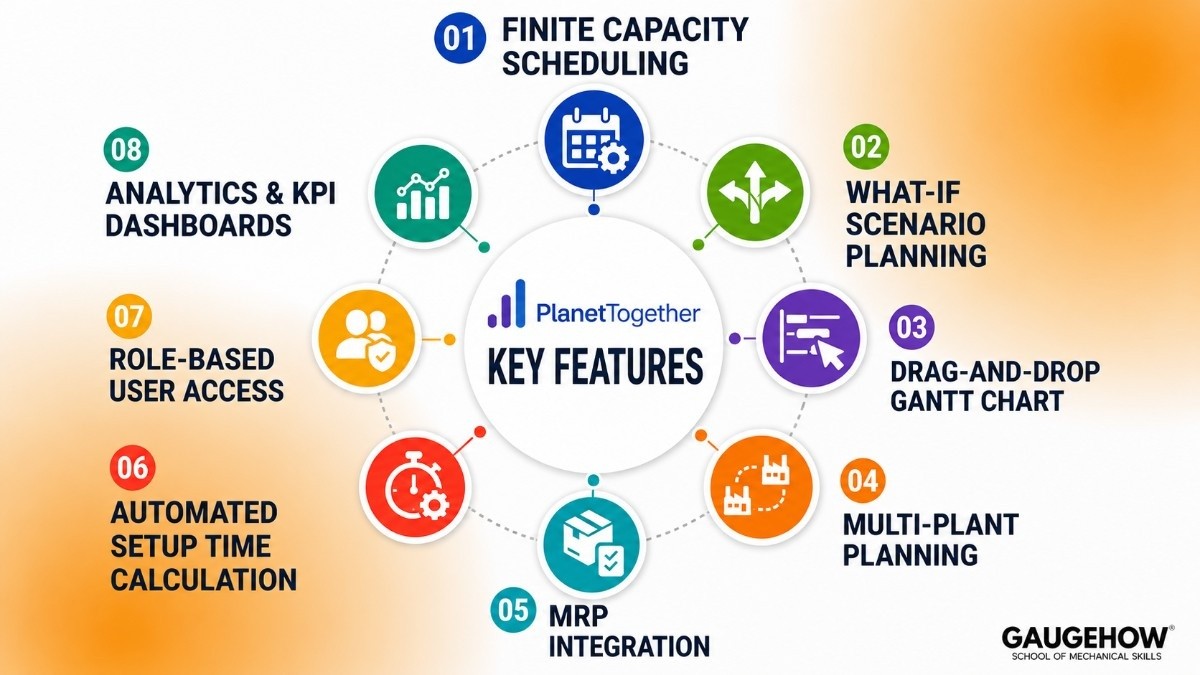
Here are the capabilities that matter in practice — not the ones that look impressive in a demo slide deck.
1. Finite Capacity Scheduling
Every resource in the system — machines, labor, tooling — has a real capacity limit. PlanetTogether schedules against actual availability, not theoretical maximums.
When a resource is overloaded, the system flags it visually and recalculates. You can see constraint violations in real time instead of discovering them during a shift briefing.
2. What-If Scenario Planning
This is the feature production planners talk about most. You can create a complete copy of your current schedule, make changes — a new rush order, a machine going down, a material shortage — and see the downstream impact before committing.
Then compare scenarios side-by-side on KPIs like late orders, throughput, and setup time. It's a sandbox for decisions that used to be made by gut feel.
3. Drag-and-Drop Gantt Chart
The Gantt in PlanetTogether isn't just for viewing — it's fully interactive. Planners can drag jobs across resources and time periods, and the system recalculates constraints and conflicts in real time.
For shops that still rely on whiteboard planning, this is the closest digital equivalent that actually respects shop floor logic.
4. Multi-Plant Planning
If you operate across more than one facility, PlanetTogether can plan and optimize schedules across all of them from a single interface. Work can be split or routed between plants based on capacity, reducing the manual coordination overhead that typically falls on senior planners.
5. Material Requirements Planning (MRP) Integration
PlanetTogether can incorporate material availability into the schedule — not just capacity. If a component is delayed, the system can automatically adjust affected jobs, surface the conflict, and suggest alternative sequences rather than leaving you to find it during a production review.
6. Automated Setup Time Calculation
Setup time between jobs is one of the highest hidden costs in manufacturing. PlanetTogether calculates changeover time dynamically based on product attributes — so if two similar jobs run back-to-back, it applies a shorter setup; if they're dissimilar, it applies the full duration.
This alone can meaningfully reduce wasted time on high-mix production lines.
7. Role-Based User Access
Not everyone needs to edit the schedule. The system supports three user tiers: full edit access for planners, view-plus-status-update for shop floor supervisors, and read-only with what-if capability for managers and customer service. This matters more than it sounds — it reduces accidental changes to live schedules.
8. Analytics and KPI Dashboards
Built-in analytics track the metrics that matter: on-time delivery rate, resource utilization, schedule adherence, and late order counts.
Planners can subscribe to automated reports delivered by email — useful for plants that want daily visibility without manual data pulls.
PlanetTogether APS Pricing
PlanetTogether does not publish pricing publicly, which is standard for enterprise manufacturing software. Pricing is customized based on:
Number of planner and viewer licenses
Number of plants being scheduled
ERP system being integrated (some connectors carry additional cost)
Deployment model (cloud vs. on-premise)
What the market suggests:
Tier | Typical Profile | Estimated Range |
|---|---|---|
Entry | Single plant, 1–2 planners, basic ERP connection | $20,000–$40,000/year |
Mid-market | 2–4 plants, 3–5 users, SAP or Dynamics integration | $50,000–$120,000/year |
Enterprise | Multi-plant, global rollout, custom integrations | $150,000+ |
Free trial: PlanetTogether offers a free product demo (guided walkthrough with your own data, not a canned demo). There is no self-serve free trial. For a platform at this complexity level, that's standard — you need configuration for the demo to mean anything.
Implementation cost is separate and typically runs 1–3x the license cost, depending on ERP complexity.
Best For: Who Should Be Looking at PlanetTogether?
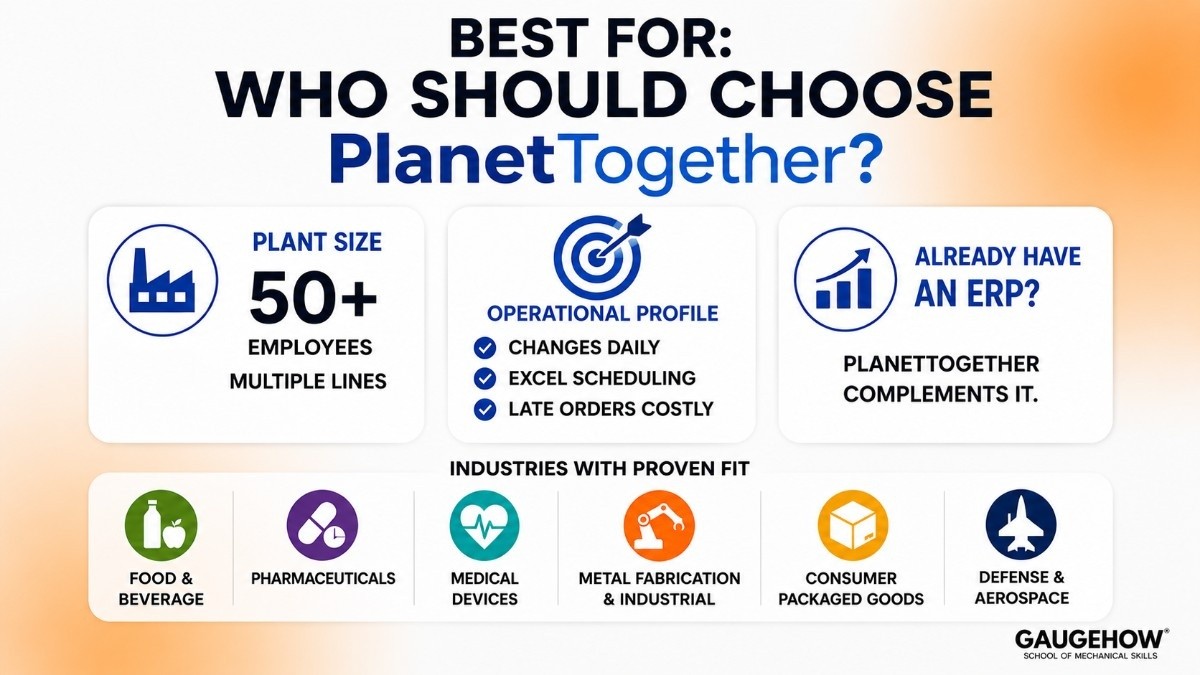
PlanetTogether APS fits best when a few conditions are true:
Plant size: Mid-to-large manufacturers — roughly 50+ production employees and multiple production lines. Not minimum — but where complexity justifies the investment.
Industries with proven fit:
Food and beverage (complex changeover and shelf-life constraints)
Pharmaceuticals (compliance, batch scheduling, regulatory traceability)
Medical devices (tight tolerances, mixed discrete/process manufacturing)
Metal fabrication and industrial manufacturing (high-mix, low-volume with complex routings)
Consumer packaged goods (demand variability, multi-SKU lines)
Defense and aerospace (long-lead materials, complex BOMs)
Operational profile: Any plant where the production planner currently manages the schedule in Excel, where "schedule changes" happen daily, or where late orders are a recurring and costly problem.
Already has an ERP: PlanetTogether is designed to complement — not replace — an existing ERP. If you don't have one, start there first.
PlanetTogether Integrations: SAP, Microsoft Dynamics, ERP & MES Connectivity
One of PlanetTogether APS's biggest strengths is its ability to integrate with existing ERP, MES, and manufacturing systems. Rather than replacing your current software stack, PlanetTogether works alongside it, pulling operational data, optimizing production schedules, and pushing executable plans back to the source system.
SAP Integration
PlanetTogether offers deep integration with SAP S/4HANA, SAP ECC, and SAP Business One.
Data synchronized from SAP includes:
Production orders and planned orders
Bills of Materials (BOMs)
Routings and work centers
Machine capacities and calendars
Inventory and material availability
Customer due dates and priorities
After optimization, PlanetTogether sends updated production schedules back to SAP automatically.
The key advantage is finite-capacity scheduling. While traditional ERP planning often assumes unlimited capacity during initial planning, PlanetTogether creates realistic schedules based on actual resource constraints.
Microsoft Dynamics Integration
PlanetTogether also integrates with Microsoft Dynamics 365 Finance & Operations and Business Central.
Key capabilities include:
Synchronization of production orders and routings
Real-time capacity updates
Material availability visibility
Automatic schedule updates back to Dynamics
This integration is especially valuable for mid-sized manufacturers managing multiple production lines, shared resources, and changing customer demand.
Supported ERP Systems
In addition to SAP and Microsoft Dynamics, PlanetTogether supports:
Oracle ERP Cloud
Oracle E-Business Suite
Epicor Kinetic
Infor CloudSuite Industrial
QAD Enterprise Applications
Plex Manufacturing Cloud
MES and Shop Floor Integration
PlanetTogether can connect with modern Manufacturing Execution Systems (MES) through REST APIs and middleware platforms.
Supported options include:
AVEVA (Wonderware)
Custom MES platforms
Shop floor data systems
Industrial data platforms
API and Data Connectivity
For organizations with custom environments, PlanetTogether provides flexible integration options:
REST APIs
Azure Data Factory
Third-party iPaaS platforms
Customer-owned middleware solutions
Implementation Timeline
Most ERP integrations can be connected within 4–8 weeks.
A full deployment typically takes 3–6 months, depending on scheduling rules, constraints, setup logic, and business-specific configuration requirements.
The majority of implementation effort is spent configuring realistic production planning rules rather than establishing technical connections.
Deployment: Cloud, On-Premise, and What "Brownfield-Ready" Means
PlanetTogether supports both deployment models. Here's what that means in practice.
Cloud (SaaS): Hosted on Azure. Faster to deploy, lower IT overhead, predictable subscription pricing. Best for companies that don't have regulatory or data-sovereignty requirements that mandate on-premise.
On-Premise: Full installation on the customer's own servers. Required for some regulated industries (defense, certain pharmaceutical operations). Higher IT management overhead, but full control over the environment.
Brownfield-readiness: This matters for plants that are upgrading from older scheduling systems — including spreadsheets. PlanetTogether is designed to layer onto existing ERP and MES infrastructure without requiring a clean-slate implementation. You don't need to replace what's already working.
Most implementations today are cloud-based, and the SAP and Dynamics connectors work equally well in both deployment models.
Pros and Cons
What It Gets Right
Deep ERP integration without replacing it. PlanetTogether connects to SAP, Microsoft Dynamics, Oracle, and others without requiring you to rip out your existing system. Planners stay in one interface; data flows both ways.
Scenario planning is genuinely useful. The what-if feature isn't just a checkbox — it's built for the speed of real production decisions. Creating a scenario takes minutes, not hours.
Setup time optimization is uncommon at this price point. Most mid-market APS tools treat setup time as a fixed value. PlanetTogether's attribute-based calculation is closer to what enterprise tools like SAP APO offer.
Responsive support. Multiple user reviews across G2 and Capterra independently cite support quality as a differentiator. In manufacturing software, post-implementation support isn't optional — it's where value is made or lost.
Multi-plant capability in the base product. Some competitors charge separately for multi-plant scheduling. PlanetTogether includes it.
Where It Falls Short
Pricing opacity creates friction. For operations evaluating multiple tools, not knowing the cost range until a sales call is a genuine obstacle. Smaller manufacturers especially need early budget signals.
Implementation timelines vary. The company markets a rapid implementation (3–6 months for SAP users), but more complex environments with custom ERP configurations can run longer. Plan conservatively.
UI feels functional, not modern. The interface is powerful but not designed to win design awards. For teams used to modern SaaS tools, there's a visual adjustment period. It's a minor issue that becomes irrelevant once planners are trained, but worth flagging.
Not built for very small shops. If you're running a 10-person job shop with 1 planner and basic scheduling needs, PlanetTogether's depth is more than you'll use. Simpler alternatives exist at a lower cost.
Other Alternatives Worth Knowing
Kinaxis RapidResponse — Built for supply chain planning at enterprise scale. Stronger on demand sensing and supply chain risk than on shop-floor scheduling. Better fit for companies where supply chain planning is the priority over production scheduling. Higher price point.
Logility Solutions — Strong in demand forecasting and inventory optimization. Less specialized in finite capacity scheduling than PlanetTogether. Better fit for distribution-heavy operations than complex manufacturing environments.
MRPeasy — Affordable, cloud-native ERP/MRP for small manufacturers (under 200 employees). If PlanetTogether's price point is out of range, MRPeasy handles basic scheduling well. Doesn't have the optimization depth of APS, but that may not be needed.
Acumatica — Cloud ERP with built-in production management. More appropriate as a full ERP replacement than a standalone APS layer. Worth considering if you're also evaluating ERP at the same time.
Frequently Asked Questions
Is PlanetTogether cloud-based? Yes — PlanetTogether is available as a cloud (SaaS) deployment hosted on Microsoft Azure. On-premise installation is also supported for manufacturers with specific regulatory or infrastructure requirements. Most new implementations today choose the cloud.
Does PlanetTogether integrate with SAP? Yes. PlanetTogether has one of its most mature connectors built specifically for SAP — including S/4HANA, ECC, and Business One.
The integration syncs production orders, routings, material availability, and work center capacity in both directions. SAP users typically achieve foundational integration within 3–6 months.
How long does PlanetTogether implementation take? For SAP users with clean master data, 3–6 months is realistic for a foundational rollout. More complex environments — multiple plants, custom ERP configurations, heavily modified routings — typically run 6–9 months. Data quality is the single biggest variable. The cleaner your ERP data, the faster the implementation.
How does PlanetTogether compare to Kinaxis or DELMIA Quintiq?
PlanetTogether APS is typically aimed at mid-market manufacturers looking to improve production scheduling and finite-capacity planning. Kinaxis focuses more broadly on end-to-end supply chain planning and response management, while DELMIA Quintiq is often used by large enterprises that require highly complex scheduling and optimization across multiple sites, plants, and logistics operations.
Can APS software replace the scheduling module in my ERP? Not replace — complement. ERP scheduling modules (like SAP MRP) plan based on infinite capacity and lead times. APS adds a constraint-based optimization layer on top of that plan, producing schedules that are actually executable on the shop floor.
The ERP remains the system of record; APS becomes the operational scheduling brain.
What is the difference between APS and MRP? MRP (Material Requirements Planning) answers: what do I need to make, and when do I need materials? It's demand-driven and inventory-focused.
APS answers: given real capacity, real materials, and real constraints, in what exact sequence should we build things to maximize throughput and on-time delivery? APS builds on MRP output, not around it.
The Bottom Line
PlanetTogether APS is not built for flashy marketing or quick trials. It is built on 30 years of scheduling expertise to handle real manufacturing challenges like limited resources and changing production demands.
For mid-to-large manufacturers using SAP or Microsoft Dynamics, it helps reduce late orders, improve resource use, and save planners from rebuilding schedules every day.
It is not ideal for small shops with simple processes or companies looking for an all-in-one ERP system.
But for manufacturers with serious scheduling challenges, PlanetTogether APS is one of the best mid-market solutions.
PlanetTogether APS helps manufacturers in production planning with scheduling, better resource use, and faster decision-making for smoother operations.























