Tulip
Tulip Interfaces

Tulip Interfaces: Complete Guide to Features, Pricing and Review (2026)
Tulip Interfaces is one of the fastest-growing names in manufacturing software — and for good reason. It lets factory teams build their own digital tools without writing a single line of code. This guide covers everything you need to know before making a decision.
Tulip Frontline Operations Platform: Overview
One-line definition: Tulip is a cloud-based, no-code platform that helps manufacturers replace paper-based processes with connected digital apps — built by the people who actually work on the factory floor.
Tulip was founded in 2014 as a spinoff from MIT. It is headquartered in Somerville, Massachusetts, with offices in Munich and Budapest. By 2025, over 60,000 frontline workers across 1,000 manufacturing sites were using Tulip apps daily.
What makes Tulip different is its philosophy. Most manufacturing software is built by software engineers for software engineers.
Tulip is built for the operators, technicians, and engineers who are actually on the shop floor — people who understand the process but have never written a line of code.
Tulip Manufacturing Software: What It Does
Tulip gives manufacturing teams a drag-and-drop editor to build apps that run on tablets at workstations. These apps guide operators through steps, collect quality data, flag errors in real time, and connect to machines and sensors automatically.
The result is a factory floor that runs on live data instead of paper checklists and end-of-shift reports. Problems are caught the moment they happen — not the next morning.
Tulip is used across industries including medical devices, pharmaceuticals, electronics assembly, aerospace, and consumer goods. Customers include Richemont, Stanley Black & Decker, AstraZeneca, and Johnson & Johnson.
Tulip No-Code MES: Key Features
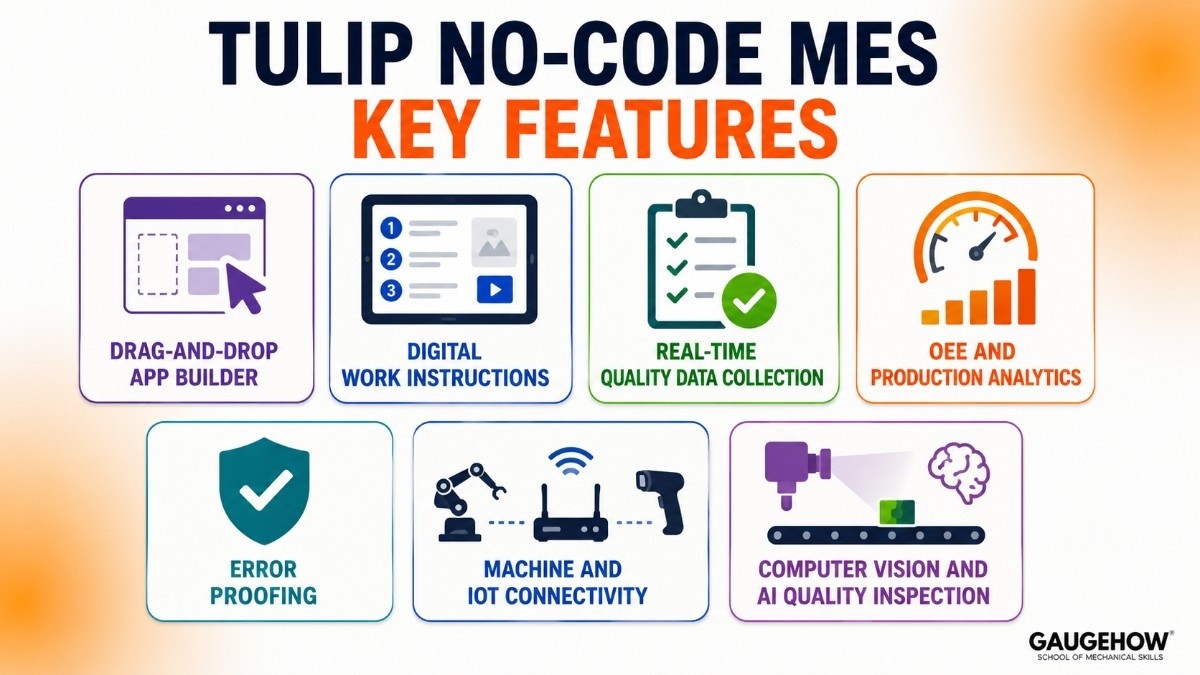
Drag-and-Drop App Builder
Tulip's editor works like building a presentation. You drag in buttons, images, tables, timers, and decision logic — no code required. A manufacturing engineer with no software background can build a functional shop floor app in a few hours.
This is the feature that draws most people to Tulip. Traditional MES platforms take months to configure. Tulip apps can be live in days.
Digital Work Instructions
Operators see step-by-step instructions on screen at their workstation. Each step can include images, videos, diagrams, and pass/fail checks.
The system enforces the correct sequence — operators cannot move forward without completing each step.
This replaces printed work instruction binders that go out of date the moment an engineer makes a change. With Tulip, an update is made once and appears on every workstation immediately.
Real-Time Quality Data Collection
Quality checks are embedded directly into the workflow. When an operator records a measurement or flags a defect, that data is captured instantly and feeds into live dashboards. You see quality trends as they develop — not in a weekly report.
OEE and Production Analytics
Tulip connects to machines through IoT sensors and calculates Overall Equipment Effectiveness (OEE) automatically.
Downtime events are logged the moment they occur, categorized by cause, and displayed on dashboards visible to the whole team.
Error Proofing
Tulip can prevent an operator from moving to the next step if a required check has not been completed or if a measurement is out of tolerance. This is called error proofing — the system makes it physically difficult to make a mistake.
Machine and IoT Connectivity
Tulip connects to barcode scanners, RFID readers, torque tools, scales, calipers, and industrial machines through its edge device hardware.
Data from these tools flows directly into apps and analytics without manual entry.
Computer Vision and AI Quality Inspection
In 2025, Tulip added AI-powered computer vision — cameras at workstations can automatically inspect components and flag defects without a human checker.
This is a newer capability that is already deployed at several electronics and consumer goods manufacturers.
Tulip Platform Manufacturing: Pricing
How Tulip Is Priced
Tulip uses a subscription model. Pricing is based on the number of operators using Tulip apps and the number of stations deployed. It is not priced per module like traditional enterprise MES platforms.
Tulip does not publish a full price list publicly, but they are significantly more transparent than enterprise competitors. Pricing is typically discussed after a short demo call.
What to Expect
For a single-site manufacturer with 20–50 operators, annual costs typically fall between $30,000 and $80,000 per year. Larger deployments with hundreds of operators across multiple sites scale accordingly.
Compared to Siemens Opcenter, DELMIA Apriso, or Plex — which can cost hundreds of thousands to millions per year including implementation — Tulip is considerably more affordable for small to mid-sized manufacturers.
Is There a Free Trial?
Tulip offers a free trial that you can start directly on their website at tulip.co. No sales call is required to begin. This is rare in the MES market and reflects Tulip's confidence in how quickly users can see value.
The trial gives you access to the full app builder so you can build and test real workflows before committing.
Pros and Cons
What Tulip Does Well
Fastest deployment in the MES market — teams routinely go from zero to live apps in days, not months
Genuinely no-code — manufacturing engineers, not IT staff, build and maintain the apps
Free trial with no sales barrier — rare in industrial software
GxP-ready — meets FDA 21 CFR Part 11 requirements for regulated industries without a separate validation project
Strong IoT connectivity — purpose-built edge hardware makes machine integration faster than most MES platforms
Active community — Tulip has a large library of pre-built app templates contributed by users across industries
Gartner-recognized — included in the 2025 Gartner Market Guide for Manufacturing Execution Systems
Where Tulip Falls Short
Not a full enterprise MES — Tulip does not have deep multi-plant production planning, advanced scheduling, or full ERP replacement capabilities.
For large manufacturers with complex global operations, it is not a like-for-like replacement for Siemens Opcenter or DELMIA Apriso
Limited out-of-the-box reports — because everything is built by the customer, reporting also requires building. You get what you configure, which means setup time for analytics is real
App sprawl can happen — without governance, teams can end up with dozens of inconsistent apps that are hard to maintain. Requires internal ownership to manage well
Not ideal for complex batch manufacturing — pharmaceutical companies needing full electronic batch records and complex deviation management will find specialist platforms like Werum PAS-X more appropriate
Scales better in width than depth — Tulip is excellent for digitizing many processes across a factory. It is less suited for very deep, complex single-process management that an enterprise MES handles natively
Best For

Industries Where Tulip Performs Best
Medical device manufacturing — GxP compliance, digital work instructions for complex assembly, traceability
Electronics and high-tech assembly — complex multi-step assembly, error proofing, component tracking
Aerospace and defense — guided assembly, AS9100 audit trails, operator certification enforcement
Pharmaceuticals — GxP-ready apps, FDA 21 CFR Part 11 electronic records for manual operations
Consumer goods — high-volume assembly lines, quality data collection, OEE tracking
Industrial equipment — low-volume, high-mix manufacturing with frequent process changes
Ideal Plant Size
Tulip is strongest for small to mid-sized manufacturers — typically 50 to 2,000 employees, one to five production sites.
It is also used as a starting point at larger enterprises that want to run a fast pilot before committing to a full enterprise MES. The low entry cost and quick deployment make it a low-risk way to prove the value of digitization before a larger investment.
When Tulip Makes the Most Sense
The clearest use case is a manufacturer still running on paper — printed work instructions, clipboard-based quality checks, whiteboards for production tracking. Tulip can replace all of that within weeks and deliver immediate, visible improvement.
Integrations
ERP Systems
SAP— production orders and material data can be pulled from SAP into Tulip apps through standard connectors
Oracle — supported through API connectors
Microsoft Dynamics 365 — available through native and partner-built integrations
Epicor and QAD — commonly integrated at mid-market manufacturers using Tulip
Shop Floor and Machines
Tulip Edge IO — Tulip's own edge hardware that connects to machines, sensors, and USB devices at the workstation level
Barcode and QR scanners — native support, plug and play
RFID readers — supported for material and parts tracking
Calipers, torque tools, scales — connected through USB or Bluetooth via Tulip Edge devices
OPC-UA — for connecting to PLCs and SCADA systems from major automation vendors
Other Platforms
Tulip app library — a community library of pre-built apps for common manufacturing use cases that can be imported and customized
Webhooks and REST API — for connecting Tulip to any third-party system that supports standard API protocols
AWS IoT — Tulip partnered with Amazon Web Services in 2025 to deepen IoT data integration
Deployment
Cloud-Based (Primary Model)
Tulip runs entirely in the cloud. The app editor, data storage, and analytics dashboards are all hosted by Tulip. Operators access apps through a browser or the Tulip Player app on tablets or touchscreens at their workstation.
There is no software to install on workstations and no servers to manage on-site. Updates happen automatically and are always available the next time someone logs in.
Edge Connectivity
While the platform runs in the cloud, Tulip's physical Edge IO devices sit at each workstation and handle local machine connectivity.
If the internet connection drops, Edge IO continues collecting machine data locally and syncs back to the cloud when connectivity is restored.
This hybrid approach — cloud software with local edge hardware — means Tulip works reliably even in factories with imperfect network infrastructure.
On-Premises
Tulip does not offer a full on-premises deployment. If your factory requires all data to remain on-premises for security or regulatory reasons, Tulip may not be the right fit. In those cases, a platform like Siemens Opcenter or an on-premises MES would be more appropriate.
Brownfield Readiness
Tulip is purpose-built for brownfield environments. The Edge IO hardware connects to existing machines without replacing them. You do not need new equipment to start using Tulip — the platform integrates around whatever is already on your factory floor.
Tulip MES: How It Compares to Traditional Systems
Most traditional MES platforms — Siemens Opcenter, DELMIA Apriso, SAP Digital Manufacturing — were built in an era when manufacturing software was configured by consultants over many months and then handed to operators to use as-is.
Tulip takes the opposite approach. It gives the people closest to the process the tools to build their own solutions.
This is what Gartner calls a "composable MES" — a system you assemble from building blocks rather than one that comes pre-assembled.
The tradeoff is depth. Traditional MES platforms have more built-in functionality for complex scheduling, global multi-site management, and regulatory compliance. Tulip is shallower but dramatically faster to deploy and easier to maintain.
Tulip vs Plex MES
This is one of the most common comparisons manufacturers make — particularly at the mid-market level where both platforms are realistic options.
What They Share
Both Tulip and Plex are cloud-native platforms. Both are used by small-to-mid-market manufacturers. Both replace paper-based processes with digital workflows and provide real-time production visibility.
Where They Diverge
Tulip gives you a blank canvas and lets you build exactly what you need. It is more flexible and deploys faster. But it requires internal effort to build and maintain the apps — you are building the system, not buying it.
Plex is a more complete, pre-built platform. It includes production execution, quality management, supply chain, and ERP functions out of the box.
Less building required — but also less flexibility, a longer implementation, and significantly higher cost.
Side-by-Side Comparison
Tulip | Plex MES | |
|---|---|---|
Deployment speed | Days to weeks | 6–12 months |
Pricing | Lower — starts ~$30K/yr | Higher — starts ~$150K+/yr |
No-code building | Yes — core feature | No |
ERP included | No | Yes |
Multi-site management | Limited | Strong |
GxP / pharma ready | Yes | Moderate |
Free trial | Yes | No |
Best for | SME, fast digitization | Mid-market, full MES replacement |
Which Should You Choose?
Choose Tulip if you want to move fast, stay flexible, and have people internally who will own the platform.
Choose Plex if you want a more complete, pre-built system and are willing to invest in a longer implementation to get it.
Alternatives to Tulip Interfaces
Plex by Rockwell Automation
A more complete cloud MES that includes ERP, quality, and supply chain. Better suited for manufacturers who want a full system out of the box. Higher cost and longer implementation than Tulip.
QAD Redzone
A connected workforce platform focused on OEE improvement and frontline team engagement. Strong in food and beverage and consumer goods. Similar ease of use to Tulip but more focused on performance visibility than app building.
MaintainX
A mobile-first platform for work orders, maintenance procedures, and operational checklists. Easier to deploy than Tulip for pure maintenance use cases but less capable for production execution and quality management.
Siemens Opcenter
The enterprise-tier option if you have outgrown Tulip's scope. Significantly more complex and expensive but handles multi-site global manufacturing, deep regulatory compliance, and PLM integration that Tulip cannot match.
Tulip vs DELMIA Apriso
A similar story to Opcenter — DELMIA Apriso is for large global manufacturers with complex PLM requirements.
If your operation has grown beyond what Tulip can handle, Apriso is a natural next step but comes with a 12–24 month implementation and enterprise pricing.
Frequently Asked Questions
Is Tulip Interfaces cloud-based?
Yes. Tulip is fully cloud-based — no software to install, no servers to manage. Operators access apps through a browser or the Tulip Player app on tablets at their workstation.
Tulip's Edge IO hardware handles local machine connectivity at the workstation level and syncs data to the cloud automatically.
Does Tulip replace a full MES?
It depends on your needs. For small to mid-sized manufacturers replacing paper-based processes, Tulip can serve as a full operational platform.
For large manufacturers with complex production planning, multi-site management, or full electronic batch record requirements, Tulip is better used as a complement to — or a starting point before — a full enterprise MES.
Is Tulip suitable for regulated industries?
Yes. Tulip is GxP-ready and meets FDA 21 CFR Part 11 requirements for electronic records and electronic signatures. It is actively used in pharmaceutical manufacturing, medical device assembly, and other regulated environments.
It is not a replacement for a full pharmaceutical MES (like Werum PAS-X) for complex batch manufacturing — but for manual operations and assembly in regulated industries, it works well.
How long does it take to implement Tulip?
Most manufacturers have their first apps live within a week. A full shop floor rollout across a single facility typically takes four to eight weeks.
This is dramatically faster than any traditional MES implementation. The key factor is having an internal champion — someone on the team who takes ownership of building and maintaining the apps.
What is Tulip Edge IO?
Tulip Edge IO is Tulip's physical hardware device that sits at a workstation and connects to machines, sensors, barcode scanners, and other equipment. It sends data from those devices into Tulip apps in real time.
If the internet connection is interrupted, Edge IO continues collecting data locally and syncs when connectivity is restored.
Can Tulip integrate with SAP?
Yes. Tulip integrates with SAP through standard connectors, allowing production orders and material data to flow into Tulip apps.
The integration is not as deep as an SAP-native MES like SAP Digital Manufacturing Cloud — but for pulling order data into work instructions and recording completions back to SAP, it works reliably for most use cases.
Final Thoughts
Tulip Interfaces fills a gap that enterprise MES platforms cannot — fast, flexible digitization that manufacturing teams can own themselves without months of implementation and large consulting fees.
It is not the right fit for every manufacturer. Large global operations with complex regulatory requirements will still need an enterprise MES.
But for the majority of manufacturers still running on paper — or struggling with rigid legacy systems — Tulip offers a genuinely better starting point.
The free trial on tulip.co is the best way to evaluate it. Build one real workflow from your factory floor, connect a machine or scanner, and see how long it takes. That experiment will tell you more than this guide.
Tulip Interfaces is a no-code manufacturing platform that helps factories go paperless fast — no IT team needed. See features, pricing, and honest review.























