CAD Design Engineer Roadmap: Step by Step Career Guide

Almost every mechanical product you can name started as a CAD file before it became a real part. If you enjoy modeling in 3D and want to turn that skill into an actual career, becoming a CAD design engineer is one of the most practical paths in mechanical engineering today.
The challenge is that most people learn CAD software without ever learning the roadmap around it: which tool to pick, which skills matter beyond modeling, and how to actually get hired.
This guide from GaugeHow lays out the full CAD design engineer roadmap, step by step.
What Does a CAD Design Engineer Actually Do?
A CAD design engineer uses computer aided design software to turn a product idea into a 3D model, then into a manufacturable drawing. The job goes beyond drawing shapes on a screen.
It includes building accurate assemblies, adding correct tolerances, checking whether a part can be produced at a reasonable cost, and working closely with manufacturing and quality teams so the finished part matches the design intent exactly.
CAD design engineers work across automotive, aerospace, industrial equipment, and consumer product companies, and the specific software they use often depends on which of these sectors they enter.
CAD Design Engineer Roadmap
Step 1, Build Your Engineering Foundation
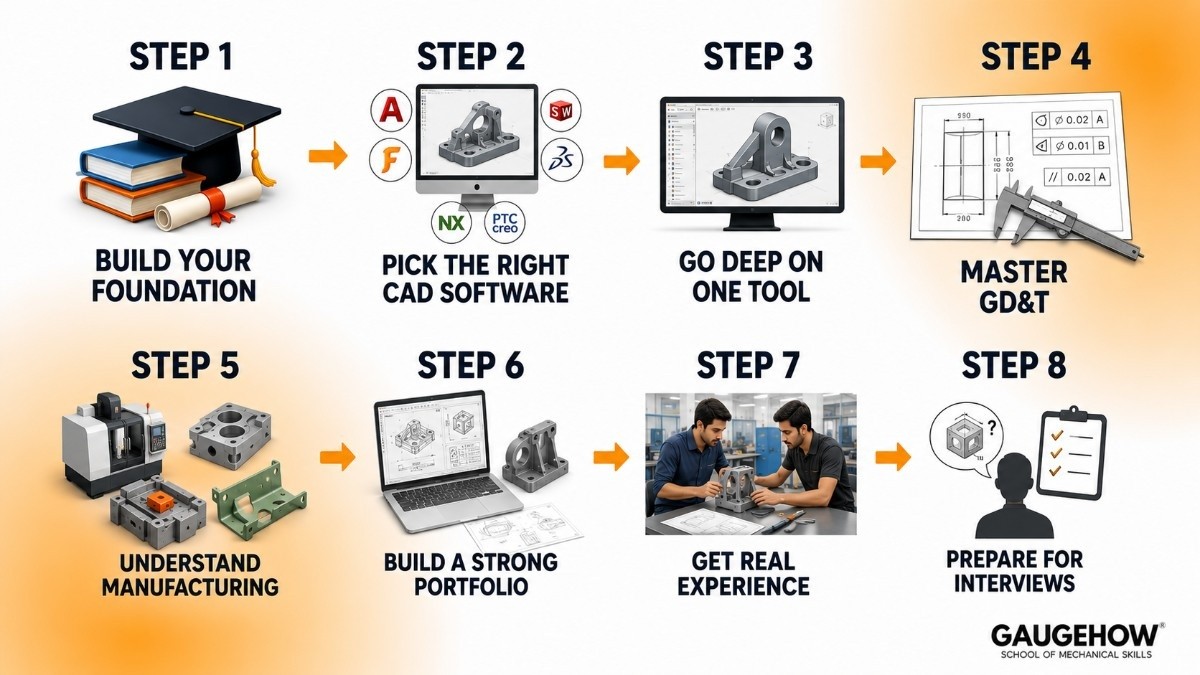
A bachelor's degree in mechanical, automotive, or a related engineering field is still the most common starting point. Pay close attention to engineering mechanics, materials science, and manufacturing processes during your degree.
These subjects give your CAD models real engineering logic behind them, instead of just correct looking geometry. Everything after this step is about turning that foundation into a skill set employers can actually test.
Step 2, Pick the Right CAD Software First
This is the most important decision in the entire roadmap, and it is worth making deliberately rather than picking whatever tutorial you find first.
AutoCAD is still the standard for 2D layouts, fabrication drawings, and plant design across many industries. Our AutoCAD course covers this from the basics.
SolidWorks is the most requested tool for product and mechanical design roles. Our SolidWorks 2024 course takes you through part modeling, assemblies, and drawing generation.
Fusion 360 is a strong option if you want CAD, basic simulation, and CAM in a single tool, especially useful for startups and product design work. Covered in our Fusion 360 course.
CATIA is heavily used in automotive and aerospace design, particularly for surfacing and large assemblies. Start with our CATIA V5 course.
Siemens NX and PTC Creo show up often in automotive, industrial, and OEM design environments. See our Siemens NX course and PTC Creo course if you are targeting these sectors.
If you are unsure where to start, our full CAD learning path maps out these tools in order, so you can pick one and build a real skill rather than sampling all of them lightly.
Step 3, Go Deep on One Tool Before Learning a Second
A common mistake at this stage is trying to learn three or four CAD tools at once. Employers hire based on depth, not breadth. Learn one tool well enough to build a full assembly, apply correct mates and constraints, and generate a clean, print ready drawing on your own, without watching a tutorial for each step.
Once you can do that confidently, a second tool becomes much faster to pick up, since most CAD logic transfers across software.
Step 4, Master GD&T Before You Apply
Geometric Dimensioning and Tolerancing is how a CAD design engineer communicates tolerances clearly enough for a machinist or quality inspector to build and check the part correctly.
A large share of CAD learners never touch this skill, which makes it one of the fastest ways to stand out in an interview. Our GD&T and Engineering Graphics course is built specifically to close this gap before you start job hunting.
Step 5, Understand Manufacturing, Not Just Modeling
A CAD model that looks correct but cannot be manufactured at a reasonable cost is not actually finished.
As you build projects, start asking practical questions: can this part be machined in one setup, does this wall thickness work for injection molding, does this bend radius make sense for sheet metal.
This habit alone separates a CAD design engineer from someone who only knows how to operate the software.
Step 6, Build a Portfolio That Proves You Can Finish a Design
CAD design engineering is a visual, easily provable skill, so your portfolio matters more than your resume. Build two or three complete projects, not partial ones.
A complete project includes the initial problem, the 3D model, a full assembly if relevant, a print ready drawing with correct tolerances, and a short note on what you would improve next time. This is what a hiring manager actually wants to see before an interview, not just a folder of parts.
Step 7, Get Hands On Experience
An internship is the fastest way to build real world CAD experience, since it exposes you to design reviews, revisions, and feedback from senior engineers. If a formal internship is not available, self directed projects or freelance CAD work are a reasonable substitute.
What actually matters to employers is proof that you have taken a design from a rough idea through to a manufacturable drawing under real constraints like cost and tolerance.
Step 8, Prepare for CAD Specific Interview Questions
CAD design engineer interviews usually test three things.
First, your modeling process, meaning how you would approach building a specific part or assembly.
Second, your tolerance reasoning, meaning why you chose a particular fit or tolerance value.
Third, your ability to solve a design problem under a constraint, such as reducing weight or simplifying an assembly for manufacturing. Practice with real questions on the Interview Q&A Hub before your first interview.
CAD Design Engineer Roadmap: Career Growth by Stage
Stage | Experience | What Changes |
|---|---|---|
Junior CAD Design Engineer | 0 to 2 years | Learning modeling, drawings, and basic tolerancing under supervision |
CAD Design Engineer | 2 to 5 years | Owns full assemblies, starts working across multiple CAD tools |
Senior CAD Design Engineer | 5 to 8 years | Leads design reviews, coordinates with manufacturing and suppliers |
Lead or Principal Design Engineer | 8 plus years | Sets modeling and drawing standards across projects |
Design Engineering Manager | 8 plus years, people track | Leads a team, manages resourcing and career growth of engineers |
Around the 5 to 8 year mark, most CAD design engineers move in one of two directions. Some go deeper technically and become the specialist other engineers turn to for the hardest modeling and tolerancing problems.
Others move into managing a team and planning project work. Both directions build on the same roadmap.
CAD Design Engineer Roadmap: Salary Expectations in India
Salary figures vary by source, city, and employer, but the general pattern across recent salary data is consistent:
Career Stage | Approximate Annual Salary (India) |
|---|---|
Fresher, 0 to 2 years | 3 to 6 LPA |
Mid level, 2 to 5 years | 6 to 12 LPA |
Senior, 5 to 8 years | 12 to 20 LPA |
Lead or Principal, 8 plus years | 20 LPA and above |
CAD design engineers who combine strong modeling skills with GD&T and manufacturing awareness, especially in automotive and aerospace sectors, tend to land at the higher end of each band.
The specific CAD tools you know well, along with your sector, also move these numbers as much as raw years of experience.
FAQ: CAD Design Engineer Roadmap
Q: Which CAD software should I learn first?
A: SolidWorks is a safe general starting point for mechanical and product design roles. If you already know you want automotive or aerospace, CATIA is worth prioritizing instead.
Q: How many CAD tools do I actually need to know?
A: One tool learned deeply is far more valuable to employers than three or four tools learned at a surface level. Add a second tool only once you are confident in the first.
Q: Is GD&T necessary if I already know CAD software well?
A: Yes. Knowing the software well is only half the job. GD&T is what makes your drawings usable by manufacturing and quality teams, and most CAD learners skip it entirely.
Q: What is the difference between a CAD designer and a CAD design engineer?
A: CAD designer typically focuses on modeling and drafting output. A CAD design engineer combines that modeling skill with engineering judgment, meaning tolerance decisions, manufacturing feasibility, and design tradeoffs.
Q: How long does it take to become job ready as a CAD design engineer?
A: With focused practice, basic modeling comfort can arrive in a few weeks, but reliable drawings, assemblies, and a solid portfolio usually take a few months of steady, project based practice rather than passive tutorial watching.
Conclusion
A CAD design engineer roadmap comes down to a clear order of priorities: pick one CAD tool and learn it deeply, add real GD&T knowledge, build manufacturing awareness, and finish complete portfolio projects rather than half done ones.
Specialize into a sector once you know your direction, and the path from fresher to senior CAD design engineer becomes straightforward to follow.
Start Your CAD Design Engineer Roadmap With GaugeHow
Explore the full CAD learning path or the Design Engineer career track on GaugeHow for a structured route through the tools, GD&T, and manufacturing skills covered in this roadmap.
CAD-CAM-CAE Work Platform
Find or Post CAD, CAM and CAE freelance projects, full-time jobs and Internships.
GaugeHow is the platform built for core engineering work. Whether you need a freelancer for a CAD project, a full-time hire, or an engineering intern,post it here and get matched with the right person.